





captpower
Members
-
Joined
-
Last visited
-
Update regarding my case I didn't have Mover Tuner installed it turned out my Unraid USB Flash had some issue after replacing it everything back to normal and mover started normally Thanks
-
Hi Everyone anybody figure it out, I have same issue I started noticing it after I uninstalled ZFS master plug-in attaching diagnostics Thanks In Advance trooper-diagnostics-20250524-0113.zip
-
issue is fixed for me my case: my server has 2 NICs set as bond (active backup) as far as I can remember, a few days ago I disabled the bonding for testing purposes then I removed the cable from the server for some reason Unraid set the default routing table to the unplugged NIC (this happen after I upgraded to OS 7.0.1 and rebooted). Solution: I simply set the metric values for each NIC (1 for the active and 2 for the unplugged) in settings --> network settings and everything back to normal. Hope this will be useful. Regards
-
I did the same also tried different DNS but the problem persist, Any Ideas?
-
Hi everyone after upgrading to OS 7.0.1 Community application stopped working with error Download of appfeed failed. Community Applications requires your server to have internet access. The most common cause of this failure is a failure to resolve DNS addresses. You can try and reset your modem and router to fix this issue, or set static DNS addresses (Settings - Network Settings) of 208.67.222.222 and 208.67.220.220 and try again. Alternatively, there is also a chance that the server handling the application feed is temporarily down. See also this post for more information Last JSON error Recorded: Syntax error last post I found was back in 2023 and it seems it was from Unraid side and things back to normal after a while My DNS works fine and tried a couple of different ones they all failed with same error. anyone having same issue? Thanks
-
I have exactly same problem after upgrading to 7.0.1 from the terminal I can ping google.com and all my VMs seems fine the issue only with docker
-
Just removed the device from the array then re assign it again now data is rebuilding will update once done.
-
Hi Everyone hope getting some help here Array Status shows Array has 1 failed device. 1 SMART error. I know that one of my HDD is kinda old thus the SMART error but the failed device is suddenly appeared I can access the HDD just fine and view the data on it also lsblk shows the device is available same in Hardware tab in Unraid GUI attached diagnostics Thanks in advance trooper-diagnostics-20240728-0349.zip
-
Hi Everyone any idea on how to delete/remove the unused networks I already deleted them from Appdata/..../networks.d but they still show in docker cli and Unraid network setting Thanks In Advance

-
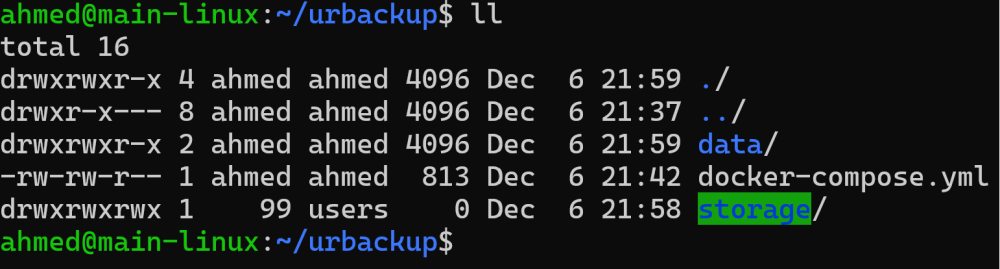
works like a charm but any idea why the weird user 99? docker was unable to access that folder that I mounted the share to Thanks
-
Hi everyone Hope getting some help for the subject I had a power loss after fixing it started the server back up everything works fine except docker tried disabling re enabling restart & shutdown Thanks in advance trooper-diagnostics-20231117-0123.zip
-
It might be Docker and VM were turned on in the setting so unraid was protected the data in the cache pool because I tried to unassign without turning them off multiple times always getting the same result (the pool is unmountable both 1TB SSD need to be formatted) anyhow I`m glad that it worked Thanks again
-
Yayyyy it worked I disabled both VM and docker first then stopped the array unassigned the device started the array back up btrfs action started and all done within 5 Min Thank You so Much trooper-diagnostics-20230913-1755.zip
-
trooper-diagnostics-20230913-1413.zip
-
New digs attached output from command Label: none uuid: ce49b453-e0bc-4321-9900-c7b565b0c2e9 Total devices 3 FS bytes used 57.98GiB devid 1 size 931.51GiB used 90.03GiB path /dev/sdc1 devid 2 size 953.87GiB used 91.03GiB path /dev/sdd1 devid 3 size 465.76GiB used 21.00GiB path /dev/sdj1 Label: none uuid: 664688eb-99b5-4f76-a6b8-6fe3461d349e Total devices 1 FS bytes used 351.45GiB devid 1 size 931.51GiB used 354.02GiB path /dev/sdi1 trooper-diagnostics-20230913-1251.zip



