





russo
Members
-
Joined
-
Last visited
-
thank you all. Im feeling more confident.
-
Hi all, Im pretty certain I can take a single HDD from my OLD sever and insert it into my new server and keep the existing data on that drive. I believe I have to unassigned devices to do this. I just dont want to F this up and lose my data one the drive. Can any one give me some guidance to do this? much appreciated
-
Is my NVME drive going bad? My drive is formatted xfs if that matters. This is my 2nd cache drive (all of this was highlighted in RED.) Server went down and I pulled this from my logs: Oct 7 11:45:55 Metamorphic kernel: I/O error, dev nvme1n1, sector 251919400 op 0x1:(WRITE) flags 0x100000 phys_seg 1 prio class 2 Oct 7 11:45:55 Metamorphic kernel: I/O error, dev nvme1n1, sector 576922280 op 0x1:(WRITE) flags 0x800 phys_seg 1 prio class 2 Oct 7 11:45:55 Metamorphic kernel: nvme1n1p1: writeback error on inode 134217857, offset 188432384, sector 81767864 Oct 7 11:45:55 Metamorphic kernel: nvme1n1p1: writeback error on inode 407550514, offset 299008, sector 251919400 Oct 7 11:45:55 Metamorphic kernel: XFS (nvme1n1p1): log I/O error -5 Oct 7 11:45:55 Metamorphic kernel: nvme1n1p1: writeback error on inode 1481918985, offset 1130496, sector 908295072 Oct 7 11:45:55 Metamorphic kernel: nvme1n1p1: writeback error on inode 946807835, offset 393216, sector 576922280 Oct 7 11:45:55 Metamorphic kernel: nvme1n1p1: writeback error on inode 1350310924, offset 0, sector 822112024 Oct 7 11:45:55 Metamorphic kernel: nvme1n1p1: writeback error on inode 134217857, offset 49298833408, sector 211658912 Oct 7 11:45:55 Metamorphic kernel: XFS (nvme1n1p1): Filesystem has been shut down due to log error (0x2). Oct 7 11:45:55 Metamorphic kernel: XFS (nvme1n1p1): Please unmount the filesystem and rectify the problem(s). Oct 7 11:45:55 Metamorphic kernel: nvme1n1p1: writeback error on inode 946807835, offset 397312, sector 576922288 Oct 7 11:45:55 Metamorphic kernel: nvme1n1p1: writeback error on inode 295713028, offset 356352, sector 190029792 Oct 7 11:45:55 Metamorphic kernel: nvme1n1p1: writeback error on inode 134217857, offset 56916508672, sector 226535136 Oct 7 11:45:55 Metamorphic kernel: loop: Write error at byte offset 32248201216, length 4096. Oct 7 11:45:55 Metamorphic kernel: I/O error, dev loop2, sector 42048968 op 0x1:(WRITE) flags 0x9800 phys_seg 1 prio class 2 Oct 7 11:45:55 Metamorphic kernel: XFS (loop2): log I/O error -5 Oct 7 11:45:55 Metamorphic kernel: XFS (loop2): Filesystem has been shut down due to log error (0x2). Oct 7 11:45:55 Metamorphic kernel: XFS (loop2): Please unmount the filesystem and rectify the problem(s). Oct 7 11:45:55 Metamorphic kernel: I/O error, dev loop2, sector 62984768 op 0x1:(WRITE) flags 0x1000 phys_seg 4 prio class 2 Oct 7 11:45:55 Metamorphic kernel: nvme1n1p1: writeback error on inode 295713028, offset 524288, sector 191537680 Oct 7 11:45:55 Metamorphic kernel: loop: Write error at byte offset 65024147456, length 4096. Oct 7 11:45:55 Metamorphic kernel: I/O error, dev loop2, sector 127000288 op 0x1:(WRITE) flags 0x100000 phys_seg 1 prio class 2 Oct 7 11:45:55 Metamorphic kernel: loop: Write error at byte offset 49298833408, length 4096. Oct 7 11:45:55 Metamorphic kernel: I/O error, dev loop2, sector 96286784 op 0x1:(WRITE) flags 0x100000 phys_seg 1 prio class 2 Oct 7 11:45:55 Metamorphic kernel: loop: Write error at byte offset 11040649216, length 4096. Oct 7 11:45:55 Metamorphic kernel: I/O error, dev loop2, sector 21563768 op 0x1:(WRITE) flags 0x100000 phys_seg 1 prio class 2 Oct 7 11:45:55 Metamorphic kernel: I/O error, dev loop2, sector 42048993 op 0x1:(WRITE) flags 0x9800 phys_seg 1 prio class 2 Oct 7 11:45:55 Metamorphic kernel: I/O error, dev loop2, sector 42049022 op 0x1:(WRITE) flags 0x9800 phys_seg 1 prio class 2 Oct 7 11:45:55 Metamorphic kernel: XFS (loop2): log I/O error -5 Oct 7 11:45:55 Metamorphic kernel: XFS (loop2): log I/O error -5 Oct 7 11:45:55 Metamorphic kernel: XFS (loop2): log I/O error -5 Oct 7 11:45:58 Metamorphic kernel: bash[3517126]: segfault at 0 ip 000055e91cc14f50 sp 00007ffd935f8160 error 6 in bash[55e91cbdb000+6d000] likely on CPU 3 (core 3, socket 0) metamorphic-diagnostics-20251007-1355.zip
-
thank you. I just enabled the "mirror to flash" option. Also set it up to write it to my "data" folder." I guess I just have to wait until it happens again, right?
-
hey guys, Im having intermittent crashing that i need to research. Attached are my logs. This logs are after my reboot a few min ago. Back story, over the past 2 months I've been experiencing system crashes. It has happened maybe 4-6 times in this period. To fix it, i'd simply reboot. What is the best way to troubleshoot this? One thing i've noticed is that when i download lots of data to the system, this is when it seems to happen. thanks guys! tower-diagnostics-20240223-1956.zip
-
I've done some reading. I think i'll take the safe route and do one upgrade at a time.
-
thank you, Trurl you've been helpful is there any issues adding the parity drive at the same time as the 2 additional regular drives?
-
Hi All, few questions: I need recommendations on the sequence of adding a 2nd parity drive and 2 other regular drives. These 2 additional drives will simply replace 2 smaller drives. What is the recommendation for this process? I would like to try to minimize downtime. on a side note. I have 2 Unraid servers (mirroring each other.) Nothing is mission critical. Is it recommended to keep this setup or can I simply eliminate the backup server and go with adding a 2nd parity drive? regarding parity drives. I currently have a 16tb parity drive. I know that the parity drive has to be larger or same size as your regular drives. Can I add a 18TB parity drive and run a 16,18 setup or do i need to match the 16tb parity drive? thanks
-
Great! thanks for this info
-
Just for the record, this media server is not live yet and all of my files are backed up. Im simply transferring from one server to my unraid, and it's almost done! I have 3 drives giving me errors. Disk 2, 5, and 6 attached are the logs tower-diagnostics-20230607-1115.zip
-
Let me just say that Im a very new unraid user, and I too have moved from Truenas. I and quite happy with the move. So far, I've had very few permission issues unlike truenas where i was always troubleshooting how to get things to work in truenas. The plugins/apps seem to install flawlessly. Im currently using RSYNC to migrate all of my data over to Unraid. Should take about 6 days to fully transfer everything. Regarding your apps, there seems to be a buttload more apps being offered in the app store. Try it out for 30days for free. You may want to pick up 1 extra drive for "parity." read up on parity if youre not familiar with it. unlike Truenas, there's a cool file manager that you can download from the apps store (krusader) Yes, you can drag and drop from your Truenas in Krusader to unradi. However, I easily max out my 1 gig connection with rsync. SpaceInvader one has some awesome tutorials. Here's on on Parity:
-
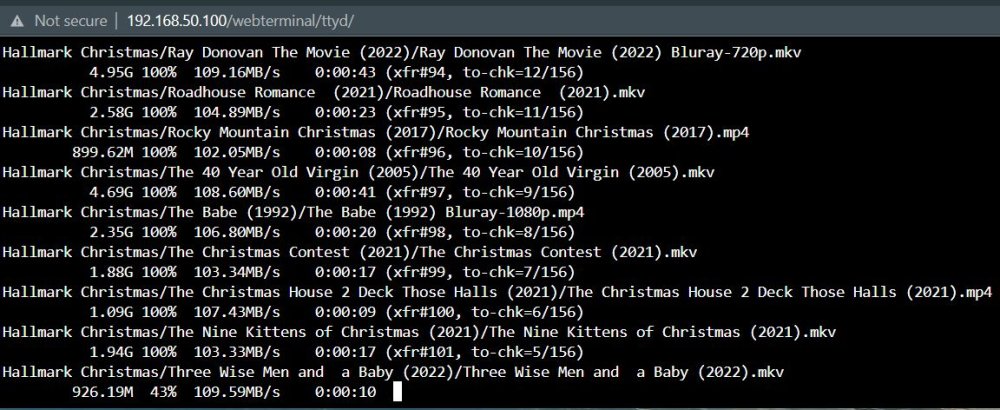
Ok, Rsync shows that im hitting the 1gig transfer rate. Im going to guess that there's a setting somewhere within my FLashFXP client that is causing the slow down. I didnt experience this slowdown when i transferred between the 2 Truenas servers. I think i'll use this Rsync for now on since it consistently hits over 100MB/s Dont judge me by my file names 🤪 again, a big thank you to YOU
-
rsync -av root@TrueNAS_IP:/mnt/pool/dataset/ /mnt/user/share/ --no-perms is that the right command for no perms?
-
awesome! I'll try this in a bit and report back thanks
-
I just did a reverse SFTP transfer from UNRAID to my TRUENAS. Never go more than 24MB/s


