






ajtatum
Members
-
Joined
-
Last visited
Everything posted by ajtatum
-
Thanks, it's rebuilding the first drive now.
-
So, what's the process for rebuilding on top? Sorry, I just can't seem to find anything in the UI that says "rebuild" or anything along those lines.
-
By the way, the parity check completed and reports zero errors...
-
Yea, I know the USB connection isn't ideal. It was really just a way for me to test out unRAID with the intention of getting something (either a custom-built mini ITX case or a Terramaster F4-423) later on. I took one disk offline, and it's now an "Unassigned Device" and under "Array Devices" it shows "Device is missing (disabled), Contents emulated". Attached are the diagnostics. I appreciate your help in getting this figured out. What's weird to me is that all the Docker containers are working perfectly fine even though all the devices show as "Unmountable". Thanks, AJ xaviertower-diagnostics-20230821-0813.zip
-
I'm doing a parity check now, would that process rebuild each device? If not, how do I go about doing that? My best guess is that it's due to the 4 hard drives being connected in a 2.5" 4 disk USB enclosure as I'm running it on a mini PC that used to be my router, so I don't have the actual connection capabilities. There's just one 2.5" SATA connection on the device itself. I'm debating about whether or not I should by something like a 4 bay Terramaster NAS and run unRAID on that. As otherwise I'm not enough of a hardware guy to build my own setup. Anyway, do you think the issue could be the USB setup?
-
Sure, I forgot how I fixed it last time without losing all my data. I recall clicking on "New Configuration", I think. All I recall is that I was 99% sure that it wouldn't recover, but it did. xaviertower-diagnostics-20230820-1256.zip
-
This is the second time when all the drives in my array are unmountable. Out of the servers and NASes I have or had, none have caused issues like Unraid has. It's literally a maintenance nightmare as I never know what to expect when I log onto the Unraid server.
-
Yea, I tried that too... Left parity drive on and attempted to boot up with disk 1 & 2, 1 & 3, 2 & 3 but disk 3 continued to not mount correctly and disk 1 & 2 showed "Unsupported Partition Layout".
-
So, I tried removing the devices from the array but it said invalid configuration. The parity drive may very well be messed up as there's no file system specified for it.
-
I'll give that a shot, but I'm also starting to think that this got FUBAR'd somehow. It happened after upgrading to the latest version of Unraid, so unless it's just pure coincidence, the upgrade did something that wreaked havoc on my server.
-
Another thing that's interesting is that I'm 99% sure that my file system was btrfs, as that's what my Cache device is, and for the array disks it shows "XFS" and in the default settings for disks it also shows "btrfs"
-
When I try to take the array off-line, which I believe is the way I'd unassign them from the array, it just hangs at "Stopping" and doesn't do anything unless I reboot the device. Spinning down all the disks also does nothing. Is there a better way to remove the devices from the array? Under "Historical Devices" there's a "X" to remove a device's configuration, but I'm not sure what that would do exactly. I didn't use Unraid as a NAS server, more like an App Server and have the docker backups on my Synology. So I'm debating whether or not I should just format the disks or not, but what's still disturbing is that Disk 4 has a red "X" next to it saying that the device is disabled, and the contents are emulated. So, somehow 3 of my 4 disks got screwed up.
-
Ok will do that shortly, but how does this happen? Knock on wood, but I haven't had any issues with Synology or when I was running TrueNAS.
-
After upgrading Unraid, I noticed that my SSDs are all pretty much unhealthy except for the parity drive. I have no idea what the root cause is besides the upgrade. Attached are my diagnostics. xaviertower-diagnostics-20230720-2113.zip
-
Is the Reactive Resume the latest version of the project? The docker shows v1 and there's hardly any configuration settings available, as compared to what's on https://github.com/AmruthPillai/Reactive-Resume and reading the installation and the environment variables, etc. I was hoping to try this out... would there be anyway you could update it?
-
Here are the diagnostics @JorgeB! xaviertower-diagnostics-20230621-1608.zip
-
I'm trying to understand the reporting from my Dashboard which shows "Useable Size" as 15.5GB and I have 2x 16GB sticks of RAM installed. It shows "Maximum Size" as 32GB, but I'm not sure if that means that it recognizes 32GB installed or if that's the maximum the motherboard could handle. To make it more confusing and concerning, is when I go to the Docker tab and look at the Advanced View, it shows a max of 15.48GB. So, I don't know if Unraid recognizes the full 32GB of RAM and is allocating 16GB to Docker or if Unraid only recognizes 16GB of RAM installed. Can someone help me understand? Thanks, AJ
-
Sorry if the title is confusing, so let me clarify a bit... To give an example, on my Proxmox server I have an NFS share from my Synology that I can use to store VM/LXC data on. What I'd like to do with Unraid, for example, is to run qBittorrent and have it download directly to an NFS share from my Synology. The same for a backup solution, I'd like to backup Unraid directories to an NFS share. However, unless I'm missing it, I don't see where I can set this up. Is it possible? If not, are there any alternatives? Thanks, AJ
-
Is it normal for it to say "Array has 1 failed device. 1 heat warning. 1 SMART error." and the Parity drive be "invalid" while the array is building? For SMART, it shows as errors; however, these are new drives all purchased at the same time.
-
Oh! Ok, that definitely makes sense now. Thank you for your prompt response. Now just have to wait for the array to be built...
-
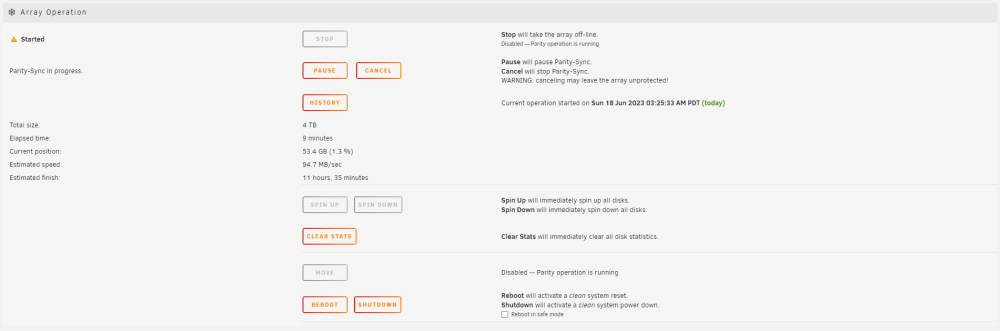
So, this is what I have for my array devices. I'm not using Unraid as a NAS, but moreso as an application server that would backup to my Synology NAS. I'm running it on a Mini PC that could support only one mSata and one Sata device, so I'm using an external 4-bay enclosure for SSDs. This is what my Array Devices looks like: I figure I might as well use the mSata for something, so using that for cache: However, upon starting the array at the bottom, it shows "Total Size: 4 TB" not 12 TB as I would expect, but I'm also new to Unraid so I'm unsure if this is to be expected: Is it 4 TB because of how Unraid "handles" RAID by not striping the data and each disk being independent? Or did I screw something up? I just don't want to have to wait 11 hours (which is crazy as my eight bay, 12 TB HDDs took less).


-
I was reading the minimum requirements from https://unraid.net/product, but just noticed that "Two hard disk drives to ensure data protection with a parity disk" is a requirement for "Data Storage and Protection" but not for "Application Servers" or "Creating Virtual Machine". That's definitely correct. I enjoy my Synology and it's app's ecosystem. It may not be perfect, but I definitely prefer it over QNAP and TrueNAS Scale for NAS/Backup purposes. What has me intrigued about Unraid is it's app library and I want to test out how easy it is to deploy new apps, etc. While I do have Portainer installed on my Synology and on a VM on Proxmox, I'm kind of looking for something a little bit more that can be like a PaaS such as Cloudron or Yunohost. I had Cloudron running for a year, but ended up not being able to justify the annual subscription and they didn't have a large app library. So, I'm hoping Unraid can be somewhat of a middle ground between managing Docker containers through Portainer and a fully-managed solution like Cloudron. My other solution would be running Unraid through Proxmox, but I've read that's not a great idea. Unfortunately, I haven't been able to dig into the "why" more as various sub-Reddits have gone private, and that's where I typically find answers from people who have tried. 😭 --- At the end of the day, so long as I can backup to my Synology from Unraid, I'm good. I think I have enough information now to test the install on the mini PC using either a mSata SSD, sata SSD, or the 4-bay USB SSD dock. If it can work with external hard drives, I may look into a dock that has a RAID controller.
-
Ok, so I read that I need at least two hard drives. Using the mini PC would make this kind of difficult as it only has one mSata connection and one Sata port. I know I could split the Sata port into two, possibly more, but unless I take off the cover for it, there's not enough space for multiple 2.5" drives. However, I do have an external USB dock that currently hold four 4tb SSDs. My original intent was to have them as a pool for Proxmox, but I haven't had any reason to use them yet and I've barely made a dent into the server's internal storage. I may just have to try this out for myself, but can unRAID use external SSDs? When I had TrueNAS Scale, it originally didn't even recognize external hard drives until an update came along, and even then they could only be used for backup purposes.
-
I have a mini PC that used to be my firewall and it has four 2.5g Ethernet ports (Intel I225) and an Intel Celeron J4125 processor with 32gb of RAM and currently a 512gb mSata hard drive. It supports one more mSata drive and a 2.5 SSD drive. However, I'm not looking for Unraid to be a NAS as I own a Synology. What I'm curious about is a couple things: 1. I have a managed switch with 2.5g ports, could I do Link Aggregation in Unraid to combine at least 2 ports together? What about 2 link aggregations? (So, the device would have 2 IPs with 5gb connection. Idea here being that I could theoretically have 2 web servers requiring ports 80 and 443.) 2. Provided that I set up an NFS share for Unraid on my Synology, could I use that NFS share as a data directory? (Similar to Proxmox.) 3. My biggest concern relates to #2, I likely won't be running it with two physical hard drives (at least at first). So, I won't be able to set up any RAID array. Even then my space would be fairly limited unless I spend a lot of money on mSata drives. Will this be an issue? If you have any comments, suggestions, questions, etc please let me know. I'm basically trying to find a purpose for this PC and unRAID looks pretty slick and would be a nice app server to spin things up, tinker with, etc. If the apps data can be saved on my Synology, then a lot of my concerns would be covered. Thanks, AJ


