





widz
Members
-
Joined
-
Last visited
-
Assume your repo is just set for latest?

-
tried a few different locations and all seem to be misbehaving... wonder if it's time to bin off HotSpot Shield.... 2025-09-10 08:21:27,486 DEBG 'start-script' stdout output: 2025-09-10 08:21:27 TLS: tls_multi_process: initial untrusted session promoted to trusted 2025-09-10 08:21:27,499 DEBG 'start-script' stdout output: 2025-09-10 08:21:27 Connection reset command was pushed by server ('') 2025-09-10 08:21:27,499 DEBG 'start-script' stdout output: 2025-09-10 08:21:27 SIGHUP[soft,server-pushed-connection-reset] received, process restarting 2025-09-10 08:21:27,499 DEBG 'start-script' stdout output: 2025-09-10 08:21:27 DEPRECATED OPTION: --cipher set to 'AES-128-CBC' but missing in --data-ciphers (AES-256-GCM:AES-128-GCM:CHACHA20-POLY1305). OpenVPN ignores --cipher for cipher negotiations. 2025-09-10 08:21:27,501 DEBG 'start-script' stdout output: 2025-09-10 08:21:27 Note: Kernel support for ovpn-dco missing, disabling data channel offload.
-
First thank you for maintaining this container / app - seems as of last night I can no longer access the web panel without first turning off the VPN enabled flag... looking at the logs it seems to start up the outbound tunnel and I'm guessing fails... if I'm reading this right? 2025-09-10 07:36:42,057 DEBG 'start-script' stdout output: 2025-09-10 07:36:42 TLS Error: TLS key negotiation failed to occur within 60 seconds (check your network connectivity) 2025-09-10 07:36:42 TLS Error: TLS handshake failed 2025-09-10 07:36:42,058 DEBG 'start-script' stdout output: 2025-09-10 07:36:42 SIGHUP[soft,tls-error] received, process restarting supervisord.log Command execution.log
-
just thought i'd come back to this, after i enabled valheim plus / bepinex and found that log file - the game server is starting up. just seems it never feeds back into the main log files? [Info : Unity Log] The shader Hidden/Dof/DepthOfFieldHdr (UnityEngine.Shader) on effect Main Camera (UnityStandardAssets.ImageEffects.DepthOfField) is not supported on this platform! [Warning: Unity Log] The image effect Main Camera (UnityStandardAssets.ImageEffects.DepthOfField) has been disabled as it's not supported on the current platform. [Info : Unity Log] The shader Hidden/SunShaftsComposite (UnityEngine.Shader) on effect Main Camera (UnityStandardAssets.ImageEffects.SunShafts) is not supported on this platform! [Info : Unity Log] The shader Hidden/SimpleClear (UnityEngine.Shader) on effect Main Camera (UnityStandardAssets.ImageEffects.SunShafts) is not supported on this platform! [Warning: Unity Log] The image effect Main Camera (UnityStandardAssets.ImageEffects.SunShafts) has been disabled as it's not supported on the current platform. [Info : Unity Log] 01/24/2024 14:24:00: Game server connected and on another note thank you for your work on all these containers
-
6.12.6 maybe time to upgrade hah
-
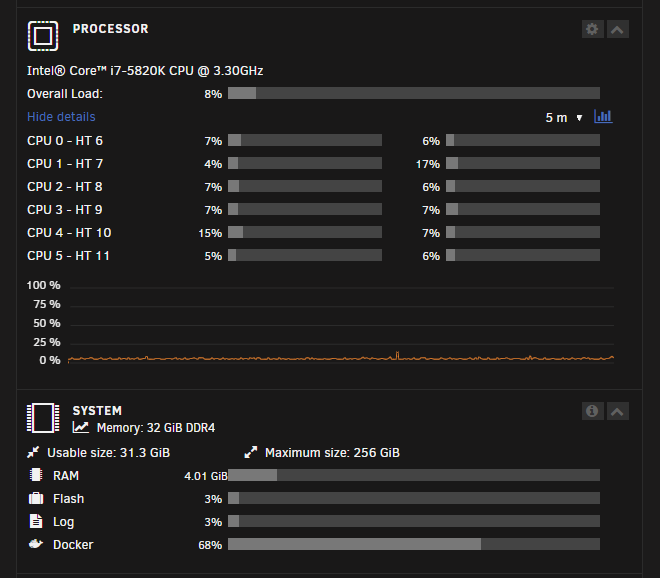
Intel® Core™ i7-5820K CPU @ 3.30GHz 32GB of Ram, Docker img on a NVME Drive maybe i need to up the max docker image size?
-
https://pastebin.com/GcB5qdsX Put it in a pastebin, but i've reinstalled the container and it seems to just loop around. I've looked over the log folder in \valheim\Steam\logs and can't see anything standing out
-
Fresh Valheim container, seems to be just going around in a loop? I have used other containers by yourself- one i think which wanted credentials... could this now be breaking this container? Steam Console Client (c) Valve Corporation - version 1705108307 -- type 'quit' to exit -- Loading Steam API...dlmopen steamservice.so failed: steamservice.so: cannot open shared object file: No such file or directory OK Connecting anonymously to Steam Public...OK Waiting for client config...OK Waiting for user info...OK Success! App '896660' already up to date. ---Prepare Server--- ---Server ready--- ---Starting Backup daemon--- ---Update check deprecated!--- ---Start Server--- ---Ensuring UID: 99 matches user--- usermod: no changes ---Ensuring GID: 100 matches user--- usermod: no changes ---Setting umask to 000--- ---Checking for optional scripts--- ---No optional script found, continuing--- ---Taking ownership of data...--- ---Starting...--- ---Update SteamCMD--- tid(21) burning pthread_key_t == 0 so we never use it Redirecting stderr to '/serverdata/serverfiles/Steam/logs/stderr.txt' Logging directory: '/serverdata/serverfiles/Steam/logs' [ 0%] Checking for available updates... [----] Verifying installation... Steam Console Client (c) Valve Corporation - version 1705108307 -- type 'quit' to exit -- Loading Steam API...dlmopen steamservice.so failed: steamservice.so: cannot open shared object file: No such file or directory OK
-
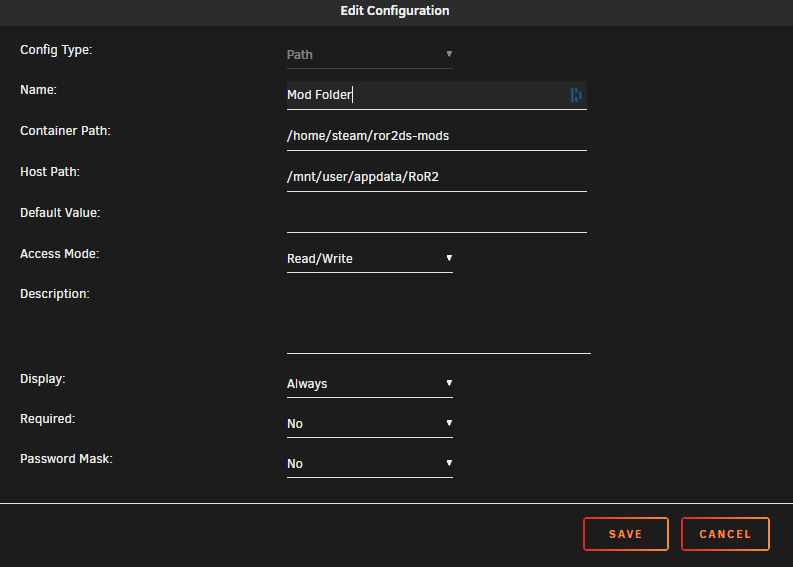
Hi all, I've been trying to wrap my head around converting the docker container for a Risk of Rain 2 dedicated server to run within unraid docker system. Using the one on docker hub at https://hub.docker.com/r/avivace/ror2server it imports and converts fine as far as i can see, but I then run into issues when trying to setup and apply the mod folder? The instructions want me to change the docker run to docker run -p 27015:27015/udp -v /path/to/directory:/home/steam/ror2ds-mods -e R2_ENABLE_MODS=1 avivace/ror2server:latest so I've tried doing this by having the following under extra parameters - -e R2_ENABLE_MODS=1 avivace/ror2server:latest and added an additional path variable as below - When I update the config and then run the container the log files are showing - /root/ror2-dedicated/entry.sh: line 30: /root/ror2-dedicated/Risk of Rain 2_Data/Config/server.cfg: No such file or directory Setting up mods... cp: cannot stat '/root/ror2ds-mods/BepInEx': No such file or directory cp: cannot stat '/root/ror2ds-mods/doorstop_config.ini': No such file or directory cp: cannot stat '/root/ror2ds-mods/winhttp.dll': No such file or directory Can a docker wizard show me where i'm going wrong or what i'm not wrapping my head around
-
widz changed their profile photo
-
Hi all, hoping someone can help me stop bashing my head against a brick wall with this - I'm trying to pass through an Arc A380 into the jellyfin docker for hardware transcoding. For reference I'm using a custom kernel by thor (6.5.0-rc1-thor-Unraid+) to enable the baseline arc support. I have intel gpu top addon installed and by all measures I know with my limited knowledge it appears to be loading the driver and the device. root@Asgard:/# sudo lshw -c video *-display description: VGA compatible controller product: DG2 [Arc A380] vendor: Intel Corporation physical id: 0 bus info: pci@0000:03:00.0 version: 05 width: 64 bits clock: 33MHz capabilities: pciexpress msi pm vga_controller bus_master cap_list rom configuration: driver=i915 latency=0 resources: irq:55 memory:fa000000-faffffff memory:e0000000-efffffff memory:c0000-dffff root@Asgard:~# dmesg | grep i915 [ 24.719785] i915 0000:03:00.0: [drm] VT-d active for gfx access [ 24.722270] i915 0000:03:00.0: vgaarb: deactivate vga console [ 24.722312] i915 0000:03:00.0: [drm] Can't resize LMEM BAR - platform support is missing [ 24.722354] i915 0000:03:00.0: [drm] Local memory IO size: 0x0000000010000000 [ 24.722366] i915 0000:03:00.0: [drm] Local memory available: 0x000000017c800000 [ 24.722375] i915 0000:03:00.0: [drm] Using a reduced BAR size of 256MiB. Consider enabling 'Resizable BAR' or similar, if available in the BIOS. [ 24.737419] i915 0000:03:00.0: vgaarb: changed VGA decodes: olddecodes=io+mem,decodes=io+mem:owns=io+mem [ 24.737849] i915 0000:03:00.0: Direct firmware load for i915/dg2_dmc_ver2_08.bin failed with error -2 [ 24.737857] i915 0000:03:00.0: [drm] Failed to load DMC firmware i915/dg2_dmc_ver2_08.bin. Disabling runtime power management. [ 24.737861] i915 0000:03:00.0: [drm] DMC firmware homepage: https://git.kernel.org/pub/scm/linux/kernel/git/firmware/linux-firmware.git/tree/i915 [ 24.745353] i915 0000:03:00.0: [drm] *ERROR* GT0: HuC firmware i915/dg2_huc_gsc.bin: fetch failed -ENOENT [ 24.745362] i915 0000:03:00.0: [drm] GT0: HuC firmware(s) can be downloaded from https://git.kernel.org/pub/scm/linux/kernel/git/firmware/linux-firmware.git/tree/i915 [ 24.772982] i915 0000:03:00.0: [drm] GT0: GuC firmware i915/dg2_guc_70.bin version 70.5.1 [ 26.009003] i915 0000:03:00.0: [drm] GT0: GUC: excessive init time: 1203ms! [freq = 2400MHz, before = 2400MHz, status = 0x8002F034, count = 1, ret = 0] [ 26.031089] i915 0000:03:00.0: [drm] GT0: GUC: submission enabled [ 26.031100] i915 0000:03:00.0: [drm] GT0: GUC: SLPC enabled [ 26.033750] i915 0000:03:00.0: [drm] GT0: GUC: RC enabled [ 26.267162] [drm] Initialized i915 1.6.0 20201103 for 0000:03:00.0 on minor 0 [ 26.276509] i915 0000:03:00.0: [drm] Cannot find any crtc or sizes [ 26.276670] i915 0000:03:00.0: [drm] Cannot find any crtc or sizes [ 26.290812] mei_gsc i915.mei-gscfi.768: FW not ready: resetting: dev_state = 2 pxp = 0 [ 26.290837] mei_gsc i915.mei-gscfi.768: unexpected reset: dev_state = ENABLED fw status = 00000345 84670000 00000000 00000000 E0020002 00000000 [ 26.291564] mei_gsc i915.mei-gsc.768: FW not ready: resetting: dev_state = 2 pxp = 2 [ 26.291589] mei_gsc i915.mei-gsc.768: unexpected reset: dev_state = ENABLED fw status = 00000345 84670000 00000000 00000000 E0020002 00000000 root@Asgard:~# getent group render | cut -d: -f3 root@Asgard:~# getent group video | cut -d: -f3 18 root@Asgard:~# getent group input | cut -d: -f3 71 I have then passed the device into the container using --device=/dev/dri:/dev/dri root@Asgard:~# docker exec -it jellyfin /usr/lib/jellyfin-ffmpeg/vainfo Trying display: drm libva info: VA-API version 1.18.0 libva info: Trying to open /usr/lib/jellyfin-ffmpeg/lib/dri/iHD_drv_video.so libva info: Found init function __vaDriverInit_1_18 libva info: va_openDriver() returns 0 vainfo: VA-API version: 1.18 (libva 2.18.0) vainfo: Driver version: Intel iHD driver for Intel(R) Gen Graphics - 23.2.3 (8d3be84) vainfo: Supported profile and entrypoints VAProfileNone : VAEntrypointVideoProc VAProfileNone : VAEntrypointStats VAProfileMPEG2Simple : VAEntrypointVLD VAProfileMPEG2Main : VAEntrypointVLD VAProfileH264Main : VAEntrypointVLD VAProfileH264Main : VAEntrypointEncSliceLP VAProfileH264High : VAEntrypointVLD VAProfileH264High : VAEntrypointEncSliceLP VAProfileJPEGBaseline : VAEntrypointVLD VAProfileJPEGBaseline : VAEntrypointEncPicture VAProfileH264ConstrainedBaseline: VAEntrypointVLD VAProfileH264ConstrainedBaseline: VAEntrypointEncSliceLP VAProfileHEVCMain : VAEntrypointVLD VAProfileHEVCMain : VAEntrypointEncSliceLP VAProfileHEVCMain10 : VAEntrypointVLD VAProfileHEVCMain10 : VAEntrypointEncSliceLP VAProfileVP9Profile0 : VAEntrypointVLD VAProfileVP9Profile1 : VAEntrypointVLD VAProfileVP9Profile2 : VAEntrypointVLD VAProfileVP9Profile3 : VAEntrypointVLD VAProfileHEVCMain12 : VAEntrypointVLD VAProfileHEVCMain422_10 : VAEntrypointVLD VAProfileHEVCMain422_12 : VAEntrypointVLD VAProfileHEVCMain444 : VAEntrypointVLD VAProfileHEVCMain444 : VAEntrypointEncSliceLP VAProfileHEVCMain444_10 : VAEntrypointVLD VAProfileHEVCMain444_10 : VAEntrypointEncSliceLP VAProfileHEVCMain444_12 : VAEntrypointVLD VAProfileHEVCSccMain : VAEntrypointVLD VAProfileHEVCSccMain : VAEntrypointEncSliceLP VAProfileHEVCSccMain10 : VAEntrypointVLD VAProfileHEVCSccMain10 : VAEntrypointEncSliceLP VAProfileHEVCSccMain444 : VAEntrypointVLD VAProfileHEVCSccMain444 : VAEntrypointEncSliceLP VAProfileAV1Profile0 : VAEntrypointVLD VAProfileAV1Profile0 : VAEntrypointEncSliceLP VAProfileHEVCSccMain444_10 : VAEntrypointVLD VAProfileHEVCSccMain444_10 : VAEntrypointEncSliceLP I've tried both QuickSync and VA-API within the jellyfin dashboard Jellyfin log - https://pastebin.com/8A0Rfy8j What am I missing 🥲

