





dunn
Members
-
Joined
-
Last visited
-
Why isn't it deprecated if only some people can use it? There isn't even a warning in the CA. I'm not a real developer, so I can't contribute to this, and honestly I wouldn't want to. I initially thought this application would be much more sophisticated. But now it looks to me like a simple Bash script could have done a better job. Hell, if you'd think about all the time and energy that went into making this a web application, you could have made a very user-friendly Bash script with dialogues and all the bells and whistles. You maybe even could have implemented it in the UI, so it could be called by a click on the web interface.
-
Thanks but I did that already, only had the issue of not being able to uncheck the dry run. Now after doing another plan I was able to uncheck it suddenly. No idea what was different this time. Honestly in this state this application probably does more harm than it helps. The UI is just horrible and you have no idea what's going on in the background of this app. It would be much better to have an article written for the documentation that explains how to use the terminal for such things. Instead we got this mess and people are still recommending it. The only thing this application is good for is generating the rsync commands. I now just copied them, mass edited and executed them in TMUX. I only needed it once so it gets deleted and I'll never touch it again. I would have not wasted hours on this application if I would have just used the terminal directly.
-
Is this plugin even working with the current version? No matter what I do, I can't use it. First, there is always the message about exclusive access to disk. I stopped everything and even disabled mover and Docker completely, reinstalled the app multiple times, restarted it, but that message will always be there. I guess I just have to ignore it, but why is it being displayed there? I have no idea whether this is just a general message or a notification for me. Second, I'm unable to uncheck dry run. There was once a user having similar issue, but he got ignored. Then there was another guy who solved it by himself by playing with the custom rsync flags. I tried that too, but had no luck at all. I'm going to use rsync now manually, since trying to solve this plugin is just a waste of time. But can anyone update this plugin to be working properly? It's the first thing everyone recommends.
-
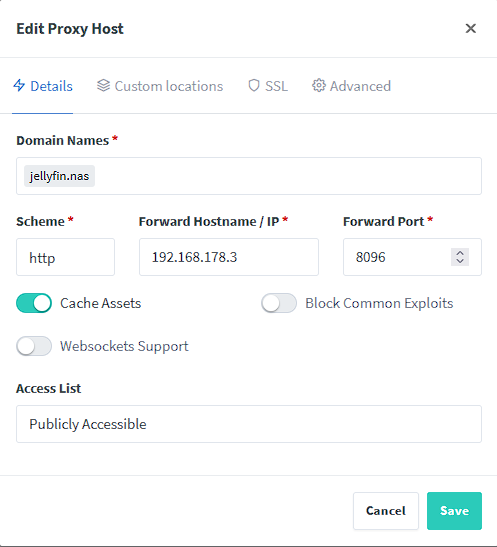
It's bridged but with host it's the same. But it seems you are right, I can't reach 192.168.178.3 from the NPM container. Is there a way to make it reachable from the container? Edit: Ok I found it. I changed to macvlan and granted host access to custom networks. It now works
-
It's on 192.168.178.3:8096 like it's shown in the proxy host.
-
Hi, I got the following setup: Pi-Hole custom network br0 fixed IP adress 192.168.178.100 NPM custom network br0 fixed IP address 192.168.178.101 I think I made a mistake in my configuration but I can't see what's wrong. When I call the domain I get a 502: 2023/07/14 12:34:12 [error] 22183#22183: *9 connect() failed (113: No route to host) while connecting to upstream, client: 192.168.178.2, server: jellyfin.nas, request: "GET / HTTP/1.1", upstream: "http://192.168.178.3:8096/", host: "jellyfin.nas"

-
I didn't even know there were 3 packages for the same applications due to autocompletion. I'm going try to roll with these images now, thanks. But for the future I looked up on how to create templates yourself to be more flexible and I found this indepth guide. https://selfhosters.net/docker/templating/templating/
-
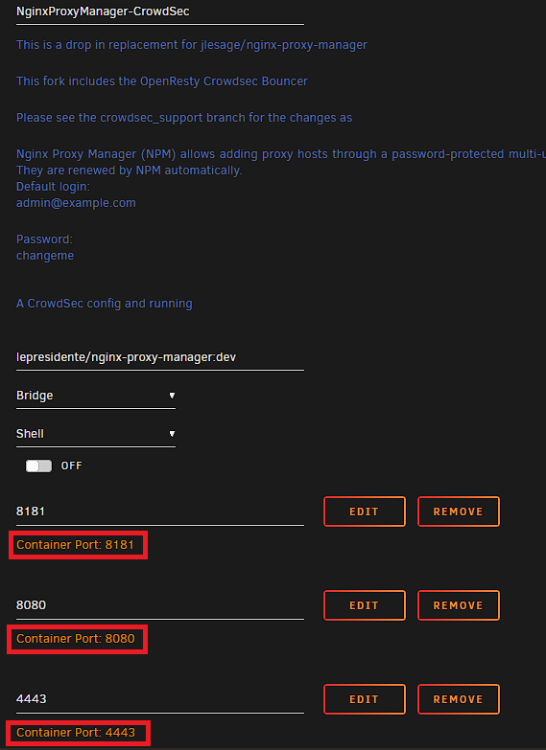
What another one? The other Crowdsec one has the same issue.
-
The standard ports of the app are 801, 7818 and 4431. The maintainer of the package even called the variables TCP_PORT_801 and so on, so the only way I see using it is by building your own app, but there is no real documentation on how to do that. If I'd use host network I couldn't change the ports either, only in bridge I could. But for this I'd have to change the port of the main appliance so I could give NPM port 80.
-
So I guess you can't solve the issue without tinkering right? Looks like people are running their instances as a VM to bypass it. I'm now trying to build the image for myself, but then I will have issues with updates.
-
I'm not sure but I think my inexperience with Docker and networks might be the issue why I'm not understanding you guys at all. You guys make it sound like it's a cakewalk setting up Pihole, but already at the start you run into issues with network. I add a domain in Pihole and point it to my reverse proxy. But how do I point it to the reverse proxy if the port is not the standard port? Using the custom network interface makes you unable to change the port so that seems not to be an option. If I could change the container port by myself it wouldn't be an issue, but it seems Unraid or the Docker image don't support that.
-
Quite a bummer there's no feature for this yet. Theoretically it shouldn't be too much hassle to implement the feature in the web UI, dnsmasq seems to be already preinstalled on the current version of Unraid. Setting up containers or even a full VM just so I can bypass the limitations, that just doesn't sound right. My hardware is quite old and I wanted the system to draw the least energy possible, so I'm going to configure dnsmasq manually. Not sure if you think this is being helpful or if you just wanted to flex your setup.
-
Hi, I just recently switched from a Ubuntu server to Unraid. I want to setup a DNS server on Unraid for private domains for all my services. I searched the forums and it kinda baffles me how few people are actually interested in this. Maybe I'm overlooking something? On my old system I used to have dnsmasq running with an Nginx reverse proxy to resolve e.g. sonarr.nas to my NASIP:8989. Now I'm searching for something similar on Unraid, but preferably as a plugin with an interface since I tend to forget about these tinkered solutions like the 14 years old how to for dnsmasq. The DNS server solutions like Technitium or Pi-hole seem to be overkill for my needs. Is there anything like that on Unraid or do I have to setup dnsmasq manually?
