





bubbaQ
Moderators
-
Joined
-
Last visited
-
I'm finally upgrading my main workstation to Windows 10, and I'm using Intel 550 10GBE cards for a direct connection. Using iperf, I get only about 4Gb/sec ... but if I set the TcpWindowSize size large enough (iperf switch "-w 2048k") I get the expected 9.9 Gb/sec. This is on a clean win10 install, and it doesn't matter whether I use unRAID as the iperf client or server.... meaning it doesn't matter which system gets the -w flag to initiate the larger TCP window size. Anyone see this before?
-
By "haste" I meant abandoning the project permanently. I completed my tests and all the hashes all match, so even on files over a TB, there was no corruption.
-
Don't be hasty.... I'm running hashes against them now to compare to backups. You might just need to use long integers and recompile it.
-
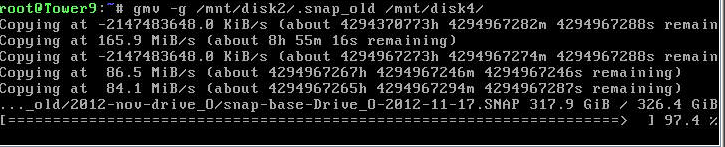
Have you tested it with *large* files? I get overflows with large files. See attached.
-
The "multi-stream" changes are really killing me. I had to revert to 6.7 as I lost 40% of my throughput when copying disk to disk in the array. Can we get back the ability to set reconstructive write ON and have it *stay* on?
-
What did you do to get it running?
-
To replicate: Size browser so there is no horizontal scrollbar. Resize so there is a horizontal scrollbar. Scroll right. Banner area at top does not cover entire canvas on the right.
-
Some points: - be sure you start the script with "#!/bin/bash" line - be sure you are using Linux line endings, and not Windows. - use apt-get install -y -q <package name> or else it will fail waiting on you to approve it. Also check the log from the unRAID Docker GUI to see the progress of the script.
-
Any reason you abandoned the Syncrify docker? I have Syncrify running on bare-metal in unRAID, and would like to move it to a docker, but didn't want to waste time if there was a deal breaker in it.
-
No, once the webGUI is doing a shutdown, you can't use it for anything else. If you end up in that loop, your only choices are to 1) login via telnet and deal with it by hand at the CLI, or 2) the big red switch. But there is a way to create a back door HTTP listener on another port using awk. I used that for a long time so I had HTTP access to do some things like a "kill-anything-that-has-files-open-and-stop-array-now-damnit" script. But logging in via ssh and doing it from the command line ended up being easier for me than maintaining and upgrading that code with new stuff I wanted.
-
That's what my original did: http://lime-technology.com/forum/index.php?topic=42773.msg407486
-
You have to do a search and replace to insert custom html/javascript into the stock unRAID html. I've done it but it is fraught with peril of 1) it not working on a different version and 2) hosing up the page so a user couldn't get to the buttons to shut down unRAID. But as I said in the original thread, that is a perfect place to put it..... plus adding an extra click-through when stopping the array when there are open files that may block it, so you don't get stuck in a loop.
-
FWIW, you can't run phpvirtualbox in unRAID 6.x even with a web server working, because the php install is incomplete (no extensions, such as SOAP)
-
There are many hardware solutions out there that allow fan speed control via scripts... check out: http://www.sidewindercomputers.com/fancontrollers.html I use the Matrix Orbital, but the T-balancer is a good choice too.
-
It defaults to "disabled" in the BIOS now. I also have this board and like it. Only thing I don't like is the location of some of the headers make them hard to get to with cards installed.
