





Deagarys
Members
-
Joined
-
Last visited
-
It is rebuilding as we speak, i will keep this thread updated, and after it rebuilds ill do the extended smart test. thank you for your help so far. Let’s hope non more needed
-
And what if it does come up with the error “device disabled” again, what would the next step to try be? or is it time to replace the disk? (Disk is pretty new by the way ) or could it be that even with a new drive this would happen again because something corrupted on the drive? Is there a way to find this out?
-
Would you recommend me stopping the test and doing what you linked to in your previous comment? also, after i rebuild the disk onto itself would it still be possible to have the same error occur an hour later again?
-
Update: after i saw all data was back everything seemed ti be working as usual and then suddenly this error reappeared. i have run check filesystem on all disks (i don’t know what any of it means) they all return the same values (the disk with the error and all other disks without) so that seems like a good sign to me. I also ran a quick smart test which finished without errors. I am now currently running a long one which seems to take a very long time.
-
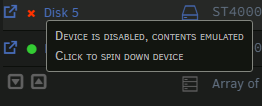
All data seems to have returned after i restarted again, however the error Device is disabled content are emulated came back. What are the correct steps for me to now take in terms of a beginner. Is there a way for me to fix this without replacing the disk? server-deagarys-diagnostics-20250502-2127.zip
-
All data that i seem to have lost are media, i don’t mind if i lose this and i can’t get it back, if i can get it back it would save me the teoihle of re downloading everything but that’s it. I just want to get back where i was left off on
-
I have not issued an format command, all i did was stop the array, unassigned disk 5 (the on that was “disabled” rebooted system, reassigned it, start the system, clickee new config ( i read all of these steps somewhere else) and then the disk was mounted and working, it then started a parity check instead of a rebuild. Now the parity check is done all data is gone i can’t find it anywhere a lot of series can’t be played now in plex but the drives still all show up as full. and now i am here
-
server-deagarys-diagnostics-20250502-1929.zipHere are my diagnostics in advance.
-
Hey guys, it all started when i saw an error saying device is disabled, content emulated. After i saw this error i stopped the array and removed the disk and re assigned it. Then i read i needed to rebuild, which i thought i did but i believe i did a parity check. Now all my disks still show that they are at full capacity but i have lost a LOT of movies and series. It looks like all of the data i have lost are these media files which i would be completely ok with. I can just re download them however it shows that my disks are full. What do i do now? Is there still a way for me to get my lost data back? If not how can i get the correct used up space to show up, so i can redownload everything. Thanks in advance im all pretty new to all of this.
-
nginx: [emerg] cannot load certificate "/etc/letsencrypt/live/npm-24/fullchain.pem": BIO_new_file() failed (SSL: error:80000002:system library::No such file or directory:calling fopen(/etc/letsencrypt/live/npm-24/fullchain.pem, r) error:10000080:BIO routines::no such file) I believe this is the real error i am dealing with, Indeed there is no directory "npm-24"
-
I have no idea either, i'm not that savvy in networking, what would it normally be?
-
nginx: [warn] low address bits of 192.168.1.0/16 are meaningless in /data/nginx/proxy_host/1.conf:134 nginx: [warn] low address bits of 192.168.1.0/16 are meaningless in /data/nginx/proxy_host/27.conf:137 nginx: [warn] low address bits of 192.168.1.0/16 are meaningless in /data/nginx/proxy_host/5.conf:137 nginx: [warn] low address bits of 192.168.1.0/16 are meaningless in /data/nginx/proxy_host/6.conf:132 nginx: [warn] low address bits of 192.168.1.0/16 are meaningless in /data/nginx/proxy_host/7.conf:132 nginx: [warn] low address bits of 192.168.1.0/16 are meaningless in /data/nginx/proxy_host/8.conf:132 nginx: [warn] low address bits of 192.168.1.0/16 are meaningless in /data/nginx/proxy_host/9.conf:132 nginx: [emerg] cannot load certificate "/etc/letsencrypt/live/npm-24/fullchain.pem": BIO_new_file() failed (SSL: error:80000002:system library::No such file or directory:calling fopen(/etc/letsencrypt/live/npm-24/fullchain.pem, r) error:10000080:BIO routines::no such file) I am suddenly getting this error, and now nginx does not want to start... nginx has been running smoothly for over a year now.. Does anyone know what happened and how i fix this?
-
Did you ever manage to find it?
-
Can i up my container size so i dont get these messages anymore?
-
I have found out why my logs were so huge. NZBGet was running privelaged. and logged almost everything. Turned privelaged off and log reduced a ton. Still would like to know if its normal that some containers like readarr and sonarr are almost 2gb
