





Deagarys
Members
-
Joined
-
Last visited
Everything posted by Deagarys
-
Will do that first thing tomorrow then. Is the other 4TB drive good?
-
A lemon? What does this mean hahaha faulty drive?
-
I literally bought it today
-
i have a completely new 550watt psu in there i have no gpu just a i5 processor. Should be able to handle 6 disks.
-
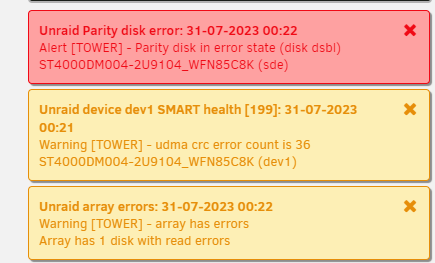
Following your steps, Once unassigned parity disk i do not get this message (i expect this is because my disk is already disabled) I start array with unassigned parity disk, stop it again and assign the parity disk. start it again. it shows this next to the start button: (Start will Parity-Sync and/or Data-Rebuild) I get these notifications: And it does not start any rebuild process nor a parity-sync process. Once again new diagnostics: tower-diagnostics-20230731-0025.zip (I really appreciate you actually doing the steps on your machine!)
-
So this time doing it next to the start array it actually showed it will start a data rebuild. But i got a error that parity disk is in error state and nothing happened. Hopefully you can see the problem in the diagnostics @itimpi tower-diagnostics-20230731-0005.zip
-
I read in another thread to stop array unassign the disk start it, stop the array re assign it and start it again. This did not fix the issue. I also read to stop the array, make a new array and start it. This also did not fix my issue
-
I dont seem to get this button/warning
-
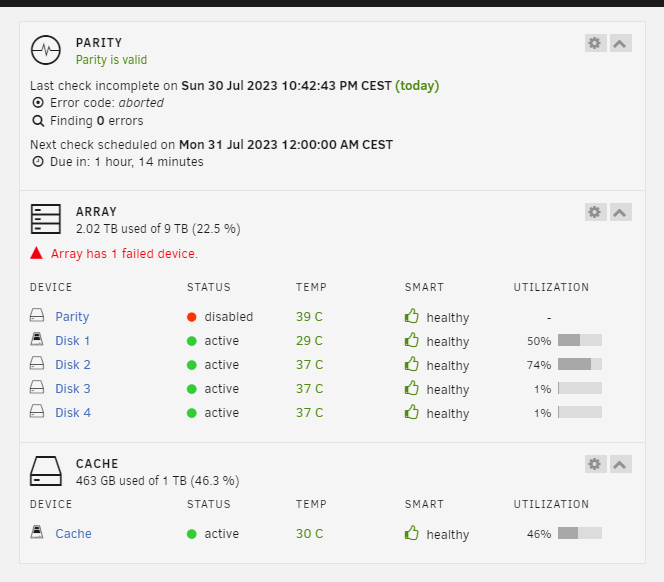
I added some new extra drives today, my new drives were bigger than what i had so i had to make a new array and make my new drive the parity drive. I did i parity check which completed successfully Yet my drive is still disabled. Why is that? tower-diagnostics-20230730-2247.zip

-
If i try my second PC (connected directly to modem and not my switch unlike my main pc and server) it works. So i believe the issue lays with my network switch. But what could cause this? and how do i fix it? its a unmanaged switch
-
I just plugged the Ethernet cable from my pc into my laptop. So when my laptop is on the same switch as my tower the website is also not accessible. And when i unplug it and go back to wifi it immediatley becomes accessible.
-
I have pointed my domain to my server dashboard with the help of nginx proxy manager and cloudflare. The dashboard can be accessed even from outside my home network just like i wanted it to be. Every device seems to be able to connect to it except from my main PC. This PC is on the same network switch as the unraid tower itself. wifi seems to connect to the website, just not my main pc. What could be the issue of this?
-
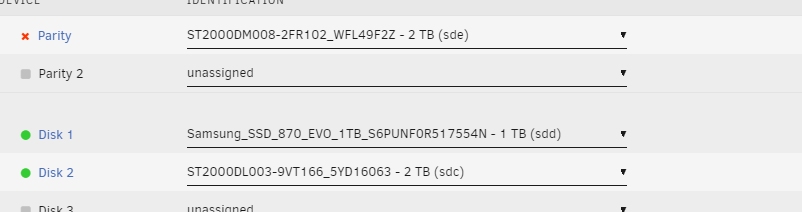
I upgraded my Towers hardware today (no new disks just cpu ram and mobo), and after i booted it up it crashed while mounting the devices. now it hangs in bios and i have to restart it a couple of times and when it boots up in Unraid, i get a parity device is disabled error. I have attached the diagnosis: tower-diagnostics-20230729-0048.zip
-
For some reason I got subdomains working but now i get a ERR_TOO_MANY_REDIRECTS on the main domain
-
Cloudflare A record -> points to my public IP Cloudflare CNAME record -> * points to my domain Connection with Nginx proxy manager works, i have a certificate and if i go to my domain i see this: when i enable any of the proxy hosts in nginx it stops working. What am i missing or doing wrong? i feel like i am so close to having it work properly





-
So last 2 days i've setup my server and am very happy with it. What i would like now is to be able to access specific parts like Heimdall, Jellyfin and audiobookshelf from outside my house via a domain. How do i get this to work without a vpn? I want it like this: domain.com -> heimdal dashboard jelly.domain.com -> jellyfin audio.domain -> audiobookshelf I have a domain, cloudflare setup and nginx proxy manager.
-
SOLUTION: The issue was that the DNS on my Tower was pointed towards my Pi-Hole. I turned automatic DNS off and back on. This seemed the fix the issue. I now took the automatic DNS and made that ip my static DNS so it will not target Pi-Hole automatically again.
-
I changed my routers DNS back to it's own. Restarted it all the internet came back, but not on my server yet. Issue is not with pi hole i suppose.
-
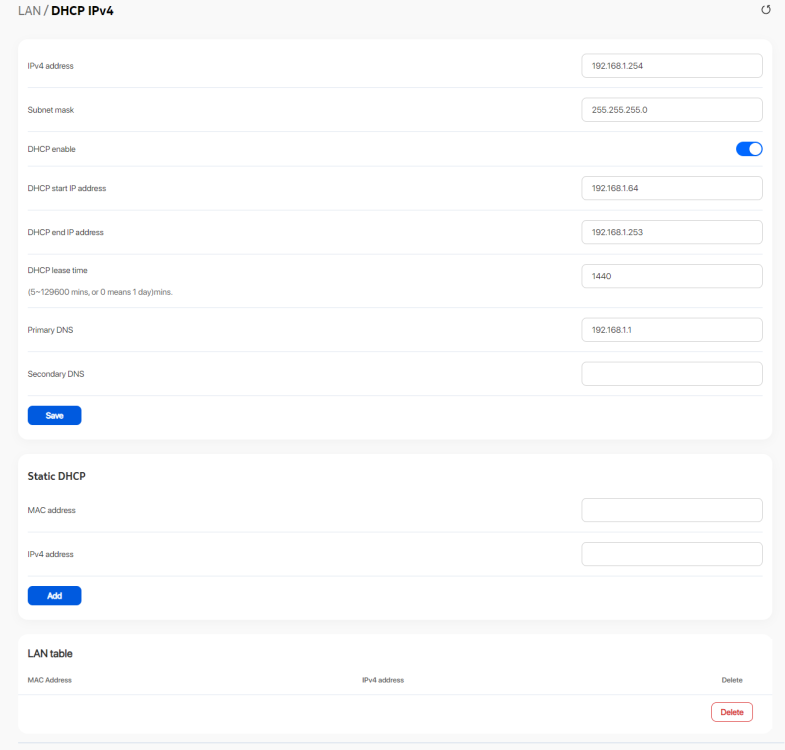
192.168.1.1 is my pi hole which is the dns of my router. This has been working for 12hrs now or something like that and suddenly just stopped working. only on my server everything else has internet.
-
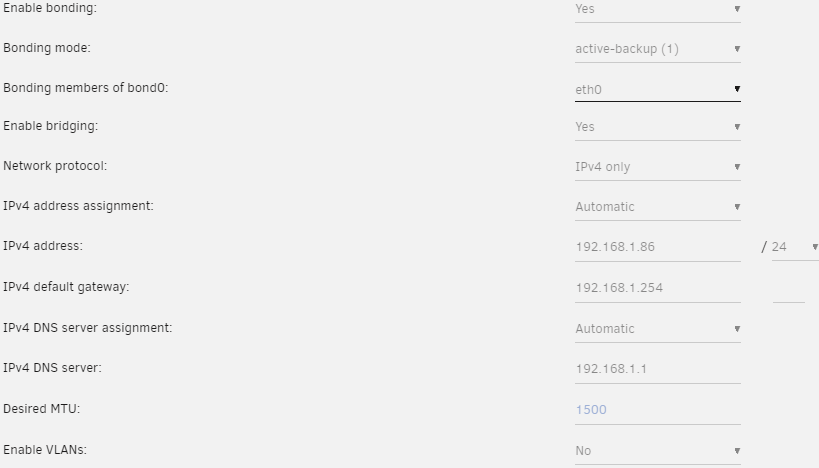
I just edited my previous reply with a screenshot of my network settings.
-
Where? I am completely new to this. This is my second day of having the tower This is what i can find:
-
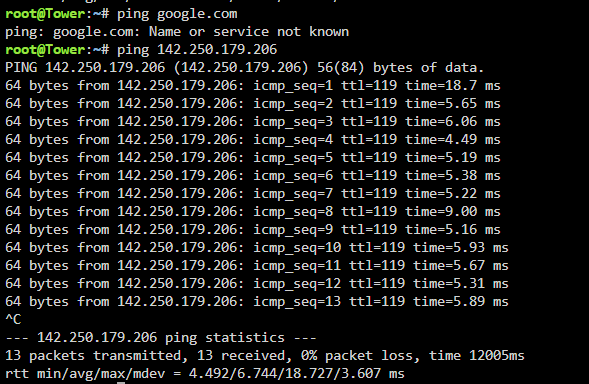
For some reason i cannot ping google .com but i can ping 142.250.179.206 which is google their ip
-
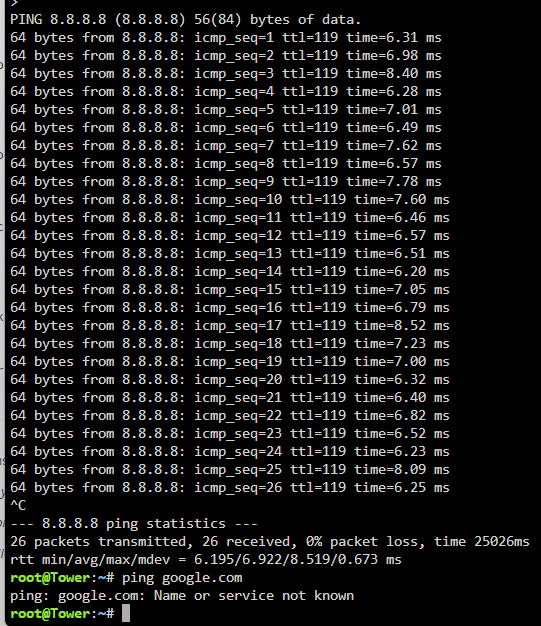
tower-diagnostics-20230727-2302.zipfile:///C:/Users/Mike/Downloads/tower-diagnostics-20230727-2302.zip It stopped working out of nowhere. I tried stopping all my docker apps, but still no internet. I have no clue what to do to fix this, hopefully someone can help
-
Do i also run the makebootable bat file?
-
Im trying to turn my old pc into my first unraid server, everytime i try to install unraid on it it boots into bzroot...ok and just stays on it. I also once got a LMZA corrupt error. I tried doing both UEFI and legacy. What am i doing wrong?


