





rbrowning85
Members
-
Joined
-
Last visited
Everything posted by rbrowning85
-
I am looking to do the same thing. Any updates or guides on how to get this working?
-
Interesting. So you are pointing your Cloudflare Tunnel to your router's IP address? Then using an Adguard DNS rewrite, you are then forwarding that to NPM, which then proxies it to the correct docker container? app.example.com --> Cloudflare Tunnel --> home router --> AdGuard DNS rewrite --> NPM --> docker container Does this require you to open ports 80 and 443 on your router?
-
I have my Cloudflare Tunnel pointed to NPM and a wildcard cert setup. However, when I enable Force SSL, I get an error stating "too many redirects." Any idea why I am getting this error? NPM perfectly redirects my app.example.com to the correct docker container with this turned off. I just don't understand what is a causing the error.
-
I got it to work, but based on the ticket I created on github, it appears that the Unraid app is not creating the required sql lite database. Is there another way to install this?
-
Any progress on this topic?? I am looking to do the something similar as well.
-
To my dismay I decided to delete the docker and VM vdisk files and rebuild everything. Not going as smoothly as I hoped.
-
No, that's why I moved everything to the array and then back to the cache. I havent been able to update or make any changes to my docker or VMs since i upgraded my cache. Can I just assume the larger of the two files is the correct one? I'm willing to take a little bit of a risk. I would rather get things up and running again.
-
Does this mean that I need to delete one of the two files? How do I know which one to delete? Is this a result of using the ZFS format, because you have to go through the extra step to destroy a dataset?
-
Here is the output: root@UnRaid:~# find /mnt -name libvirt.img /mnt/user/system/libvirt/libvirt.img /mnt/cache/system/libvirt/libvirt.img
-
Correct. For example, Docker is loading, but it is not showing any of the containers I had previously installed. See attached screenshots.

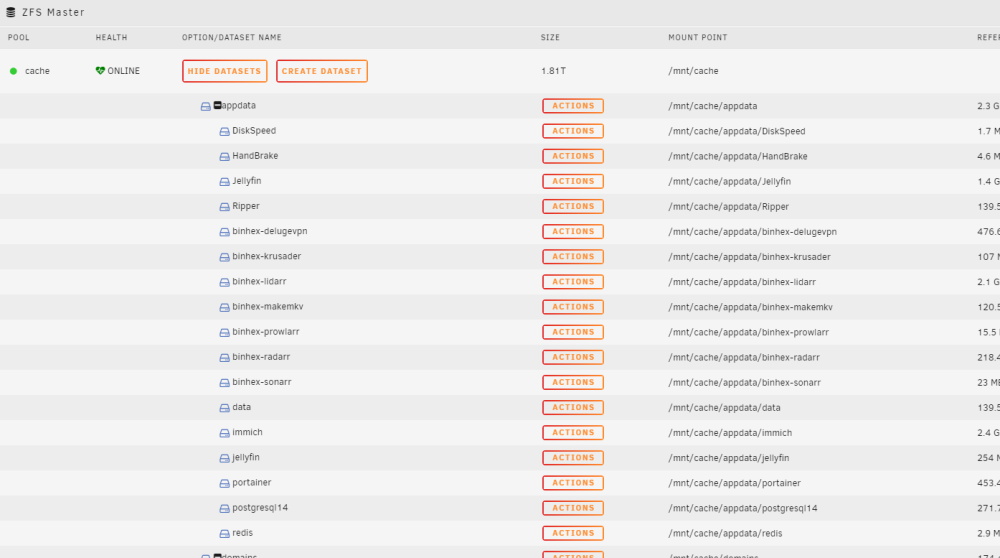
-
I recently upgraded my cache drive following these instructions found here. When I re-enable Docker and VMs both are. Attached is the diagnostic I ran this morning. Any help would be greatly appreciated. unraid-diagnostics-20231206-1002.zip
-
I show the same thing under the About menu. However, when I try to rip a blu-ray disk, I get the attached error.
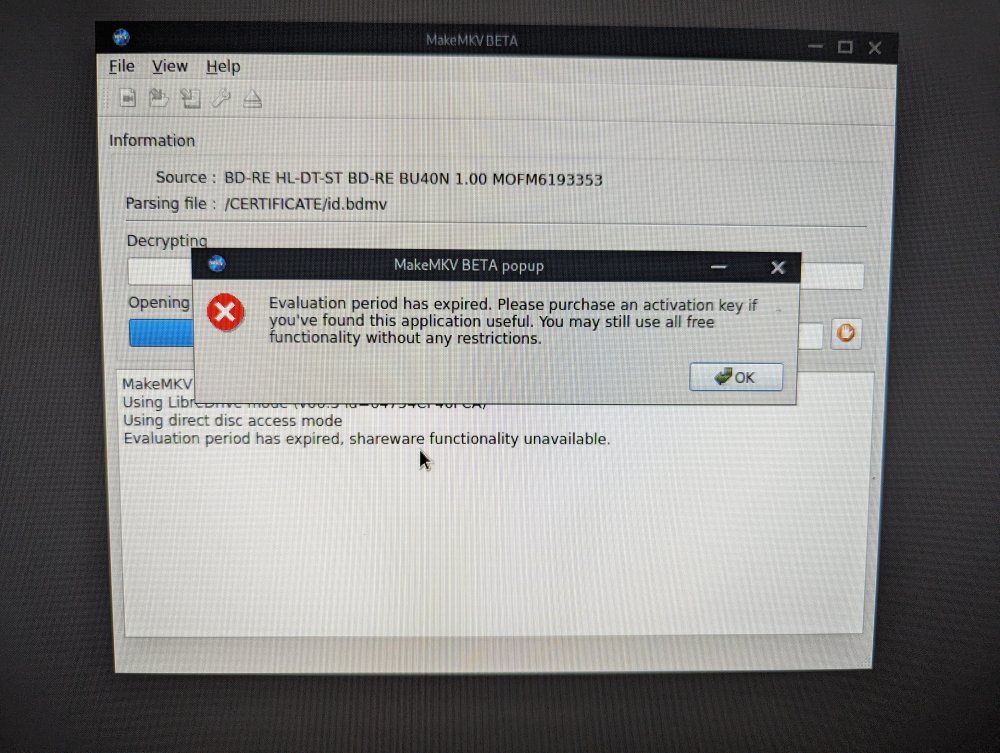
-
I am getting the update error. Will this docker be updated with a new license? Is there a way I can update the license manually?
-
Oh. My. God.... It worked. You have no idea how long I have been trying to solve this problem. THank you!!!!!!!
-
It appears that the Shinobi docker container is on network "root_default" instead of Bridge. I assume this makes a difference? If so, how do I correct it?
-
I ran both command lines. The first one only showed the dockers that were installed. Shinobi wasnt listed. I also ran the prune command and it cleaned 0B. Any other ideas?
-
Pardon my ignorance. How do i prune the unused containers? For some reason the Shinobi docker never shows up in the Appdata folder. That's part of my confusion/frustration. I am not sure where it was saved to be able to completely wipe it out and start fresh. No, it is not listed in the docker tab under advanced view.
-
After watching a SpaceInvaderOne video, I was able to get RClone working via the plugin and several scripts. I was hoping for more of a GUI experience, but after a lot of trial and error, I believe I have things working as expected.
-
I have been using UnRaid for about a month now, and I was looking to start using my UnRaid server as an NVR for my security cameras. I followed SpaceInvaderOne's tutorial to setup Shinobi. However, the app in the Community Applications is very out of date. So I sought to install the latest version of Shinobi using their docker instructions. I tried running the command: bash <(curl -s https://gitlab.com/Shinobi-Systems/Shinobi-Installer/raw/master/shinobi-docker.sh) from https://docs.shinobi.video/installation/docker. It did not work initially. I was told that I had to install Docker Compose, so I did. I found a plugin in CA, then re-ran the command, and the previous command worked perfectly. I had Shinobi up and running as expected. During the setup process I attempted to change the folder where videos were to be stored. I changed the location to be: mnt/user/NVR/videos. However, after saving I could no longer access Shinobi. I found the following errors in the Shinobi docker logs: ERROR 1396 (HY000) at line 7 in file: '/home/Shinobi/sql/user.sql' : Operation CREATE USER failed for 'majesticflame'@'127.0.0.1' Error: ENOENT: no such file or directory, mkdir 'mnt/user/NVR/videos/' I tried uninstalling and reinstalling the docker container, but I received the same the errors after reinstalling the container. I assume that this is because there is a Docker template file somewhere that did not get removed when I uninstalled the container. I looked in /boot/config/plugins/dockerMan/templates-user/ but I did not see a template. I am also unable to locate the config.json file in order to manually reset or change the video directory. I assume it is buried within the docker image. Please help. I have been trying to Google everything I could think of to help me solve this problem, but this is where my knowledge of UnRaid, Docker, and command line prompts runs out. Short of completely formatting my server, I am open to doing whatever it takes to get this issue resolved. Again, since my server has only been up and running for about a month, I dont have that much installed and can recreate just about everything. Thanks in advance.
-
I have the same question, and I am having the same problem with rclone. I cannot seem to get it to work with any of my services (OneDrive, Google Drive, Dropbox)


