





PANiCnz
Members
-
Joined
-
Last visited
Everything posted by PANiCnz
-
Can anyone comment if this issue was fixed with version 7?
-
Upgraded to 6.12.14 and NFS shares were inaccessible immediately after reboot, if anything its worse. Downgraded back to 6.12.9 and everything is working again.
-
Silly question, I assume you've got a network cable plugged in to the correct port?
-
Bare metal too.
-
Same issue here after a clean install to 6.12.13. Interestingly had previously been running 6.12.11 fine, yet when I manually downgraded to 6.12.11 the NFS issue remained. Have manually downgraded to 6.12.9 to get NFS working again.
-
I've started using the rclone plugin and so far its doing what I want.
-
Any tips/recommendations for syncing the backup files to the cloud? Ideally OneDrive or something similar.
-
Can anyone confirm if the X11SCA-F supports PCIe bifurcation on the 8x slots? Ideally, I'd like to use a 2x M.2 adapter in one of these slots.
-
I'm looking to buy a SATA card to replace my existing LSI HBA in search of some power savings and APSM support to achieve lower C states. It seems ASM1166 cards are widely recommended for this purpose, but I would prefer the M2 form factor with the SFF-8087 connector. It looks like these cards most commonly use ASM1064 instead. Does the ASM1064 support APSM and allow me to achieve a similar outcome to the ASM1166
-
I'm having what I think is a fairly common problem but after reading numerous posts and Reddit articles I'm not making any progress. From what I can see a folder on UNRAID is given the permissions drwxrwxrwx while files are given -rw-rw-rw-. In particular if I have run the New Permissions app. I'm running the linuxserver/qbittorrent container with effectively standard settings. From what I can see the umask is set to 022 and so folders are being created with drwxr-xr-x and files are -rw-r--r--. So, what I understand is the existing folders are 777 and the umask setting is creating the new folders with 755 (777 - 22). Can anyone explain to me why 755 is prefered over 777? I understand 755 prevents write and is in theory more secure etc, but if 777 is good enough for existing files why are new files being created with 755? If I want to create new files with the same permissions as my existing files, do I just remove the umask value?
-
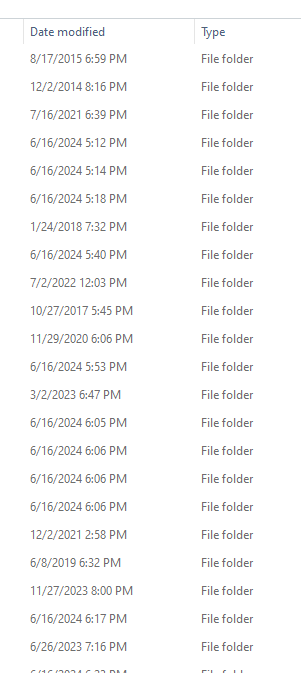
In the progress of migrating files/folders from an existing OMV NAS to a new Unraid build. Following this guide, but halfway through the transfer the last modified date changes from the source date to the date the file was transferred. I'm using the rsync command in the above guide which I believe is intended to retain the source last modified date. So I am assuming the issue might by on the OMV NAS side. Any guess as to what I need to change to retain the last modified date?
-
Could someone explain to me the difference between the sync and downloads folders? -v <path to data>:/sync \ -v <path to downloads>:/downloads \


