





gecl
Members
-
Joined
-
Last visited
-
is there a way to remove the errors?
-
syslog-10.27.27.231.log Does this explain why it locked up?
-
I thought I did, to save to SSD, but I don't see it in that folder. What settings do I ned to change?
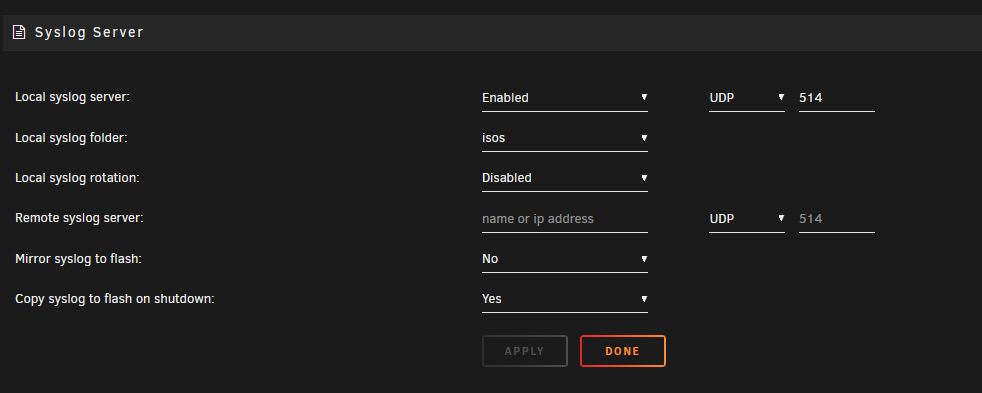
-
server-syslog-20250227-2020.zipDoes this one show anything?
-
Here is my syslogserver-syslog-20250124-1941.zip
-
I updated bios to FFc, and set Power Supply Idle Control to "typical current idle" and it locked up again. I've attached the diagnostics. server-diagnostics-20250102-1313.zip
-
It took itself off the network, locked up, and wouldn't display through gpu to screen. server-diagnostics-20241231-1356.zip
-
What do you mean by "Since the emulated disk is mounting, and assuming contents look correct, you can then rebuild on top", can you explain this.
-
I've replaced disk 2 with my 4th drive in last month. I can't remember what the other issue was but this time its UDMA. What am I doing wrong, and can Disk 2 be enabled? server-diagnostics-20241218-1544.zip

-
Thanks, and what has the GPU display boot?
-
Not passing GPU through to VM When GPU is connected all the HDMIs on the Motherboard and the GPU stop transmitting. Is it a bios setting to make the motherboard GPU still display boot screen?
-
3050 Is the only GPU, I don't know what bound to vfio means.
-
Is there a bios setting to display the boot/terminal on a monitor? When I boot without the 3050 connected, I can see the boot screen, but when it boots and the 3050 is running, all my HDMI ports stop working, and I can't view the boot screen from either the native HDMI ports or the ones on the GPU. AMD Ryzen 7 5700G CPU Gigabyte B550I Aorus PRO AM4
-
Can I use the keyboard to pull the diagnostics because I can't access the GUI? It's in the middle of rebuilding parity as I just replaced a failed drive so I'm hesitant to do a hard reboot. Is there any other way to get to the GUI than through the IP 10.xxx.xxx.xxx? I can ping the server and the apps are responding but I can't see the dashboard, main, or login screen. Is there a way to see if parity rebuild is complete without having the GUI?
-
Can I use the keyboard to pull the diagnostics because I can't access the GUI? It's in the middle of rebuilding parity as I just replaced a failed drive so I'm hesitant to do a hard reboot. Is there any other way to get to the GUI than through the IP 10.xxx.xxx.xxx? I can ping the server and the apps are responding but I can't see the dashboard, main, or login screen. Is there a way to see if parity rebuild is complete without having the GUI?
