




.jpg.0b616e550346049ebd693502012366dc.jpg)
James Miller
Members
-
Joined
-
Last visited
Everything posted by James Miller
-
I did it carefully over the past week. I first upgraded a test environment to 7.3. It was a Mac Mini. It upgraded okay (modified boot loader in place), and I then switched to internal boot, which is using a newer / different boot loader. It all worked. I then upgraded my main Mac Mini (with all the Thunderbolt enclosures attached). Switched across to internal boot, and it’s been working for about a week using internal boot. Seems to be working in 7.3.
-
I'm making the assumption and hoping the next major update will include an updated boot loader which may address this. This is very much a workaround, and in a future update the bootx64.efi will likely get overwritten.
-
Hi, Yep, I used the boot loader and config provided above. It worked first time, so I’ve not tweaked or adjusted anything yet as it worked first try. J
-
I’ve been testing this tonight and appears to work. Able to boot the Mac Mini 2012, in EFI mode with the Thunderbolt 2 enclosures attached.
-
Hi, I've just started testing, but I've downloaded 7.2.4 to a USB, added the limine binary to the /EFI/boot and added the config files. So far the Mac mini 2012 has booted with the external Thunderbolt 2 enclosures connected. Just running through some testing now. J
-
Hi, I think I forgot to report back after the previous testing. The Mac Minis I'm using all have the most recent firmware they can, and non have had OCLP on them. I did try using legacy boot, and UnRAID itself would boot but if I had the external Thunderbolt enclosures attached the Mac Mini would hang on LEGACY boot with the newer OS. So, I've stuck with 7.1.4, using EFI boot as that's the combo that works. I'm hoping the next major release will fix the fault and allow me to upgrade. J
-
There are a couple of ways. On the Mac Mini if you hold down the OPTION key on boot it will list the various boot options. You should see an EFI and a legacy boot option. You can then select the non EFI option to legacy boot. Also from within UnRAID -> MAIN -> flash (boot device) then down the bottom there is a "Permit UEFI boot mode". If you turn that off it forces legacy boot.
-
That's a fair question to ask. I'm using UEFI boot (not legacy), and these Macs have never had OCLP on them. I hadn't thought to try legacy boot as I've not needed to do that before. I'll get it a try on the test Mac and see if I get different results.
-
Okay, just did a quick test by downloading 7.2.1 onto a test USB stick and trying it in a Mac mini 2012. Still getting the kernel panic.
-
I've not had a chance to test yet, but looking at the release notes I don't see anything about this bug, and the kernel doesn't look to be changed so I'm assuming this update won't fix this.
-
Thank you for providing some hope. I’ll try again with the next release.
-
I guess I’ll wait for the next update and see if it’s resolved. I’ve been running this happily for years, and it’s worked really well.
-
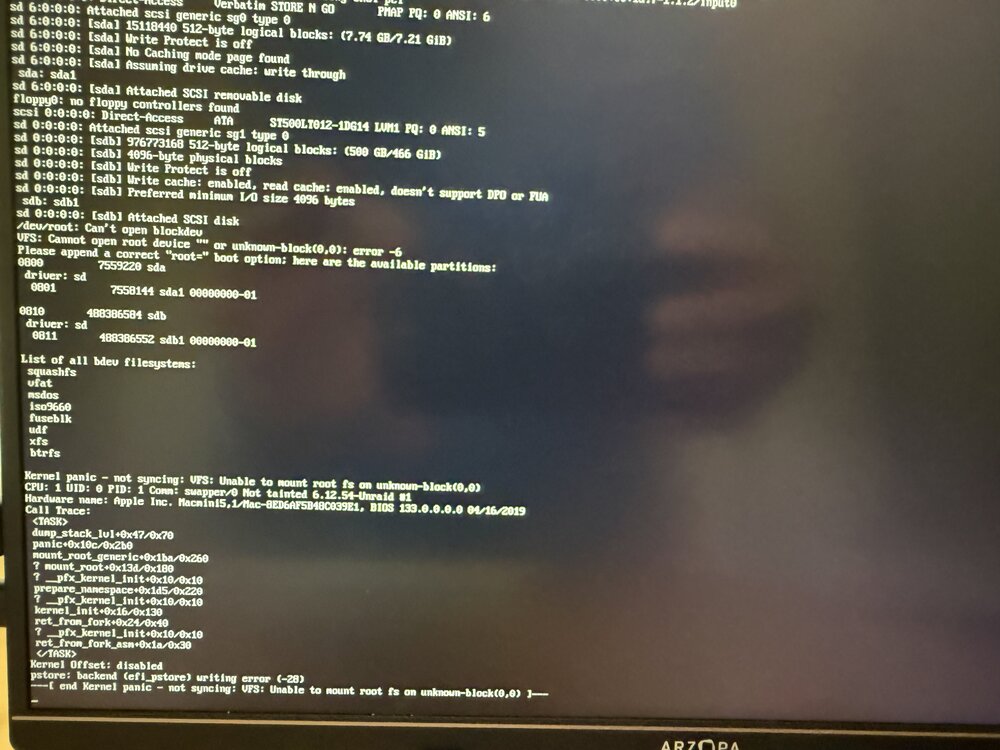
Thank you for that suggestion and I tried a variation of that. I grabbed a new/clean flash drive and used the USB created tool to make a new/vanilla one. Exact same error (that’s where the screen shot is from).
-
Hi All, I've checked the forums before posting, and I'm not seeing others report this symptom yet. I have UnRAID running on a Mac mini and it's been working really well for the past few years. It's currently running 7.14 and using an Kingston USB (one of the 'known working' / recommended ones). I attempted to upgrade to 7.2 last night and after it wouldn't boot with a kernel panic and warmings about /dev/root / can't open block device. From various reading this is usually an issue with the USB stick, or damaged file system. I copied the previous bz files back to the root of the USB and it's booting correctly now (back to 7.14). As a troubleshooting step, I grabbed a seperate (and admittedly older) Mac Mini and a different USB stick (Verbatim) and did a fresh/vanilla install of 7.2. The attached error is the same on the PROD UnRaid Mac Mini (noting PROD is a Macmini6,2 with a Kingston USB), but apart from that difference the kernel panic and error is the same. Any suggestions welcome, and/or is there some difference with 7.2 which is preventing it from working on the Mac Minis now?
-
Well, I have no idea what I’ve done differently, but the NVMe is now consistently working. I’ve shutdown and rebooted several times. Still appearing and working. Thanks for the help.
-
Just an update, but I have NFI what I've done differently to make this work. I went back to the primary NAS that I wanted to use this in. It's a Mac Mini 2012, with 2x ThunderBays connected to it (8x drives), and added the JetDrive (NVMe) again. This time I shut everything down. unplugged the power from the bays etc. This time when I turned everything back on and allowed unRAID to boot the JetDrive was appearing as a disk (/dev/nvme0n1p1) as it should. I'm currently copying about 1.2TB of data from the spinners to the NVMe, and it's working and seems pretty fast. It's a Time Machine backup store, so lots of little files. I honestly have no idea what it's now appeared, and I'll try more reboots etc to see if it stays there, but so far seems to be working. lcars-nas01-diagnostics-20240406-1412.zip
-
okay - last test for now backup Mac Mini hardware + 6.12.10 + ThunderBay + JetDrive = NVMe detected, mounted usable in the array and pool. Based on the permutations it seems like 6.12.6 works consistently, but 6.12.10 is hit and miss. 6.10.10 detects the NVMe as a device in System Devices, but isn't always detecting it as a drive. tower-diagnostics-20240405-2155.zip
-
I'm not rulling it a local hardware issue, but so far the JetDrive (the NVMe enclosure) works in my MacPro/MacBook etc, both directly and via other ThunderBolt devices on the bus. Using it in a Mac Mini running unRAID 6.12.6 either being the only device or with other ThunderBolt devices (ThunderBays) on the bus seems to work. I know you asked to upgrade the 6.12.6 USB, but I'm hesitant to at the moment as that appears to be the only one constantly working at the moment.
-
Okay, This test. Same backup hardware + ThunderBay + JetDrive + 6.12.6 (the working one). So, this is the JetDrive connected going via a ThunderBay on the bus as well. This is detecting the drives in the ThunderBay and the JetDrive, so seems to be working. So, also a Mac Mini, also with other devices (ThunderBays) on the bus and the JetDrive is appearing as a drive and I can use it in pools and arrays. lcars-nas02-diagnostics-20240405-2106.zip
-
Okay, now this is getting stranger. So, same backup server hardware. I've removed the Thunderbolt enclosure the NVMe was passing through. It is once again detected in the System Devices, but no drive.tower-diagnostics-20240405-1929.ziptower-diagnostics-20240405-1929.zip Before I used the same Mac Mini hardware, fresh USB + just the JetDrive and it worked (wish I'd grabbed a diag file then). Then same hardware + USB + ThunderBay enclosure + JetDrive = NVMe/JetDrive detected, but not as a drive. Remove the ThunderBay from the path, back to the JetDrive being detected in the System Devices, but not as a drive. I'll do more testing on permutations, but this is getting really weird. tower-diagnostics-20240405-1929.zip
-
Hi, I've not completed all the tests, but sharing part of what I've done. So, using the 'backup NAS' hardware, I grabbed a new USB and installed a trail of UnRAID. Yes, this is more variables, but I'm not ready to upgrade the back-up USB just yet. So, same backup hardware (that was working), but running 6.12.10. 6.12.10 - JetDrive directly connected. It shows up as a drive, I can assign it to pools, start the array etc. 6..12.10 - connected with a ThunderBay enclosure in the path (same as the main NAS), and the ThunderBay drives show up, but the NVMe drive doesn't. It still detects the NVMe enclosure, but doesn't detect the drive. I'm attaching the diagnostic file for the 10.12.10 TEST/TRIAL machine with the ThunderBay in-line. I'll also take the ThunderBay out of the path, and attach that diag file as well. Noting, if I use these combination with Windows etc on the same hardware it seems all the drives. tower-diagnostics-20240405-1908.zip
-
Thanks for the quick response. I've done two things since the original post. I saw that 6.12.10 was released so just upgraded to that (hence a reboot). Didn't appear after the reboot. Based on what you've just said, I've just disconnected, waited a few seconds and reconnected. Without spamming the entire syslog, here are the entries from when I disconnected the drive and reconnected it. Apr 4 19:53:19 LCARS-NAS01 kernel: thunderbolt 0-10101: device disconnected Apr 4 19:53:23 LCARS-NAS01 kernel: thunderbolt 0-10101: new device found, vendor=0xa8 device=0x2 Apr 4 19:53:23 LCARS-NAS01 kernel: thunderbolt 0-10101: Transcend Storejet If I check in System Devices I can still see it listed in there as: [c0a9:5421] 11:00.0 Non-Volatile memory controller: Micron/Crucial Technology Device 5421 (rev 01) But I still don't see it as a drive to assign to a pool or an array. Also, if I SSH in and look in /dev/ I don't see any nvme devices. On the 6.12.6 test USB I do see a /dev/nvme0n1
-
Hi, This is the first time I'm seeking support via these forums, so my apologies if I've missed something. I'm using UnRAID 6.12.9 on a Mac Mini 2012 with a number of external ThunderBolt 2 enclosures attached. Overall this has been working well, and I have been using this since the middle of last year. This week I wanted to add some additional storage (also connected via the ThunderBolt bus), but it's not appearing as a drive. If I look in Tools -> System Devices I can see it there "[c0a9:5421] 11:00.0 Non-Volatile memory controller: Micron/Crucial Technology Device 5421 (rev 01)". If I go to the Main screen, I don't see it as a disk to assign to a pool or array. I also have a seperate test UnRAID box (running 6.12.6), also on a Mac Mini, with ThunderBolt devices attached. If I connect the same Transcend JetDrive to the UnRAID install using 6.12.6, it appears as a drive, I can assign it to pools/arrays etc. On the surface, it looks like 6.12.9 is seeing the device, but not identifying it as storage. I think reading the various release notes, there were kernel updates between 6.12.6 and 6.12.9, so is it possible there is some kind of bug in 6.12.9? I'm attaching the diagnostic file from the 6.12.9 if someone else can identify something I've missed. James lcars-nas01-diagnostics-20240404-1825.zip
-
A couple of days ago I upgraded the Fix Common Problems plugin, and it's now warning "Possible rootkit or malware detected". After a bit of Googling I think this used to look at the size of the .key files in /boot/config. Everything looks normal, does anyone have any suggestions of things I should check?
-
Hi, I'm not sure if it's something I've done, but the docker container is always showing as 'unhealthy'?
.thumb.jpg.00a666f8fa0a19b1bb304dcdd1e7cc7e.jpg)

