





tormi
Members
-
Joined
-
Last visited
Everything posted by tormi
-
It takes forever to stop the array... Can I just reboot? By that I mean it says Retrying... and it has been going for 6 hours now.
-
Ok. This has happened before, but that time it was memory problem. Seems this is a yearly thing since I started with Unraid. And it scares me how to fix it. Can you share a link so I know excactly what to do to recreate the filesystem?
-
So just back from vacation. Have tested both pairs of memory sticks (2 by 2x8gb) the last two days. 0 errors on the sticks. It seems to me the same issues persist. WHat can I do?
-
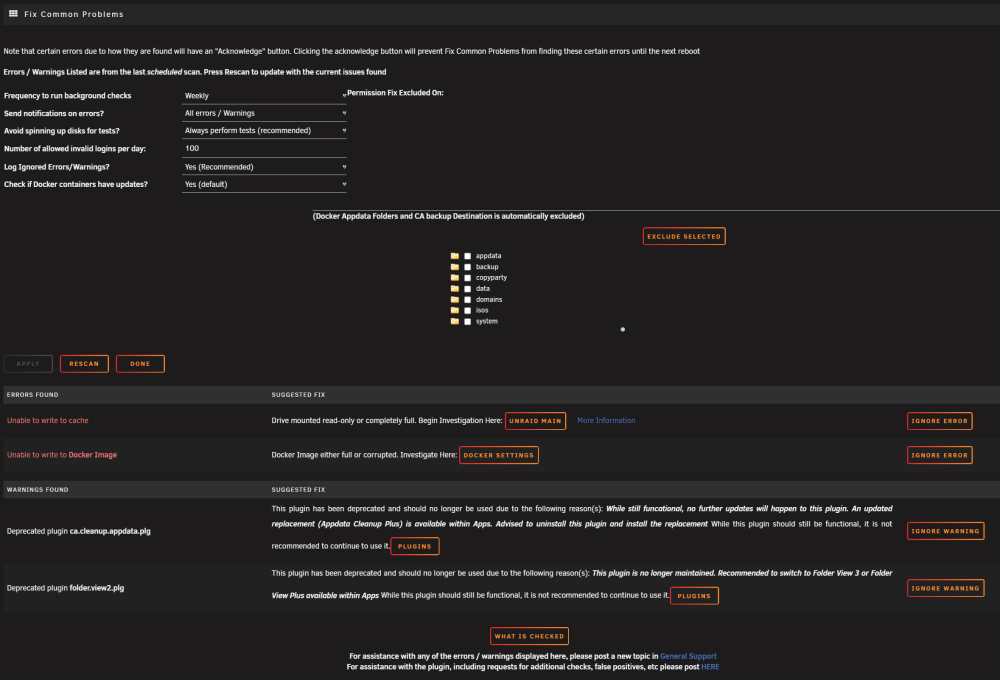
Long standing server, had been 40 days since last reboot, suddenly could not access plex from my server. I can still access the server though. Following errors: *Unable to write to cache *Docker Image either full or corrupted. Worried about memproblems (have switced mem bricks 3 times already) but have not run memtest yet, since I am not at my computer right now. As you can see none of the disks are near full: selje-tower-diagnostics-20260906-2120.zip

-
Server has been up and running for 1,5 days now. It seems like all is ok from my side, and I have Dockers up and running again. selje-tower-diagnostics-20260123-1017.zip If anybody wanna do a hopefully last check of the diag file I would greatly appreciate it.
-
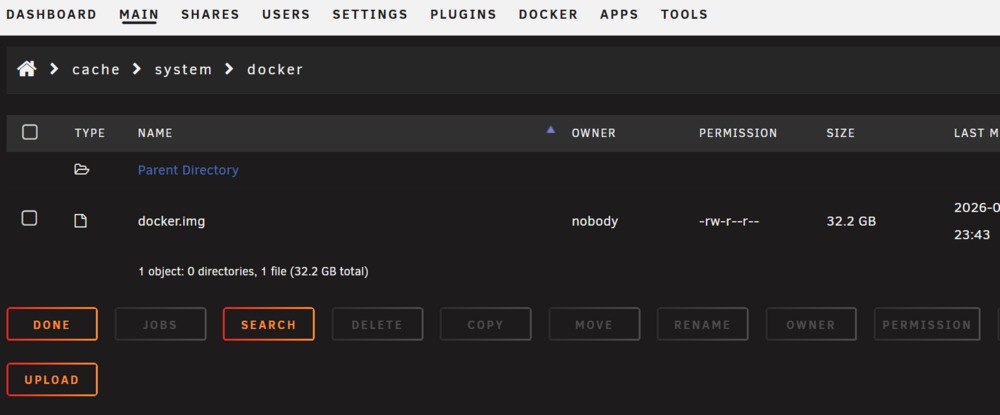
Hmm... Finally got my hardrives back up and running. I moved the backup of my cache - back to the cache, but I now get a message that I don't have any "No Docker containers installed". The docker.img is copied back to the cache... selje-tower-diagnostics-20260121-2348.zip
-
Backup and reformat the cache pool then I guess? Would not a backup now of the cache pool bring the errors back into the new pool?
-
Last 2 memory sticks comes back perfect. Here are the newest diags.selje-tower-diagnostics-20260121-1825.zip
-
Oh, no. You were definitively right again. Several 1000 errors on the first memstick pair (the one I changed) in november. I have to pairs with 2x8gb on each stick. Running a test on the other pair now... will post result on this... And a new diag file if this pair does not fail.
-
Ok. Will do that. If this AGAIN is memory errors, it is the 3rd time in 1 year. Wonder what to do if it is again the same thing.
-
After doing this it seems the cache pool started up again, at least for now. Here are the diags.selje-tower-diagnostics-20260120-2047.zip
-
Unraid have been running fine for 1,5 months now after I had to swap a few bad memory sticks. I have not been accessing it for a few weeks, but when accessing today I found none of the dockers started. Obviously because of the error my Cache drive. I tried rebooting, but I don't really understand the diagfiles. Any help on this is greatly appreciated. tower-diagnostics-20260120-0012.zip
-
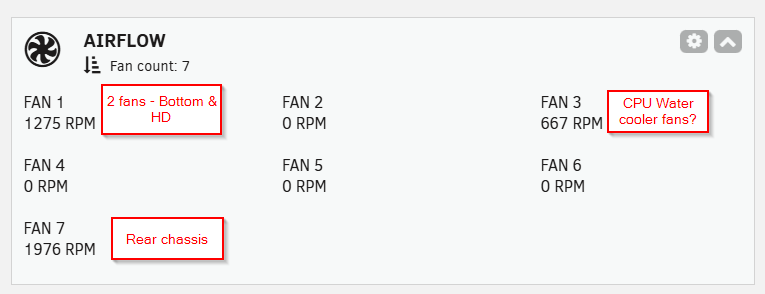
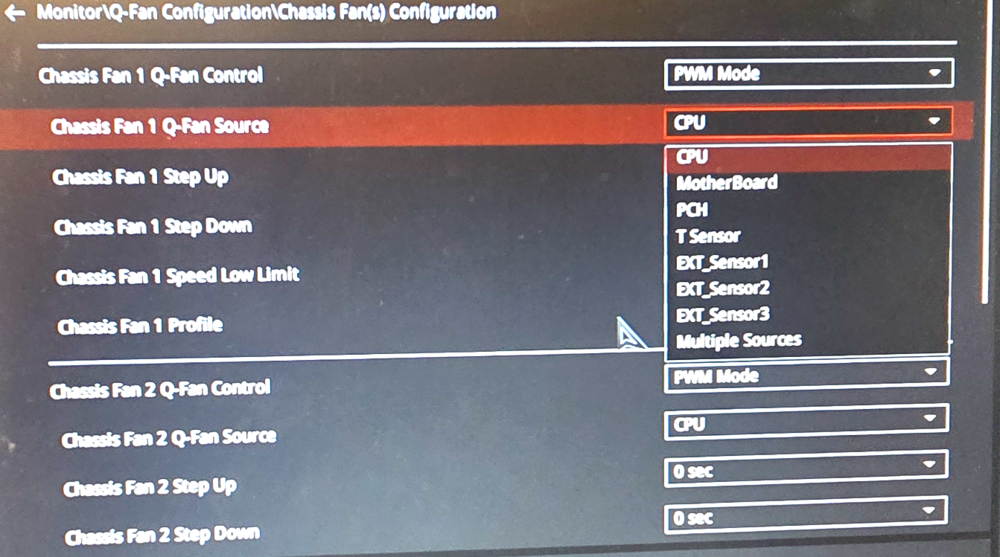
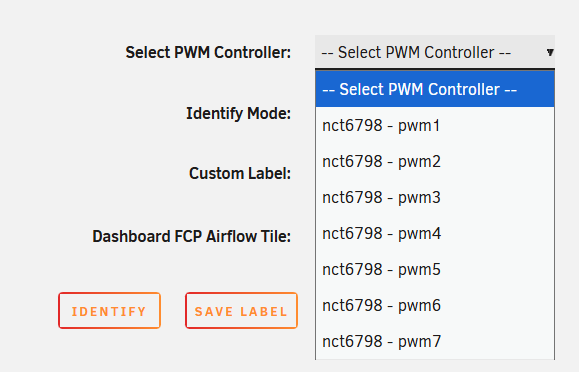
Hi. So I have installed Fan Control, Dynamix Temp sensor and Nuovoton drivers to be able to see my PWM sensors. My problem is that when identifying my fans they dont turn off/turn up to 100% or pulse. I only have 3 PWM fans setup like this: The fans are what I expect the to be, I have not been able to verify for sure, but from visually checking it looks like this. My BIOS settings are like this: As you can see both chassis fans are set to PWM mode. They are also both set to CPU as "source" which probably is wrong, but I don't know what I should choose here. Any help is appreciated: These are the found PWMS, however I think there is only something available fans at 1,3 and 7. Or do I actually need to test all of them to be sure? (Just thought of this now...)
-
It certainly looks better now as far as I can see. Already packed my 2 errored ram and returning them. They were installed in January 2025, had no errors at that time. Does this make sense that they are already broken? I am getting worried Unraid is eating ram? :) syslog-Tower (5).log
-
Holy F........ I had this freaking thing 1 year ago, but not the same errors though. Thanks though. Will do it! Update: So far the two first memsticks are failing massively.... How can this happen? It is only a year ago since I changed 2 of the sticks and tested all of the. Server has just been running for 6 of the last 12 months maximum...
-
Another day, another crash. Syslog attached.syslog-Tower (271025).rar Everytime the parity check also starts... So my server is either dead or running a parity checks these days. And to my knowledge, I have done nothing specific that should cause this. My initial thought was some problems with the dockers and they hogging the network card, but I have not been running any dockers for a while now so...
-
Hmmm... I thought the syslog would continue. Should I mirror the syslog to USB, I read somewhere that that could screw up the flash disk aswell...? Will this give you more data? Anyways I restarted the syslog server I guess that is what you meant about starting a new log.
-
syslog-Tower.rarThe problem persists. I have been away for a few days, but when I returned I could not access the server again. I have not done anything else the last couple of months than to install an extra instance of wordpress, but for the last couple of crashes I am not even running those containers, as I was worried about a port conflict.
-
syslog-Tower.rarI have been away for a few days. This is the same syslog as last time but in rar format. I can see my server is not accessible yet again...
-
Here is new syslog. Looks better now. I stoppedsyslog-Tower.log the parity sync midway. Should I run a new one?
-
Ok i have rebuilt dockers/docker.img. But parity is also rebuilding. Is it safe to reboot while parity is running or should I wait?
-
Here is the syslog, it happened again.syslog-Tower.log
-
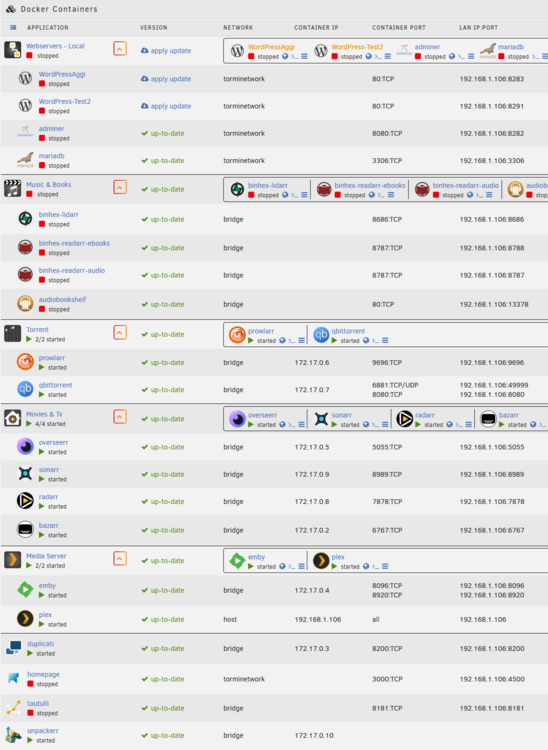
Recently, from what I can see at random I suddenly can not access the Web GUI. The last couple of months this has happened about once a week. I have to do shut off /turn on the computer to get the GUI back. I have attached my diagnostics but I don't know if they are any use, as I just had a bzfirmware error on reboot so the server is now rebuilding parity. I can see a bunch of CSUM errors in the log as of now, but I am lost as to wether this is a problem in itself or if it could be related. I also share an overview of my dockers: Any help is greatly appreciated. tower-diagnostics-20251016-2129.zip
-
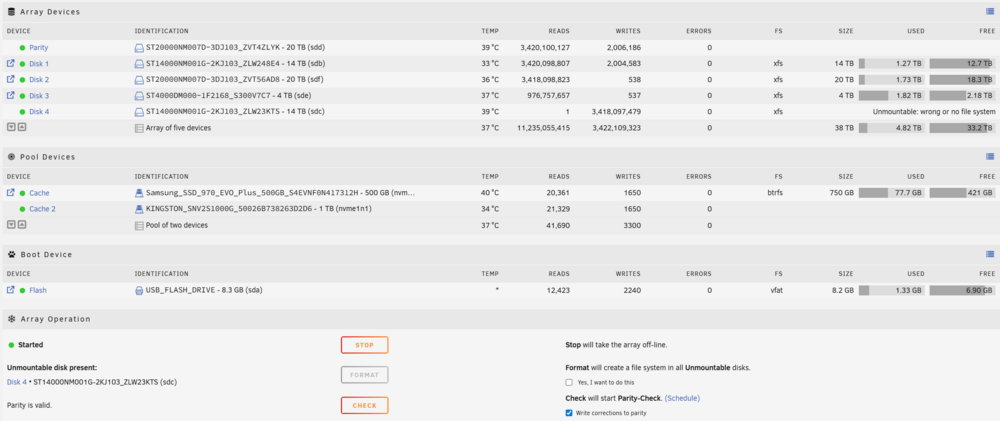
The disk number 4 has worked perfectly. But after my parity disk suddenly showed up with an error, I had to rebuild parity on my parity disk ( I only have one). However after this rebuild was done, disk 4 showed up with an error. I ended up with switching out my old SATA cable from parity disk. For me it looks like all is working ok now, so I am wondering if I can just disconnect my disk 4 and still have nice parity? I have enough of disk space for my need anyways.
-
Wow. Thanks for your setup @Hoopsterand elaborations. Seems like this work great for you. Can you tell me why you choose to go with both Unraid and router setup? Would you do the same if you only need to access unraid dockers? I did experience 8 months ago a breakin to my router and one of my dockers hosting podcasts. At that time I did not use Vpn, only portforward from router to docker containers. Nothing serious happened but today I have a Knx smart home and I am very sceptical to allowing anybody entering anything from the router level. What would you suggest to go for if I only want to do Vpn on the Unraid server?


