





clowrym
Members
-
Joined
-
Last visited
Everything posted by clowrym
-
Since the latest update my array drives willl not spin down. tower-diagnostics-20241008_0043.zip
-
You can revert back to a previous version, you just have to set the tag to the version you want. I am running the :dev tag and it seems to be running ok. IPV6 errors have been consistant in my logs for almost as long as I have been running this. I do have unraid set to IPV4 only. . I have only created the template, not the docker. looks like there was an update within the last couple days https://hub.docker.com/r/haugene/transmission-openvpn/tags
-
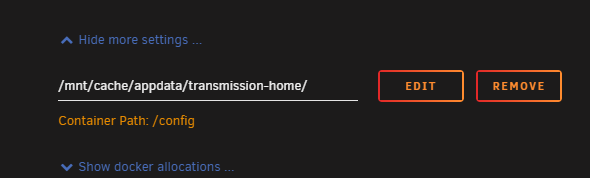
check your transmission settings, where is your data folder mapped?

-
GENERALLY HERE: But depends on what you have set, can you post your run command?
-
Its been a while since ive used wireguard, but i dont remember having any issues accessing the GUI using wireguard. how do you have wireguard set? Lan & Spoke i beleive works for me..... I do have a script that runs though to add lan networks: docker exec Transmission_VPN /bin/sh -c "/sbin/ip r a 192.168.0.0/24 via 172.17.0.1 dev eth0"
-
i doubt it, i'm running the same and have no issues, i'tt try and set up a second docker with your settings and see what happens this weekend,
-
I dont know if this is causing an issues, as you aren't using PIA, but can you remove this and try again.
-
Can you do a force restart and send me your run command, make sure to x out any passwords / usernames
-
not sure if this is part of your issue.... but you can try adding this: --dns 8.8.8.8 --dns 8.8.4.4 some more troubleshooting found here
-
the only error i see in what you provided: WARNING: initial DNS resolution test failed
-
Ive never tried to run this alongside another VPN container, I runn all my VPN needs through this one. you could check Haugene's Git Hub
-
could be i suppose, i'm no unraid expert, so i can't really say what the cause was!! Glad you got it running!!
-
Nothing stands out there, How about the container log?
-
I would need to see your docker run command / settings
-
No worries, I have no issue trying to help with configurations, set up etc, but when it comes to the actual container, i cant do much, as its not mine!
-
I dont maintain the repository, only the template, please post here Hexparrot's Repository
-
I recently had an issue with my flash drive where on sector was dead. I have since replaced it, and everything is back up and running. The section of the drive that was bad contained the majority of my Docker templates. Once i got my system back up and running, my dockers were still runnung, so I have tried to re-add the template, but for some reason all the changes I make to the template, dont get saved, so everytime there's an update, i have to add my variables again. I tried removeing the containers and adding them again, but still seem to be having the same issue. I've looked at the permissions on the flash drive, and all seem to look good, not sure what else to try!! test-diagnostics-20211109-1744.zip Also, a couple of my docker's running dont have xml files anymore as they were corrupt, so i couldnt copy them, they still run, is there a way to find the run command so i can recreate the custom variables?
-
For some reason when I try and sign in, a pop up appears, i sign in fine, then the window closes, but it still tell sme to sign in!! Edit, I manually deleted the plugin as it didnt show up, and couldnt install, and now everything seems to be wrking

-
I dont think so, it seems to be working fine with mine.
-
interesting...Mine seemed to update fine, but i have been using the dev branch for a while, so that could be why Release 4.0
-
I would confirm that your Docker is connecting through the VPN . the point of the local_network variable is to allow your local network access to the VPN subnet.... Personally i use Check my VPN IP ....
-
I have a script I run to add other IP's / subnets when i use a VPN to connect, or change IP's etc... Otherwise I dont get access to the webgui...Maybe you need something similar? I havent tried / tested giving this docker its own IP #!/bin/bash echo adding 10.1.0.0/24 LAN_NETWORK docker exec Transmission_VPN /bin/sh -c "/sbin/ip r a 10.1.0.0/24 via 172.17.0.1 dev eth0" echo Netowrk added exit
-
That would be a question for hexparrot....I created the unraid docker template, not the github repo!! I have in the past updated java from within the docker with no issue....
-
you can give each docker its own IP address if you want, I'm not sure on trying to route your traffic through one connection....i've never tried, or had the need to do it..... Switch your network to custom and specify an ip in the template:

-
I would post your issue here https://github.com/hexparrot/mineos-node



