





BazzT92
Members
-
Joined
-
Last visited
-
Hello SimonF, here the Data. @C246:~# lsusb Bus 001 Device 001: ID 1d6b:0002 Linux Foundation 2.0 root hub Bus 001 Device 004: ID 051d:0003 American Power Conversion UPS Bus 001 Device 007: ID 0557:7000 ATEN International Co., Ltd Hub Bus 001 Device 010: ID 0557:2419 ATEN International Co., Ltd Virtual mouse/keyboard device Bus 001 Device 016: ID 2109:2815 VIA Labs, Inc. USB2.0 Hub Bus 001 Device 020: ID 1b1c:1b13 Corsair Vengeance K70RGB keyboard Bus 001 Device 021: ID 09da:9090 A4Tech Co., Ltd. XL-730K / XL-750BK / XL-755BK Mice Bus 001 Device 023: ID 0d8c:0102 C-Media Electronics, Inc. CM106 Like Sound Device Bus 001 Device 024: ID 0d8c:0102 C-Media Electronics, Inc. CM106 Like Sound Device Bus 001 Device 029: ID 214b:7250 Huasheng Electronics USB2.0 HUB Bus 001 Device 030: ID 214b:7250 Huasheng Electronics USB2.0 HUB Bus 001 Device 031: ID 09da:9090 A4Tech Co., Ltd. XL-730K / XL-750BK / XL-755BK Mice Bus 001 Device 032: ID 258a:1006 SINO WEALTH USB KEYBOARD Bus 001 Device 037: ID 05e3:0610 Genesys Logic, Inc. Hub Bus 001 Device 038: ID 05e3:0610 Genesys Logic, Inc. Hub Bus 001 Device 039: ID 05e3:0608 Genesys Logic, Inc. Hub Bus 001 Device 040: ID 06c4:c411 Bizlink International Corp. D6000 Controller Bus 001 Device 041: ID 04a9:190e Canon, Inc. CanoScan LiDE 120 Bus 002 Device 001: ID 1d6b:0003 Linux Foundation 3.0 root hub Bus 002 Device 002: ID 0951:1666 Kingston Technology DataTraveler 100 G3/G4/SE9 G2/50 Bus 002 Device 004: ID 2109:0815 VIA Labs, Inc. USB3.0 Hub Bus 002 Device 008: ID 05e3:0620 Genesys Logic, Inc. GL3523 Hub Bus 002 Device 009: ID 05e3:0620 Genesys Logic, Inc. GL3523 Hub Bus 002 Device 010: ID 17e9:6006 DisplayLink Dell Universal Dock D6000 @C246:~# lsusb -vvvs 001:041 Bus 001 Device 041: ID 04a9:190e Canon, Inc. CanoScan LiDE 120 Device Descriptor: bLength 18 bDescriptorType 1 bcdUSB 2.00 bDeviceClass 255 Vendor Specific Class bDeviceSubClass 255 Vendor Specific Subclass bDeviceProtocol 255 Vendor Specific Protocol bMaxPacketSize0 64 idVendor 0x04a9 Canon, Inc. idProduct 0x190e CanoScan LiDE 120 bcdDevice 7.04 iManufacturer 1 Canon iProduct 2 CanoScan iSerial 0 bNumConfigurations 1 Configuration Descriptor: bLength 9 bDescriptorType 2 wTotalLength 0x0027 bNumInterfaces 1 bConfigurationValue 1 iConfiguration 0 bmAttributes 0xa0 (Bus Powered) Remote Wakeup MaxPower 500mA Interface Descriptor: bLength 9 bDescriptorType 4 bInterfaceNumber 0 bAlternateSetting 0 bNumEndpoints 3 bInterfaceClass 255 Vendor Specific Class bInterfaceSubClass 255 Vendor Specific Subclass bInterfaceProtocol 255 Vendor Specific Protocol iInterface 0 Endpoint Descriptor: bLength 7 bDescriptorType 5 bEndpointAddress 0x81 EP 1 IN bmAttributes 2 Transfer Type Bulk Synch Type None Usage Type Data wMaxPacketSize 0x0200 1x 512 bytes bInterval 0 Endpoint Descriptor: bLength 7 bDescriptorType 5 bEndpointAddress 0x02 EP 2 OUT bmAttributes 2 Transfer Type Bulk Synch Type None Usage Type Data wMaxPacketSize 0x0200 1x 512 bytes bInterval 0 Endpoint Descriptor: bLength 7 bDescriptorType 5 bEndpointAddress 0x83 EP 3 IN bmAttributes 3 Transfer Type Interrupt Synch Type None Usage Type Data wMaxPacketSize 0x0001 1x 1 bytes bInterval 8 Device Qualifier (for other device speed): bLength 10 bDescriptorType 6 bcdUSB 2.00 bDeviceClass 255 Vendor Specific Class bDeviceSubClass 255 Vendor Specific Subclass bDeviceProtocol 255 Vendor Specific Protocol bMaxPacketSize0 64 bNumConfigurations 1 can't get debug descriptor: Resource temporarily unavailable Device Status: 0x0000 (Bus Powered)
-
Hello, i have devices that have problems being passed trough to a VM. Canon CanoScan LiDE 120 Scanner: Can be passed trough and the driver installs, but if you scan something it reports that the device would be locked. There is a lock at the back, it is not locked and it wortks on native machines. Dell Universal Dock D6000 Dockingstation with DisplayLink: If i pass trough all parts and install the driver, DisplayLink:Dell_Universal_Dock_D6000 with Serialnumber 1803284219 gets Virsh Error If the Device is connectet on an passed trough PCIe-USB3-controller it works without problems. But i want the flexibility to switch this device between running VMs and it is not an option to run a PCIe Switch to connect multiple USB3 controllers for this, than i could use real GPUs. Are these known problems, an are there workarounds for these? If you need more informations feel free to ask. Thank You Sebastian

-
Hello, i am using multiple VMs with the same vdisk only one at a time. VM properties Vdisk is set to manual and all use the same vdisk. The vdisk is on a ZFS share, and snapshots are possible. Now i would like to use this vdisk in the first VM native and create a snapshot every time an additional VM starts and if it gets offline delete the changes. All userdata is on NAS and so on... Did someone manage to build somthing like this before? Best regards, Sebastian
-
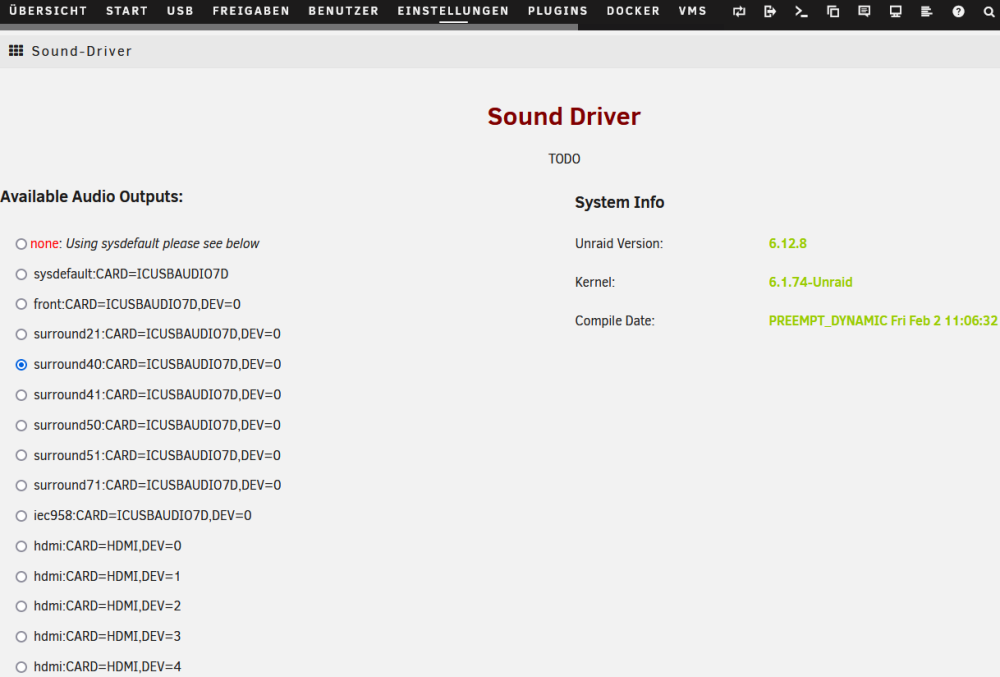
Hello, fixed the errors, see below. Best regards, Sebastian What i try to do and i have done so far: I try to compile scream (audio receiver) to playback VMs Virtual Soundcard Streams over ALSA using the inofficial Sound Driver Plugin. By following the Readme i installed cmake from https://mirrors.slackware.com/slackware/slackware64-current/ by following this: Added packages from slackware64-current: binutils-2.42-x86_64-1.txz cmake-3.28.3-x86_64-1.txz gc-8.2.6-x86_64-1.txz gcc-13.2.0-x86_64-1.txz gcc-g++-13.2.0-x86_64-1.txz gcc-gdc-13.2.0-x86_64-1.txz gcc-gfortran-13.2.0-x86_64-1.txz gcc-gm2-13.2.0-x86_64-1.txz gcc-gnat-13.2.0-x86_64-1.txz gcc-go-13.2.0-x86_64-1.txz gcc-objc-13.2.0-x86_64-1.txz gccmakedep-1.0.4-noarch-1.txz git-2.44.0-x86_64-2.txz glibc-2.39-x86_64-1.txz glibc-i18n-2.39-x86_64-1.txz glibc-profile-2.39-x86_64-1.txz guile-3.0.9-x86_64-1.txz kernel-headers-6.6.21-x86-1.txz libffi-3.4.6-x86_64-1.txz libgcrypt-1.10.3-x86_64-1.txz libgudev-237-x86_64-1.txz libmpc-1.3.1-x86_64-1.txz make-4.4.1-x86_64-1.txz
-
Since i installed this MOVER TUNING Plugin under 6.12.8 i am also getting this error now. mv: cannot stat '/usr/local/bin/mover': No such file or directory Mover won't start, had to uninstall the Plugin, start mover, stop mover, install the plugin again, now it moves, but I dont know how long 😑.
-
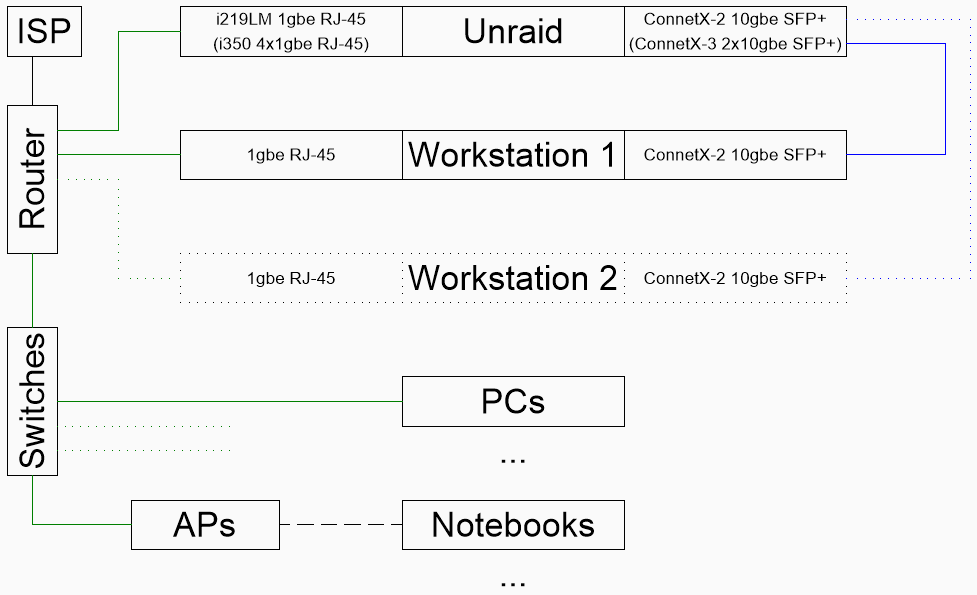
Hello, i am unable to configure the network and WOL function in Unraid. The Server should act like a Switch between 10gbe and 1gbe. Ive tried to bridge the NICs (Network schematic and configuration down below). The NIC (i219LM Fujitsu D3417) is configured in the BIOS. I use the dynamix_s3_sleep Plugin Without the Bridge and 10gbe NIC it kind of worked with only g (Wake on MagicPacket). If the Plugin triggered S4 it was ok. If i trigger s4 it direktly bootet again. But i would like to wake the system by accessing the share aka "\\x.x.x.3\temp" i think p/u/m/b should all work. What am I doing wrong? Thank you. network-rules.cfg network.cfg dynamix.s3.sleep.cfg Home/Family-Network schematic:
-
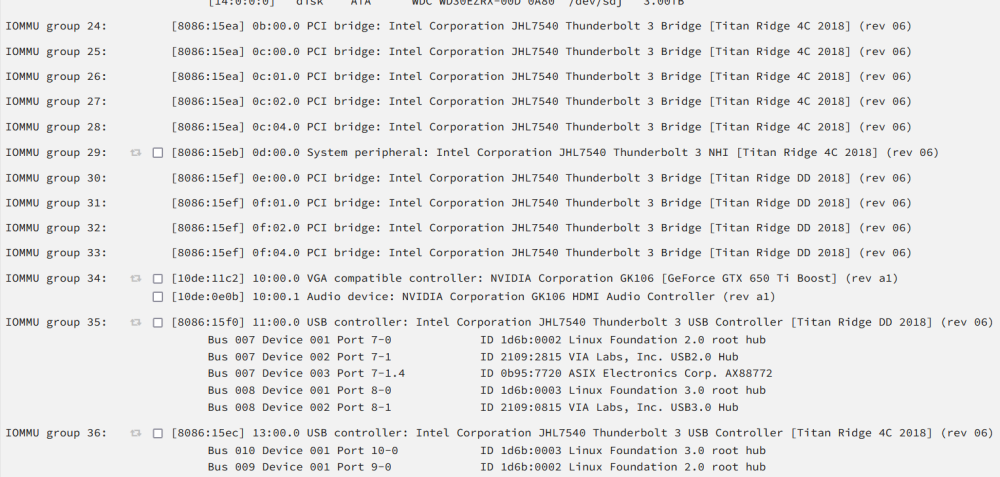
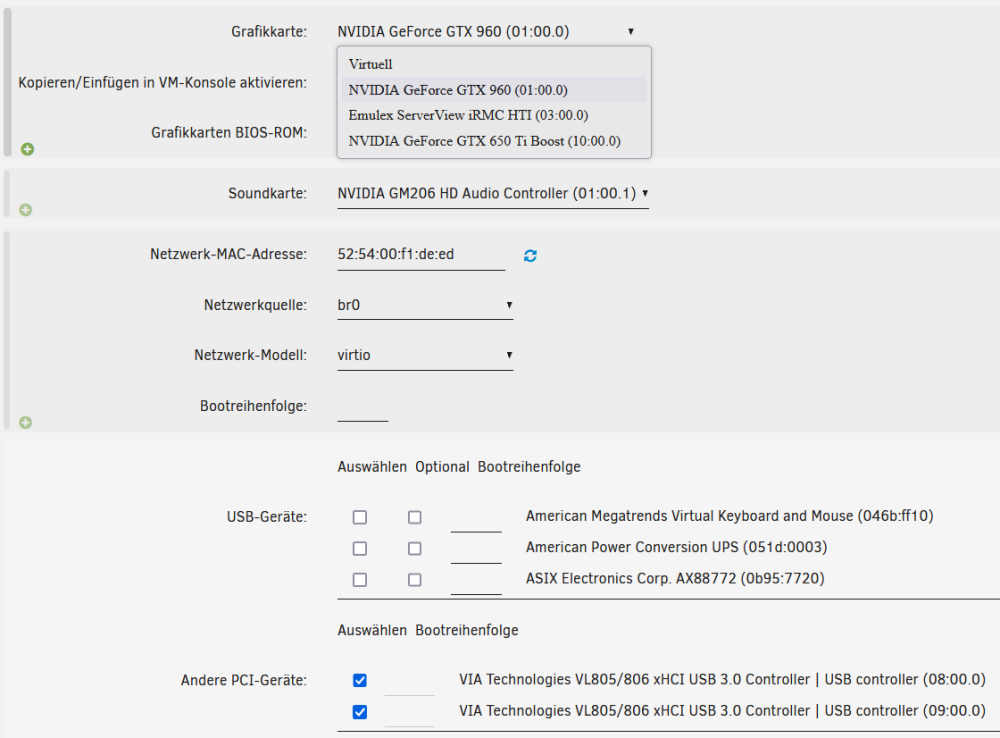
Hello, i am relative new on Unraid, my Server and the first VMs are running (specs in Profile). Normal Passtrough GPU and USB Cards to the VM are working. Even the GPU connected trough the Thunderbolt Controller works. But i cant find a way to passtrough the complete Thunderbolt 3 Controller (to switch Devices on the VM while running). IOMMU 24 - 35 / PCI 0b:xx.x - 11:xx.x How can i enable the Thunderbolt controller to be listet under "Other PCI-Devices" Is there somthing i did not see or have to be enabled? It would be great if you could help me. If you need more information let me know. lspci lspci -tvv
-


