





mtdunphy
Members
-
Joined
-
Last visited
-
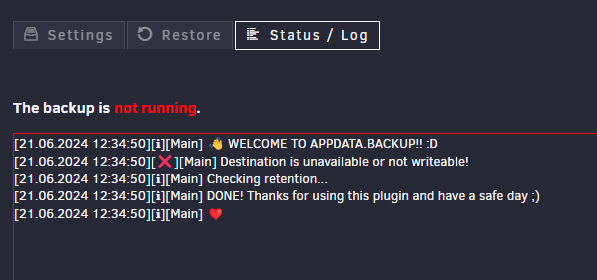
Got the following error this morning when I woke up. It was backing up to my remote NAS and now nothing. I tried different shares on my remote NAS. Attached a screenshot and debug log code below. 297940e3-33da-4cc2-9a89-234d4bd087b0
-
Having the same issue. Tried changing to different location to backup to. Nothing works, had it previously on my remote NAS.
-
I did a reboot after noticing the error, at the time of my post the key still stated invalid. Waiting for support to reply back to my submission.
-
I recently had a bad usb key, upon reimaging a new usb 2.0 drive. I reauthorized my usb drive and obtained a new license GUID for it. Copied the url for the key into from the email and everything worked. Went back today and notice that my usb drive key was invalid. After looking in my account the usb thumb drive is registered to the GUID with the correct number, they all match. I can see the Pro key on my usb drive. I've attached my diag file.tower-diagnostics-20240206-2248.zip
-
I went ahead and moved my drives and re-flashed a new USB drive, then attached everything to a spare SuperMirco Mobo and it posted. Sadly it's an old backup of my config but the files are on the Array, now I'm waiting for parity to rebuild.
-
I'm going to have to look at it further this weekend, I do know the flash drive is unreadable on my windows pc, since it's formatted fat32. The fresh boot drive I created is readable, that' why I asked. But, yea, I'll have to dig deeper in the problem.
-
Neither show up. Black screen. No HDD activity. I do have the tower-flash-backup-20231124-1657 from 11/24/2023. Could I make a new boot drive and restore the flash save?
-
I'll start off by saying I'm a total newbie to Unraid. Recently I noticed my Unraid was unresponsive and it was failing to log in, at the GUI. So, being upset with it I did a hard reset of the pc via the power supply. When I went and powered up the pc, the normal boot screen of my bios didn't show up on my monitor. After 20 minutes of waiting unraid failed to boot. The share of unraid is just for file storage, I don't run any type of VMs and some test docker apps that I never got to work. My question is how safe is my data on the drives? I have one 16gb flash as a boot, 2x8tb parity drives, 1x8tb cache and 6x6tb as storage. If I create a new boot drive, will the data still be there? It's only storing some media for my plex server on another pc? I'm feeling if I can get this to work I might have to switch back to a more stable based NAS software like TrueNAS.
