





anticholium
Members
-
Joined
-
Last visited
Everything posted by anticholium
-
Just ssh in your Unraid server and execute the given command but replace 'steam-headless' with 'SteamHeadless', i.e. don‘t use the container console in this case
-
well ok, I can't tell for sure, but there won't be the same modesetting driver related bug in parallel that I was experiencing with my Blackwell-GPU (5060)...
-
host terminal, you execute the commands inside the docker though
-
additionally post the result of this command: docker exec steam-headless bash -lc ' echo "=== /usr/bin/start-dumb-udev.sh in current container ===" ls -l /usr/bin/start-dumb-udev.sh echo nl -ba /usr/bin/start-dumb-udev.sh '
-
also your syslog has multiple lines with May 2 10:58:36 Loki acpid: input device has been disconnected, fd 10 May 2 10:58:38 Loki kernel: input: Mouse passthrough as /devices/virtual/input/input275 May 2 10:58:38 Loki kernel: input: Mouse passthrough (absolute) as /devices/virtual/input/input276 May 2 10:58:38 Loki kernel: input: Keyboard passthrough as /devices/virtual/input/input277 May 2 10:58:38 Loki kernel: input: Sunshine Nintendo (virtual) pad as /devices/virtual/input/input278 May 2 10:58:38 Loki kernel: input: Sunshine X-Box One (virtual) pad as /devices/virtual/input/input279 May 2 10:58:38 Loki elogind-daemon[2149]: Watching system buttons on /dev/input/event7 (Keyboard passthrough) May 2 10:58:38 Loki kernel: traps: light-locker[133722] trap int3 ip:14a5b214fa77 sp:7ffc59149ee0 error:0 in libglib-2.0.so.0.8400.4[66a77,14a5b2108000+a1000] after the modesetting related bug (which was preventing a display beeing initializable and therfore no xorg etc) was resolved by the recent driverupdate to 595.71.05, I was stuck to a somehow udev realted crashloop, which I was trying to manually workaround (wihtout longlasting effect)... – I can tell you the way by which I currently have a running/working steam-headless, but let's see your results first, since your case is maybe different in detail and my workaround might not help you... also try this docker command and provide the results: docker exec steam-headless bash -lc ' tail -200 /home/default/.cache/log/xorg.err.log 2>/dev/null \ | grep -Ei "EE|fatal|failed|evdev|input|nvidia|screen|permission|no such|segmentation|backtrace|Server is already active" '
-
Your having a somehow comparable crashloop I was experiecing until recently, where Xorg is exiting (status 1) and all following processes like xvnc11 and sunshine are exiting too, therefore no working webvnc and sinshine and consecutive no working moonlight streaming. In the beginning, there was a nvidia modesetting related error, which prevented a virtual display to be initialized so maybe you can provide your xorg.log (for e.g. docker exec steam-headless bash -lc 'tail -200 /home/default/.cache/log/xorg.err.log') and also some simple check if nvidia smi is working inside your container (by docker exec steam-headless bash -lc 'nvidia-smi').
-
please provide the containers logs, docker run command and system diagnostics
-
Xorg related crashloop, somehow in the context of a udev associated script... – My complex manual workaround somewhere above wasn't very reliable, when there was a pause in input and/or temporary gamepad disconnection/reconnection, it mostly crashed. I was tired of further debugging and trying to fix issues manually. Then I backuped everything and tried the current steam-headless via cli manually in a seperate test container, installed everything from scratch -> no crashloops, xorg and following processes running, stable, everything worked from the first try, steam, big picture, controller de-/reconnects, no issues. I removed the temporary test-container and made a clean reinstall of steam-headless with latest container images via Unraid CA, fresh appdata folder, everything from scratch except Steam library. Container ended up in the know xorg initiated crashloop again! So why was it, that the test container worked without any issues? I removed the whole steam-headless container and made a fresh and complete re-install via cli with docker commands etc., container starting without any issues, sunshine worked, moonlight pairing as expected, steam install, mapping of steam library, big picture -> games starting as they should, no crashes for many hour right now... I don't get it!
-
if interested in any details
-
That's exactly what I couldn't do, because I have a 5060Ti (Blackwell) and therefore dependent to the open kernel modules, which in turn prevented any driver downgrade under Unraid. – That said: the acutal unraid/driver upgrade (7.2.5/6.12.85/595.71.05) fixed the bug with "Failed to acquire modesetting permission" issue. before: NVIDIA(GPU-0): Failed to acquire modesetting permission xorg FATAL Sunshine Found [0] outputsafter: xorg RUNNING DISPLAY :55 OK Sunshine Found [1] outputs Detected display: HDMI-0 connected: true Found H.264 encoder: h264_nvenc Found HEVC encoder: hevc_nvenc Found AV1 encoder: av1_nvencBUT: There is now a separate second issue in the container stack: a crash/restart loop related to Sunshine virtual input devices and /dev/input/event* handling. That appears to be separate from the original NVIDIA modesetting problem, which I was only able to "fix" with a crazy manual workaround. Ther should be a way better solution by fixing the issue upstream...
-
Update / findings concerning "failed to acquire modesetting permission issue" in the context of steam-headless and consecutive xorg, xvnc and sunshine crashloop: After further testing and updating the plugin/driver to latest open source, the original "Failed to acquire modesetting permission" issue appears to be related to the NVIDIA 595 driver branch and the host GUI / DRM modesetting state, not simply a Docker or container configuration mistake. before: NVIDIA(GPU-0): Failed to acquire modesetting permission xorg FATAL Sunshine Found [0] outputsafter: xorg RUNNING DISPLAY :55 OK Sunshine Found [1] outputs Detected display: HDMI-0 connected: true Found H.264 encoder: h264_nvenc Found HEVC encoder: hevc_nvenc Found AV1 encoder: av1_nvencThere is now a separate second issue in the container stack: a crash/restart loop related to Sunshine virtual input devices and /dev/input/event* handling. That appears to be separate from the original NVIDIA modesetting problem. And ich77, you already wondered about the many "input devices" related lines with in my syslog, so another independent issue I try to adress at the steam-headless support forum and github respectively. Thank you so much for your work!
-
Oh, that's weird, I obviously didn't realize that before. Thank you nontheless.
-
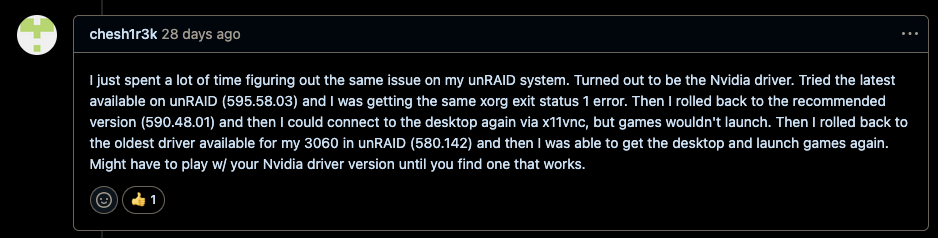
another unraid user was able to resolve the same bug by rolling back to 580.142, since he has a RTX 3060, so not dependent on open source kernel modules. 590.48.01 did only work partially... Any thougts on that? the linuxserver image, as expected, didn't work because of not supporting open source driver... – any "clean" option to manually downgrade to https://github.com/unraid/unraid-nvidia-driver/releases/download/6.12.54-Unraid/nvos-580.95.05-6.12.54-Unraid-1.txz ? https://github.com/Steam-Headless/docker-steam-headless/issues/224
 I didn't try the linuxserver.io image, since it doesn't have moonlight/sunshine support implemented, it's "only" web accessible... – Maybe I should try it nontheless. – Concerning the xorg test on the host itself: how would a window manager or a desktop session help without an initialized/initializable display? I thougt its roughly this: xorg starts, loads the driver, gpu/display/screen is initialized, x display is provided, then the window manager!? No? But the host xorg logs show that it's already failing at step 3, initializing the display, like in the steam-headless container. I just thought, that even a full blown desktop environment would fail also with high probability because of that? But I will try to run unraid in GUI mode and run the test again. Thank you for your efforts, I really appreciate your answers! from the logs: NVIDIA dlloader X Driver 595.58.03 NVIDIA GLX Module 595.58.03 NVIDIA GPU NVIDIA GeForce RTX 5060 Ti (GB206-A) at PCI:1:0:0 Option "UseDisplayDevice" "DFP-0" ... NVIDIA(GPU-0): Failed to acquire modesetting permission. NVIDIA(0): Failing initialization of X screen PS: yes, Plex for eg successfully uses the gpu for transcoding PPS: linuxserver.io: "Nvidia support only works on 580 and up full proprietary drivers (no MIT/GPL)" so not suitable for me at all (blackwell architecture, open source, you know that way better than me).No, I'm not running Unraid in GUI mode. I configured Xorg: Sadly the linuxserver.io image isn't a moonlight compatible replacement...Ok, sorry for the mess, I can remove the postings. But what about Xorg failing to initialize a screen on the host itself? Sadly, the linuxserver.io-image is not moonlight capable, "just" web-accessible. Furthermore: it only supports 580+ full proprietary drivers, which is not an option for my blackwell gpu...I redownloaded the driver twice during the last two days, but I didn't realize any checksum mismatch and I think that would have been somewaht obvious?I tried this one here: docker run --rm --runtime=nvidia --gpus all nvidia/cuda:13.2.0-base-ubuntu24.04 nvidia-smi Unable to find image 'nvidia/cuda:13.2.0-base-ubuntu24.04' locally 13.2.0-base-ubuntu24.04: Pulling from nvidia/cuda 01d7766a2e4a: Pull complete 52ab058d967b: Pull complete 33dea4171410: Pull complete 4f4fb700ef54: Pull complete 2761e0c7dc1e: Pull complete 314a2f652b6c: Pull complete Digest: sha256:36cccda4bebc3b0b1ebe1907ead8169cf144d45df890be871b36b304cf91145a Status: Downloaded newer image for nvidia/cuda:13.2.0-base-ubuntu24.04 ERROR: driverInitFileInfo 578 result=11ERROR: init 664 result=11ERROR: init 250 result=11Tue Apr 28 19:04:49 2026 +-----------------------------------------------------------------------------------------+ | NVIDIA-SMI 595.58.03 Driver Version: 595.58.03 CUDA Version: 13.2 | +-----------------------------------------+------------------------+----------------------+ | GPU Name Persistence-M | Bus-Id Disp.A | Volatile Uncorr. ECC | | Fan Temp Perf Pwr:Usage/Cap | Memory-Usage | GPU-Util Compute M. | | | | MIG M. | |=========================================+========================+======================| | 0 NVIDIA GeForce RTX 5060 Ti Off | 00000000:01:00.0 Off | N/A | | 0% 31C P8 6W / 180W | 5MiB / 16311MiB | 0% Default | | | | N/A | +-----------------------------------------+------------------------+----------------------+ +-----------------------------------------------------------------------------------------+ | Processes: | | GPU GI CI PID Type Process name GPU Memory | | ID ID Usage | |=========================================================================================| | No running processes found | +-----------------------------------------------------------------------------------------+result=11 fault = same as steam-headless... Any ideas about this?@Josh.5 please help me out of my current steam-headless crashloop, I tried with my semi knowledge and different ai, but it seams an unbreakable downward spiral. It worked very well for more than a year, without any config change on a server with a RTX 5060Ti 16GB. The only thing which changed, were the unraid builds and the nvidia driver plugin, latest 595.58.03. Which logs or cli prompt result may I provide to get to to the crux of the matter. Thank you so much in advance! Kind regards, Chris PS: it's mainly for my two sons, which really enjoyed a lot streamplay some games to the apple tv! They're so sad right now for me not being able to restart things successfully.got it re-"running"(i.e. crashlooping) aigain, no matter which nvidia variable I ex-/include, no differenceSorry, which two variables? --runtime nvidia and what?I already tried that, no differenceI also have no idea what exactly is causing these lines; it might be related to the steam-headless container, since it simulates a variety of input devices!? But that’s just my more or less clueless guess. – There must have been some change related to the latest driver, though, because the container was working perfectly fine just a week earlier without any changes to the configuration. – My sons use it to stream Steam games via Moonlight to the Apple TV and control them with a Nintendo Pro Controller—it’s actually pretty cool, better than some dedicated gaming consoles. But now, of course, they’re really sad because I can’t get it working again… My docker run command: docker run -d --name='steam-headless' --net='host' --pids-limit 2048 -e TZ="Europe/Berlin" -e HOST_OS="Unraid" -e HOST_HOSTNAME="Futro" -e HOST_CONTAINERNAME="steam-headless" -e 'USER_PASSWORD'='password' -e 'TZ'='Europe/Frankfurt' -e 'USER_LOCALES'='en_US.UTF-8 UTF-8' -e 'NVIDIA_PATCH_VERSION'='' -e 'WEB_UI_MODE'='vnc' -e 'NVIDIA_VISIBLE_DEVICES'='all' -e 'NVIDIA_DRIVER_CAPABILITIES'='all' -e 'DISPLAY'=':55' -e 'MODE'='primary' -e 'PORT_NOVNC_WEB'='8083' -e 'ENABLE_VNC_AUDIO'='false' -e 'ENABLE_EVDEV_INPUTS'='true' -e 'CA_TS_FALLBACK_DIR'='/home/default' -l net.unraid.docker.managed=dockerman -l net.unraid.docker.webui='http://[IP]:[PORT:8083]/' -l net.unraid.docker.icon='https://raw.githubusercontent.com/Josh5/docker-steam-headless/master/images/steam-icon.png' -v '/mnt/user/appdata/steam-headless':'/home/default':'rw' -v '/mnt/user/Games':'/mnt/games':'rw' --hostname='SteamHeadless' --add-host='SteamHeadless:127.0.0.1' --restart='unless-stopped' --shm-size='2G' --ipc='host' -v '/tmp/.X11-unix/':'/tmp/.X11-unix/':'rw' -v '/tmp/pulse/':'/tmp/pulse/':'rw' --ulimit='nofile=1024:524288' --device='/dev/fuse' --device='/dev/uinput' --device-cgroup-rule='c 13:* rmw' --cap-add='NET_ADMIN' --cap-add='SYS_ADMIN' --cap-add='SYS_NICE' --security-opt='seccomp=unconfined' --runtime='nvidia' 'josh5/steam-headless:latest' 205d87be9c5d0aeca4d6771154e9f9cf36023455fbd2e6ccefd16f4ed94d4481


