___niko___
Members
-
Joined
-
Last visited
-
Yes I did and it's working again thank you @Masterwishx 🫱🫲
-
That's a good question and I can't remember..didn't pay attention to it and after upgrading to a new version of UNRAID and the Mover Tuning Plugin, I was just notified that that schedule had now moved to the tuner plugin so don't remember how it was set up before 😄
-
My server will boot again tomorrow so I can check then to be sure. UNRAID: 7.2.3 The plugin: the latest version that was available last week on April 5 The unraid move schedule was disabled and don't know for certain but unsure if I ever had the forced mover plugin enabled (will check) Nothing else was changed except for upgrading the Mover Tuner plugin.. The cron was created by using crontab guru but maybe I missed something in the documentation on how to set the proper cron values. I'll try setting it to 0 instead of SUN: 00 13 * * 0
-
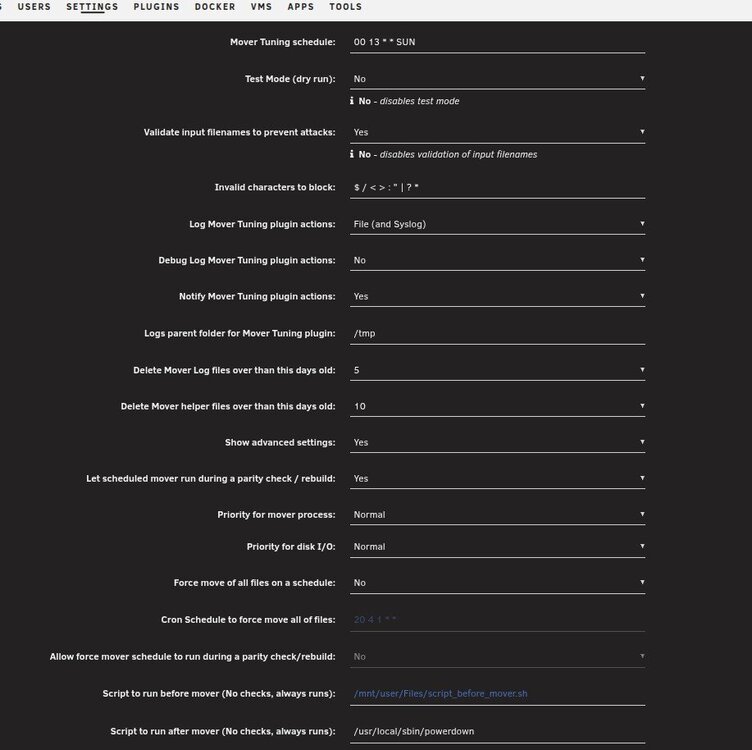
I'm facing the same issue as @Triplerinse my perfectly working schedule once a week on Sunday at 13:00 doesn't run anymore. (I only boot my unraid server once a week to act as a backup target). The syslog of my unraid server showed this: Apr 5 11:47:01 backupserver crond[1900]: failed parsing crontab for user root: SUN /usr/local/emhttp/plugins/ca.mover.tuning/mover start |& logger -t move Apr 5 12:25:01 backupserver crond[1900]: failed parsing crontab for user root: SUN /usr/local/emhttp/plugins/ca.mover.tuning/mover start |& logger -t move Apr 5 13:00:11 backupserver crond[1900]: failed parsing crontab for user root: SUN /usr/local/emhttp/plugins/ca.mover.tuning/mover start |& logger -t move This is how I configured the mover schedule.. Any hints on what I did wrong?
-
thank you, will check this out over the next weekend when my backup server automatically boots up to receive backups, thanks for the quick reply @Masterwishx ! 🤝
-
When using UNRAID 6.x with the mover plugin it was possible to do pre & post scripts. I used that function after moving all my new data that was stored on the cache drive to the array and then as the post script run the command: /usr/local/sbin/powerdown to powerdown the server gracefully. With version 7 and the new version of the plugin I can't find that field anymore, did it move someplace else or any workarounds ? (I don't know if it was a UNRAID or a mover tuning feature 🤔 )
-
___niko___ changed their profile photo
-
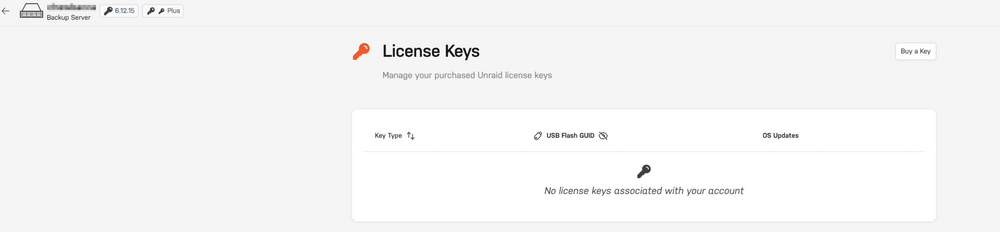
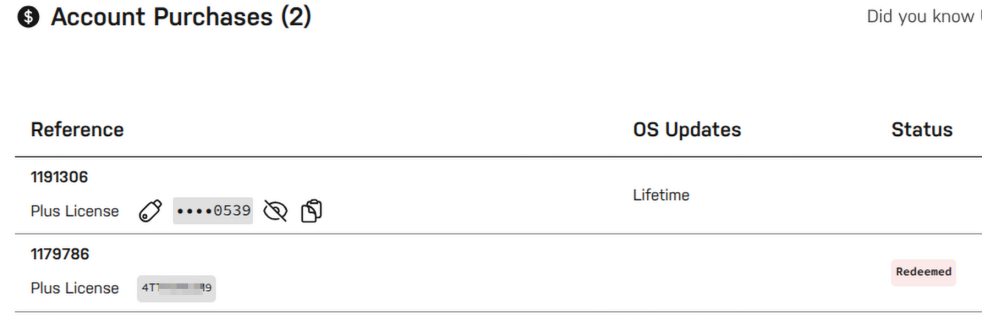
I'm trying to get my license linked to my unraid account in case my usb drive will die one day. (docs) According to the docs I should be getting a: Unlinked License Key Detected message, but this is sadly not the case. (ublock not active on this site) (I'm seeing a similar case here but no real answer as far as my German goes. Anyone that can point out what I'm doing wrong? Running Unraid 6.12.15
-
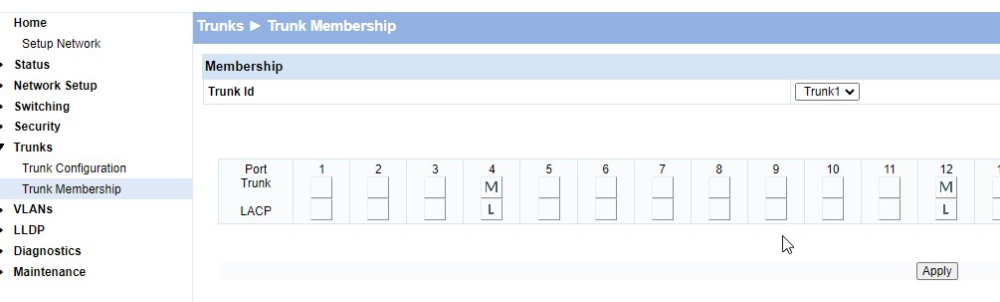
Thank you for this awesome guide! I ended up here even though I have an older HP 1810 Procurve switch. I first tried without any switch configuration and Mode 0 (balance-rr) in UNRAID but my write-speed in Windows would drop from 112MB/s to about 33MB/s. I have 2 nics in my box so wanted to give UNRAID some more speed lanes in case multiple clients write at the same time to my cache-ssd There is probably no need for a complete guide but for unraid and an older HP switch with LACP you need to configure it like so: The trick is to modify and disable the Static Capability setting, then go to Trunk Membership and you should be able to select LACP for the ports you want: The rest of the guide for the UNRAID side is the same as written in the startpost. After my LACP came up, I was unable to connect to the webgui. (ssh worked fine) 2 tips that helped: 1) I set BIND_MGT="yes" in /boot/config/ident.cfg 2) I disabled USE_SSL="no" in /boot/config/ident.cfg /etc/rc.d/rc.nginx restart After that I was able to connect to the webgui using the UNRAID ip. Then I changed Local TLD from local to my domain (local.domain.tld) after that the webgui was accessible again. (no idea why this happend)

-
Brilliant post much appreciated @Frank1940! I'm going to use unraid sharing when I configure a share for my proxmox VM backup. For the truenas -> unraid rsync tasks, unraid is just being used as an target for different truenas servers, would have been nice if all permissions would replicate back and forth but it seems to be a PITA. No matter, I know which permissions go where in case of emergency having the data + timestamps (for family-photos as example) is most important)
-
confusing for sure 😀 (not using AD, trying to rid my world of as much Windows as possible) Other (older) tutorials used to mention setting permissions from Windows and don't mess it from bsd/linux. (NappIT for example) Before using rsync and unraid I've been moving data around using ZFS snapshots between TrueNAS instances and then things work flawlessly. The permissions are a pain but not enough to stop me from using rsync. Thank you for your quick reply! 🙇♂️ @Frank1940
-
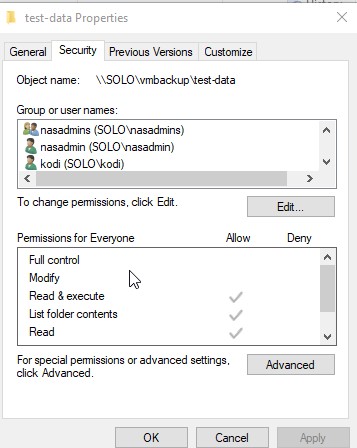
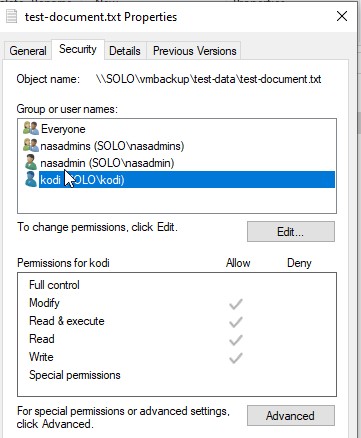
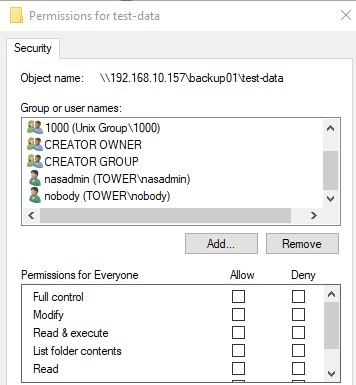
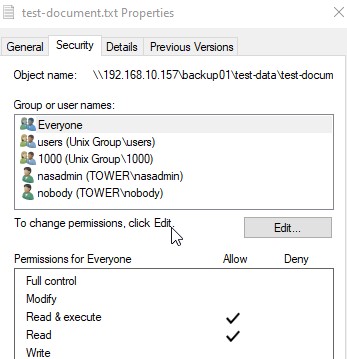
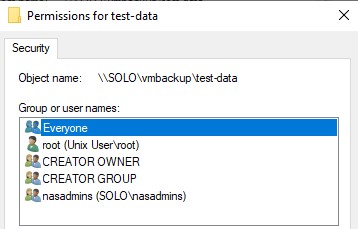
Was wondering @Frank1940 what your experience has been with permissions? My experience so far with copying data from TrueNAS Scale to unraid is that no matter what options I give it when copying data from truenas scale -> unraid, once I rsync the data back, the permissions get stripped away. Been doing some rsync tests to sync between truenas scale and unraid (which is my backup server) So on truenas I created folder with a test file with these permissions (The kodi user I added through Windows explorer): On unraid I created the same users as truenas with the same UID rsyncing from unraid using the unraid smb mount to the truenas server does not replicate any of the permissions.(using /usr/remotes) When replicating it from truenas to unraid using ssh with this command: rsync -avh /mnt/pool02/ds02/vmbackup/test-data root@unraid:/mnt/user/backup01/ The directory security on the unraid target looks like this after rsync sends it to unraid: Then proceeded to deleting the folder at the Truenas source after which I tried to replicate it back from UNRAID: Tried several variants like this one but it does not work: (when logged into the truenas server) rsync -a [email protected]:/mnt/user/backup01/test-document.txt /mnt/pool02/ds02/vmbackup/ rsync: [receiver] mkstemp "/mnt/pool02/ds02/vmbackup/.test-document.txt.SHIxK3" failed: Operation not permitted (1) rsync error: some files/attrs were not transferred (see previous errors) (code 23) at main.c(1865) [generator=3.2.7] rsync --partial --stats --progress –A –rltgov --no-perms [email protected]:/mnt/user/backup01/test-document.txt /mnt/pool02/ds02/vmbackup/ Unexpected remote arg: [email protected]:/mnt/user/backup01/test-document.txt rsync error: syntax or usage error (code 1) at main.c(1512) [sender=3.2.7] After many attempts this commands copies the data back from unraid(when logged into unraid) to truenas but the permissions are stripped: rsync –a -r –v -t /mnt/user/backup01/test-data root@truenas:/mnt/pool02/ds02/vmbackup I've almost given up on getting the permissions right when copying data from truenas <--> unraid and back Any success stories on how to do this properly are most welcome!
-
Thanks @itimpi as I showed in the picture, the data on the unraid server to be used IS the backup data already. The most important stuff is also replicated to an offsite NAS using RCLONE.
-
Talked to @Pri on Discord and got these answers: Question 1: use XFS for disks in the unRAID array, it's tried and true, reliable. Question 2: Don't set your shares for files to use the cache drive until after you've migrated all your data, it will be a lot faster and stop your cache from hitting 100% capacity before Mover is invoked. Also SSD's have a finite amount of write cycles so it's a good idea to leave them out of the initial onloading of your data from your previous system for longevity too. Thank you @Pri
-
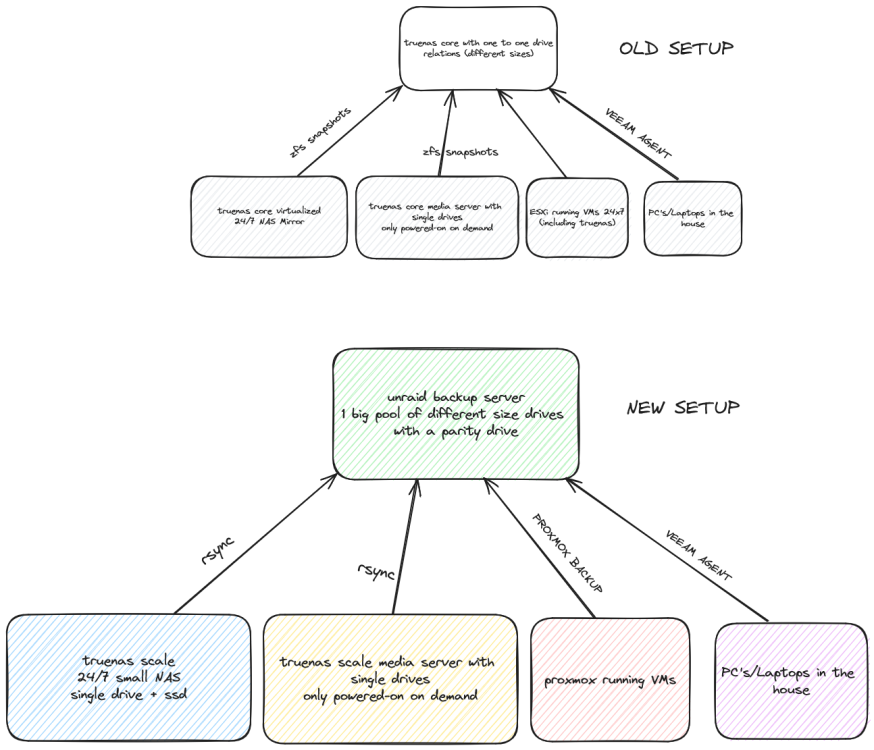
The Plan Attached a picture of the old and new setup The Rationale I'm about to embark on my first unraid project. Drives and electricity cost at lot of money over here in the EU, so I decided to give my several machines that I already have a different purpose to optimize usage and cut back on power-costs. Although I like ZFS and snapshots combined with TrueNAS, it's not as flexible as unraid with the mixed size drives. Overall plan is to have my unraid machine do its thing once a week and then turn it off at the end of the day. The Questions I have plenty of experience with TrueNAS and watched a lot of spaceinvader's videos but before I begin on my unraid journey, really need help with 2 decisions. 1) filesystem: XFS/ZFS. Unraid now seems to be firmly aboard the ZFS train but for my usecase I don't think ZFS has much extra use. Snapshots also take up space and for bitrot I have the parity drive(sort off). Have mostly movies and family pictures which are already compressed so not missing out a lot there either. I'll lose the snapshots but I've read that rsync can copy over all files retaining dates/permissions etc so not hung up on that. So my take would be using XFS, if I've missed any compelling reason not to use XFS please let me know. My plan is to start with 2 drives then putting some selected data drives in the unraid server to locally copy the data onto the array. Once finished, wipe the data drive and then make it part of the array expanding the capacity to where it can hold all the data from the different sources. After the copying is done, add the parity drive. 2) Should I use a cache SSD during this first period of just copying data onto the array or better to wait once everything is in place and THEN add a cache drive to cache new writes before committing them to the array? Thanks for reading!