





sarsmark
Members
-
Joined
-
Last visited
-
哪有离线包解决这个问题?
-
-
-
Docker VERSION show “not available” In 6.12.13, you can use the following command to manually refresh the VERSION status of Docker, but 6.12.14 doesn't seem to work. /usr/local/emhttp/plugins/dynamix.docker.manager/scripts/dockerupdate
-
docker更新显示都不可用 现象就是这贴: 6.12.13时候用下面这个命令可以手动刷新Docker的更新状态,但是6.12.14好像也不行了。 /usr/local/emhttp/plugins/dynamix.docker.manager/scripts/dockerupdate
-
之前一直好好的,为何突然出现这个问题呢?快一个月都这样了。
-
这是作者的答复: Before you waste your time on this please note that any "fixes" are unlikely to be merged. I dont consider it to be an issue with this plugin. The problem is the same for any containers on the system created by means other than Dockerman (cli, portainer, composeman, etc.) thus the fix should be in Dockerman. Update tracking is not a feature of the compose manager plugin, and is in many cases irrelevant as locally built containers are a more common use case with compose.
-
How should this script be used? Can you talk about it in detail? Thank you.
-
thanks a lot。The next step is to solve the issue of prompt "apply update".
-
Does the Docker Compose MANAGER have a GitHub address? The download of downloads in the application market is always wrong.
-
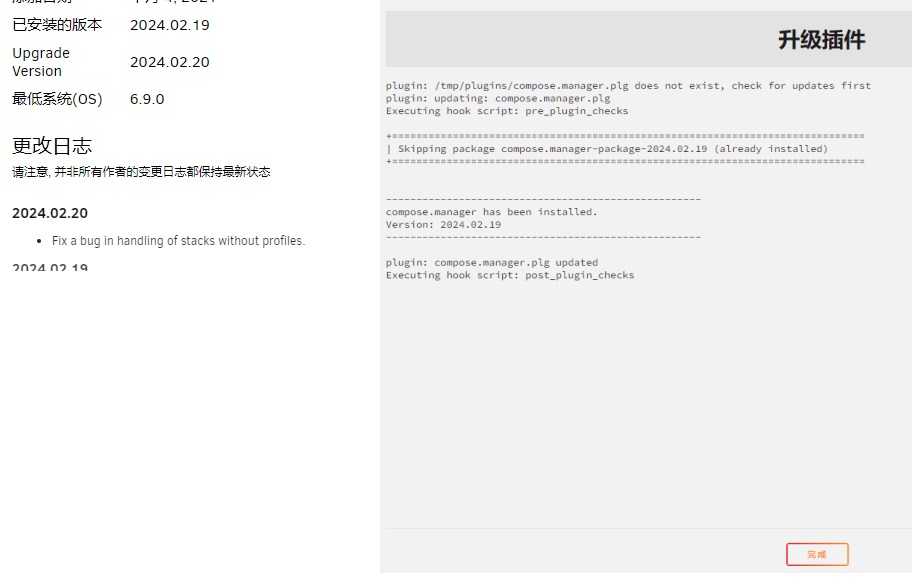
Cannot upgrade to the latest version ,The latest version is already 2024.2.20, but I can only upgrade to 2024.2.19。
-
感谢解答,不知道何时作者能够将这个问题解决。
-
如图,一直提示有更新,我点击update stack之后,也提示有更新,重启docker也是一样 难道docker-compose的更新有什么要求?

-
-
依然不行啊。。。。 plugin: updating: NerdTools.plg Executing hook script: pre_plugin_checks plugin: XML file doesn't exist or xml parse error Executing hook script: post_plugin_checks

