





bromerico975
Members
-
Joined
-
Last visited
Everything posted by bromerico975
-
Hi, try this: echo 1 | sudo tee /sys/bus/pci/drivers/r8169/0000:02:00.0/link/l1_2_aspm This activates ASPM for the Realtec NIC.
-
Hi, with this command, you can activate ASPM for the Realtek NIC: echo 1 | sudo tee /sys/bus/pci/drivers/r8169/0000:03:00.0/link/l1_2_aspm "0000:03:00.0" is the address for the Realtek RLT8111H from lspci command.
-
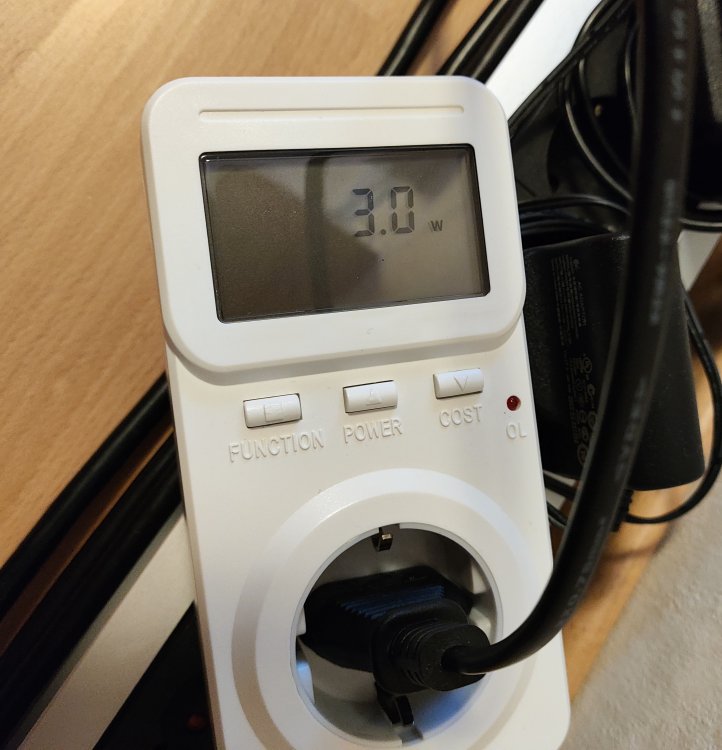
It's up to unraid. With TrueNAS SCALE I reach 3 watts.
-
Hello, I have a similar system as you: - ASUS Pro H610T D4-CSM - Intel i3 12100 boxed - 1x 16GB Crucial DDR4 3200MHz - Leicke ULL NT03015 12V 120W - Transcend 16GB JF V10 (no HHD for testing) - Unraid 6.12.6 But the lowest wattage I can reach is 4.7 watts (only with LAN cable and USB stick). The fan only consumes 0.1 watts. @bagican How can you reach 3.1 watts? Is your Akasa power supply so much better? Have you compared the power consumption from Debian 12 with Unraid? Thanks in advance!
-
Hi, I have almost the same system as you: - ASUS Pro H610T D4-CSM - Intel i3 12100 boxed - 1x 16GB Crucial DDR4 3200MHz - Leicke ULL NT03015 12V 120W - Transcend 16GB JF V10 (no HHD for testing) - Unraid 6.12.6 I found the solution to enable ASPM for the Realtek RTL8111H (it works for me): echo 1 | sudo tee /sys/bus/pci/drivers/r8169/0000\:02\:00.0/link/l1_2_aspm "0000\:02\:00.0" is the adress for the Realtek RLT8111H from lspci (0000:02:00.0). But the lowest wattage I can reach is 4,7 watts with unplugged HDMI cable and unplugged keyboard. @bagican How can you reach 3 watts? Is your Akasa power supply so much better?


