poshmick907ak
Members
-
Joined
-
Last visited
Everything posted by poshmick907ak
-
Got it, thanks for that update. If you do decide to roll it into your plugin that'd be amazing. I'll plan to do the manual install in the interim, it'd just be so much cleaner if this functionality was available available through a maintained plugin.
-
Thank you, I did see that and the steps make sense. I've just never installed a package manually in Unraid like that before and wanted to find out if there are any stability or security risks I should know about first. If this is legitimate (seems to obviously be based on this thread), why isn't Etherwake just available as a plugin through the Unraid app store? Is there some standard it doesn't meet or compatibility problems with current Unraid releases?
-
Can this plugin be used to send a WOL packet to another physical PC on the network? I've installed it and am trying to use it via the CLI (will eventually build a scheduled script using the UserScripts plugin) to wake up another Unraid server of mine. If this is possible, can someone give me an example of the CLI syntax to use?
-
Hmm... not seeing any plugin by that name in the app store. Found another thread on it and it seems like it may be included as part of Unraid? If so, any syntax example on how to send a WOL packet from the Unraid CLI using it. I'm not finding any examples posted.
-
I have a backup Unraid server I've been manually turning on periodically when I want to run a manual "backup" by syncing my files over. This isn't really a true backup solution, so I'm working on reconfiguring my backup method to be a true versioned backup based on Duplicacy that can run on a schedule. My end goal is to have a scheduled script using the UserScripts plugin which will send a WOL packet to my backup Unraid server to wake it up, run a Duplicacy backup job, then SSH into the backup Unraid server and execute a shutdown once done. Right now I'm just working out the remote wake-up portion and need help sending a WOL packet to the other server from the main Unraid server's CLI. How can I do this? I have configured WOL on my backup server and verified it works by sending WOL packets from my Windows PC using simple WOL utility to test WOL is working on the backup Unraid server. I just can't figure out how I can do this from CLI on the main Unraid server so that I can then incorporate those commands into a User Script.
-
After a little quick reading on Screen, it looks like tmux is an alternative built into Unraid. I'm a dweeb when it comes to Linux CLI, so it took a brief read to learn it, but tmux did exactly what I needed to with managing CLI sessions. Thanks for the help!
-
Hmm, I opened Unraid in my browser and then clicked the terminal button to launch a new terminal window. When I enter 'screen', I get 'command not found'. I also tried, 'screen nwipe', but that didn't do anything either. Anything I'm missing here?
-
This might be a stupid question, but how do I access an existing nwipe session if the terminal window gets closed out? I remotely connected into my server from my laptop and started an nwipe session through the Unraid terminal, but it's projected to take a week or so. I closed the window after letting it run a bit, but when I typed nwipe in the terminal later trying to pull it back up to see where it's at, it brought be back to the initial wipe wizard. Does closing the UI out after launching a wipe cancel the wipe and if not, how do I view wipe operations in progress if I open a terminal from a later or separate browser session?
-
It's working now.... very weird, I don't know what changed, but thank you for the help!
-
Actually, I was able to figure out how to get to that directory, but there was no unblanced.hist file there to move or rename.

-
I can confirm on reinstalling Unbalanced, I see the below entry in its log before I even make a fresh attempt to clear a drive, so the history file seems to be persistent between uninstall/reinstalls: I tried running the command you suggested from the Unraid terminal to clear the old file out of use by renaming it, but the command didn't work. Forgive my ignorance, do plugins in Unraid have their own terminal that is separate from Unraid so they operate somewhat in a sandbox environment or do I need to cd to another directory to run the command? I tried running both "dir" and ls" from the terminal, but don't see any directories listed. Linux isn't my strong suit, so thanks for the patience and help with this one


-
I was able to find errors in both. Here's what I found:
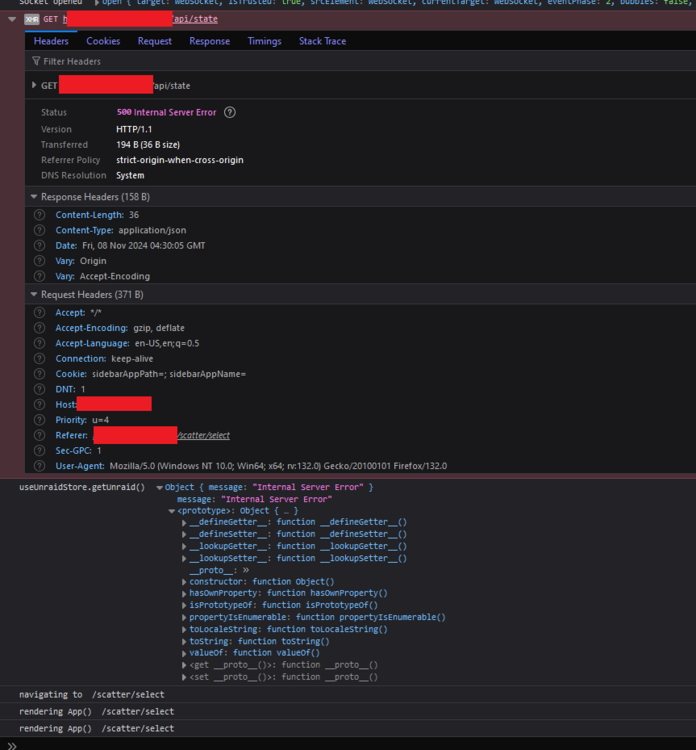
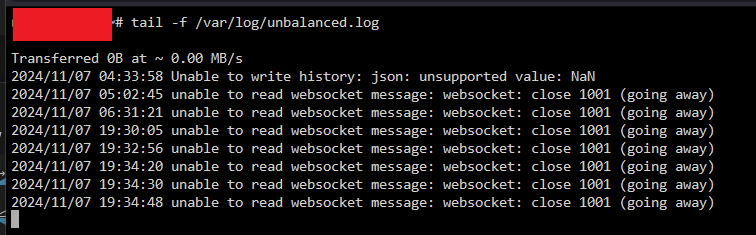
-
I know that's why I'm really trying to avoid that and would prefer to just move the data off, but Unbalanced isn't working.
-
Any ideas as to why Unbalanced is doing what it's doing? If I can't get it to move the data off the drives so I can update the file system one drive at a time, I don't know what to do other than to trash the array then rebuild it with the file system I want before restoring all the data from my backup server.
-
Yes, I have one parity drive active. I could try removing it before shuffling data then re-add it after the data shuffle is done and let it rebuild. Would that help?
-
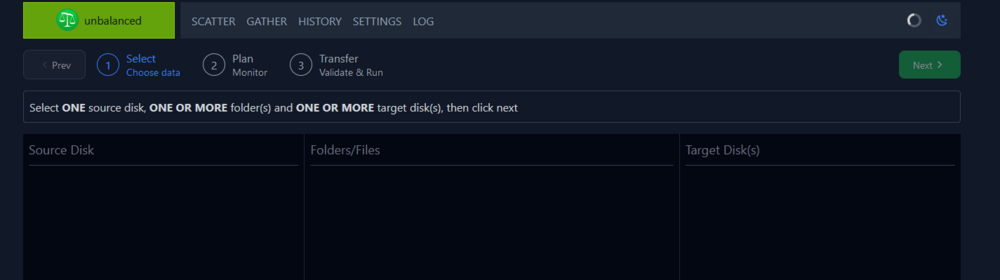
Hi, I'm trying to use Unbalanced to empty a drive before dropping it from the array to change the file system on it then add it back in. I've installed unbalanced and been able to this for a handful of drives, but it stopped working. Now when I go to access the unbalanced UI, I can pick my source disk, folders to move, destination drive, and target disks. When I then select move (dry run deselected), all the content in the columns disappeared and I have a spinning wheel up top. It's been doing that so long I can't tell if it's broken or stalled or what's up. The logs page is inaccessible and I don't see the read/write counters on my drives changing, so I don't think it's doing anything. I tried uninstalling/reinstalling it, but it made no difference. Any suggestions?
-
I'm having this same issue and tried posting in this thread, but couldn't, so figured I'd post in a separate bug report thread since I don't see one posted for this issue: I upgraded to 6.12.8 and the Web UI became almost unusable with how slow it was. After finding the above thread, I was able to confirm I was in the same boat with special characters in both the Description and Model fields for my server. After emptying those fields out, the Web UI became snappy and operated normally again. The special characters used included: ' - û Just to clarify, I am NOT running the Connect plugin. The creator of the original thread referenced above had theorized the Connect plugin was behind this, but like him, I was able to confirm it was simply the presence of special chracters in these fields.
-
Ok, so making some progress on this, I read you should be able to override the DNS for a container by specifying "--dns X.X.X.X" as an extra parameter passing your DNS IP as part of the container setup, but couldn't see where to enter parameters. Turns out I just had to enable Advance View. Anyway, I tried entering "--dns X.X.X.X" to specify the IP of my DNS server in extra parameters field, but the container still shows 127.0.0.11 as the DNS server on boot. Am I doing that right? I did test this with a second container and saw the same behavior.
-
I've configured custom bridge interfaces in my Docker settings that correspond to my local VLANs I want my Docker containers to live on. When installing a new container, selecting one these VLAN-specific custom bridge interfaces requires me to set a static IP for the container (using IPVlan). All the containers I've setup install just fine this way and have full network functionality on their designated VLANs as intended. The only thing I can't figure out is how to set the DNS server configuration for my Docker containers. I have a local AdGuard-Home instance running as a Docker container on this Unraid server I'd like to be the primary DNS server for all other Docker containers as well as everything else on my network. The only exception being the Unraid server itself, I set that to use 9.9.9.9 since it will be booting prior to the AdGuard Docker container. Since I set Unraid to use 9.9.9.9 as it's DNS, is it passing this through to Docker behind the scenes and then all installed Docker containers use 9.9.9.9 as a result? When I do a "cat /etc/resolv.conf" command through the terminal for one of my local containers (tested on the linuxserver build of Radarr in this example), it returns that the container is using 127.0.0.11 for it's DNS server. Where can I override this to use my AdGuard IP? I couldn't find anything under Docker settings and none of the additional parameters I tried passing to the container during setup honored the IP (I read you should be able to specify this using a parameter of "DNS" in the container setup, but it didn't work).
-
Thanks @trurl, that confirms my assumption. Looks like I'm stuck at the slower transfer rate for the time being unless I reconfigure the structure of my array (not really wanting to do right now). I'll just have to be patient then
-
New user to Unraid with LOTS of data to move from my workstation to an Unraid server soon. I'm almost done reconfiguring them so both server and workstation are connected via 10Gb network. My understanding is that when I copy a directory with lots of content over SMB to the Unraid server using robocopy or even just Windows Explorer, that process is going to move files sequentially. On the receiving end, Unraid will write those files sequentially as it receives them to the appropriate drive as determined by the high-water setting. Unlike a RAID 5 array that would split the incoming stream out among drives, Unraid will only ever write this incoming stream of content to one drive at a time, thus making the drive write speed, not my NIC speed the bottleneck, correct? If I run parallel copy processes on my workstation moving broken up different portions of my data to the Unraid server at the same time, would Unraid potentially handle each incoming stream of content independently in a way that would allow writing to multiple disks simultaneously rather than one at a time and thus allowing me to take better advantage of my 10Gb connection?
-
So reading a little more into this, I think I have clarity on Macvan vs IPvlan the difference being each host gets a unique virtualized MAC vs having to share with IPvlan. I think the only consequence of IPVlan would be I couldn't have hosts get IPs via DHCP and maybe some layer 2 discovery protocols might be borked, but neither should be an issue in my use case, so I think I'll make the plunge and just switch to IPVlan.
-
So I'm new to Unraid and am trying to setup my server so that the single network interface is a trunk. I have configured my NIC in Unraid settings so Unraid's management is working fine on the default native VLAN. I've also defined the additional VLANs that will be used for my Docker containers. In Docker settings I enabled Macvlan (don't really know the difference with IPVlan, but went with Macvlan since I used that to expose my Dockers on my Synology to the local network) and then defined the custom network interfaces for each VLAN I had defined in Unraid network settings. When setting up my docker containers that needed to live on special VLANs, I was able to assign them to the VLAN-specific custom Docker interfaces for those VLANs and they worked great on those networks as I intended.... until they didn't I've had my server lock up and become non-responsive twice now (Unraid management nor any of the Docker containers responding to pings). I noticed that the FixCommonProblems plugin flagged me for "Macvlan and Bridging found". Looking online, I've found some references to problems with Macvlan and possible system stability. What's the proper way to fully extend my network to Docker containers? I'd like to have them operate like they were directly on my network and receive their own individual IP addresses and not just be bridged behind the Unraid IP using different ports (some of them won't even be on the same VLAN as the Unraid management NIC). Do I need to add a second NIC to the server so one is for un-tagged native VLAN traffic just for the Unraid management IP and then dedicate a separate NIC for use with Docker that supports trunking for the various VLANs used by the containers?