





Olivilo
Members
-
Joined
-
Last visited
-
I got same and thought i am stupid if you find a solution share :)
-
Hallo Alle schöne Feiertage. Ich hab einen Desktop zu nem Docker Unraid verwandelt auf dem auch 2 VMs ihre Arbeit tun ddoch würde ich mri wünschen wenigstens eine an einen Realen Monitorausgang zu senden. Ich suchte daher vom Hersteller Das rom Iso Bios File weil ich dachte dashalb fehlt es... also ab zu amd : Dort sagt mir. diese Siete es bigt nur win10 und Win11 Treiben : https://www.amd.com/en/support/downloads/drivers.html/processors/ryzen/ryzen-7000-series/amd-ryzen-7-7840hs.html#amd_support_product_spec Und hier fand ich auch Linux treiber: https://www.amd.com/en/support/download/linux-drivers.html für Red Hat und Suse und ubuntu, doch ich glaube da Unraid ja auch Slackware läuft hilft mir das nicht weiter oder gibst da nur ne lösung für die ich biher in der Suchfunktion im Forum nicht fand? Danke fürs Lesen :) schönen Tag euch.
-
i am reinstalling with a smaller docker new vDis... thx if i remember well ths old files are still in this old container or did unraiud also delet all stuff nwo that i made a new one ? as a thx for your help i made soem bannes feel free to use: https://forums.unraid.net/topic/40389-share-your-banners/page/16/#findComment-1557516
-
Here are Some Free banner for everybody, as a little THX from my side for this nice cdomunity and the foum Dwarfs helping no matter how noobish some questions are. Thx for your SUPPORT EVERYONE btw in the PNG should be the Comfi UI def still if you want make more in this style use following safetensors: 'RevAnimated" (stark in künstlerischen, linienbetonten Stilen) "DreamShaper XL" (gut für mystische/fantastische Szenen) "RPG" (für comicartige Details) "JuggernautXL" (falls du mehr Sci-Fi-Tiefe willst)


















































-
comandline cp to the array or just kill some dockers in the chache docker VM and change its size below cache size of the ssd ? ?
-
would i fix thsi to connect a secoind cache dirve to the array ?
-
i have a feeling that i have a differnet problem look poictures... my docker is bigger than my actual cache drive...
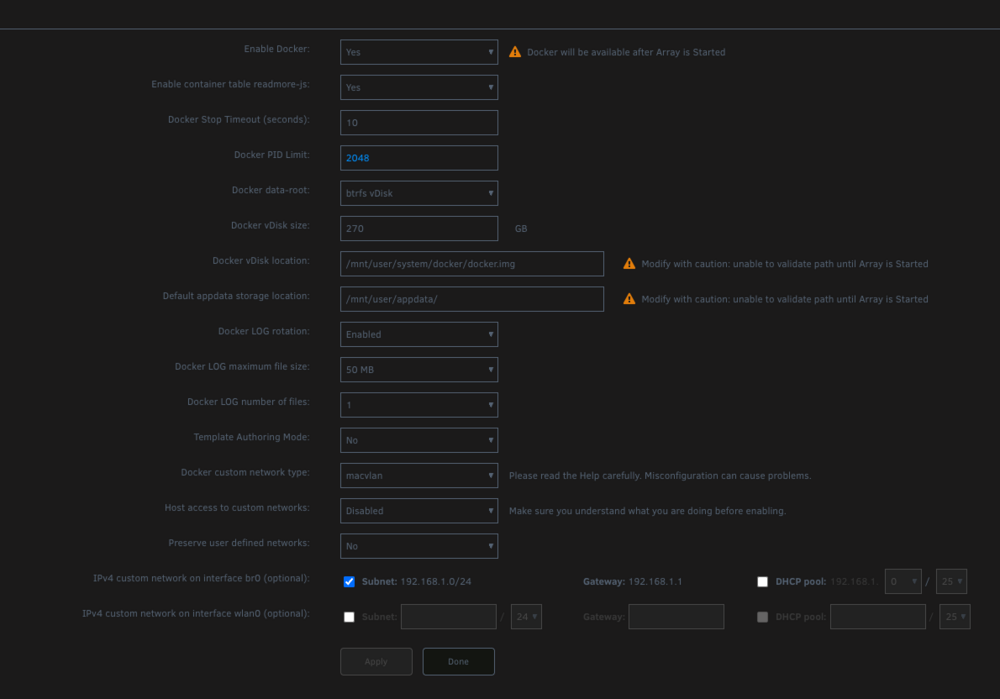
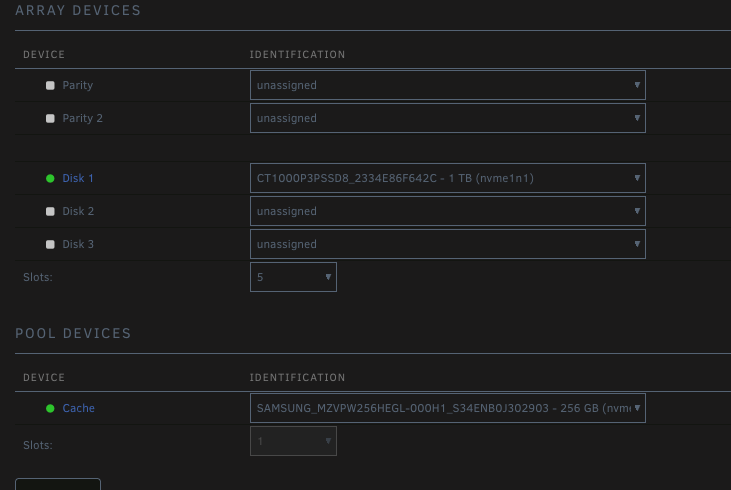
-
failed to start after reboot of system also all my VMs does not appear anymore, and i dont know what changed since yesterday can anybody gibe me a hint greenberret-diagnostics-20250528-1030.zip
-
Thx this solved it for me : Manual make a directory (liteconfigdir) make yamle fith name config.yaml not another name... didnt work at my Unraid make a new Variable Field and give it the $LITELLM_DATABASE_PASSWORD and your real PW so use it yaml file:
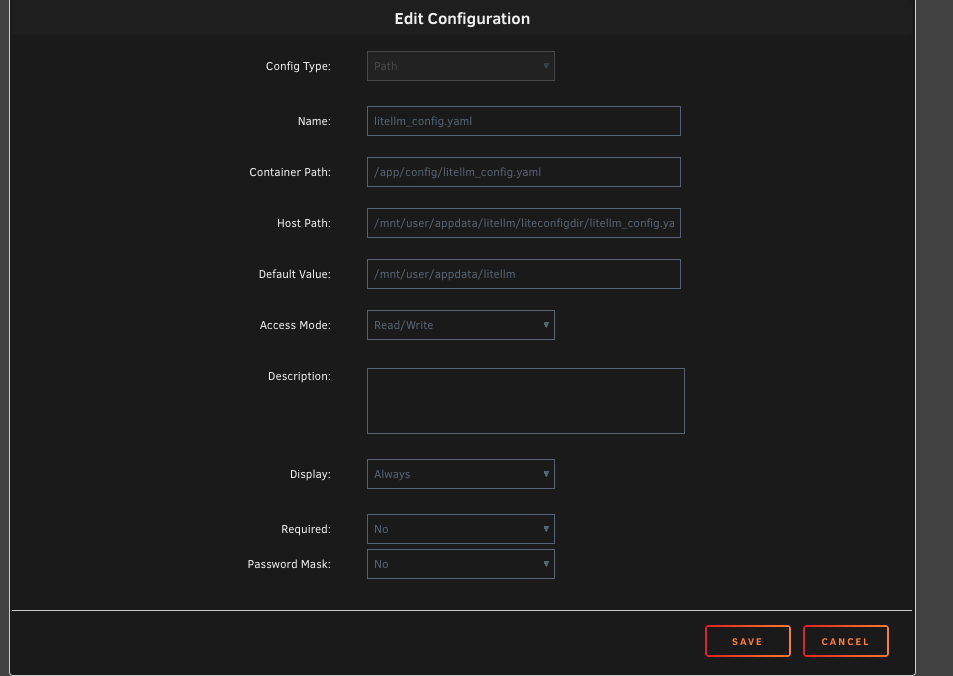
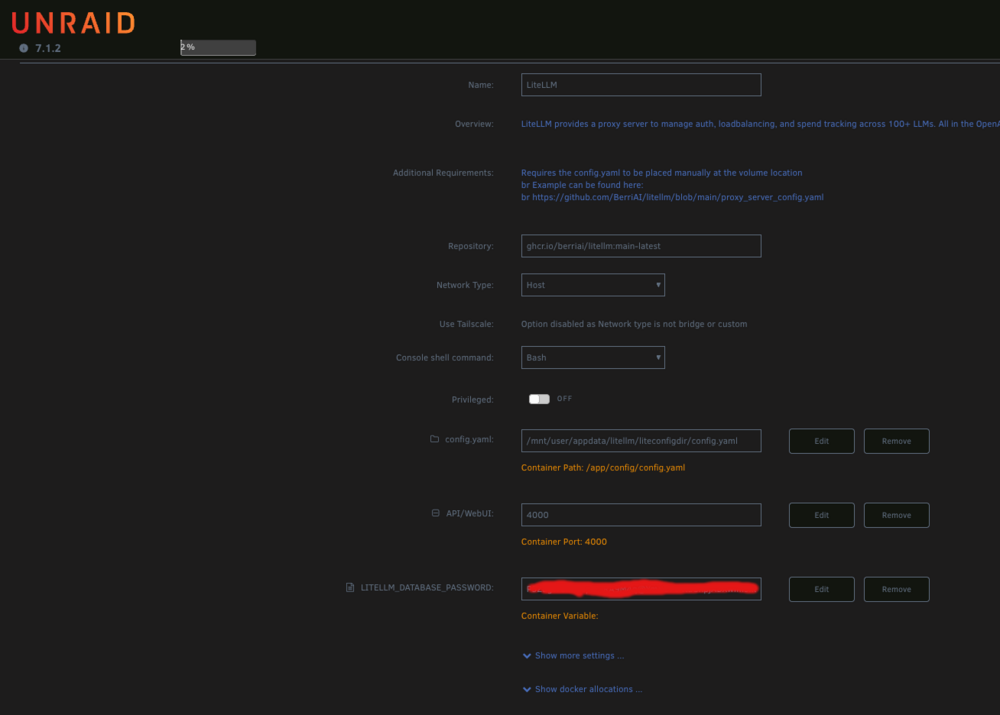
-
ok ich hab ueber tailscale sll vernbindung aufgebaut und konnte sehen das tailscale mit dem Ngix sich gebissen hat also direkter root ssl von meinem, dectop terminal tailscale runtergefahren und siehe da der unraid faehrt das webgui hoch nun nicht mehr auf dem port 2449 sondern 80 und ich sehe folgendes : Da in diesem Frontend weder mein Root mit pw akzepiret wird alsuach mein main user vom Host sich nicht anmelden kann und die SSL verbindung mit root@IP komplett geblockt wird hab ich nu kaum noch optionen Ich habe gelesen man kann einen USB stick neu aufsetzen die config Daten copierren und hoffen das er richtig hochfaehrt... oder sollte ich auf diesem stick versuchen durch zugriff am descvtop direkt die PW datein zu loeschen udn sommit eine neuinstallation zu starten was den root angeht? Werden evtl die kkonfiguirationen meiner shares und Docker noch funktiuonieren udn woanders gespeichert sein auch wenn ich so nu root aendere oder geb ich nur zeit fuer unnuetze versuche aus? Und nein ich hab kein Backup und in dem Unraid Connect gibst auch kein Backup mehr hab es wohl ausgeschaltet udn nu gibts da auch nix zum runterladen...
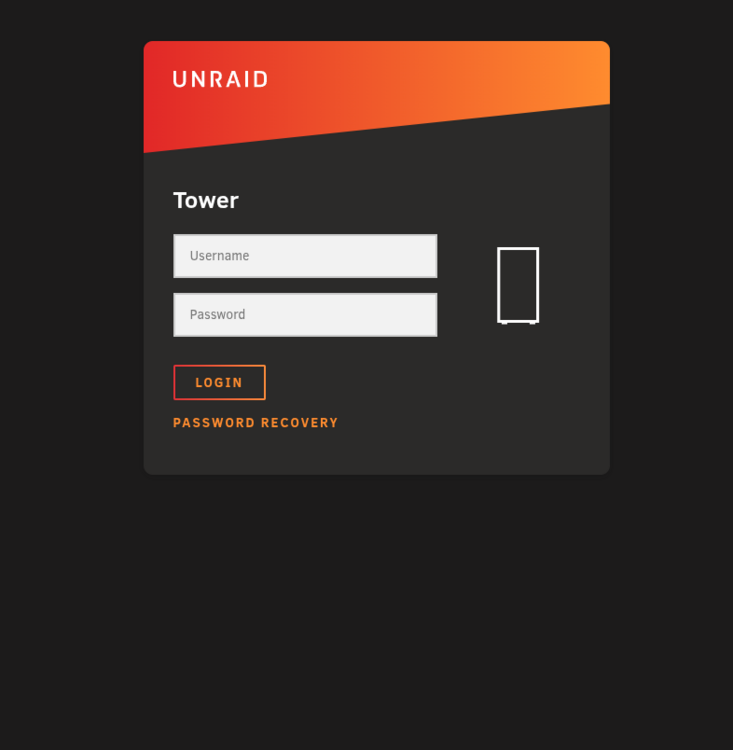
-
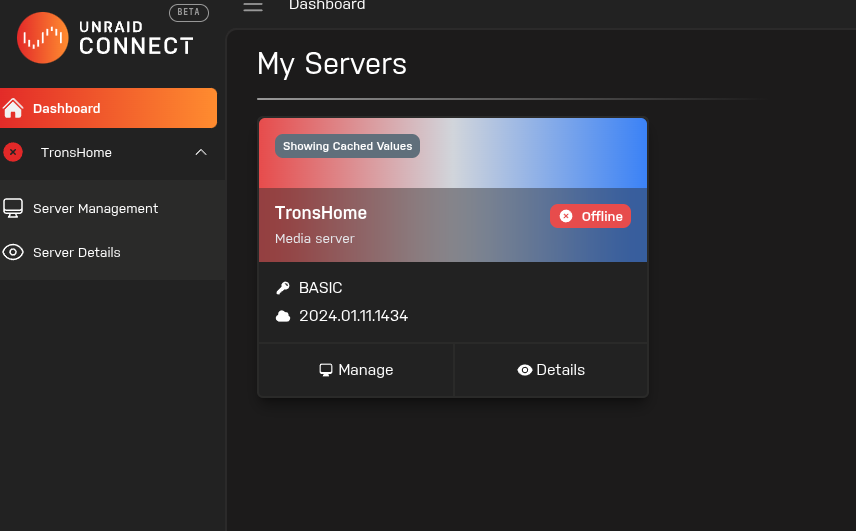
Ich schau mal ob ich irgendwo hier bei connect ein key backup noch habe eigenartiger weise wird mir hier nur ein Basic schluessel lizens angezeigt obwohl ich zwei unraid basic schluessel am laufen habe. Der hier angezeigte ist das sorgenkind
-
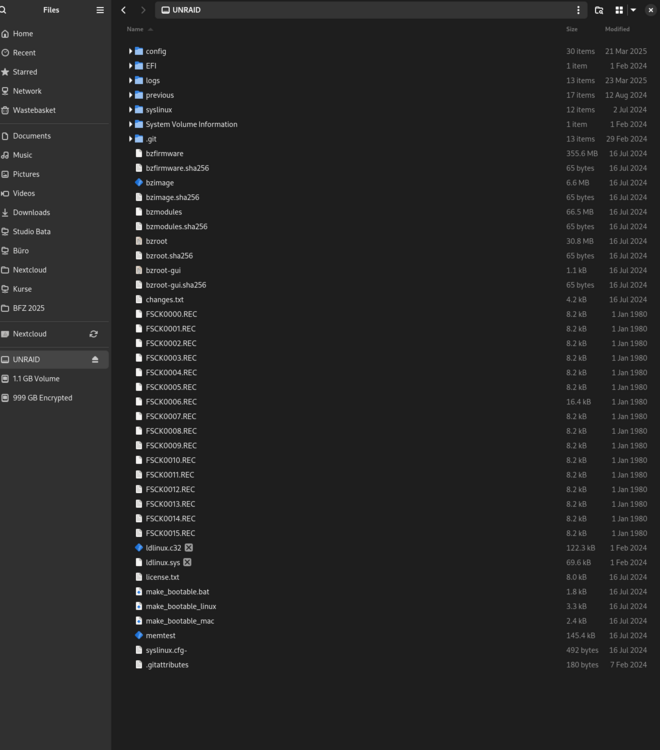
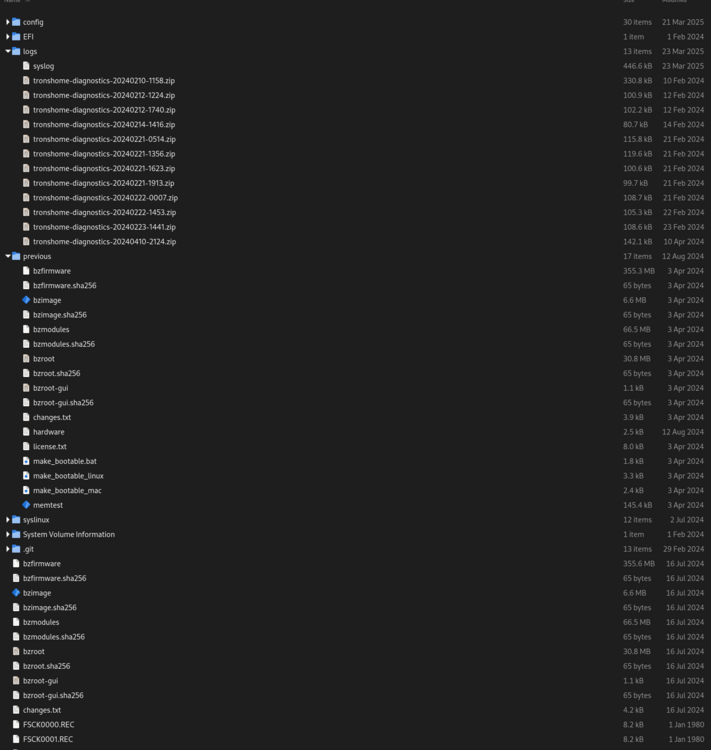
Ich kann auf den USB stick zugreiffen und weis nicht so genau wo ich jetzt nach alten configs suche auf dem USB und wo die dann rein muessen hier ein Bild: Welche Dateiens suche ich ?
-
Ihr seid die besten schon habe ich Mut bekommen mich naechste woche an mein Problem zu setzen und wenn es dann wieder lauft werde ich dieses Tool aufjedenfall nutzen. Wenn ich euch richtig verstanden habe soll ich den Unraid so wie er ist erstmal an einem anderen rechner anschliessen und alle Ordner auf die ich zugriff habe naeher anschauen und evtl bestimmte einstellungen confings vom alten system das Tron hiess und nu Tower gennant wird sichern, dann einen neuen Unraid stick aufsetzen diese Inhalte da rein copieren den in den rechner stecken davon Booten und hoffen das wenn die platten eingebunden sind er alles wieder erkennt? Danke nochmals an der regen Teilnahme. Ich werde euch zwar berichten wie die Rettung vonstattemn lief jedoch werde ich dies mal als Erledigt kennyeichnen und allen Beteiligten Danken fuer Ihre Zeit.
-
Danke schonmals ich werde das mal machen sobald ich den kopf dafuer frei habe, ich hatte den server im connect doch hab ich nirgends explizit den USB ein backup erstellt. Ich werde mir den stick mal anschauen und dann berichten was ich da noch erreiche oder sehen kann. Schoenen Sammstag noch
-
Ich hatte nen stromausfall und hab danach keinen zugriff mehr gehabt weil das webfronted nicht startete. Ping im LAN hat funktioniert doch hatte ich immer ssl im lan aus also kam ich so nicht ran. das root pw is schoen lang und mit vielen sonderzeichen also war ein login mit dem gui auch nicht moeglich. ich nuzte ein VPN namens Tailscale und da war der rechner drueber zu erreichen. Eigenartigerweise traegt er nun einen anderen Namen der Server hiess vorher Tron nun heist er Tower... im Anhang hab ich die logs uber ssl tailscale Verbindung bekommen. Weis nun nicht wie ich weitrer vorgehen sollte. Der server nutzt keine parity und hat auch nur 1 HDD und 2 SSD platten drin. Jede Idee ist wilkommen. tailscale-utils.log tailscale.log syslog






