





Thedinotamer
Members
-
Joined
-
Last visited
Everything posted by Thedinotamer
-
I tried copying the build in this excel sheet (Ctrl + F and search 12500) except the PSU because I couldn't find it anywhere: PCPartPicker Part List: https://se.pcpartpicker.com/list/bPvqph CPU: Intel Core i5-12500 3 GHz 6-Core Processor (kr2627.18 @ Amazon Sweden) Motherboard: Gigabyte Z690 UD DDR4 ATX LGA1700 Motherboard (kr2916.00) Case: Fractal Design Define R5 ATX Mid Tower Case (kr1224.33 @ Amazon Sweden) Custom: be quiet! System Power 7 300W (kr217.09) Custom: Fanxiang M.2 NVME SSD 1TB (kr1520.29) Custom: Fanxiang M.2 NVME SSD 1TB (kr1520.29) Custom: LSI 9211-8i (kr580.39) Custom: G.SKILL Ripjaws V 16GB DDR4 (kr1400.83) Total: kr12006.40 Prices include shipping, taxes, and discounts when available Generated by PCPartPicker 2026-05-05 18:02 CEST+0200
-
@ChatNoir sure, but there is so much to choose from and I don’t want to accidentally choose a very power hungry board. Plus I have done some digging after making the post and figured out that using any of the PCIE slots will just eat up a lot of power, so therefore it might be better to get an ITX board with minimum 3 M.2 slots, whereas one will be used for an ASM1166 SATA M.2 adapter
-
I’m trying to find a motherboard that has a minimum of 2 M.2 slots and 2 PCIE slots. My goal is to keep the server as low idle wattage as possible. I would also prefer if there were more than 6 SATA ports, but if that is not possible, do you guys think a PCIE ASM1166 SATA adapter or HBA will turn up the wattage by a lot?
-
I'm having problems doing my first backup. I'm trying to backup the appdata backups from the plugin to google drive, but it's giving me a fatal error. Here's the logs: https://privatebin.net/?32ed93ec3cb641b7#DmnvsY41zaEEUE9BBSw7sHVqfhdPTFenVybUnf4WVENy unraid-diagnostics-20251002-1828.zip
-
I'm trying to backup the appdata backups to google drive but it won't work. Here's the log: { "DeletedFiles": 0, "DeletedFolders": 0, "ModifiedFiles": 0, "ExaminedFiles": 72, "OpenedFiles": 0, "AddedFiles": 0, "SizeOfModifiedFiles": 0, "SizeOfAddedFiles": 0, "SizeOfExaminedFiles": 7829739220, "SizeOfOpenedFiles": 0, "NotProcessedFiles": 0, "AddedFolders": 0, "TooLargeFiles": 0, "FilesWithError": 0, "ModifiedFolders": 0, "ModifiedSymlinks": 0, "AddedSymlinks": 0, "DeletedSymlinks": 0, "PartialBackup": false, "Dryrun": false, "MainOperation": "Backup", "CompactResults": null, "VacuumResults": null, "DeleteResults": null, "RepairResults": null, "TestResults": null, "ParsedResult": "Fatal", "Interrupted": false, "Version": "2.1.0.5 (2.1.0.5_stable_2025-03-04)", "EndTime": "2025-10-02T16:21:08.6090354Z", "BeginTime": "2025-10-02T16:19:41.3264821Z", "Duration": "00:01:27.2825533", "MessagesActualLength": 138, "WarningsActualLength": 1, "ErrorsActualLength": 2, "Messages": [ "2025-10-02 18:19:41 +02 - [Information-Duplicati.Library.Main.Controller-StartingOperation]: The operation Backup has started", "2025-10-02 18:19:41 +02 - [Information-Duplicati.Library.Main.BasicResults-BackendEvent]: Backend event: List - Started: ()", "2025-10-02 18:19:46 +02 - [Information-Duplicati.Library.Main.BasicResults-BackendEvent]: Backend event: List - Completed: (260 bytes)", "2025-10-02 18:19:47 +02 - [Information-Duplicati.Library.Main.Operation.FilelistProcessor-KeepIncompleteFile]: keeping protected incomplete remote file listed as Uploading: duplicati-20250930T220001Z.dlist.zip.aes", "2025-10-02 18:19:50 +02 - [Information-Duplicati.Library.Main.Operation.FilelistProcessor-SchedulingMissingFileForDelete]: scheduling missing file for deletion, currently listed as Uploading: duplicati-b4f358cf2b1e14be7ba0d55005026376f.dblock.zip.aes", "2025-10-02 18:19:50 +02 - [Information-Duplicati.Library.Main.Operation.FilelistProcessor-SchedulingMissingFileForDelete]: scheduling missing file for deletion, currently listed as Uploading: duplicati-b90c15e6701b442b483ff1f226bde3315.dblock.zip.aes", "2025-10-02 18:19:50 +02 - [Information-Duplicati.Library.Main.Operation.FilelistProcessor-SchedulingMissingFileForDelete]: scheduling missing file for deletion, currently listed as Uploading: duplicati-b43e2160b4e0d4a21b50f3b101d16cc7f.dblock.zip.aes", "2025-10-02 18:19:50 +02 - [Information-Duplicati.Library.Main.Operation.FilelistProcessor-SchedulingMissingFileForDelete]: scheduling missing file for deletion, currently listed as Uploading: duplicati-b3cccbc0d040e488bbd523ab0ed2ba613.dblock.zip.aes", "2025-10-02 18:19:50 +02 - [Information-Duplicati.Library.Main.Operation.FilelistProcessor-SchedulingMissingFileForDelete]: scheduling missing file for deletion, currently listed as Uploading: duplicati-b24f74b5bd3b64487a9009fbf245c5f33.dblock.zip.aes", "2025-10-02 18:19:50 +02 - [Information-Duplicati.Library.Main.Operation.FilelistProcessor-SchedulingMissingFileForDelete]: scheduling missing file for deletion, currently listed as Uploading: duplicati-b8f3cb5f514b749fd87d41008dc204fc0.dblock.zip.aes", "2025-10-02 18:19:50 +02 - [Information-Duplicati.Library.Main.Operation.FilelistProcessor-SchedulingMissingFileForDelete]: scheduling missing file for deletion, currently listed as Uploading: duplicati-b91ec9e93433f45798151c149a4659d8c.dblock.zip.aes", "2025-10-02 18:19:50 +02 - [Information-Duplicati.Library.Main.Operation.FilelistProcessor-RemoteUnwantedMissingFile]: removing file listed as Deleting: duplicati-b9cef3eb2b0954cc6aa3554dec9f4b9ad.dblock.zip.aes", "2025-10-02 18:19:50 +02 - [Information-Duplicati.Library.Main.Operation.FilelistProcessor-RemoteUnwantedMissingFile]: removing file listed as Deleting: duplicati-baf59c773d1204d39be601b15bff8670e.dblock.zip.aes", "2025-10-02 18:19:50 +02 - [Information-Duplicati.Library.Main.Operation.FilelistProcessor-RemoteUnwantedMissingFile]: removing file listed as Deleting: duplicati-b86ea941f7c47439e94cfe55c8d8ecc17.dblock.zip.aes", "2025-10-02 18:19:50 +02 - [Information-Duplicati.Library.Main.Operation.FilelistProcessor-RemoteUnwantedMissingFile]: removing file listed as Deleting: duplicati-b11467c8b4c534d0499ac857598c4a0f3.dblock.zip.aes", "2025-10-02 18:19:50 +02 - [Information-Duplicati.Library.Main.Operation.FilelistProcessor-RemoteUnwantedMissingFile]: removing file listed as Deleting: duplicati-b43749b2e60104ce6b426000cf25a4598.dblock.zip.aes", "2025-10-02 18:19:50 +02 - [Information-Duplicati.Library.Main.Operation.FilelistProcessor-RemoteUnwantedMissingFile]: removing file listed as Deleting: duplicati-b267c767e5c4c40738acec249b82fb2bd.dblock.zip.aes", "2025-10-02 18:19:50 +02 - [Information-Duplicati.Library.Main.Operation.FilelistProcessor-RemoteUnwantedMissingFile]: removing file listed as Deleting: duplicati-bca4a958ec1fd46a1b1de19e0aefaa588.dblock.zip.aes", "2025-10-02 18:19:50 +02 - [Information-Duplicati.Library.Main.Operation.FilelistProcessor-RemoteUnwantedMissingFile]: removing file listed as Deleting: duplicati-be988ad0a5c4c411585c6f93301e85ac6.dblock.zip.aes", "2025-10-02 18:19:50 +02 - [Information-Duplicati.Library.Main.Operation.FilelistProcessor-RemoteUnwantedMissingFile]: removing file listed as Deleting: duplicati-b502fafbef8fd42779084b727a6a37696.dblock.zip.aes" ], "Warnings": [ "2025-10-02 18:21:08 +02 - [Warning-Duplicati.Library.Main.Operation.Backup.BackendUploader-UploadError]: Error during upload failure: The remote server returned an error: (403) Forbidden.\nWebException: The remote server returned an error: (403) Forbidden." ], "Errors": [ "2025-10-02 18:21:08 +02 - [Error-Duplicati.Library.Main.Operation.BackupHandler-FatalError]: Fatal error\nWebException: The remote server returned an error: (403) Forbidden.", "2025-10-02 18:21:08 +02 - [Error-Duplicati.Library.Main.Controller-FailedOperation]: The operation Backup has failed with error: One or more errors occurred. (The remote server returned an error: (403) Forbidden. (The remote server returned an error: (403) Forbidden.) (One or more errors occurred. (The remote server returned an error: (403) Forbidden.)))\nAggregateException: One or more errors occurred. (The remote server returned an error: (403) Forbidden. (The remote server returned an error: (403) Forbidden.) (One or more errors occurred. (The remote server returned an error: (403) Forbidden.)))" ], "BackendStatistics": { "RemoteCalls": 25, "BytesUploaded": 0, "BytesDownloaded": 0, "FilesUploaded": 0, "FilesDownloaded": 0, "FilesDeleted": 0, "FoldersCreated": 0, "RetryAttempts": 20, "UnknownFileSize": 0, "UnknownFileCount": 0, "KnownFileCount": 260, "KnownFileSize": 6687156260, "LastBackupDate": "0001-01-01T00:00:00", "BackupListCount": 1, "TotalQuotaSpace": 16106127360, "FreeQuotaSpace": 669808981, "AssignedQuotaSpace": -1, "ReportedQuotaError": false, "ReportedQuotaWarning": false, "MainOperation": "Backup", "ParsedResult": "Success", "Interrupted": false, "Version": "2.1.0.5 (2.1.0.5_stable_2025-03-04)", "EndTime": "0001-01-01T00:00:00", "BeginTime": "2025-10-02T16:19:41.3266922Z", "Duration": "00:00:00", "MessagesActualLength": 0, "WarningsActualLength": 0, "ErrorsActualLength": 0, "Messages": null, "Warnings": null, "Errors": null } } unraid-diagnostics-20251002-1828.zip
-
I fixed the same issue by adding --ulimit nofile=65536:65536 to Extra Parameters which is way safer.
-
Hi, i'm on unraid 7.1.3 and I have an issue where when I disable the "Accept DNS" setting all the arr apps stops working, for example prowlarr can't access the indexers. how do I make all containers use the DNS on my unraid machine? I have thee DNS setting turned on now though, so tell me if I need to give a config file without it. hemmaserver-diagnostics-20250725-1757.zip
-
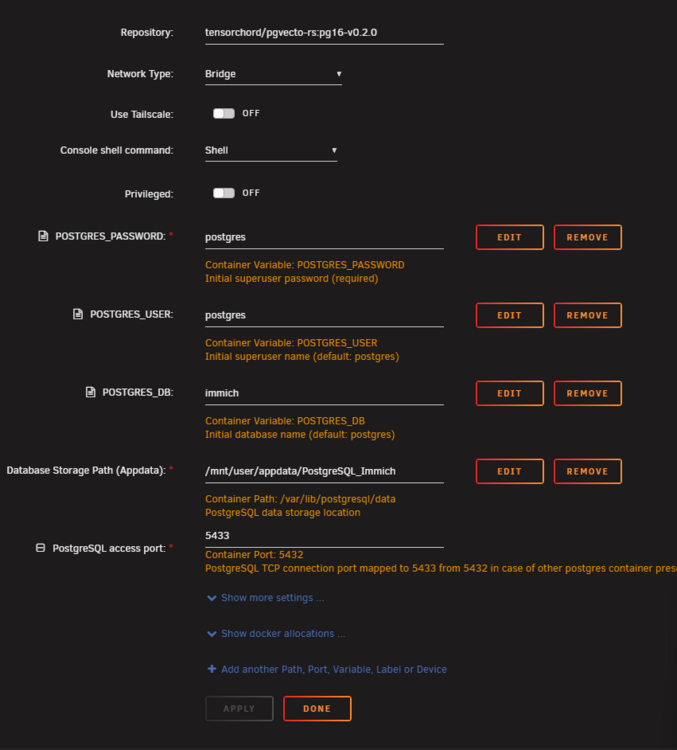
@foo_fighter So you put in the whole thing basically. Why is the original repo just tensorchord/pgvecto-rs:pg16-v0.2.0 when the full path is docker.io/tensorchord/pgvecto-rs:pg16-v0.2.0?
-
Immich recently updated to v1.333.0 and in the announcement thread I linked to they mention that it's recommended to update to the new database vector extension called VectorChord. How would I do this in spaceinvaderone's postgres container without breaking anything? Do I just change the repository from tensorchord/pgvecto-rs:pg16-v0.2.0 to immich-app/postgres:16-vectorchord0.3.0-pgvectors0.3.0?
-
If anyone is having problems with Jellyfin transcoding not working and the plugin not showing that it's, in fact, working should read this (this probably doubles as a bug report too):
-
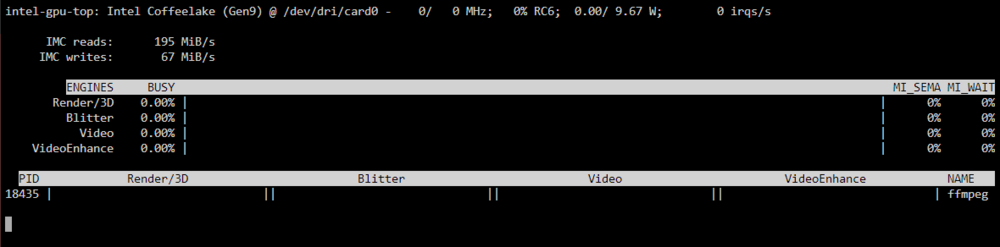
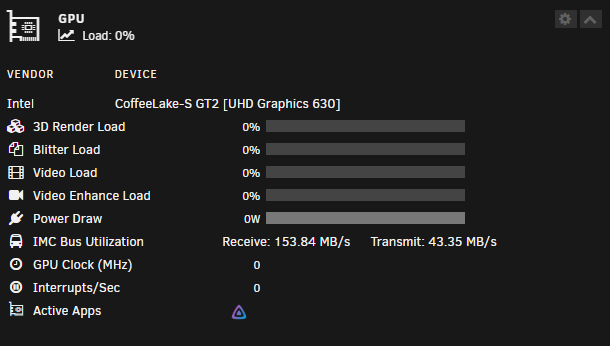
@MowMdown It seems like it's working now when I look at it again. Although, it's still not showing percentages all the time, in the GPU Statistics plugin it works as intended like 1 sec then back to zero. But the Jellyfin logo is there atleast.
-
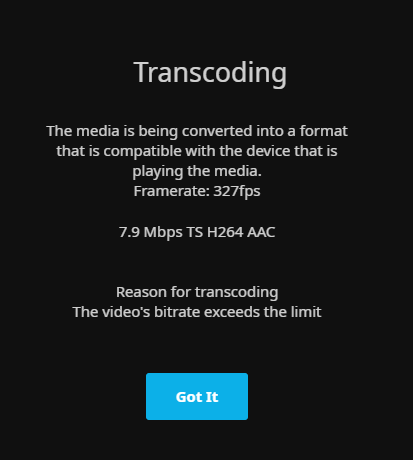
@MowMdown Finally! But it's not showing up in the dashboard in unraid or in the console
-
@MowMdown This?
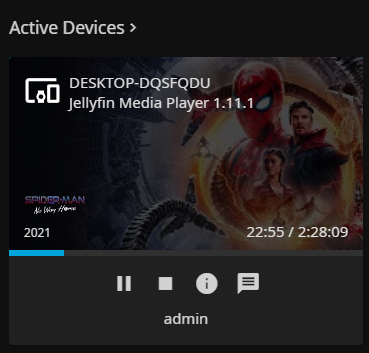
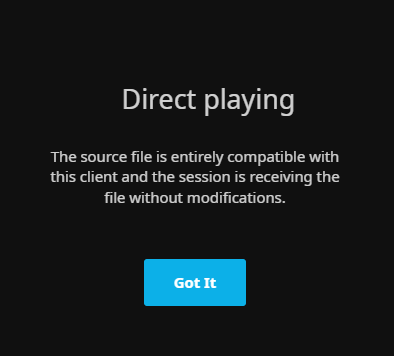
-
@MowMdown While playing an h264 movie: I'm doing this via unraids console tho
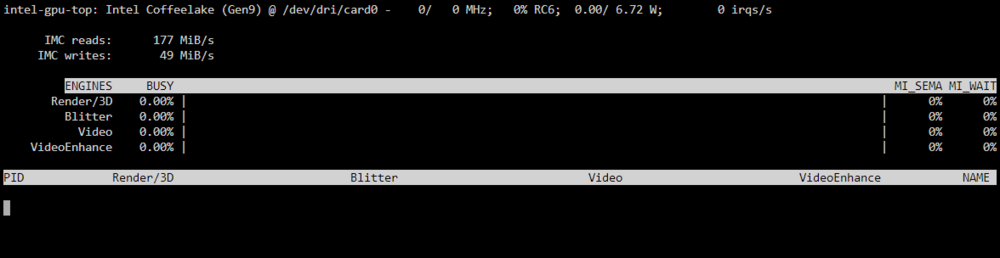
-
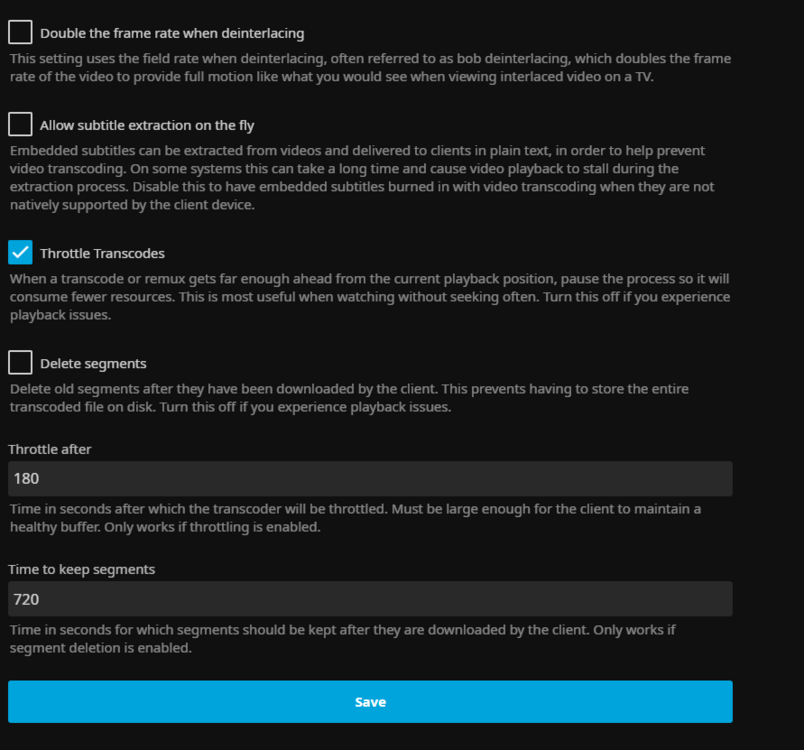
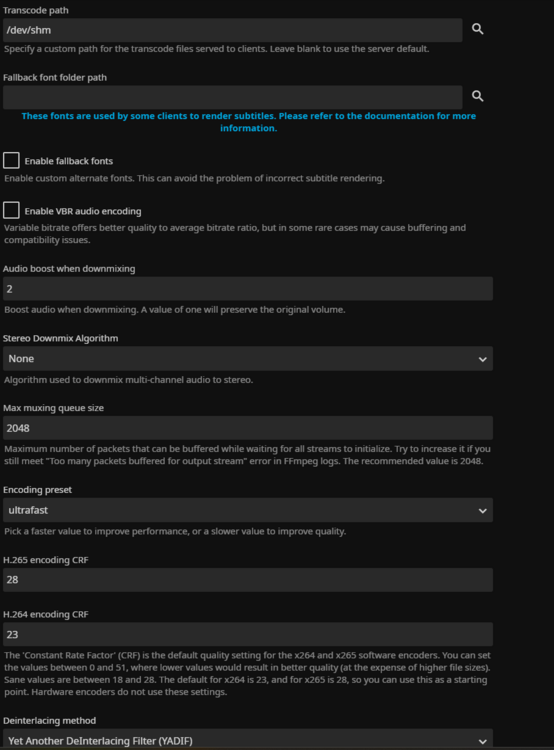
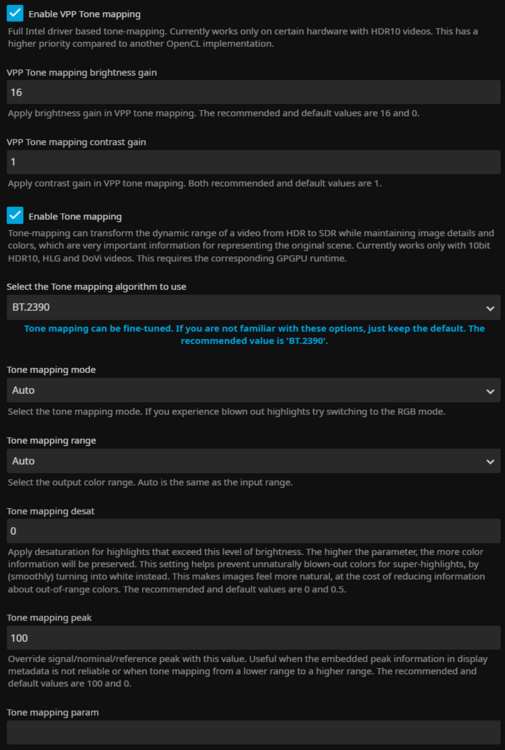
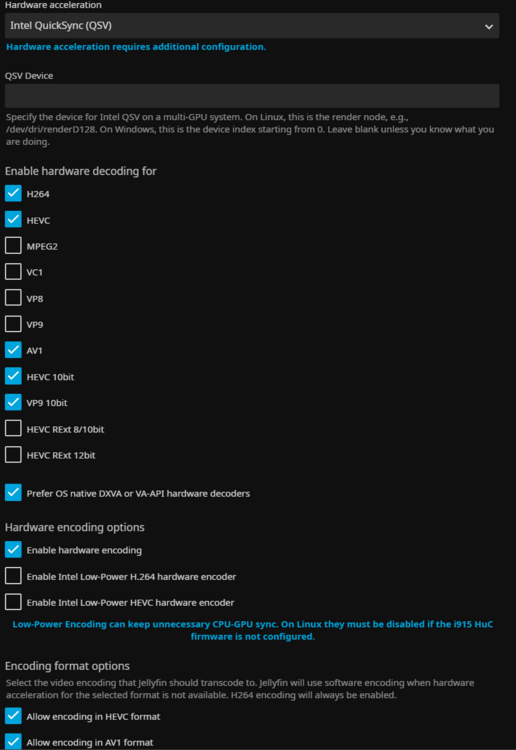
@MowMdown I changed the codecs to this so it fit better with this list (ctrl+f "uhd graphics 630"): https://www.intel.com/content/www/us/en/developer/articles/technical/encode-and-decode-capabilities-for-7th-generation-intel-core-processors-and-newer.html
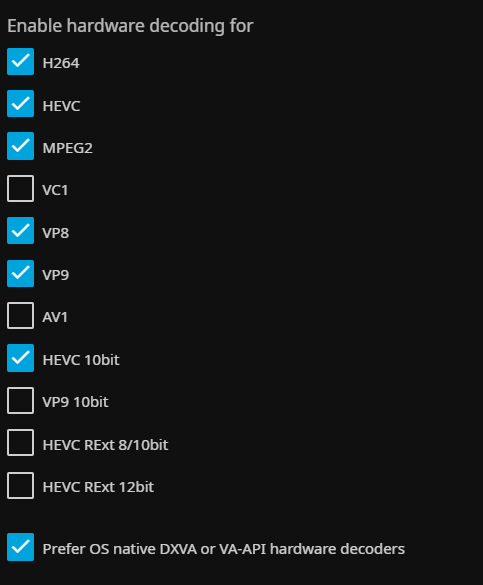
-
@MowMdown I meant that I put in 128 instead of 218, so /dev/dri/renderD128
-
218? I put in renderD128 but it didn't work. Is there anything else wrong? I don't think the codecs should be wrong right?
-
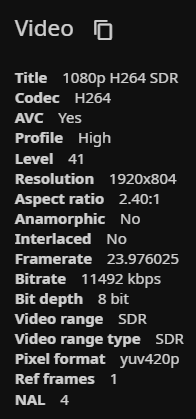
@MowMdown I'm using a i5 8400
-
@MowMdown It's there, so that's very weird. When I play a movie it still uses the cpu tho so I don't understand what's wrong. Do you think i'll have to do a new config and redo everything?

-
@MowMdown It finds the igpu, but it doesn't recognize what's happening in the background i'm guessing so it only shows 0's. What else can I do other than putting "--device=/dev/dri" (without quotes) in extra parameters or having it as a device? I've also tried putting "modprobe i915" in the go file without success.


-
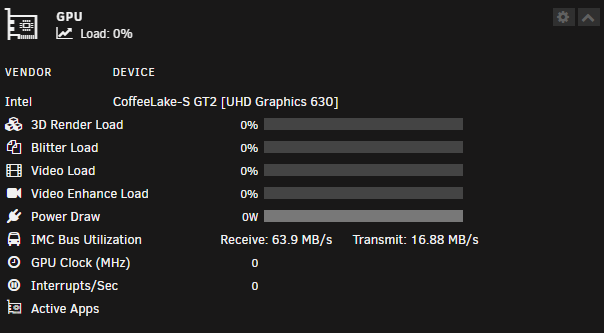
@MowMdownHere it is, I forgot to post it, This is what gpu statistics (and the intel_gpu_top command) shows too. hemmaserver-diagnostics-20241211-1443.zip
-
I have tried everything out there, including changing to the official jellyfin container and adding --device=/dev/dri to the extra parameters or add /dev/dri as a device but nothing has worked. The only solution I can think of is that there is something wrong with the Intel GPU top plugin since it shows zero on all statistics except IMC bus which is fluctuating constantly. Correct me if I am wrong but all the statistics should be fluctuating a bit at least even if there is no heavy load? Anyway, does anyone know a solution to my problem? I think I am going crazy lol
-
@Kilrah I just want to know what is usually backed up. Is it everything on the server or is it just the flash drive and the appdata? What is needed for a 3-2-1 backup on Unraid?
-
My friend has an unraid server where he has the arr stack for streaming and immich for pictures and we were wondering what a good 3-2-1 backup strategy would look like? I have tried to google but most of the guides are not unraid specific and the few discussions found on here and reddit usually talk about duplicacy which has a monthly fee from what I understand, which we were trying to avoid.
-
In my case it's the linuxserver.io container of jellyfin. I have tried adding both "--device=/dev/dri" and "--device=/dev/dri:/dev/dri" in the extra parameters section and also replacing that by adding a new device pointing to /dev/dri, but nothing works. I have also tried adding modprobe i915 to the go file even if the Intel_GPU_TOP plugin is installed and that doesn't work either





