icarus69
Members
-
Joined
-
Last visited
Everything posted by icarus69
-
Openspeedtest results (Docker container): Download - 95.6Mbps. Upload - 100.2Mbps. Ping - 7ms. Jitter - 3ms. Speedtest.net (WiFi speeds I get from my laptop connected to my router: Download - 543.46Mbps. Upload - 52.02Mbps. Ping - 15ms. My Unraid server is connected to my local network by connecting it's 1Gbps Ethernet port directly into my ISP router, a Virgin Media Hub 5. Motherboard: Supermicro X11SCA-F CPU: Intel i3-9100 RAM: 2x 32GB Samsung DDR4 2666Mhz ECC RAM 32GB UDIMM M391A4G43MB1-CTDQ PSU: Corsair SF850L HBA: LSI 6Gbps SAS HBA LSI 9240-8i = (9211-8I) IT Mode HDDs: 3x WD Red Plus 6TB SSD: 1x Transcend SSD370S 32 GB 2.5 Inch SATA III 6 Gb/s (array in order to use the 3x HDDs as my actual array as a ZFS pool) CPU fan: Noctua NH-L12S Case fan: 1x Arctic P12 PWM PST Is there anything I should do r.e. settings anywhere that could improve the speeds I'm getting (as reported by Openspeedtest)? I don't have budget to go and buy any additional hardware right now.
-
This is exactly what I was looking for, thanks. Question: I've just set up my Unraid server, and have already created SMB shares of my Music folder to Emby, as well as having just followed SpaceInvaderOne's tutorial on how to set up Time Machine to back up to a share on my Unraid server. Moving to NFS, will this affect those shares? What will I need to do besides the intructions you gave?
-
Thanks for this. I've changed the settings in Network Settings to Static in that case (screenshot). Does this look right now? Also r.e. DNS server settings, could you explain what that is for, and why I would/wouldn't need to put something here? R.e. the IPMI plugin, which one (screenshot)? And how to set up?
-
I recently set up my first ever Unraid server. I haven't really done anything with it yet as I'm still learning a lot about how it works, terminology, concepts, best practice, and so on. Something I wanted to run by the community was my BIOS settings. As I don't know much about this stuff, I wanted to share screenshots of my settings to see if anything stood out to anyone, as settings that I should change? The server is going to be used for media storage and some Plex streaming. It's connected to my network with an ethernet cable going directly from the server into my ISP router. Another thing I want to know how to do is control the fan speed based on the temps of the HDDs. I can see in the Apps section of Unraid that there are lots of different plugins that might help with this. Unfortunely I don't know what any of them mean, how to set up and so on. I can't seem to find any fan speed settings in my BIOS, so I'm assuming a plugin will be the way to go. Any help on this also? Lastly, I wanted to ask about IP addresses. I set a static IP address. As you can see in the BIOS, my local network's IP address it 192.168.0.1 - I've put that in the "Local Gateway" box. I set the "Local Netmask" to 255.255.255.0. And then I set the "Local IP Address" (which I'm assuming is where it wanted me to select a static IP address?) to 192.16.0.140. I didn't know what to put in the "DNS Servers" box, and my friend who helped me do this initial setup didn't know either. My question regarding IP address stuff is: why, when booting up into Unraid, does it say my server's IP address is 192.168.0.229, and not the one I set in the BIOS (192.169.0.14)? I mean, it works fine and I'm able to open up the Unraid console on my computer just fine by typing in 192.168.0.229. Just curious about where the 192.168.0.14 comes into play, if at all? Any help with any of these questions is appreciated. Motherboard: Supermicro X11SCA-F CPU: Intel i3-9100 RAM: 2x 32GB Samsung DDR4 2666Mhz ECC RAM 32GB UDIMM M391A4G43MB1-CTDQ PSU: Corsair SF850L HBA: LSI 6Gbps SAS HBA LSI 9240-8i = (9211-8I) IT Mode HDDs: 3x WD Red Plus 6TB SSD: 1x Transcend SSD370S 32 GB 2.5 Inch SATA III 6 Gb/s (array in order to use the 3x HDDs as my actual array as a ZFS pool) CPU fan: Noctua NH-L12S Case fan: 1x Arctic P12 PWM PST
-
-
HI there, After setting up my new Unraid server, I installed the Tailscale Docker container. I then spoke to Spaceinvaderone, who recommended I use the plugin instead. I uninstalled the Docker container and installed the plugin. But when I try to open the app (Settings > Tailscale), I get an error that says "404 Not Found. nginx." So it doesn't even open the login page etc. I've attached the log file and diagnostics from when I got this error. Any help appreciated. EDIT: Solved log.txt NAS-tailscale-diag-20240404-101502.zip
-
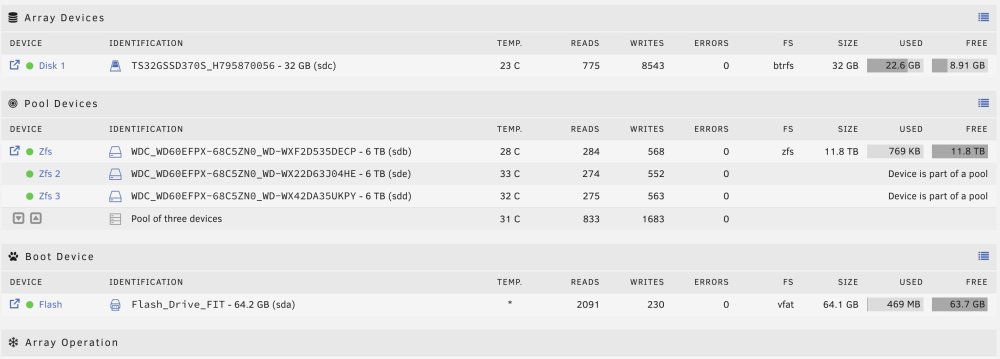
EDIT: Solved I have just set up my first Unraid server. It's using 3x 6TB HDDs in RaidZ1. I didn't realise I needed at least one drive as an array device, in order to set up a pool. So I stuck in a 32GB SSD I had lying around just to get the thing going. I obviously don't want to need to use this 32GB SSD - from my perspective it's just there as a formality. Looking at what's taking up the 22.6GB of space already in the SSD, I can see it has Docker and Libvert on it. What I want to know is: 1 - Can I move these files over to my ZFS pool? How? 2 - If so, is there also a way of making my ZFS pool the "default" location for any downloads, rather than the 32GB array?