





Jordan Bridgman
Members
-
Joined
-
Last visited
-
Hi! I got a machine check error and the plugin links me to this post in this thread for more information: However, NerdPack (and its successor NerdTools) have both been deprecated (at least to the best of my knowledge...). As a result I don't have mcelog installed nor do I have an obvious way to install it. My question then is twofold: Any chance of getting the "more information" thread for the plugin updated so it doesn't reference the deprecated predecessor of a deprecated plugin? 😅 Any recommendations on how to proceed with investigating the machine check event reported by Fix Common Problems since I can't do as described above? Thanks in advance!
-
I was running from GUI. Tried it again today and XFS repair worked this time. Not really sure what the difference was but hey, at least it worked. Unfortunately I now have 11TB in lost+found to sort through but at least the system appears to be stable 😅 I'm hoping everything that's missing right now is in lost+found, it's hard to tell when it's this big
-
I have a backplane there weren't really data cables to check (I mean technically there is a data cable but if that one's gone bad more than one drive should be misbehaving). So, I thought maybe the new PSU wasn't able to provide enough power to the backplane over the one molex cable it came with. I found some SATA -> molex adapters and used them to distribute the backplane power load across 3 PSU cables instead, which worked - server is booting, array is starting (at a reasonable speed), and the drives stopped behaving erratically. XFS repair still failed, so parity rebuild is in progress now. But I think that'll solve this one - thanks!
-
I've had some mysterious issues with cache drives dying prematurely, and after getting brand new drives, new SATA cables, using new SATA ports, and swapping out basically everything except for the power supply of the server, I finally caved and got a new power supply. I installed it yesterday, but when the server booted back up, 2 of the regular drives were in an error state. The server booted slowly, but it booted. Today I tried to run XFS repair which did not work. Now I'm trying to rebuild the drives from parity, but I can no longer get the array to start. The poor machine is just all over the place and I'm not sure what to do with it at this point. Restarts aren't helping. Safe mode didn't do it. Reseating power cables and the bad drives didn't do it. Diagnostics attached... any ideas? Thanks in advance! greenplanet-diagnostics-20240610-1452.zip
-
Thanks for this! I'm having trouble getting the docker to use my 1070 ti. I have Nvidia drivers installed and up-to-date I set NVIDIA_VISIBLE_DEVICES to my GPU-xxx GUID I also tried setting NVIDIA_VISIBLE_DEVICES to all but that had no effect I have --runtime=nvidia in the Extra parameters I also tried adding a variable for NVIDIA_DRIVER_CAPABILITIES set to all but that had no effect I also saw an error message in the logs on startup about there being no CUDA_VISIBLE_DEVICES, so I tried adding that variable as well, set to my GPU-xxx GUID, to no avail All that said, the GPU is being passed through - stable diffusion just isn't using it. When I go into the docker shell I can run `nvidia-smi` and I can see the GPU, but it always says "No running processes found" even if I'm actively generating an image. # nvidia-smi Tue Apr 30 09:36:46 2024 +-----------------------------------------------------------------------------------------+ | NVIDIA-SMI 550.78 Driver Version: 550.78 CUDA Version: 12.4 | |-----------------------------------------+------------------------+----------------------+ | GPU Name Persistence-M | Bus-Id Disp.A | Volatile Uncorr. ECC | | Fan Temp Perf Pwr:Usage/Cap | Memory-Usage | GPU-Util Compute M. | | | | MIG M. | |=========================================+========================+======================| | 0 NVIDIA GeForce GTX 1070 Ti Off | 00000000:01:00.0 Off | N/A | | 0% 37C P0 32W / 180W | 0MiB / 8192MiB | 4% Default | | | | N/A | +-----------------------------------------+------------------------+----------------------+ +-----------------------------------------------------------------------------------------+ | Processes: | | GPU GI CI PID Type Process name GPU Memory | | ID ID Usage | |=========================================================================================| | No running processes found | +-----------------------------------------------------------------------------------------+ Though the docker technically works, since it appears to be on CPU only it is painfully slow. Any ideas? I've passed GPUs through to many dockers but usually once they show up in the nvidia-smi results, I'm good to go. I'm not sure how to troubleshoot the GPU not being used even though it is available. Thanks in advance!
-
Thanks for the help! I haven't had another crash since I just removed the UPS communication cable entirely so as far as I can tell, that was the issue. My server is configured to shut itself down proactively if the UPS is running low on battery so I can see how the coms cable going bad could've caused shutdown issues. Probably the last update to the thread here just for posterity's sake in case somebody finds it searching for a similar issue and wants to know how I fixed it. Thanks again all who helped!
-
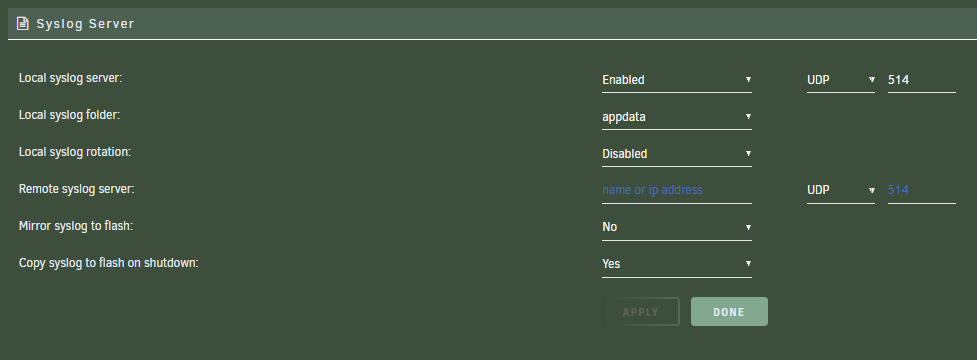
Weird! I only see references in the syslog server documentation to it being for a remote machine, nothing about setting it to the local server IP. But sure, I can add the Unraid server's LAN IP there instead of leaving it blank. Thanks!
-
Sure! Here's what I have for syslog server settings. Also, I've also successfully completed the parity rebuild without further crashes! It's hard to say for sure I 100% fixed it given the crashes were random and I might just be on a lucky streak, but the change I made that seems to have helped was removing the UPS communication cable. The cable has an RJ45 style connector on the UPS end (USB on the Unraid end) and I noticed the stay clip on the RJ45 was busted. This probably meant the cable had taken a hit at some point and I thought perhaps the damaged cable was disrupting Unraid's communication with its UPS. Because my Unraid server is configured to shut itself down when the UPS battery only has a few minutes of runtime left, it's possible disruptions in UPS communications might be causing the server to shut down.
-
There isn't anything in /boot/logs other than the diagnostics I've generated trying to troubleshoot this: # ls -lah /boot/logs total 656K drwx------ 2 root root 16K Apr 1 17:50 ./ drwx------ 10 root root 16K Dec 31 1969 ../ -rw------- 1 root root 224K Apr 1 07:56 greenplanet-diagnostics-20240401-0755.zip -rw------- 1 root root 176K Apr 1 16:55 greenplanet-diagnostics-20240401-1655.zip -rw------- 1 root root 217K Apr 1 17:01 greenplanet-diagnostics-20240401-1701.zip I've now triple-checked that syslog server is indeed enabled so I have now tried disabling syslog rotation in the hopes that helps?
-
Alright, well, it crashed again so I don't have to worry about the parity rebuild progress (sadly). Did a manual reboot and here's the syslog-previous I get from it syslog-previous
-
Gotcha! I'm hesitant to interrupt the parity rebuild for a manual reboot - it takes 24h+ to complete and I'm 1/3 of the way through here (and hoping it doesn't crash again before it finishes this rebuild). I also want to clarify that the server started itself back up after the crash automatically - it just wouldn't start the array, on account of the error state drive needing a parity rebuild (that counts as a "configuration change" and disables autostart). So, if I'm understanding correctly, I think the server has technically been restarted since the crash, and I'm not sure that rebooting now will provide the correct time window in syslog-previous.txt that we're looking for, so I want to clarify (especially before considering interrupting a parity rebuild). I do see references in the syslog that's contained within my diagnostics to an unclean shutdown, which makes me think maybe somehow there is a power issue forcing the server to shutdown?
-
Syslog server is enabled and it is set to copy to flash on shutdown. I don't see the "syslog-previous.txt" file referenced in the tooltips and I'm not sure if that's indicative of a problem of some kind, but there is a syslog file in the diagnostics I posted.
-
I had a disk go into error state a few days ago, but went through the spaceinvaderone video on XFS repair and did SMART tests and all that jazz and I can't actually find anything wrong with the disk. No errors or anything, so I re-added it to the array, and started a parity rebuild of the drive data. Standard procedure, per my understanding - and I got through all that without any issues or questions. However, I keep coming back to my server to check in on the status of that parity rebuild only to find the array is stopped and the parity rebuild never completed. It has happened 3 times now. No idea what's going on. I do see a lot of weird errors about a USB device not responding in sys log, and I do see some warnings that UPS communication is dropping in and out in the GUI notifications. My server is plugged into its UPS via a USB cable so I wonder if that could be related - however, other things plugged into that UPS appear fine, so I don't think the UPS is failing to supply power. And if that's not the issue, I'm not sure what else to do with the UPS to troubleshoot it. I am also on a new USB boot drive. The previous one was the original drive I built the first iteration of my Unraid server with in like 2017 and it finally gave up the ghost. But I got a USB drive recommended for Unraid by spaceinvaderone - I don't think that's what's causing the USB errors. I added a Coral m.2 TPU and 2x80mm exhaust fans recently. The Coral seems to be working fine, and I mention the exhaust fans because I saw in another thread Squid mentioned CPU overheating can cause this kind of random shutdown. My CPU hasn't overheated before, and it has more fans now, so I'm pretty sure that's not it. The new fans went in because the drives can run a little hot on hot days, but recent ambient temperature has been low. All told, I have a fair number of changes recently that make it a little harder to troubleshoot, and I have yet to find the actual crash or shutdown or whatever is happening in the logs. Still looking - I have a feeling the answer is in here somewhere - I'm just not super familiar with the log format and haven't tracked it down yet. Diagnostics attached. Let me know if ya'll have any ideas - thank you! greenplanet-diagnostics-20240401-0755.zip

