





cyberteer
Members
-
Joined
-
Last visited
Everything posted by cyberteer
-
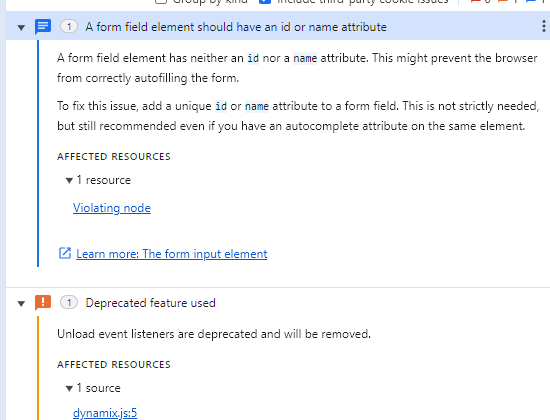
The PHP Settings had nothing, however, I want to note that the "error reporting level" on that page is set at 'Default'. As for the browser debug console, the following errors were noted after attempting to edit and save changes to an existing UD script. Additionally, the following was identified as the "Violating node" (blue section) element.style { display: none; } input[type=checkbox] { vertical-align: middle; margin-right: 6px; } user agent stylesheet input[type="checkbox" i] { background-color: initial; cursor: default; appearance: auto; box-sizing: border-box; margin: 3px 3px 3px 4px; padding: initial; border: initial; } user agent stylesheet input { font-style: ; font-variant-ligatures: ; font-variant-caps: ; font-variant-numeric: ; font-variant-east-asian: ; font-variant-alternates: ; font-variant-position: ; font-weight: ; font-stretch: ; font-size: ; font-family: ; font-optical-sizing: ; font-kerning: ; font-feature-settings: ; font-variation-settings: ; text-rendering: auto; color: fieldtext; letter-spacing: normal; word-spacing: normal; line-height: normal; text-transform: none; text-indent: 0px; text-shadow: none; display: inline-block; text-align: start; appearance: auto; -webkit-rtl-ordering: logical; cursor: text; background-color: field; margin: 0em; padding: 1px 0px; border-width: 2px; border-style: inset; border-color: light-dark(rgb(118, 118, 118), rgb(133, 133, 133)); border-image: initial; padding-block: 1px; padding-inline: 2px; } a { color: #486dba; text-decoration: none; } style attribute { --color-alpha: #f2f2f2; --color-beta: #1c1b1b; --color-gamma: #999999; --color-gamma-opaque: rgba(153, 153, 153, 0.25); --shadow-beta: 0 25px 50px -12px rgba(28, 27, 27, 0.15); --ring-offset-shadow: 0 0 #1c1b1b; --ring-shadow: 0 0 #1c1b1b; } body { font-size: 1.3rem; color: #1c1b1b; background-color: #f2f2f2; padding: 0; margin: 0; -webkit-font-smoothing: antialiased; -moz-osx-font-smoothing: grayscale; } html { font-family: clear-sans; font-size: 62.5%; height: 100%; } ::-webkit-scrollbar { width: 10px; height: 10px; background: transparent; } ::-webkit-scrollbar-corner { background: lightgray; border-radius: 10px; } ::-webkit-scrollbar-thumb { background: lightgray; border-radius: 10px; }
-
Google Chrome (latest version)
-
My suggestion appears to have been requested a couple times already using differing terms/references: As suggested by the last requestor, this is a relatively easy modification -- that could be fulfilled by simply allowing the "from" or "sender" name to be included in the existing field "Sending email address" under the SMTP Settings for Notification Settings. The specification is one of the following: Sender Name <[email protected]> "Sender Name" <[email protected]> "Sender Name <[email protected]>" Alternatively, a "new" field could be added under the SMTP Settings for Notifications Settings titled "Sending display name" keeping it consistent with current GUI terminology used in Unraid. Either way I think this feature is long overdue.
-
I wanted to add to the discussion below as I believe I have some relevant information: I am on the latest version of Unraid (6.12.10) with the latest UD plugin and experience the same issue that I am UNABLE to create new scripts using the prescribed method (click default, edit script, click save) -- as the screen simply refreshes after clicking save and the script is gone. The caveat that I think was perhaps overlooked by user unraid-550529 was that they were accessing the GUI in Incognito mode. As I can successfully perform the same operation (click default, edit script, click save) provided I am not using Incognito mode. As an admin I typically default to using Incognito mode and attempting to create a new script does not appear to work consistently when in Incognito mode.
-
I have encountered this issue also -- and it is impacting my migration from Synology to Unraid.
