





cyberteer
Members
-
Joined
-
Last visited
Everything posted by cyberteer
-
Could I kindly ask if you would use this to create one for the Terramaster F2-424? (2-Bay NAS)?
-
In Unraid 6.12.13, I am seeing the following behaviour in that the uptime displayed in the upper logo panel area is one (1) hour behind the uptime displayed on the Dashboard. I have refreshed the page, logged out and logged in -- only to see the same issue. Anyone else noticing this issue?
-
Please note that the latest and tagged 3.6.0 versions of the snorre0815/idrive-docker container have been updated and the computer/container appearing offline in the iDrive dashboard is no longer a problem.
-
For anyone experiencing the issue of their iDrive container appearing offline in the iDrive webUI dashboard. I worked with iDrive Support to help them identify and resolve the issue. I currently have a custom package that restores the connectivity with the dashboard, but it will be released publicly very soon. In the meantime avoid iDriveForLinux v3.5 and v3.6 if you can -- however, even though connectivity with the dashboard is broken -- your scheduled backups will continue without issue.
-
If you haven't updated the docker container -- I suggest waiting, there seems to be a flaw somewhere in that after upgrading to v3.5 or beyond -- your container/computer will no longer show as being online in the iDrive webUI dashboard. For existing container users -- the impact is minimal, your configured backups will continue without issue, however, creating new or adding to existing will be problematic. For new users wanting to setup iDrive, the current situation with the snorre0815/idrive-docker container will make it nearly impossible to get a backup working. In the interim, you can switch to the renofischa/idrive container which is frozen at v3.2 -- it works, just don't Check for Update or proceed with doing so as it will upgrade to v3.6 and subsequently break the connection leaving your container/computer showing as offline from the iDrive webUI dashboard.
-
@Cruzerman Thank you for the "props". Timezone (TZ) variable... if you changed the TZ setting for Unraid any docker apps ALREADY created would not get updated and need to be recreated in order to have their TZ setting updated. Icon issue... Did you setup the container using the "Template" or "Manual" method? I did check and the icon image still works -- however, I am not sure for the "Manual" method if you need to include the "https://" part or not (meaning just the part afterwards. and finally, welcome to the Unraid community!
-
Excellent -- glad to see more unRaid users take advantage of the inexpensive backup options offered by iDrive. To configure what files you want to backup, you need to navigate in your browser to the iDrive portal (https://www.idrive.com/idrive/home/), login with your account credentials for iDrive, and then from the left hand panel select "Dashboard" then "Computers". You'll be presented with a screen showing you the active connected computers to your account. Select the one which is your unRaid server by clicking it or clicking the details icon. You'll then be presented with a screen where you can configure the files/folders to backup. I would suggest navigating around within the settings on the iDrive panel.. For familiarity as well as there are options that maybe of benefit or not. Additionally, these iDrive tutorial videos may also be of assistance: https://www.idrive.com/videos#Web
-
@Redindian Glad you were successful. Typo has been corrected.
-
Thank you for following up. I suspect that this is the case. It seems necessary to have created a folder under appdata before executing the docker container. In some previous instructions it was identified to "touch" the idrivecron.json file as well, again before executing the docker container. However, it may simply be for this new version of the container that to avoid the EVS error -- that having an "idrive" folder under appdata created before executing the container maybe all that is necessary?!?
-
Hey @jjross @mraerosmith in regards to the "Unable to find EVS commandline utilities" error you both encountered... would either of you recall if when you first added the idrive docker if you created a folder/directory under /user/appdata for the idrive docker to use or did you simply let it "auto-create" upon launching the container?
-
Thank you @jjross for your input. Two reports is certainly more than coincidence. As mentioned, I don't seem to be able to replicate the issue on my Unraid installation and I wasn't able to replicate it on Ubuntu VM running docker that I'd setup to see if I could. I will raise the issue with the container builder as perhaps there is something there.
-
I appreciate the props, but still doesn't explain why the container failed initially. I suspect that if you make a change to the docker template (change volume path to backup something else or add another volume path) that the container gets rebuilt and you'll be back to having to run the update again. I'm glad to know you are up and running. iDrive really is the least expensive backup option that I have found. Simply put $10/year for 500GB is a fantastic deal. In addition, I am quite pleased with the speed at which backups have executed. Good luck!
-
@mraerosmith can you try executing: ./idrive -C and force it to update even if it says it is the same version.
-
I am on Unraid version 6.12.10, If you are older, it might be attributable to an older version of docker. What do you see when you execute: docker version from an Unraid terminal window?
-
Yes, I am sorry as I am at a loss as to why that is happening. Something is corrupt or corrupting the container, as I again pulled the image on a different computer and it works as expected.
-
@mraerosmith To give an update, I have removed the container, and the docker image and redeployed from scratch (keeping my config) and I am not getting that "EVS error". Additionally, I deployed the container on a separate Linux VM without any issues. I am left thinking that something happened to the image that you downloaded which is causing that EVS error. It seems the EVS utilities is part of the idrive for Linux install which gets executed inside the container you are creating. I would suggest, removing any existing iDrive containers from the Unraid GUI. Then in a terminal window, use the following command to remove the image: To list the images, execute: docker images Find the snorre0815/idrive-docker image ID, and execute: docker rmi <insert-image-ID-for-snorre0815/idrive-docker> You don't need the < > brackets. Next, to show any "dangling" images, execute: docker images -f dangling=true If any are found, then execute: docker image prune After all that, use the template to recreate the iDrive container, ensuring paths are pointed where you want them. As for the blank template issue, from the filename I am thinking you already had my-idrive.xml as a template -- unless you delete it from the //boot/config/plugins/dockerMan/templates-user directory you shouldn't need to recreate. Let me know how it goes.
-
What is that option "Community Applications Conversion" = true?? It was not in the template and I do not have it in my own config either. Can you set to "false" or remove it and try again?
-
I pulled the container again, it works. That EVS error you see appears before you've entered any command. That is the container itself which does not make a lot of sense. In the docker settings can you try changing the Shell to Shell and click apply. That will delete the container and rebuild.
-
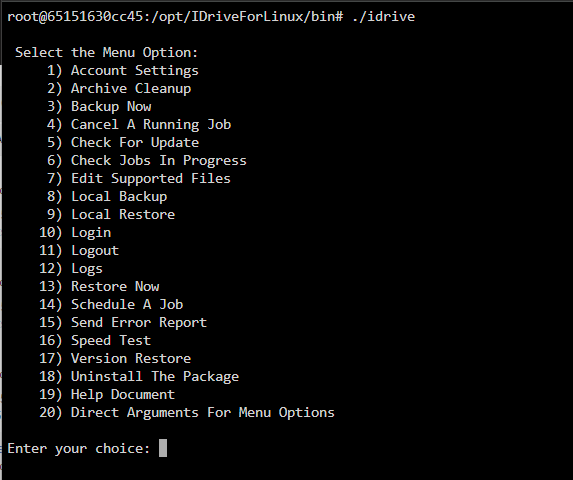
Just to confirm, you are inside the docker container at the # prompt when entering ./idrive -a? Does ./idrive --account-setting give you the same error? The screen capture below is me running ./idrive (no options). When entering the console for the container -- you should immediately be in the path /opt/IDriveForLinux/bin (as shown in the screen capture.
-
So iDrive Support has confirmed to me that version 3.x of iDrive for Linux is now required in order to connect and backup any content. As was previously noted the version 3.x now uses a binary instead of all the pearl scripts. So any documentation that references ./account-setting.pl or any .pl script should be considered deprecated. As such, I have setup and tested the 'snorre0815/idrive-docker' container that includes the version 3.x binary and can confirm that it does work (connects, computer appears in the dashboard, and able to backup content). Now for anyone that maybe interested here is a revised list of steps to setup this iDrive container on Unraid using the snorre0815/idrive-docker image: (Disclaimer: I acknowledge that credit goes to @taverty @LoneStar@ocyberbum @JoergHH for their work effort as I am simply putting all their hardwork together in a single post) iDrive Docker for Unraid - June 2024 [Updated] iDrive Account Creation (If you do not have an account already) 1. create an iDrive account https://www.idrive.com/idrive/signup 2. Recommend using the default iDrive encryption key. If you are absolutely set on using your own encryption key remember to store a copy in a very safe place! 3. Setting or not setting the 2FA is your choice, the version 3.x iDrive for Linux is compatible and does work with 2FA Installing the 'snorre0815/idrive-docker' iDrive Docker container: Option #1 -- manual install 1. Search for idrive under APPS tab 2. Click on link labeled: "Click Here To Get More Results From DockerHub" 3. Choose snorre0815/idrive-docker (https://hub.docker.com/r/snorre0815/idrive-docker/) 4. Configure docker container with required paths as below Must enable "ADVANCED VIEW" to expose the Icon field Icon URL: https://static.idriveonlinebackup.com/source/images/favicon.ico Path to Add Perms Container Path Host Path config R/W /opt/IDriveForLinux/idriveIt /mnt/user/appdata/idrive/config backup R/O /home/backup /mnt/user/ ** Unraid includes TZ variable when launching a container set to your selected timezone --End Option #1 -- Jump down below to continue -- Option #2 - Template install In a terminal on your Unraid, navigate to: /boot/config/plugins/dockerMan/templates-user # cd /boot/config/plugins/dockerMan/templates-user Next use nano (or your preferred editor) to create a file called my-idrive.xml # nano my-idrive.xml Copy the following XML into the editor: <?xml version="1.0"?> <Container version="2"> <Name>iDrive</Name> <Repository>snorre0815/idrive-docker</Repository> <Registry>https://hub.docker.com/r/snorre0815/idrive-docker</Registry> <Network>bridge</Network> <MyIP/> <Shell>bash</Shell> <Privileged>false</Privileged> <Support/> <Project/> <Overview/> <Category/> <WebUI>https://www.idrive.com/idrive/home/</WebUI> <TemplateURL/> <Icon>https://static.idriveonlinebackup.com/source/images/favicon.ico</Icon> <ExtraParams/> <PostArgs/> <CPUset/> <DonateText/> <DonateLink/> <Requires/> <Config Name="Config" Target="/opt/IDriveForLinux/idriveIt" Default="" Mode="rw" Description="" Type="Path" Display="always" Required="false" Mask="false">/mnt/user/appdata/idrive/config</Config> <Config Name="Backup Path 1" Target="/home/backup" Default="" Mode="ro" Description="" Type="Path" Display="always" Required="false" Mask="false">/mnt/user</Config> </Container> Save / write file to disk Then in Unraid Docker, click ADD CONTAINER From the template drop-down find and select idrive --End Option #2 5. Now click 'Apply' to create the container Next, use either option: In your Unraid terminal execute: docker exec -it idrive /bin/bash OR Login to iDrive Docker Container Console, by clicking the iDrive Docker icon and selecting 'Console' from the menu Once connected and inside the container, execute: # ./idrive -a Follow the remaining prompts to configure your account REMINDER: When prompted for a Backup Location, recommend using HOSTNAME for easy identification If you encounter the error "Unable to find EVS commandline utilities", the workaround is to force a reinstall of the iDrive package from inside the container, simply execute: # ./idrive -C If you require further assistance, see https://www.idrive.com/readme#install When finished, use the iDrive Web Dashboard (https://www.idrive.com/idrive/home/) to configure your backup, your shares will be located under "/home/backup". Enjoy!
-
From what I understand -- if you have unchecked it in the web UI, that disables the scheduler job that gets called regularly to check for file changes -- however, the CDP service will always show as running, but you should find the job disabled (scheduler) when checking from the console.
-
Have you tried https://hub.docker.com/r/snorre0815/idrive-docker/? JoergHH (see below) seems to have had some success using it. JoergHH any updates?
-
Taverty -- I noticed that you updated your docker container for iDrive for Linux. Is it upgraded to version 3.20 or still on v2.38?
-
Thank you for your efforts in finding a root cause. It is certainly appreciated even though it cannot be resolved at this time. Also, my apologies to you. The intention behind the "This would be an immediate no" was not to irritate. What I failed to articulate was that all other variables were identical whether in Incognito mode or not. Thus the filename, which is auto populated, was the same and therefore should not be a factor. Thank you again. Your work is valued and UD truly fills some huge gaps within Unraid.
-
This would be an immediate "no". As using the same USB drive (so same partition name) whether incognito or not and saving the script works when no using incognito. That seems to be the only difference... everything else is the same. Same computer, same USB drive, same script just incognito or not. I'll change the logging level and re-test and let you know.
