






Sanderluc
Members
-
Joined
-
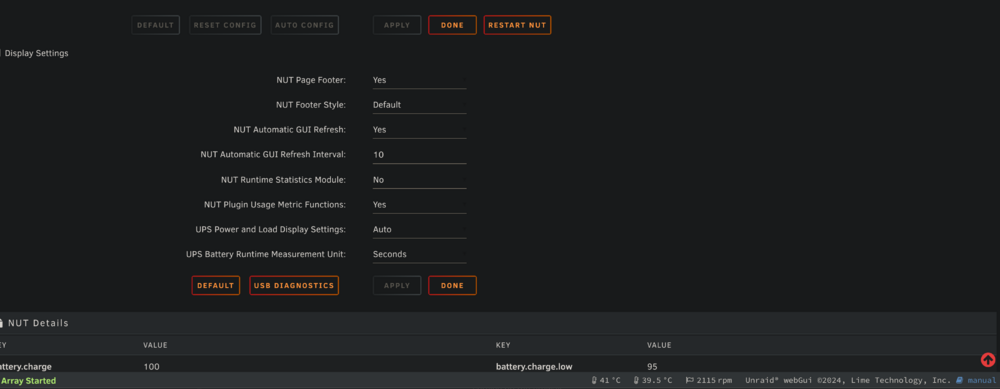
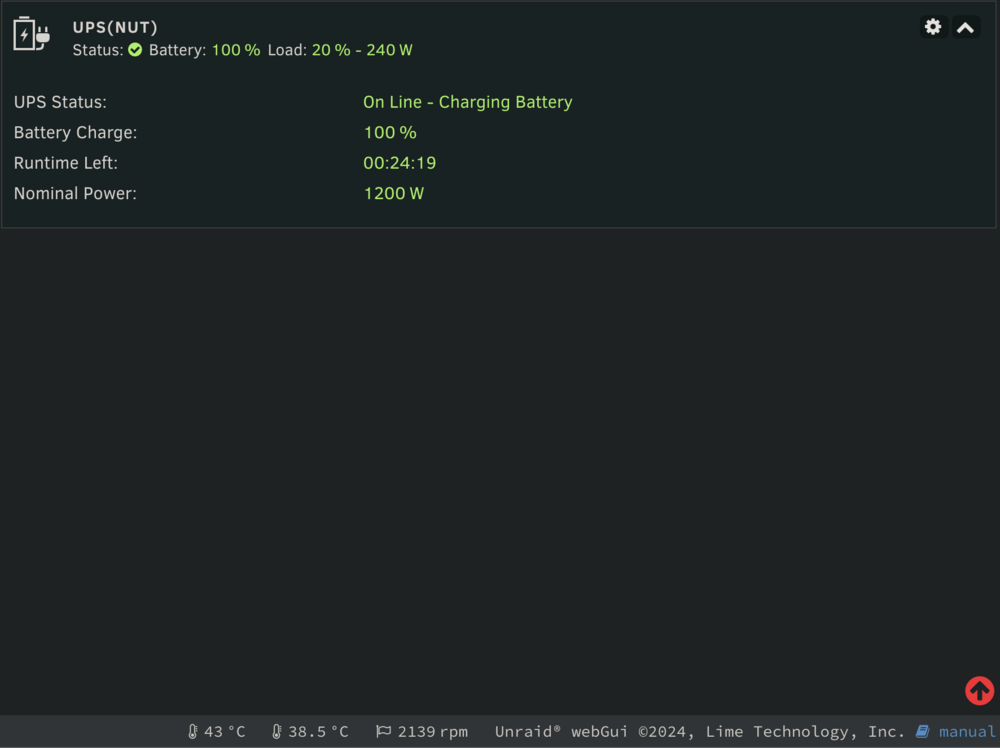
The footer is no longer displaying battery percentages anymore. Is this a bug? The feature is enabled so I don't know why this is happening. The dashboard shows the status just fine.
-
Sanderluc changed their profile photo
-
Already thought of that. I have already applied a patch now to prevent the crash.
-
There seems to be a issue on 6.12.10 when you create a Q35-7.2 VM and assigning a GPU to it. If you remove the GPU afterwards and change it to a virtual Display, the machine no longer works. This is also vice versa! The VM will not boot at all. After some testing I can conclude this is not always happening. Sometimes there is nothing wrong, and otherwise the VM won't boot. The only way to fix this is to remove the whole VM (or have backups) and create everything again. I have already lost my Windows Key because of hardware changes due to this. A XML copy of previous settings when editing would a nice Feature Request. Then I can just set the old values back. I don't backup my VM's itself. But having a XML backup would be nice. I will do my best to diagnose this issue. This problem is very easy to reproduce. I have already provided the XML variants of the working and non-working configurations (see attachments). I hope someone can see what's going wrong here. I think the XML is incorrectly created after editing. I have attached the XML configs of two identical VMs. One will not boot because I switched the display back to virtual, while the working one was created directly with a virtual display. The VM's XML configurations does not have any Disk or PCI Devices assigned to it to keep it simple. I hope this issue can be looked at. I already did find out this is only affected on Machine Q35 configurations. 1440fx seems unaffected. But I still prefer Q35-7.2 due to many reasons. Steps to reproduce: - Create a windows 11 VM with decent enough specs (And machine Q35-7.2) - Use Graphics card "Virtual" during creation - Don't assign anything else. No Disk and no USB devices. And no installation ISO's. Leave that empty. - Let the VM boot. The VM will then try to boot within PXE. - Now stop the VM - Edit the VM and assign a GPU to the VM (You need a GPU to test) - Start the VM - Stop the VM (Probably forcefully because it wont boot because of this issue) - Edit the VM and remove the GPU and assign the graphics "Virtual" back. - Start the VM - The VM is no longer working (Guest has not initialized the display yet) Questions about settings? See my screenshot for the config: VM - XML - defect.xml VM - XML - working.xml
-
Never do this from inside the GUI. Otherwise Nginx won't come back online 😂
-
It would be nice to have the ability to run Unraid on a Efficiency core. In terms of power efficiency it’s worth it. Efficiency cores are using less power than performance cores. Efficiency cores are also fast enough to run Unraid tasks on. I will isolate Core 16 then for Unraid only. I already have saved about 30 watts just by running Docker and my other VM’s only on the Efficiency cores. It would be nice to see an update in the future to change the core Unraid is running on. Since P and E cores came out Core 0 is not the always the best option anymore. I also like this option because I'm gaming on my Unraid Server. And i want to fully Isolate all P-cores so I can use all 8 cores / 16 threads without other processes using it.
-
There seems to be a issue when you have (probably) too much tabs open on the Unraid GUI that eventually a part of nginx will crash. This is resulting in spamming the whole syslog server. Docker and VM's are not affected but components that requires a websocket connection are no longer working. Fortunately enough, It was still possible to shutdown every VM and Container to perform a normal reboot. After the reboot everything went back operational. Later on I have enabled SSH to reboot nginx from there. This happened 3 times on a day to me recently. I have applied some workaround as described on: I'm waiting to see to if this helps. (Seems to work this fix) But still this can be quite annoying as when SSH is disabled, you can't reboot Nginx. Because the GUI is partially unresponsive so you need to reboot the whole server.
-
CPU-pinning still makes use of the first core (Core 0). But I have allocated all performance cores to my Gaming-VM. But even when the Gaming-VM is turned off the first core is still getting used. (like 50% usage). This must be incorrect as Core Isolation has isolated cores 0-15. Is there something wrong with Core Isolation? If Unraid still makes use of Core 0. Why can you select it then as an isolation core? I think it's better to make Core 0 unselectable then. It would be nice to have Unraid run on Core 16 (First efficiency core). This way I can ensure the all 8 performance cores / 16 threads are only provided to my Gaming-VM. And in terms of power efficiency it’s also worth it. Efficiency cores are using less power than performance cores. Efficiency cores are also fast enough to run Unraid tasks on. I will isolate Core 16 then for Unraid only. I already have saved about 30 watts just by running Docker and my other VM’s only on the Efficiency cores. It would be nice to see an update in the future to change the core Unraid is running on. Since P and E cores came out Core 0 is not always the best option anymore. If this is possible, this will result in: 1: A faster Gaming-VM (now using 7 cores instead of 8 ) 2: Less power-usage because P-cores are most of the times inactive. Because I don't game very often.
-
I have exactly the same issue as you have. Are there any workarounds to get USB-hubs working? I would like to use my thunderbolt connector as USB-hub for one of my VM, as I don't have PCIe lanes available on my motherboard. My motherboard has build-in thunderbolt 4 with USB-4 support. Same config as the photo as you.
-
I recently did some hardware changes and decided to remove one of mine NVMe controllers from the VFIO bind. I created later on a pool with 2 MVME-disks on it. But i made a mistake. I did forget that the NVME-controller was still assigned to one of my VM's. I think this is a bug because there is normally no option to bind a PCI device that is unavailable because it's not binded at VFIO. Fortunately enough I managed to recover my pool because it was on Raid 1.
-
I did have the same issue. I did a normal shutdown. I figured it out why the system did not shutdown properly. I was logged in into a SSH session on the server at the /mnt/user/isos folder. If you are in a folder that is mounted by the array, the array wont stop at all. This forced the system to shutdown with as result a 24 hour during Parity-Check.


