





csimpson
Members
-
Joined
-
Last visited
Everything posted by csimpson
-
Okay, I've taken the parity drive out of the array to re-transfer all the data again. Hopefully, once completed(again), I can turn on the party drive and it'll run a parity sync. With my experience so far, UNRAID will have an issue with this and tell me there are errors all over the place and I'll need to wipe the parity drive and do all of that over again. And maybe it won't let me. Maybe it'll tell me there are errors forever. Sorry, I'm really frustrated with how vulnerable all of my data and files have been with UNRAID. I want it to work, but in practice, this has been a very, very painful process and I've been feeling very exposed.
-
I'm absolutely livid. I just lost EVERYTHING off my shares. I was finishing the last RSYNC and the following command deleted everything. rsync -avz --info=progress2 --no-perms --no-owner --no-group --delete "/mnt/disks/Seagate_Backup_Plus_Drive/Family/" "/mnt/user/Shared/" I realize I needed to have the trailing /Family/ in the destination. I'm so angry right now. Now I need to spend another week to copy all the data over. This is why I prefer GUI's. A single character in the wrong spot can mess up everything. I know I can do a dry run, but with 5,000,000 files, I don't see how RSYNC can give a summary. I'm so disappointed.
-
I'll take a look at Duplicati. I'm using RSYNC with moderate success. I'm copying all the data back over to the array from my external drive as it's the source of truth. Going to take a couple days, but it seems like the "modified dates" are mostly correct. Files are correct and most folder are, but tooehrs are decided that they're created today. I need to determine if that's content that matters for dates. Krusader is proving to be less than reliable. However, Midnight Control has solved some of the problems Krusader created such as a large folder deletion that Krusader couldn't finish the job and delete the folders. It did some, but gave up on others and just sortof did a half assed job and figured I wouldn't notice the mess. You said "My oversight was forgetting how add-on scripts work in Unraid" and that's the issue for me as well. I'm not wanting to turn this into a thing I don't think... I like to tinker, but not with family photos and important documents. I'm looking for GUI and UX friendly solutions so that when I can come back in time, I'll have a recollection of what I needed to do or what happened. I'm not going to remember... rsync -avz --info=progress2 --no-perms --no-owner --no-group --delete "/mnt/disks/Seagate_Backup_Plus_Drive/Media/Home Videos" "/mnt/user/Shared/Media/" But a year from now when I come back I'll be like...
-
Okay, it looks like RSYNC might get me to the finish line. It's going to be a slow, painful race of replacing existing files with proper date stamped ones... But I think I can do it after doing some tests...
-
Okay, so stopping the array and then shutting down te docker apps and restarting them seemed to eliminate that .fusehidden2345345 file. Now I need to think of a good way that I can delete around 500,000 photos and videos since 1988 all of which show they were created on May 1, 2024. From there I need to "move" the files from my external drive back over to maintain the accurate dates. But using Krusader, "move" actually removes them off the external drive. <banging my head>
-
So this is becoming a very unpleasant experience. I got RSYNC working, but then realized that all of the files copied from my backup drive were recreated with new dates. So everything on the unraid system lost their dated created. Now, I'm going to one of my older backup sync drives which is correct, and am trying to delete some of the folders that are important with original dates and recreate them. However, when trying to delete a folder in Krusader called "Family" I can't delete it because there's a file called .fuse_hidden[nnnnn...] sitting in there. I can't delete the file either. Jumping out to Terminal: root@fileserver:/mnt/user/Shared# rmdir Family rmdir: failed to remove 'Family': Directory not empty Can't remove it in Terminal either. I'm not a Linux person, but I did grow up with DOS 6.2 so Command line stuff doesn't scare me. But this is getting highly frustrating with my important files.
-
Okay, I think I've got the script figured out. rsync -avz --no-perms --no-owner --no-group --delete "/mnt/user/source/" "/mnt/disks/destination" Running it now and seems to be successful... So far...
-
My mistake, it's already exFat. Expansion is the drive. Not sure what EFI is there for? I'll take a look and see if I can find some scripts to accomplish the sync options.

-
Understood. I'll leave the "." files alone for now. Is there any reason to keep the external drive as vFat? I want to be able to have an external drive that if unraid fails, I can take that external drive to my mac or PC and be able to access the data. As I understand it: NTFS - will give me two file tables to protect from an accidental eject and can only be read by a Mac so not a bad option. exFat - seems like a good choice, but with only a single file table can be prone to corruption from an accidental disconnect. APFS - Great, but won't work with Windows. vFat - don't know very much about it. Is there a preferred format for Unraid and reliability along with maximum compatibility? Also, would you mind sharing the sync options? I'm new to rsync
-
Yes, I already did that and created a couple more to delete thumbs.db and ._ files. I'm more curious about if the following script will delete only files beginning with a "." I believe it will because there's no wildcard before the "." but this could be a big "oopsie" if I'm not right. But this script would also delete .smbdelete files as well and I don't know if they're important or not. find /mnt/user -maxdepth 9999 -noleaf -type f -name ".*" -exec rm "{}" \;
-
Ah hah! That's funny because last night I created a couple scripts to delete the ._ and .ds_store and thumbs.db files that my mac creates to keep things tidy. So those have all been cleared up. I also added veto files=/._*/.DS_Store/thumbs.db/ in the SMB settings. I ran the rsync script again with a bit more success. However, an example of an error I receive is: rsync: [generator] chown "/mnt/disks/Expansion/Finances/.luckybackup-snaphots" failed: Operation not permitted (1) I have a bunch of these. It looks like there's a bunch of files that start with a "." and then the filename. Using the User Scripts plugin, would find /mnt/user -maxdepth 9999 -noleaf -type f -name ".*" -exec rm "{}" \; delete these files? I suspect so? But then, I also see that there's files called ".smbdeleteAAA02e74.4" for example. Do those need to remain? Sorry, still new to Unraid and am moving through my migration.
-
That's why I really like Apple's Time Machine. It allows you to go to a date and see a snapshot of the system and files that were there while doing an incremental backup in a GREAT UI. However, with a backup drive on Unraid, let's say I change the structure of my media or delete some tv shows on my main array. WIthout doing an actual "sync" it would keep those files in their place and before I know it, the 14TB hard drive may be filled with duplicate files from simply being shuffled around. I used to need to delete tv shows and movies often so that may not be as much of an issue going from 4TB to 16TB, but it's moreso about having a duplicate of the data at a certain time. In fact, on my old system, that's why I had two drives. One drive was a mirror of the other, but only nightly so if I deleted something off my main drive, I had 24 hours to recover it. And then my external drive was whenever I plugged it in. Apple's Time Machine fills the drive and then removes older files as it needs to. Best of both worlds. A Time Machine like app for Unraid would be... Awesome.
-
vfat - it's how it came formatted and I didn't change it.
-
Okay, thanks. I've posted over at
-
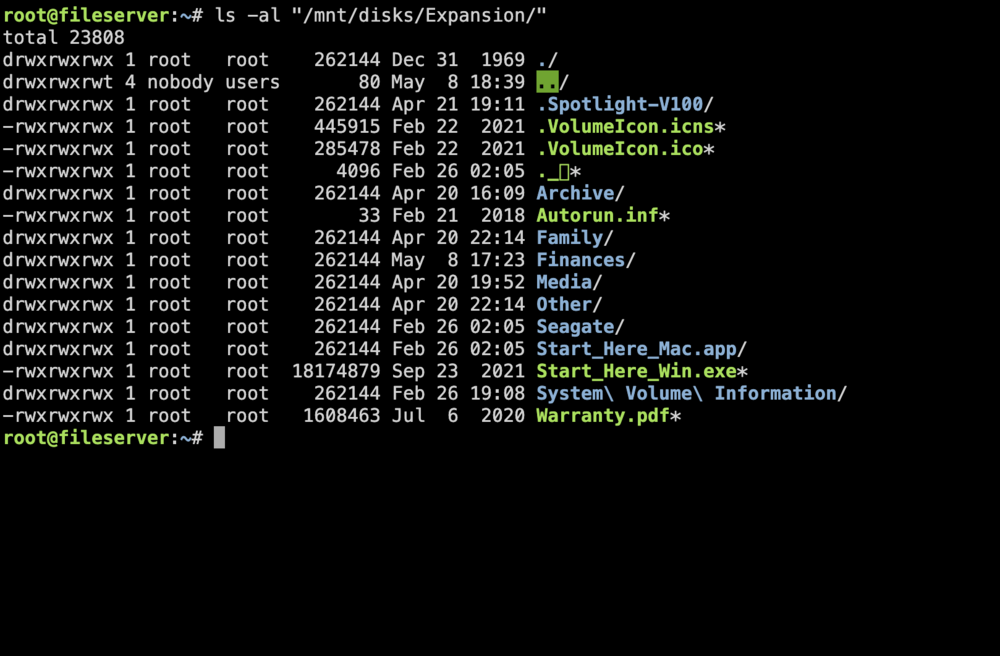
Hello, new Unraid user here. I'm trying to use RSYNC to sync an external Seagate drive mounted with unassigned devices. rsync -av --delete "/mnt/user/Shared/" "/mnt/user/syncTest/" Works perfectly fine. However, when trying to copy to my mounted external drive, I use the command: rsync -av --delete "/mnt/user/Shared/" "/mnt/disks/Expansion/" And I get the error message "Operation not permitted (1)" for all of the files. Krusader works when trying to copy files to the External Drive. Not sure what I may be overlooking with rsync? ls -al "/mnt/disks/Expansion/" gives me the following: There's some garbage files in there that came with the Seagate drive that I'll be getting rid of. But it's mainly the directories Archive Family Finances Media Other That are going to stay. Not sure what I may be overlooking?
-
Okay, I'm almost completely set up and going. I've got Plex running as well as DisqueTV for channels. Shares are mapped and everything seems to be going well. The last thing I'm trying to do is rsync to my external drive. Using the terminal command: rsync -av --delete "/mnt/user/Shared/" "/mnt/user/syncTest/" Works perfectly fine. However, when trying to copy to my mounted external drive, I use the command: rsync -av --delete "/mnt/user/Shared/" "/mnt/disks/Expansion/" And I get the error message "Operation not permitted (1)" Krusader works when trying to copy files to the External Drive. Not sure what I may be overlooking with rsync?I launched krusader again and copied the files over. This time they all showed up. But I do need to hunt through and see if anything else was missing from the copy. I just happened to notice these folders were missing 10,000 files. I did download the Fix Common Problems plugin and that looks helpful. No errors, just a couple warnings. 1. Plugin Update Check not enabled 2. Docker Update Check not enabledWeird. The parity sync is completed. All the files are missing from my "Family" folder. All the sub-folders are there and were created with the transfer from my external drive. This is very concerning.Okay, so I've watched a bunch of videos from Space Invader and have skimmed through the documentation. I've now got three 8TB drives. I copied all the data to the two 8TB drives from a backup drive and the Parity was not yet installed. Everything seemed good - about 3.7TB of data. I've now got it running a parity sync and is about 85% completed. 3-4 hours to go. I have a share set up and I can browse to the unraid server. What's a little concerning is that one of my main folders has no files, just sub-folders. I used binhex-krusader to do the transfer and all the folders are there. But none of the files in some of the directories. I can confirm they are on the source drive though. Is this normal to not see files until the parity sync is complete for the first time?Ironically, I just started a family vacation and we're in the US Mid-West, only a couple hours from the Tornado's that are punishing through Oklahoma and Kansas tonight! I think I'm going to purchase two more 8TB drives and sett up a 16TB array with new, healthy drives and keep the one new 8TB as the parity drive. I'll use my new 12TB external drive to do backups mirrors until it's too large. I'm going to take a look through the written manuals, but I much prefer video's as a visual aid (I learn better from visuals than text). All that said, I'm not back for another week so won't be poking and prodding until then.So I'm well into the process now and Unraid is either highlightiing a lot of issues that Windows was able to work through and not shout about, or I had a ticking time bomb and Unraid is shining light on it. The first issue was that I purchased a new 480GB SSD. Once I hooked it up, it gave me errors. I posted in another thread with the diagnostics, but never heard back. So I removed the drive and sent it back to Amazon. Not an issue I wanted to deal with in a new drive. So I've had to Tools > New Config a few times. Just poking and prodding. I finally had my two 4TB drives set up as disk 1 and disk 2. I eliminated the parity drive for the initial data transfer and was unable to preclear the disks, but did format them to xfs. I did preclear the brand new 8TB drive. I transferred all the data to the drives yesterday. 3.7TB in total across the 8TB array. Everything seemed good! And then the parity check started. Well, I'm now looking at 524 errors on disk 2 and after looking through the forums, I'm seeing that one of the downfalls of unraid is that when doing the scheduled parity syncs, there's no way to know if it's the pariy drive that's a problem or not. There's also no way of knowing what files are an issue unless you're using something like Dynamix File Integrity. But even then, lots of comments of frustration that it's not accurate and a Google search brings up threads from 2 years ago about the plugin reliability. But that might be outdated. But then there's the debate of xfs vs zfs but unraid prefers xfs. It's a pandora's box of indecision. I'd like like a configuration that can keep my home videos/photos and important documents safe and secure without uploading them to the Amazon or Google cloud gods. Like I said, maybe I had a ticking time bomb before and I'm now aware of it. Perhaps disk 2 needs to be replaced. But then, do I take out disk two, wipe the drives and start over from my backups? Or once parity is completed, do I just swap the drives? The backup drive should be good as it came from a drive without issues and is showing no errors. But now that content is in unraid, it's showing those 524 errors and I don't know if the files are compromised or not (or how to tell what files they may be?)Okay, good to know the parity sync should be irrelevant. I also have an "Array has 1 failed device" but I read that it is likely due to the parity being checked that it would go away. Wasn't sure if this was the same. I've attached the diagnostics zip file. Thank-you! Learning lots! fileserver-diagnostics-20240424-1813.zipVery new to Unraid, but migrating from decades of Windows for my fileserver usage. I have an 8TB parity disk and I have two 4TB disks that I have set up in the array. I purchased a new SSD and it arrived today. I installed it, formatted it but also clicked a couple things that may have messed things up. For example, I accidentally added one of the 4TB drives as a parity drives. I quickly noticed my mistake and stopped the array Tools > New Config to start over. At the same time, I installed the new SSD as a cache pool and formatted it. However, there's an error on the dashboard that reads "Pool has 1 SMART error." I ran some self-test diagnostics and it shows: Num Test_Description Status Remaining LifeTime(hours) LBA_of_first_error # 1 Extended offline Completed without error 00% 1 - # 2 Short offline Completed without error 00% 1 - Not sure if the error is there because the drives are doing a parity sync or if it's temporary? Or does the drive have an error?Thank-you so much for clarifying. I've ordered a new 480GB Sata SSD for the SSD pool and should be arriving tomorrow. So my 8TB parity drive in precleared, the two 4TB drives are in the case (can't seem to preclear them, but from what I've ready this happens automatically now with unraid) and the 480GB drive will be set up a a cache pool and will hold appdata, plex, etc. Are there any videos that are newer that can help walk through a similar setup to this? Most videos I've watched are older and it's mixing me up with the terminology. Would love to get started on the right foot!

