





csimpson
Members
-
Joined
-
Last visited
Everything posted by csimpson
-
So the code: veto files=/._*/.DS_Store/.thumbnails/ Is not needed? I really hate getting the hidden mac files on my unraid server. I suspect it's got to do with Mac Finder. I've tried using MUCommander and it doesn't give the same error. Thanks Apple... Another thing you've messed up, unnecessarily.
-
Here's the attached diagnostics. I tried to copy a folder called "Movie Posters" which is about 150MB with sub directories and files and it gave the same -8062 error. Thank-you fileserver-diagnostics-20260128-1052.zip
-
Sorry... Anyone?
-
Okay, yep, seems to be the .ds_store file. I just deleted the hidden file using terminal from the mac side, and it was able to copy the folder with the file. This isn't a fix, this is just confirming what seems like the issue is. Hopefully there's a fix for this? Is it a mac issue, or an unraid issue? Or a windows issue with SMB?
-
So it would appear that I can no longer copy a single file in a folder anymore using Finder. I keep getting en -8062 error. I recently updating to Unraid 7.2.3 and my Mac has been updated to Tahoe 26.2. This is a new issue. I can copy files, no problem and I can create a folder using finder on an SMB share, no problem. But the second I try to Drag & Drop a local file in to a folder on Unraid in Finder, I get the error. Any ideas? I'm wondering if it's SMB or the .ds_store file? I do have SMB extras as: veto files=/._*/.DS_Store/.thumbnails/
-
Okay, so I figured something out. It's was either tdarr or tdarr_node. I've disabled both of them, and the size of the docker vdisk is no longer growing. I have no clue why it was as I don't use it, but set up it "just in case" But not sure why it was getting so bloated over time? Any ideas?
-
Three days later... It's up to 27.2GB... almost 1 GB in a week, just getting chewed up in something.
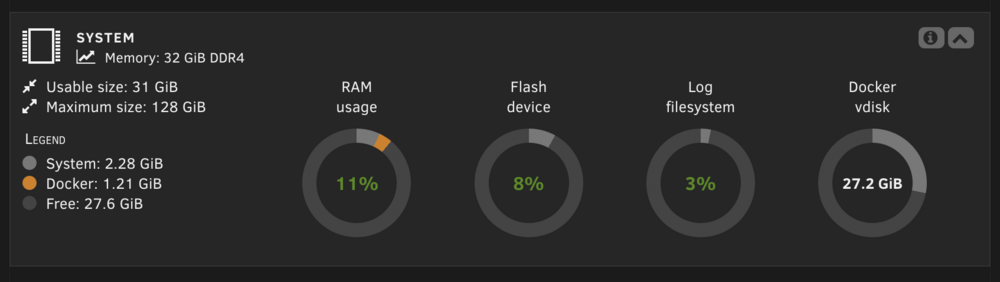
-
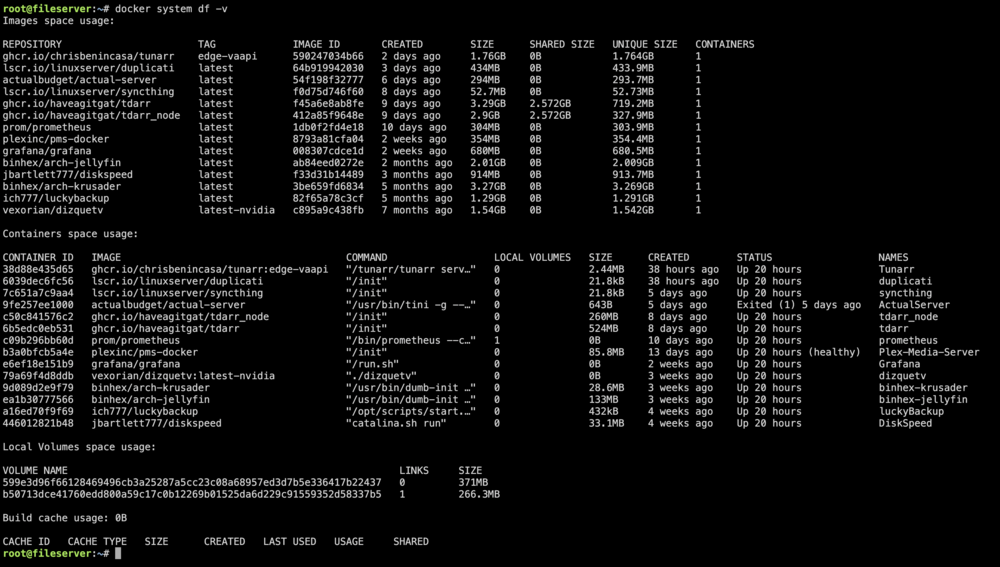
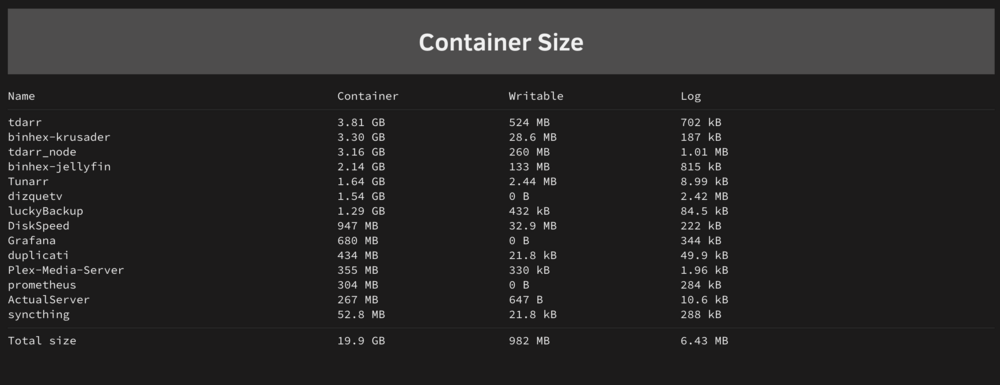
Screenshot attached for clear visual. root@fileserver:~# docker system df -v Images space usage: REPOSITORY TAG IMAGE ID CREATED SIZE SHARED SIZE UNIQUE SIZE CONTAINERS ghcr.io/chrisbenincasa/tunarr edge-vaapi 590247034b66 2 days ago 1.76GB 0B 1.764GB 1 lscr.io/linuxserver/duplicati latest 64b919942030 3 days ago 434MB 0B 433.9MB 1 actualbudget/actual-server latest 54f198f32777 6 days ago 294MB 0B 293.7MB 1 lscr.io/linuxserver/syncthing latest f0d75d746f60 8 days ago 52.7MB 0B 52.73MB 1 ghcr.io/haveagitgat/tdarr latest f45a6e8ab8fe 9 days ago 3.29GB 2.572GB 719.2MB 1 ghcr.io/haveagitgat/tdarr_node latest 412a85f9648e 9 days ago 2.9GB 2.572GB 327.9MB 1 prom/prometheus latest 1db0f2fd4e18 10 days ago 304MB 0B 303.9MB 1 plexinc/pms-docker latest 8793a81cfa04 2 weeks ago 354MB 0B 354.4MB 1 grafana/grafana latest 008307cdce1d 2 weeks ago 680MB 0B 680.5MB 1 binhex/arch-jellyfin latest ab84eed0272e 2 months ago 2.01GB 0B 2.009GB 1 jbartlett777/diskspeed latest f33d31b14489 3 months ago 914MB 0B 913.7MB 1 binhex/arch-krusader latest 3be659fd6834 5 months ago 3.27GB 0B 3.269GB 1 ich777/luckybackup latest 82f65a78c3cf 5 months ago 1.29GB 0B 1.291GB 1 vexorian/dizquetv latest-nvidia c895a9c438fb 7 months ago 1.54GB 0B 1.542GB 1 Containers space usage: CONTAINER ID IMAGE COMMAND LOCAL VOLUMES SIZE CREATED STATUS NAMES 38d88e435d65 ghcr.io/chrisbenincasa/tunarr:edge-vaapi "/tunarr/tunarr serv…" 0 2.44MB 38 hours ago Up 20 hours Tunarr 6039dec6fc56 lscr.io/linuxserver/duplicati "/init" 0 21.8kB 38 hours ago Up 20 hours duplicati 7c651a7c9aa4 lscr.io/linuxserver/syncthing "/init" 0 21.8kB 5 days ago Up 20 hours syncthing 9fe257ee1000 actualbudget/actual-server "/usr/bin/tini -g --…" 0 643B 5 days ago Exited (1) 5 days ago ActualServer c50c841576c2 ghcr.io/haveagitgat/tdarr_node "/init" 0 260MB 8 days ago Up 20 hours tdarr_node 6b5edc0eb531 ghcr.io/haveagitgat/tdarr "/init" 0 524MB 8 days ago Up 20 hours tdarr c09b296bb60d prom/prometheus "/bin/prometheus --c…" 1 0B 10 days ago Up 20 hours prometheus b3a0bfcb5a4e plexinc/pms-docker "/init" 0 85.8MB 13 days ago Up 20 hours (healthy) Plex-Media-Server e6ef18e151b9 grafana/grafana "/run.sh" 0 0B 2 weeks ago Up 20 hours Grafana 79a69f4d8ddb vexorian/dizquetv:latest-nvidia "./dizquetv" 0 0B 3 weeks ago Up 20 hours dizquetv 9d089d2e9f79 binhex/arch-krusader "/usr/bin/dumb-init …" 0 28.6MB 3 weeks ago Up 20 hours binhex-krusader ea1b30777566 binhex/arch-jellyfin "/usr/bin/dumb-init …" 0 133MB 3 weeks ago Up 20 hours binhex-jellyfin a16ed70f9f69 ich777/luckybackup "/opt/scripts/start.…" 0 432kB 4 weeks ago Up 20 hours luckyBackup 446012821b48 jbartlett777/diskspeed "catalina.sh run" 0 33.1MB 4 weeks ago Up 20 hours DiskSpeed Local Volumes space usage: VOLUME NAME LINKS SIZE 599e3d96f66128469496cb3a25287a5cc23c08a68957ed3d7b5e336417b22437 0 371MB b50713dce41760edd800a59c17c0b12269b01525da6d229c91559352d58337b5 1 266.3MB Build cache usage: 0B CACHE ID CACHE TYPE SIZE CREATED LAST USED USAGE SHARED
-
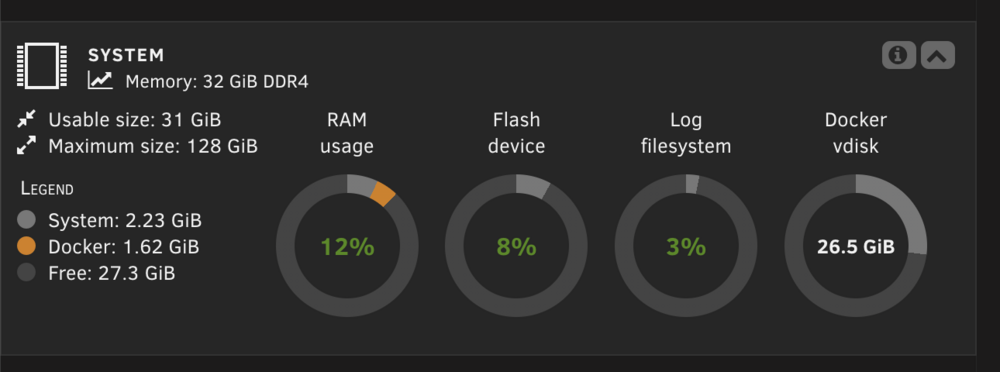
☹️ Anyone? Up to 26.5 GB eaten up in the VDisk.
-
Any ideas anyone how I can find what's chewing up the vdisk space? ChatGPT says that BTRFS is being used, which has known issues with metadata bloat in loopback images and that I'm not doing anything wrong — this is a real systemic issue, not misconfiguration with Unraid. But I can't imagine that Unraid users would tolerate this "just being the way it is" with an every growing VDisk?
-
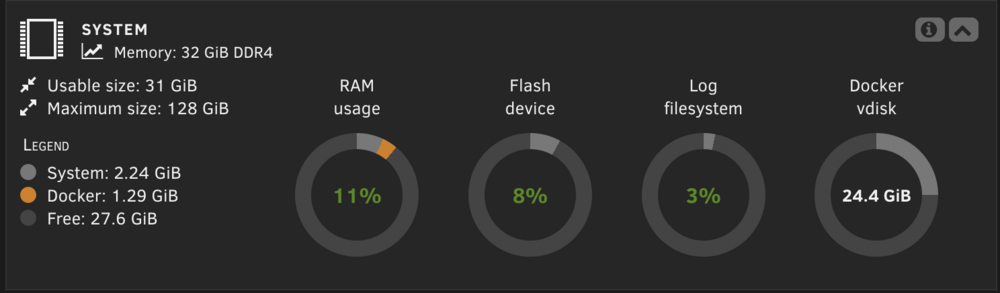
Okay, so it's been about 6 days... The Docker vdisk has gone from a clean install of 18.1GB about 2 1/2 weeks ago to 21.2GB a week ago and is now at 24.4GB. It will continue to keep growing... Last year it grew to almost 60GB and I just kept resizing it before learning this isn't intended behaviour.
-
I'll keep an eye on it. I suspect that each month it'll grow about 3-5GB for some reason. Will post back here in that time if it persists. Hopefully not!
-
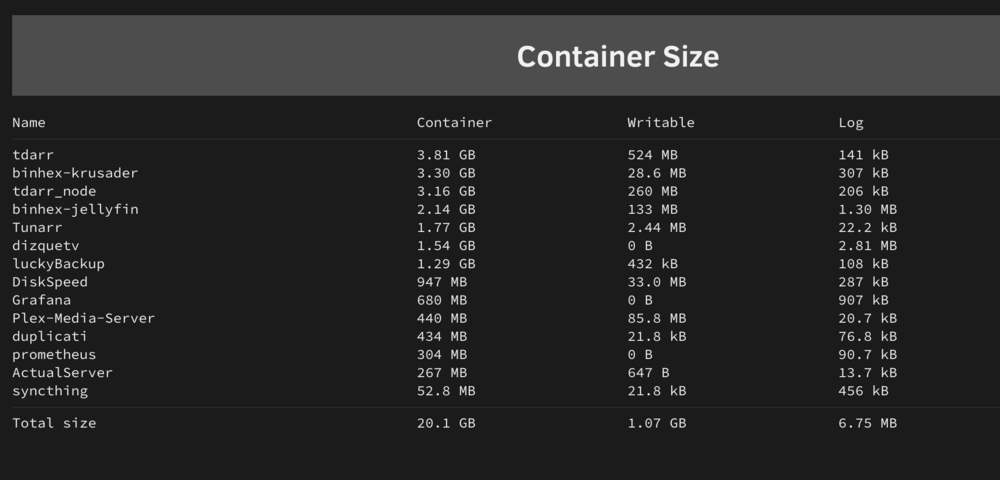
Ahh, here's the image of the sizes.
-
It got up to over 60GB in the last year. I just kept expanding the size of the docker and didn't realize that it wasn't supposed to keep growing. I thought that maybe it was Plex cache or poster images or something that was causing it to grow so was okay with it, until I started investigating and realized it's not right, somewhere?
-
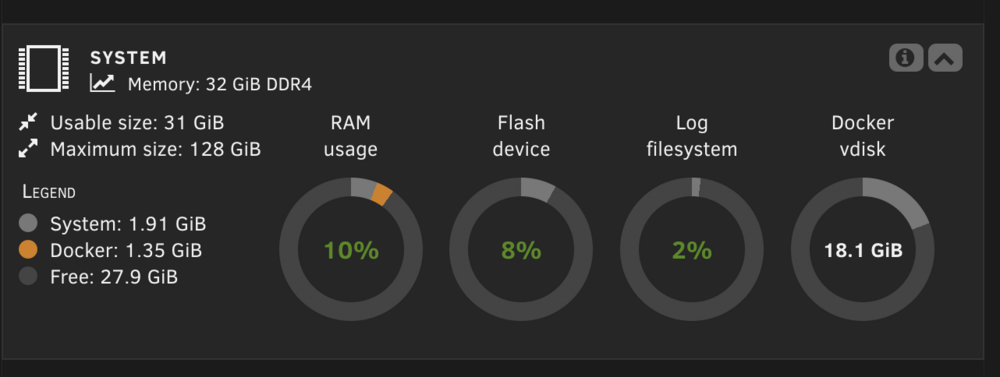
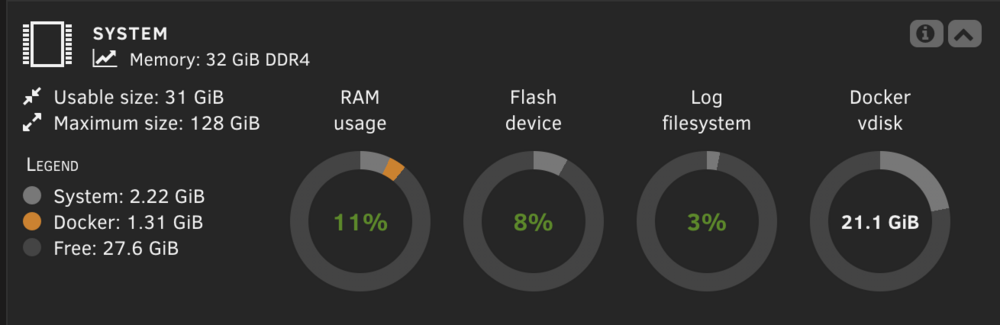
Over the past 10 days, my docker.img has grown from 18.1GB to 21.2GB — ~3GB of growth — despite rebuilding everything from scratch. Here’s what I’ve done: ✅ Deleted and recreated docker.img ✅ Reinstalled all containers ✅ Verified all major containers (Plex, Tdarr, Tunarr, etc.) are using mounted volumes properly (e.g., /transcodeRam) ✅ Ran docker system prune, docker ps -s, and docker system df ✅ Checked /var/lib/docker/* — found that /var/lib/docker/btrfs is 134GB, which seems suspicious ✅ Confirmed I’m using BTRFS on my cache pool ✅ Logging container sizes — nothing shows more than a few hundred MB growth ✅ Overlay2 is not used — Unraid defaults to BTRFS Despite all that, the docker image is slowly inflating. Most people say docker.img should never go above 20GB — yet mine creeps upward even with minimal changes and after a full reset. Question: Is this a known issue with BTRFS + loopback vdisks in Unraid? Would switching to a folder-based Docker install (instead of a loopback image) fix this permanently? Is anyone else seeing this kind of docker.img bloat over time? Looking for advice from Unraid pros who’ve solved this long term. Thanks!
-
No, I have logging disabled. I'll enable it and see what the message is when it happens again. I was just curious if there was a way to ignore certain files or folders... Even ignoring the Shared/.Recycle.Bin path would be helpful, I'm just not sure how to do it.
-
I'm sorry if this has been asked. My wife uses MS Word and saves files directly to my unraid server. Every morning, I get errors such as Link: http://fileserver.local/Settings/Scheduler Event: Unraid Status Subject: Mover Tuning Notification Description: Error: Invalid filename path: 'Shared/.Recycle.Bin/Family/Stuff/~$siness Plan May 2025.docx' Importance: warning Is there a way to ignore these files as it seems like it's a temporary file written by Office that starts with ~$
-
A bunch of ways. #1 - would be local storage. You can use JavaScript to create name/value pairs to store data for profile settings that do not get removed when clearing cache/cookies. This would then be device specific. #2 - You can create a profile for different devices which are based off the browser Useragent String combined with the available width and height of the screen. There are other pieces of data that can be detected with JavaScript if you wanted. From there, you can essentially create a UUID which ties the layout to that computer accessing it. If you have two systems that are running the same resolution AND the exact same useragent then you get the same profile/panel layout. But if you connect with an iPad or a system that's running a different resolution, it creates and saves a different panel layout for the system accessing it. And of course, Unraid could have a small toggle which shows (Display the same layout across all devices). If checked, it's a simple layout store. If unchecked, it would show the different systems that have connected based off their user agents. You could create and name different profiles. Then you'd need to deal with browser updates as that would change the useragent, but then you could implement a simple popup with Unraid which detects the minor version change and asks "Do you want to keep this layout" when the useragent changes slightly. Those would be two ways . I like the second option myself.
-
Too bad, they should be set in a DB or even the browser local storage. Cookies is the worst way to do it.
-
I wonder if this will actually get fixed? I need to be at 90% to see three columns as well regardless of resolution. Also, annoyingly, is that for whatever reason the layout keeps resetting from time to time. This should be pretty easy to "save" the layout.
-
Not that there's anything going on in this thread, but I may have solved it. I had set the resolution to be 2560X1440 and the font size was set to 150% as I'm on a HiDPI display and wanted to benefit from the higher PPI. Turns out, setting it to a font size of 100% has eliminated the freezing/crashing. I'm still testing and turning features back on, but this seems to be the culprit, so far.
-
I completely deleted the VM and reinstalled from scratch. Vanilla Install, nothing added. Just the drivers. Let's see how it goes...
-
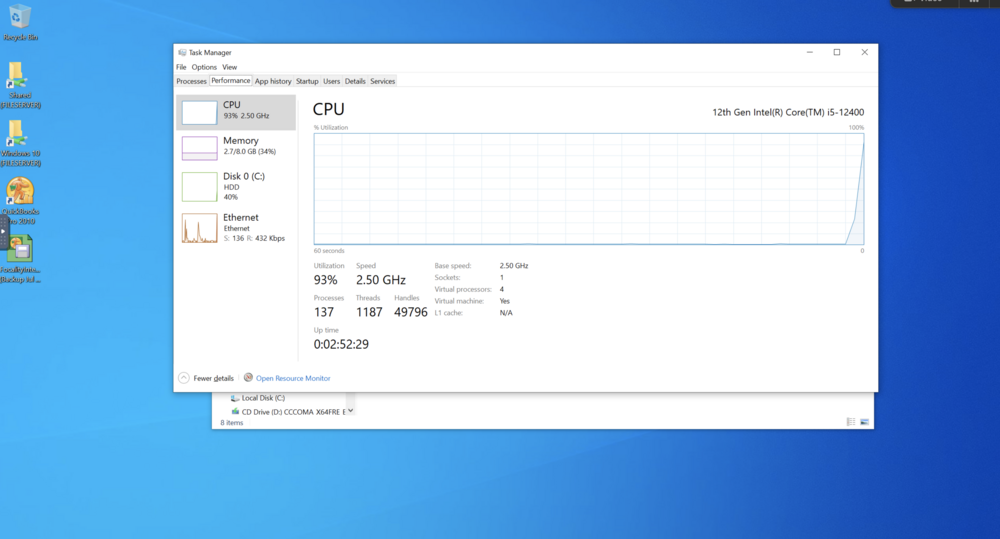
So it crashed after 2 hours and 59 minutes. It was doing nothing. This is the frozen screen.
-
@ffgdadAt the risk of hijacking my thread with two different problems and creating confusion, I'm going to pull it back to mine and ask the original question "Is there any way to diagnose this VM to see if it's running properly? It's my first VM so I'm at a loss of where to start. Do the Diagnostic logs help in this case when it's a VM freezing up"
-
After getting my windows 10 VM running over the weekend, I've been experiencing a lot of random freezing/crashing when clicking on an icon or starting an app. When Idle, it seems to keep running (so far) but when anything is clicked, there's a risk of a crash. Splashtop will freeze up or so will VNC. I need to force stop it to get it going again. I used the SpaceInvader video to set up the VM and followed it. Everything is working, but it's freezing, a lot. Is there any way to diagnose this VM to see if it's running properly? It's my first VM so I'm at a loss of where to start. Do the Diagnostic logs help in this case when it's a VM freezing up?



