





csimpson
Members
-
Joined
-
Last visited
Everything posted by csimpson
-
Good to know. I was able to rip the Disc and make an ISO of it. New problems, but I'll post a new support thread. Too tired tonight to do it. My windows VM is freezing all the time and only way to gain access again either through Splashtop or VM Control (VNC) is to "Force Stop" it.
-
I didn't take my own advice because I'm impatient... Reinstalled the VM AND MADE A BACKUP OF IT! Now back to where I was with my first post yesterday, lol.
-
Ungh... I just did something so stupid. I deleted the "Folder" with the VM - Poof, gone! Looks like the Dynamix Recycle Bin plugin doesn't track images.. I need to step away from any technology today. Too tired, making careless stupid mistakes.
-
Okay, so I deleted the Libvirt image file and then initiated a new VM install. Rather than going through the whole process of setting up Windows, downloading apps, mounting drives, etc I took the img file and copied it over to the new VM directory that was created and replaced the old. It worked! Thank-you SimonF for helping me get the straightened out. I suppose that I can make a daily backup of the Windows 10 Image and that's what stores all of the windows preferences, etc? So now back to the CD-ROM issue. I'll tackle that today but I'll look at your other settings. I'm curious why passing a CD-ROM or DVD drive through is so tricky? To have a VM set up to rip discs I'd think this is a more common task?
-
I've uploaded the newest diagnostics. Unfortunately, I need to run out for a bit with my kids but will be back later this evening. Thank-you for helping, I'm stressing out. diagnostics-20240713-1618.zip
-
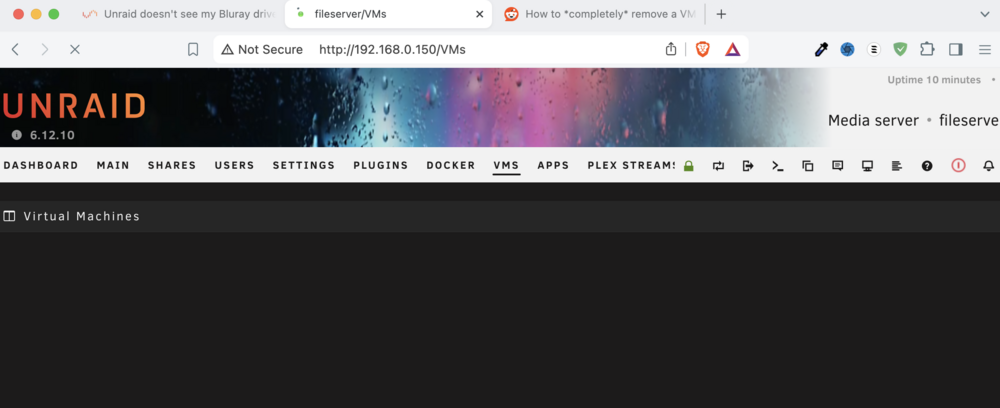
Tried this, then I enabled VM Manager, clicked on VM's and it hangs. It just shows the spinning loading icon in the browser tab.
-
I've uploaded the newest diagnostics file. No clue why enabling VM Manager brings Unraid to it's knees, even without the VM running. diagnostics-20240713-1506.zip
-
Okay, so I managed to reboot Unraid in Safe mode without the array running and disabled VM's in the VM Manager. However, if I enable VM Manager the entire system hangs. Can I delete the Windows 10 VM I created or edit the "OS Install ISO" without enabling the VM Manager?
-
Okay, I have a much more upsetting issue now. I tried replacing /dev/sr0 with /dev/sg6 and now nothing is working. I can't click on the VM tab, it just hangs. Can't restart the system without holding the power button down for 5 seconds and doing an unclean restart. Tried twice, Parity check is going to happen, but I can't seem to go back into the VM settings and change it back. I didn't think that a VM that isn't set to autostart would cripple Unraid like this.
-
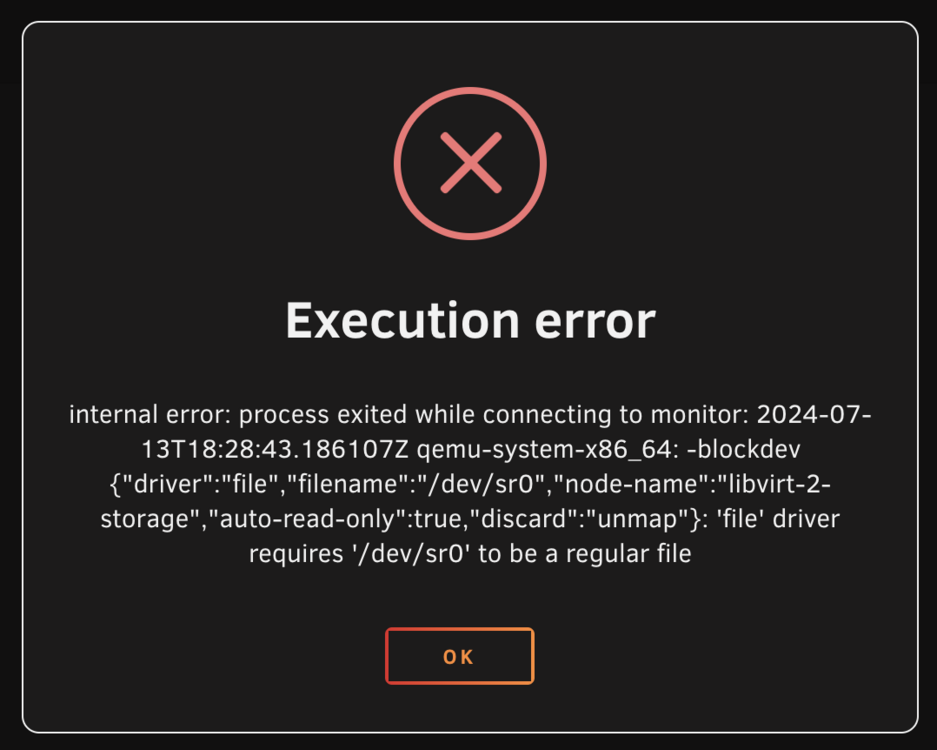
Tried that and /dev/sr0 gives the attached error. The /dev/disk/by-id/ option has me a little lost. Not sure why the OD Install ISO is being replaced with a BD Drive?
-
Are there any guides to do this? I've searched, but it seems like most forum posts are problems or for external drives. This is the first VM I'e set up so it's a bit foreign to me.
-
Hmmm, interesting to know. So how would I go about seeing it in my Windows 10 VM as a drive? That's the goal overall but figured that the first step is to see it in Unraid.
-
Diagnostics attached. Thanks! diagnostics-20240713-1316.zip
-
I got around to hooking up my Bluray Drive to install an older version of Quickbooks on a Windows 10 VM. The BIOS see's the drive but I can't find it in Unraid. Not sure if it's managed my unassigned devices like SD Cards readers, etc or what it's supposed to show up? But it's not.
-
I've set it up so that Mover Tuning holds onto files not used for 30 days. Will see how it goes.
-
I'm fine tuning my unraid setup now. I have some files that are accessed on a daily basis. For example, every morning, there's a few excel files that I update. For example, in the array called "finances/investments.xls" So in the morning when I open the file, It spins up my drive and then after an hour spins down. it may not get used until the next morning or a few hours later. Is there a way that I can have certain files sitting on my SSD's but still be seen as part of the array for nightly clone's to an external drive with RSYNC? Or is this more of a logic thing with Mover Tuning? For example, any files I add/update that are over 10MB get moved on an hourly basis. That way, larger media files get moved, but smaller excel files, etc stay on the SSD? Am I looking at it the right way? I'm going to be adding a second 1TB SSD to my cache pool and setting it up as a RAID-1 today for redundancy.
-
I'm not sure where to ask this in the Unraid Forum. I had an Nvidia 1650 and NVENC was working with the DizqueTV docker app (from the community apps). I used the NVidia Build. Yesterday, I built a complete new system with an i5-12400. tDarr is working with Quicksync. Tunarr is working with Quicksync, but I cannot get I cannot get hardware based transcoding of FFMPEG Video Encoder h264_qsv or mpeg2_qsv to work. with DizqueTV. I've tried the following: 1. Adding --device=/dev/dri and --device=/dev/dri/ to Extra Parameters. 2. Adding --device=/dev/dri:/dev/dri to Extra Parameters 3. Running the docker in privileged mode 4. Have tried multiple versions of the DizqueTV Docker install. I specifically upgraded my system so I could use DizqueTV with Quicksync to keep it efficient rather than running an NVidia GPU with dual fans, etc. The DizqueTV logs continually give the following error when trying to playback. Video and Audio are being transcoded by ffmpeg Player Latency: (5)ms Stream FFMPEG exited with code 1. Replacing failed stream with error stream Video and Audio are being transcoded by ffmpeg Played video for: 39 ms Client Closed Stream FFMPEG RECEIVED kill() command Stream FFMPEG this.ffmpeg.kill() Stream FFMPEG exited with code 1. Concat FFMPEG exited with code 1. Concat FFMPEG RECEIVED kill() command Concat FFMPEG this.ffmpeg.kill() Has anyone got DizqueTV running with Quicksync? I feel like I'm overlooking something.
-
Hmmm, I'm just not sure what else I would be doing? I have a Macbook Pro that I do all my day to day work on. Gaming is handled by the PS5 and Switch in the media room on the 120 inch 4K screen. The Unraid/fileserver is for storing data and serving up Plex/DisqueTV to the household. tDarr for some transcoding but so far, that's about it. That said, I'm tinkering and TRYING to find stuff to do with it. No home camera surveillance. But my last server is 10+ years old and much of the reason of upgrading is the fear of older hardware failing. I'm thinking about this FAR too much, lol.
-
Just ordered an i5 12400 (with Intel GPU for quicksync) , new Gigabyte Mobo (with two M.2 drive slots), 32GB of memory. Will use my existing case for the time being and be on the hunt for a new PSU. [ADDED:] Alternatively, I'm not sure if I should got for the i3 12100 instead for a lower idle current draw? This system won't be used for gaming or anything.
-
Lol, I just read your story in your signature at: I can completely relate! Where would the extra performance be seen? Clicking around in Unraid is super quick. Plex is snappy. Other than that, where would the performance be?
-
So for the last 45 days, I started from moving from my 12 year old Intel® Core™ i5 CPU 650 @ 3.20GHz with 6GB of memory windows 10 machine over to Unraid. It was running Plex and I just started to poke at DizqueTV. That's where I thought, "Hey, let's move away from Windows to something new." I feel like a kid in a candyshop with all the things available. VMs and Dockers and Plugins. Montoring and tweaking... Since then, I've got Unraid set up with two 8TB drives and an 8TB parity drive. I've got a 14TB external drive to be stored offsite. I'm using the User Scripts plugin to run R-SYNC to sync to the backup drive (and I have a 4TB external drive that spins up every morning at 3am to sync home videos/pics, financial docs and other non-replaceable files.) But Plex/DisqueTV has been a nag to me. For the longest time, everything just ran using Direct Play to my various Apple TV devices in the house. My system's draw on the UPS was 54Watts when running and 45 Watts when Idle. I started down the road to transcoding because DisqueTV/Plex was having an issue with all the different formats. I tried Tdarr but it would cripple my poor old CPU. So I went out and bought an Nvidia 1650. It works great! NVENC is working great with Tdarr and DisqueTV is humming alongg (albeit with quirks). However, I'm at the point where I'm looking for efficiency and safety. The PSU, Mobo and CPU is 10+ years old but the performance hasn't been limiting really. However, the PSU is a Bronze+. At some point, it'll fail. Just not sure when. The mother boards memory limit is 8GB and I suspect that as I grow with Unraid, I may be looking at running VM's (Or maybe not, I'm not totally sure what I would do with them). So The challenges currently facing me. 1. Do I return the 1650 and purchase a new Mobo with an Intel 12400 (or comparable) and use Intel QuickSync instead in NVENC? 2. Currently, when running my system and transcoding for DisqueTV the power draw is around 75watts. I'm curious if a new CPU, Mobo, PSU, would cut my power usage down by half, or if 75 watts is perfectly respectable? 3. If I keep my setup as it is, I need to figure out a new case and the 1650 requires a 6-pin Molex power connector. Unfortunately, with this connected, by case won't close. My case is an older NMEDIA 2000B HTPC case. 6 Drive Bays and looks like on the outside, but dated. Everything runs pretty cool... But, I'm not sure if I'd see much of a performance/efficiency increase going from the NVidia card with a 10+ year old CPU/Mobo/Memory, etc to a new Mobo, Intel 12400+ and no Video card.
-
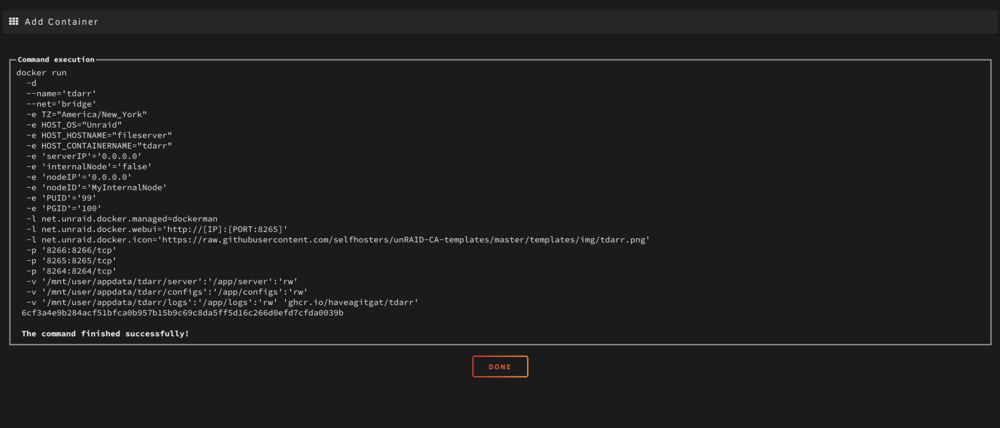
Yes, the nvidia plugin is installed and seemingly working. I've also got the GPU plugin showing me the stats on my dashboard. I tried using the repo you mentioned and it gave me the exact same error. When I remove, --runtime=nvidia it installs fine. But then, I can't seem to use the GPU. I also read that the 1030 might not be able to support NVENC but not sure why that would affect the installation process of the docker? Also, it gives me the same error when I try to do the same thing with Dizquetv.
-
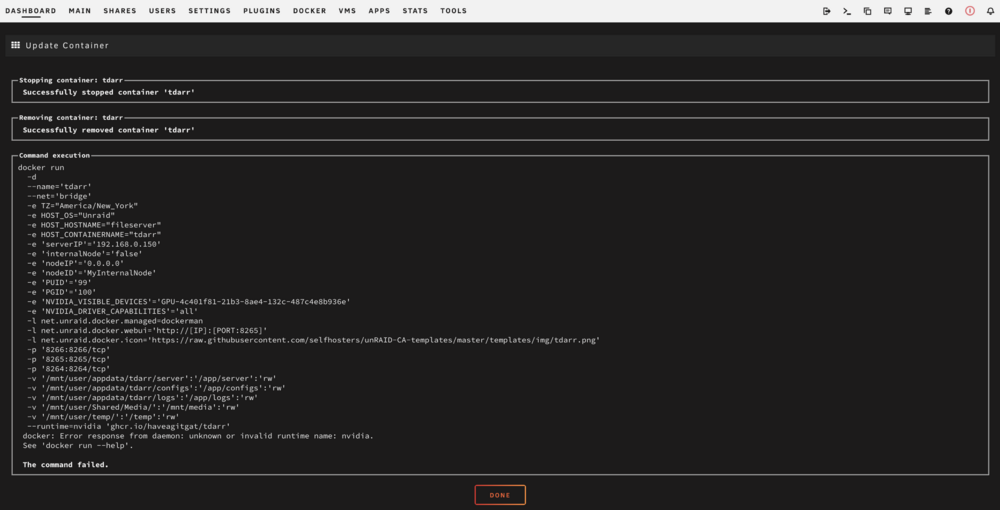
Installed Tdarr today to transcode. Super slow with my older processor of course, but wanted to try it out. Went out, bought an Nvidia GT 1030. Not ideal, but it fits in the case with the other cards. Went through Space Invaders one tutorial and after applying the settings, I get the following error: --runtime=nvidia 'gher. io/haveagitgat/tdarr' docker: Error response from daemon: unknown or invalid runtime name: nvidia. Without the --runtime=nvidia it installs fine, but no nvidia transcoding. I've also installed the nvidia drivers for unraid using plugin. Not sure what the error is trying to say. It looks like it's trying to pull from a repo and failing, but could be completely wrong. Any ideas?
-
Ahhh okay, I understand. Thank-you!
-
After 30-40 minutes, it came back and I'm once again connected? I didn't do anything or change anything. I just looked at the log, nothing extra in the syslog file.


