





shakyknees
Members
-
Joined
-
Last visited
Everything posted by shakyknees
-
From what I gather, the Restore UI wants the *.gz file produced by the backup (as opposed to an unzipped appdata directory), and will do all containers, unable to pick and choose. Same source (lost 🤢) said the same as JorgeB: stop container (uninstall it? idk), then unzip the gz into the (empty) target appdata directory.
-
Default setting was "30" and is not labelled as Seconds vs Milliseconds in the Settings UI (UNRAID 7.1).
-
Reviewing my timeline, what I had done earlier this month was following the procedure in that link. I had gotten thru Step 4 (in the section that starts with, "The steps to carry out this procedure are: Note: these steps are the general steps needed. The steps you take may differ depending on your situation. If the drive to be replaced has failed..." ...through Step 14, which said it successfully copied Parity, but did not start the Data-Rebuild which Step 14 says should automatically follow: "When the copy completes, the array will still be stopped ("Stopped. Upgrading disk/swapping parity."). The Start button will now be present, and the description will now indicate that it is ready to start a Data-Rebuild._" ...but rather the Start button was not available due to the year-old latent "Disk 1" slot vacancy equating now to "Too many wrong and/or missing disks!". Which is where I am again now. Note that Step 12 had told me to do what I did: "Assign the old parity drive in the slot of the old data drive being replaced You should now have blue drive status indicators for both the parity drive and the drive being replaced" ...before I booted to start the successful Parity build on the new 8TB disk. After re-seating the previously-parity disk connections and booting, it showed up as "Wrong" under Parity disk, and I was able to select it to replace "Unassigned" for disk1, as intuition had led me to do a few days ago, but this time I rebooted the server at that point. Now it said, "Upgrading disk/swapping parity. Copy will copy the parity information to the new parity disk." and when that finished, I rebooted again and it started copying to Data disk1. So everything is Ok, and I have no idea why it didn't behave this way the first time through. Maybe I failed to reboot as required between steps. So anyway, all good, thanks much JorgeB, I owe ya at least a coffee.
-
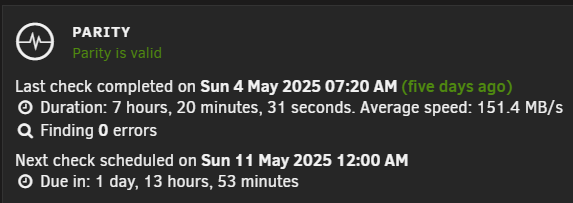
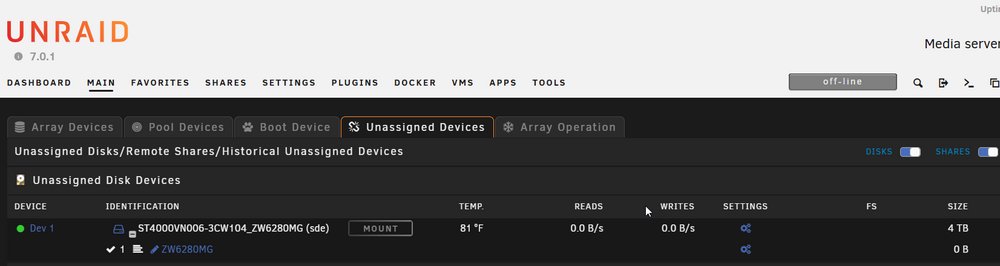
The Parity Check has been reporting success weekly for the year since I shifted that disk. IDK whether it matters, but I had never written data to the array at the time I moved that disk to cache, during my first week of configuring Unraid. I just now shut it down and re-seated the connectors for the disk (ST4000VN006-3CW104_ZW6280MG) that was the old Parity until it rebuilt parity on the new 8TB, that you were asking about whether BIOS detected it. It is now shown as Unassigned. This is how it looked at one point in the earlier timeline, before I attempted to add it as disk1 (trying to use it for Data and make Unraid stop complaining about not having a disk1). Attached Diagnostics (ratcreek-diagnostics-20250509-1023.zip) from after the latest reboot. ratcreek-diagnostics-20250509-1023.zip
-
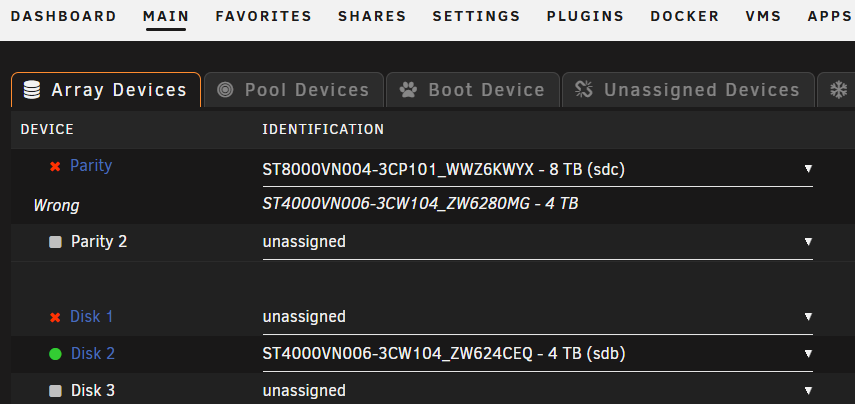
1. disk1 was my samsung SSD which I removed and has been my cache drive for the past year. 2. Yes, the old parity is still available, it is ST4000VN006-3CW104_ZW6280MG. Though it is currently all plugged in, it does not show in Array Devices. I want to repurpose it as a data disk.
-
Uploaded image
-
Resolved on 4th attempt by NOT selecting "Follow topic" during submission. How to mark as "Resolved"?
-
My best attempt at a timeline of how I dug my grave... I had been running fine for months with: Apr 17 19:51:40 RatCreek kernel: mdcmd (1): import 0 sdb 64 3907018532 0 ST4000VN006-3CW104_ZW6280MG Apr 17 19:51:40 RatCreek kernel: md: import disk0: (sdb) ST4000VN006-3CW104_ZW6280MG size: 3907018532 PARITY 4TB Apr 17 19:51:40 RatCreek kernel: mdcmd (2): import 1 Apr 17 19:51:40 RatCreek kernel: md: import_slot: 1 empty Apr 17 19:51:40 RatCreek kernel: mdcmd (3): import 2 sdd 64 3907018532 0 ST4000VN006-3CW104_ZW624CEQ Apr 17 19:51:40 RatCreek kernel: md: import disk2: (sdd) ST4000VN006-3CW104_ZW624CEQ size: 3907018532 DATA 4TB ...showing & ignoring "missing disk" where I had removed "data disk Samsung_SSD_870_EVO_500GB_S6PXNS0W524500P (sdd)" and made it Cache. I failed to persist in finding how to remove that apparently-cosmetic error. 😞 Recently I added a new 8TB ST8000VN004-3CP101_WWZ6KWYX physically to the array on an unused data plug, and selected the new disk in Array Devices' dropdown, displacing ZW6280MG, without RTFM the procedure. Also at the same time, selected the old ZW6280MG in the dropdown for the "missing disk 1" that had been warning ever since shifting the SSD to cache. Then booted a couple of times and in Maintenance it performed Parity build/copy for ~12 hours onto the new WWZ6KWYX, shown as healthy parity. Then I rebooted and it showed: May 5 13:56:57 RatCreek kernel: mdcmd (1): import 0 sdc 64 7814026532 0 ST8000VN004-3CP101_WWZ6KWYX May 5 13:56:57 RatCreek kernel: md: import disk0: (sdc) ST8000VN004-3CP101_WWZ6KWYX size: 7814026532 PARITY (new HDD) May 5 13:56:57 RatCreek kernel: md: import_slot: 0 wrong <------------------ May 5 13:56:57 RatCreek kernel: mdcmd (2): import 1 sdb 64 3907018532 0 ST4000VN006-3CW104_ZW6280MG OLD PARITY, still in its old physical position/connector May 5 13:56:57 RatCreek kernel: md: import disk1: (sdb) ST4000VN006-3CW104_ZW6280MG size: 3907018532 May 5 13:56:57 RatCreek kernel: md: import_slot: 1 replaced May 5 13:56:57 RatCreek kernel: mdcmd (3): import 2 sde 64 3907018532 0 ST4000VN006-3CW104_ZW624CEQ May 5 13:56:57 RatCreek kernel: md: import disk2: (sde) ST4000VN006-3CW104_ZW624CEQ size: 3907018532 DATA (no change) In Array Devices, I changed ZW6280MG (OLD PARITY) (DISK 1) to UNASSIGNED, and rebooted May 6 21:31:26 RatCreek kernel: md: unRAID driver 2.9.33 installed May 6 21:31:26 RatCreek kernel: mdcmd (1): import 0 sdc 64 7814026532 0 ST8000VN004-3CP101_WWZ6KWYX May 6 21:31:26 RatCreek kernel: md: import disk0: (sdc) ST8000VN004-3CP101_WWZ6KWYX size: 7814026532 PARITY (new HDD) May 6 21:31:26 RatCreek kernel: md: import_slot: 0 wrong <------------------ May 6 21:31:26 RatCreek kernel: mdcmd (2): import 1 May 6 21:31:26 RatCreek kernel: md: import_slot: 1 empty May 6 21:31:32 RatCreek kernel: mdcmd (3): import 2 sde 64 3907018532 0 ST4000VN006-3CW104_ZW624CEQ May 6 21:31:32 RatCreek kernel: md: import disk2: (sde) ST4000VN006-3CW104_ZW624CEQ size: 3907018532 I unplugged OLD PARITY ZW6280MG May 6 23:24:47 RatCreek kernel: md: unRAID driver 2.9.33 installed May 6 23:24:47 RatCreek emhttpd: Starter key detected, GUID: 0..2 FILE: /boot/config/Starter.key May 6 23:24:47 RatCreek kernel: mdcmd (1): import 0 sdc 64 7814026532 0 ST8000VN004-3CP101_WWZ6KWYX May 6 23:24:47 RatCreek kernel: md: import disk0: (sdc) ST8000VN004-3CP101_WWZ6KWYX size: 7814026532 PARITY (new HDD) May 6 23:24:47 RatCreek kernel: md: import_slot: 0 wrong <------------------ May 6 23:24:47 RatCreek kernel: mdcmd (2): import 1 May 6 23:24:47 RatCreek kernel: md: import_slot: 1 empty May 6 23:24:47 RatCreek kernel: mdcmd (3): import 2 sdb 64 3907018532 0 ST4000VN006-3CW104_ZW624CEQ May 6 23:24:47 RatCreek kernel: md: import disk2: (sdb) ST4000VN006-3CW104_ZW624CEQ size: 3907018532 I plugged OLD PARITY ZW6280MG back in to its orginal plug; it doesn't show in syslog. May 7 13:23:20 RatCreek kernel: mdcmd (1): import 0 sdc 64 7814026532 0 ST8000VN004-3CP101_WWZ6KWYX May 7 13:23:20 RatCreek kernel: md: import disk0: (sdc) ST8000VN004-3CP101_WWZ6KWYX size: 7814026532 May 7 13:23:20 RatCreek kernel: md: import_slot: 0 wrong May 7 13:23:20 RatCreek kernel: mdcmd (2): import 1 May 7 13:23:20 RatCreek kernel: md: import_slot: 1 empty May 7 13:23:20 RatCreek kernel: mdcmd (3): import 2 sdb 64 3907018532 0 ST4000VN006-3CW104_ZW624CEQ May 7 13:23:20 RatCreek kernel: md: import disk2: (sdb) ST4000VN006-3CW104_ZW624CEQ size: 3907018532 So my intuition just keeps digging me deeper without improvement, time to try my first forum question. I don't find articles that seem to meet my needs so how do I get back to a working array with the new 8TB disk as parity and the old 4TB parity to be used as data? As an aside, I'd heard more than once that newer UNRAID versions don't care where you move a disk, but I'm starting to suspect that is not necessarily true in all cases. Also, IDK what UNRAID means by a "slot". Suggestions? I have Diagnostics from 4/17 before I screwed things up, and several from the interim reboots described above. I've attached the lated Diagnostics and a screen shot of Array Devices. ratcreek-diagnostics-20250507-1433.zip
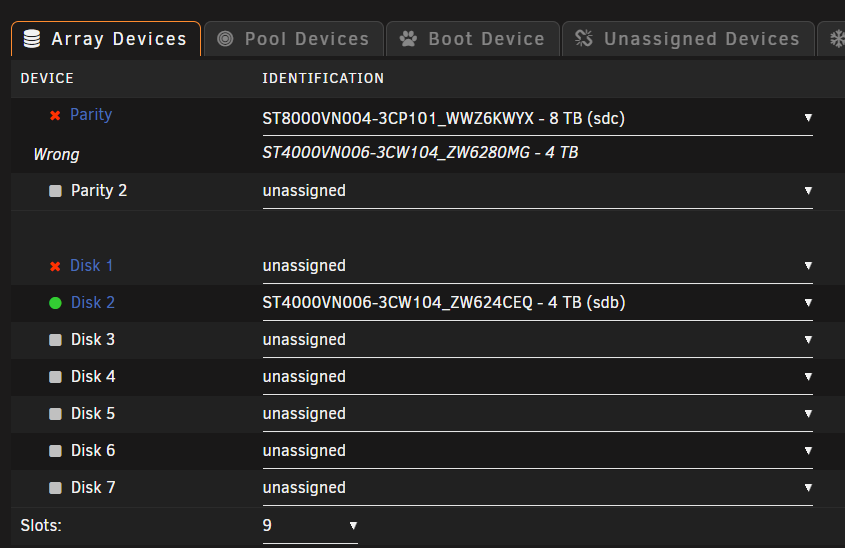
-
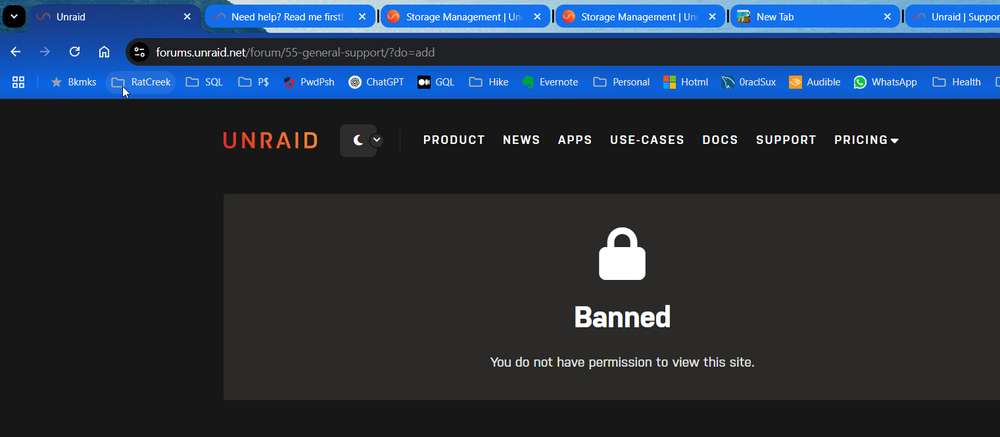
When I (logged in with my year-old account) submit my 100-line request with screenshot and diagnostics attached, Forum Submit returns, "Banned You do not have permission to view this site." Attempting to contact Limetech rejects my creds following password reset, sends me to https://limetechnology.myfreshworks.com/org/login?error=bad_credentials .
-
I got this working on my Dell T30 as follows (though it does not persist between reboots): root@myunraid:/mnt/addons# mkdir cd-dvd root@myunraid:/mnt/addons# mount /dev/sr0 /mnt/addons/cd-dvd/ mount: /mnt/addons/cd-dvd: no medium found on /dev/sr0. dmesg(1) may have more information after failed mount system call. ... so disable ripper (so it doesn't fail and eject it), and mount the disk root@myunraid:/mnt/addons# mount /dev/sr0 /mnt/addons/cd-dvd/ mount: /mnt/addons/cd-dvd: WARNING: source write-protected, mounted read-only. root@myunraid:/mnt/addons/cd-dvd# ls -la
-
My Dell T30's OEM DVD drive does not show in Unassigned Devices, whether it is empty or contains a disk known to have files. It is read just fine by Ripper docker container, but Ripper log gives no clue about what device its container thinks it is using. Surprised I find no help on this topic.



