





.jpg.21ce45a89df32845cd74f97385b0873b.jpg)
Nemu
Members
-
Joined
-
Last visited
Everything posted by Nemu
-
Perfect. 👍🏻Collabora also working?
-
For collabora you need additional containers and variables. I believe, that the mcreekmore container is for basic Opencloud at the moment.
-
Yes. It seems so.
-
Yeah... It's a pain, especially the proxy stuff. But this is a good progress. In general the container works. Yeah. Guess how often I had to reinstall each container again and again. But the container is running. Seems something with the reverse proxy. I'm not familiar with pangolin, how it handles the proxy stuff. As I'm not familiar with pangolin, I've check with AI. This is the answer. Maybe it helps? Key Differences & Required Configuration For Pengolin (which uses Caddy instead of nginx), you need: 1. Check Your Pengolin/Caddy Configuration Instead of the nginx .conf files, Pengolin uses Caddy's Caddyfile syntax. You need something like this for OpenCloud: opencloud.yourdomain.com { reverse_proxy opencloud:9200 { header_up X-Forwarded-Proto {scheme} header_up X-Forwarded-Host {host} header_up X-Real-IP {remote} } # Disable buffering for SSE flush_interval -1 } 2. Critical Headers for Authentication The login failure is almost certainly because these headers aren't being passed: X-Forwarded-Proto (must be "https") X-Forwarded-Host (your domain) X-Real-IP (client IP)
-
That's a lot of info stuff. Can you access the UI?
-
I've just tested my config with just running domains cloudflare without swag. My cloud flare domains were http to each container, and it works. So it should also work with pangolin. Seems you have used a banned password my friend ;) Password admin is in the banned password txt. You also need to comply to the password rules. At least 8 characters At least 1 lowercase letter At least 1 uppercase letter At least 1 digit At least 1 special character NOT in the banned password list If you use a new password. Delete the opencloud.yaml before ;)
-
The first error is normal. That's what I wrote, that the opencloud.yaml gets created on first container start and can't be overwritten. As mentioned. I always started from scratch to create the containers, when I made a mistake as it often caused issues, just overwrite, or delete the opencloud.yaml. Second seems an issue with the proxy conf. Can you try to use https in pangolin instead of http. It's weird but I also have to use https in cloudflare instead of http. Otherwisee I can have a more detailed look later. PS. I've just tested with just cloudflare domains, all http and disabled swag. Works totally fine. So swag is not a must and it should also work with pangolin.
-
Really weird. But this explains the failure. The opencloud.yaml has the jwt secret, which is synced with the wopi server.
-
Yes. My container has the the post args. <PostArgs>-c "opencloud init || true; opencloud server"</PostArgs> That's important, as without init, the container can't create the opencloud.yaml
-
In general, it should be ok, if you just use pangolin. Did you use my script? Have you changed the user settings in it? Then check, if it has created the folders and the files - csp.yaml and banned-password-list.txt Opencloud Container: Enter you password (IDM_ADMIN_PASSWORD), enter your opencloud domain with https in front: OC_URL https://opencloud.yourdomain.com then enter your collabora domain WITHOUT https in front: COLLABORA_DOMAIN collabora.yourdomain.com leave all other variables as is. collabora container: enter your wopi server domain (collaboration container) in aliasgroup1 with port: https://wopi.yourdomain.com:443 change your password. Under more settings extra_params you need to enter 2 times your opencloud domain ( opencloud.yourdomain.com) collaboration container (wopi server): Enter MICRO_REGISTRY_ADRESS: YourserverIP:9233 ; then under COLLABORATION_WOPI_SRC enter your wopi server domain with https in front: https://wopi.yourdomain.com, then under COLLABORATION_APP_ADDR enter your Collabora!!! domain with https in front: https://collabora.yourdomain.com ; under OC_URL enter your opencloud domain with https in front: https://opencloud.yourdomain.com ; under COLLABORATION_APP_ICON enter https://collabora.yourdomain.com/favicon.ico leave the rest as is. create your domains with pangolin opencloud to container port 9200, collabora to container port 9980 and collaboration container port 9300. This should be it one more info. If you made a mistake and started the container. You can not just edit the container variable and restart the container, as the open cloud.yaml won't get overwritten. So you always need to delete the open cloud.yaml under open cloud/config manually! That's important and one of the issues I had. So I always removed the complete containers without removing the images, deleted the folders and started from scratch.
-
Try my template. GitHubGitHub - Nemuritor01/Opencloud-Unraid-Templates: Unraid t...Unraid templates to install Opencloud with additional services as Collabora - Nemuritor01/Opencloud-Unraid-TemplatesIt's in the early stage and I'm still waiting for feedback, if this works for most people. If so, I will check to get it listed in the community store. Before installing the container, use the pre-install script (it has a user section, you need to define your domains, volumes etc). With this it should be straight forward. There is also a guide on my GitHub.
-
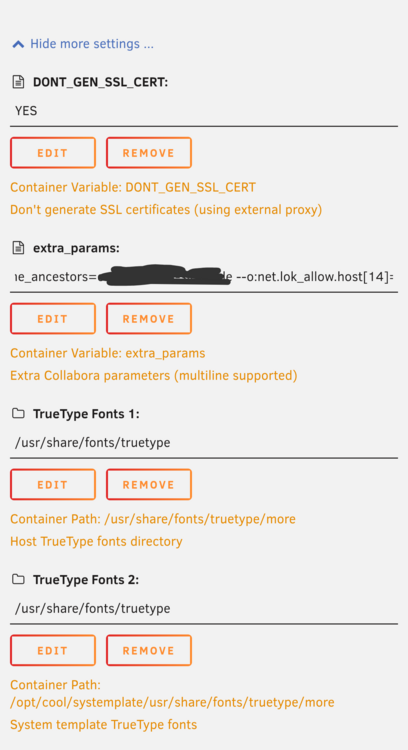
For basic Opencloud as file storage, you need just the open cloud container. This is pretty easy. Just use my open cloud template and remove all variables ports and stuff under show more settings. If want collabora to work, you need all three containers. They also need to be on the same docker network. (My script cscript can create a docker network). Wopi server is the "glue component" between open loud and collabora. So it's necessary. The container boot order is 1. Opencloud 2. Collabora 3. Collaboration(wopi server). With my script and templates, it's not that hard to set up. My script has a user section, you need to define your domains, folders, docker network, and if you want to install collabora. The script creates all folders and the correct files. If you use pangolin, you shouldn't need another proxy. Just point your domains to the containers+ports. If you install my collabora container keep an eye on the extra parameters under more settings. There are two places you need to enter your opencloud domain. It's a bit hidden, that's why I mention it. Everything else should be straight forward.
-
Which template did you use? Unraid custom templates shouldn't be able to use the env. file with the variables. You can try my y templates. The script has a user section, which you need to modify. Change domains, folders (if not default) and if you like to install collabora. The script creates the folders, permissions and necessary files for you. The open cloud template also has the variables for email support.
-
I have already set it up. Great solution, but not for every situation. Seems it's just creates tail scale sub domains for the containers, but not "real" IPs. I often try to use A records in cloudflare and route a sub-domain of my main domain to a tailscale IP. This unfortunately doesn't work work with TSDproxy. Also tried a CNAME record and point it to the tailscale https domain, but this also doesn't work. Having my sub-domain routed to tailscale would be my go-to solution for opencloud. I have already set it up. Great solution, but not for every situation. Seems it's just creates tail scale sub domains for the containers, but not "real" IPs. I often try to use A records in cloudflare and route a sub-domain of my main domain to a tailscale IP. This unfortunately doesn't work work with TSDproxy. Also tried a CNAME record and point it to the tailscale https domain, but this also doesn't work. Having my sub-domain routed to tailscale would be my go-to solution for opencloud. I have already set it up and tested it. Nice solution, but not for every situation. Unfortunately it seems, that TSDproxy doesn't create a real tailscale IP. It creates tailscale sub-domains for the containers. My approach is using sub-domains of my main-domain and route them with an A record to the tailscale IP. This is not possible with TSDproxy. I also tried a CNAME record and point it to the tail scale domain, but this also doesn't work. Unfortunately. But still a nice solution.
-
This sounds interesting. Yes, the opencloud container crashes with tailscale. reason is the entrypint in the extra parameters. This prevents the container to download and run tailscale, but it´s neccessary to run opencloud. never heard about tds proxy but looks interesting. very interesting.
-
As promised, here my repo with the xml files and proxy confs. I´ve also created a pre_install_script. The script creates the folders (you can change the path manually) with correct permissions. Further, you can set collabora=true, and add your domains. Then the template will also create the neccesary files (csp.yaml and banned-password-list.txt). To use the script, I recommend to the "user scripts" plugin from community store. Just create a new script and copy the code from my script ove and run it. My setup is: Cloudflare tunnel for the opencloud domain (published application route directly to the container). for the wopi server (collaboration container) and collabora I set a DNS rewrite in adguard home so that the container communicatin never leaves my local network. Tough, I was not able to get it working with NGinX Proxy Manager, but I´m not that good in proxy stuff and also used AI to create the swag files correctly (based on the opencloud nginx sample). If you just want to run opencloud without collabora. use the opencloud template. remove all variables under "show more settings" if you want to run it locally, Just use https://localhost:9200 as OC_URL variable. be aware. you need to access the web ui via httpS !! Your browser will tell you, that the site is not secure. you can click on advanced and the accept to continue to access page. https://github.com/Nemuritor01/Opencloud-Unraid-Templates If it works, I´m fine if mcreekmore wants to change his community template. As I said, I have not a lot of time to maintain this. Contribution is very welcome to get this fully working. my next step is integrating radicale.
-
I will skip the env file approach. I'm preparing the instructions and will upload a link to my GitHub for first downloading and testing.
-
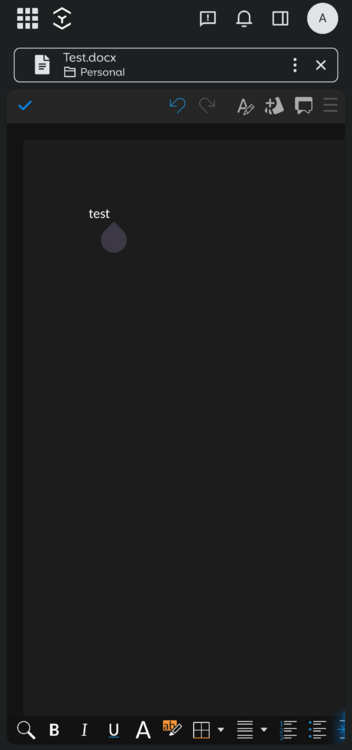
Hey guys. Short question. I've made a lot of progress running opencloud via templates. Unfortunately it needs some files to be pre placed or created via script. I have all set up but I have a question, what you prefer. In general opencloud with additional services ( as collabora) relies on an env. file. I can prepare two options. Adding most of the variables and ports to the template, which makes the template a bit confusing. I can make the template to read the env file, so that the user can create change all variables in the file, similar to the installation method of the official docker compose. What I have running is opencloud, with app store and working collabora. So overall three templates -> opencloud, collabora and wopi server. I have also the config files for swag. Tough, I was not able to get it working with NPM, but I'm not very good in the proxy stuff. I'm working on the remaining opencloud features as keycloak, but I can release a first version here. Further, is anyone interested in maintaining the templates? @mcreekmore ??? Maybe together? My time is also very limited.
-
I'm still tinkering with my template and try to get more stuff working. I've managed to get the "App-Store" running. Even it's not a real store. So let's say it this way: you can download the files from the App store place it in your specific unraid folder and it installs and is working. I have also not a lot of time, but I will check, if it's possible to get more stuff working with an unraid template.
-
If you like, you can try my template. it´s pretty simple and working since months. A domain seems necessary. Personally I´m using a cloudflare tunnel as I don´t have a fixed IPv4 adress. I have just one issue. When I create a space and a sub folder, I can´t sync images. Why??? now clue. everything else seems to be working fine (Colabora etc is not integrated). my-Opencloud.xml
-
Same for me. I found a good guide, but was not able to get it working so far. https://github.com/ente-io/ente/discussions/3778 I ´ve already created 7 containers. the server starts, but I´m not able to upload any files. So the config is not correct. If it´s helpful, I can share my templates, so maybe someone else has more luck and time. Just let me know.
-
Wie es scheint, hat sich einiges geändert bei Ente docker, seit ich das compose getestet hatte. Die einzelnen container bekomme ich momentan zum laufen, aber upload der Fotos funktioniert noch nicht. Ich vermute die S3 Container sind nicht korrekt. Momentan hab ich leider wenig Zeit, dass ich an dem Projekt arbeite.
-
Mich hat's jetzt gepackt. Anscheinend funktioniert das Compose file nicht mehr ganz, wie damals. Egal, ich hab jetzt die Templates für die CA Container fertig und muss "nur" noch ein paar Tests machen. Ich hoffe, dass sie funktionieren. Ich hab bisher noch nie ein Template hochgeladen. Gibt es dazu eine Dokumentation? und ich muss auch sagen, dass ich nicht unbedingt die Zeit habe, es zu maintainen. Vielleicht gibt es dann jemanden, der das übernehmen möchte.
-
here you go services: museum: container_name: ente_museum image: ghcr.io/ente-io/server:latest restart: always networks: - ente ports: - 8081:8080 environment: - ENTE_DB_HOST=db - ENTE_DB_PORT=5432 - ENTE_DB_NAME=ente - ENTE_DB_USER=ente - ENTE_DB_PASSWORD=ente - ENTE_KEY_ENCRYPTION=yvmG/RnzKrbCb9L3mgsmoxXr9H7i2Z4qlbT0mL3ln4w= - ENTE_KEY_HASH=KXYiG07wC7GIgvCSdg+WmyWdXDAn6XKYJtp/wkEU7x573+byBRAYtpTP0wwvi8i/4l37uicX1dVTUzwH3sLZyw== - ENTE_JWT_SECRET=i2DecQmfGreG6q1vBj5tCokhlN41gcfS2cjOs9Po-u8= - ENTE_S3_B2-EU-CEN_KEY=root - ENTE_S3_B2-EU-CEN_SECRET=P4ssw0rd1234 - ENTE_S3_B2-EU-CEN_ENDPOINT=10.10.20.10:9000 - ENTE_S3_B2-EU-CEN_REGION=EU-GE - ENTE_S3_B2-EU-CEN_BUCKET=ente - ENTE_S3_ARE_LOCAL_BUCKETS=true - [email protected] - ENTE_INTERNAL_HARDCODED-OTT_LOCAL-DOMAIN-VALUE=123456 - ENDPOINT=http://localhost db: container_name: ente_db image: postgres:16-bullseye restart: always environment: - POSTGRES_USER=ente - POSTGRES_PASSWORD=ente - POSTGRES_DB=ente volumes: - pg_data:/var/lib/postgresql/data networks: - ente healthcheck: test: ["CMD-SHELL", "pg_isready -U ente -d ente"] interval: 10s timeout: 10s retries: 5 start_period: 20s minio: container_name: ente_minio image: quay.io/minio/minio:latest restart: always command: server --console-address :9001 /data networks: - ente ports: - 9000:9000 - 9001:9001 environment: - MINIO_ROOT_USER=root - MINIO_ROOT_PASSWORD=P4ssw0rd1234 - MINIO_KMS_SECRET_KEY=main:G7ZyT1kRl+NpW3b/Q7v5nVjHYBXPDzpsrFCBL/hUvYQ= - MINIO_BUCKET=ente volumes: - minio_data:/data healthcheck: test: ["CMD", "mc ready local"] interval: 5s timeout: 5s retries: 5 createbuckets: image: minio/mc depends_on: - minio networks: - ente entrypoint: > /bin/sh -c " /usr/bin/mc config host add myminio http://minio:9000 root P4ssw0rd1234; /usr/bin/mc mb myminio/ente; exit 0; " volumes: data: driver: local pg_data: driver: local minio_data: driver: local networks: ente: name: ente
-
Hier einmal das Docker Compose als Basis. Damit startet der Server. Ich hab nicht viele Tests gemacht, ob alles funktioniert. Es gibt einige Parameter, welche man anpassen kann/sollte. Passwörter etc. Vorher auch das custom network "ente" erstellen. Vielleicht kann daraus jemand ein CA template erstellen. ENTE-IO-Docker_compose.txt
.thumb.jpg.3f025f872f067703c9c278f223c682a1.jpg)



