





tito07
Members
-
Joined
-
Last visited
-
So the whole server crashed one day and I took the opportunity run memtest. Sure enough, bad ram. Thanks for the help!
-
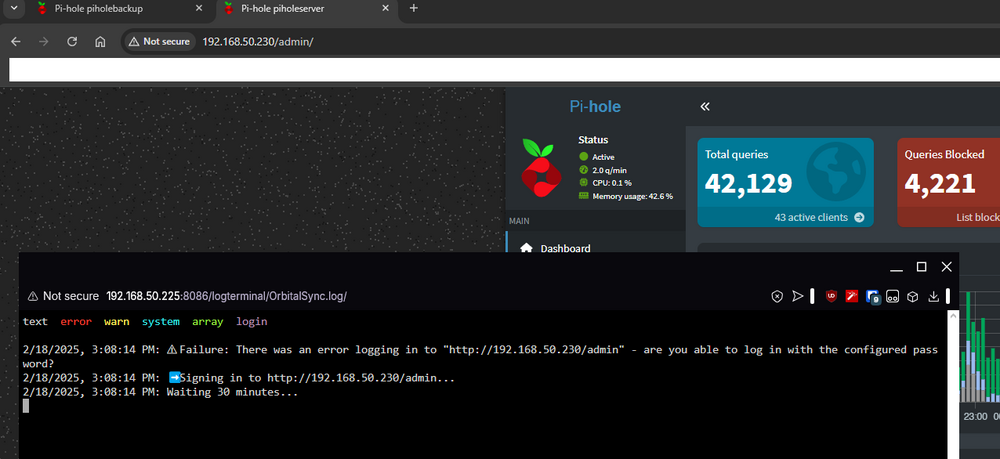
I recently updated both my piholes to v6. I have since not been able to get OrbitalSync to connect to my primary pihole. If its relevant, it somehow defaulted to port 8080 during the upgrade but I have since changed it to 80. In any case, per this screenshot you can see the address I am signed in to which I triple checked the password on as well and its showing the failure to connect:
-
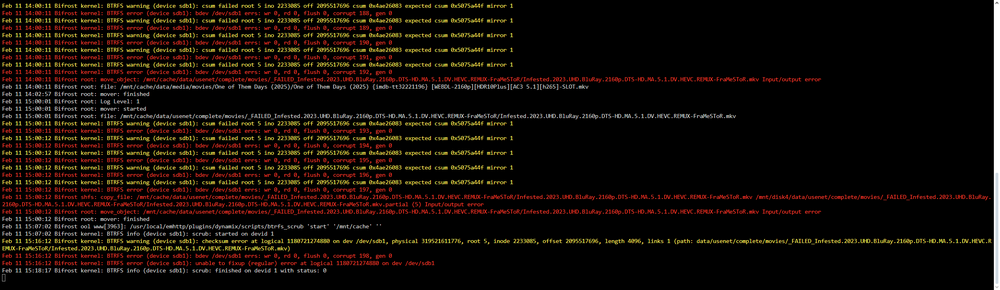
I noticed this in the logs: I deleted the file and ran the scrub again, no errors listed this time. But considering this errored on mover, it got me thinking I did have mover plugin set to every hour. I wonder if theres just some conflict with mover and the appdata plugin when its running since they were both set to the start of the hour. I have now set mover to once a day several hours ahead of the backup plugin.
-
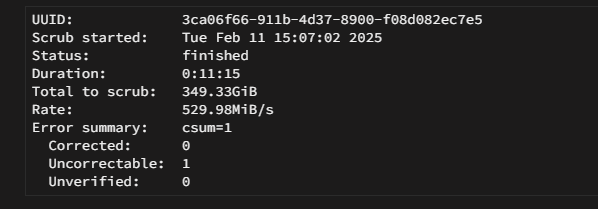
Sorry forgot to check the repair box, seems there is an Uncorrectable error:
-
Correction to above. I said "docker failed to start" when it should be "docker failed to stop container"Hi all, I am currently experiencing an issue where every 3 or 4 weeks my docker image corrupts. To expand on that, I have appdata backup set to back up my appdata folders once a week. I have tried both methods of stopping containers (stopping one by one, backing up and starting each. And stop all, back up all, restart all) and seems to be the same results eventually. Ill get the notification that a docker failed to start (have discord notices) and when I go to check the docker tab it states docker has failed to start. On the logs for appdata backup its always a different docker that it fails to stop and start up on when doing singles or when it stops them all it fails to stop them and the image corrupts. Not sure if I just have something not configured correctly in the plugin or theres a bigger issue going on. I do have all my appdata on /mnt/cache/appdata. This is a SSD in my system. I have also attached the diagnostics about 8 hours after the issue (I have the plugin do the backup in the AM). Any assistance or guidance is greatly appreciated. bifrost-diagnostics-20250211-0959.zipHey all, I have two VMs (one a pihole and one for some scripts I play around with) that were running just fine on v22 of Ubuntu. I realized its been a while since I last conducted an OS upgrade so I decided to shoot for it. They both upgraded, I called it a night and then the next day tried to view them via VirtViewer like I normally do but they hang on the "Connected to graphic server screen" on both. When I try to view them via the Unraid VM Console I am met with just a blank screen. I clicked on the Debug Logs within this window and I see the following: Channel type record not implemented This player cannot handle mode 1 keyboard channel is insecure If I shutdown and reboot with the viewer option I do see the successful boot up (I am reaching the desktop). I did see an Ubuntu error regarding spice-vdagent (something about SIGSEGV). I did try to purge and then reinstall it but that did not fix it. During this boot I am able to connect with VirtViewer but if I close out and try again like 15 mins later the issue reoccurs. Not quite sure how to fix the issue, I tried googling but am not seeing anything fruitful. Would appreciate assitance. I do believe they remain operational as the Pihole is the DNS for the devices on my network and they continue to work fine. If I were to manually shut it down my devices go into DNS error screens. I am on Unraid 6.12.10.Follow up question, I am sure it has to do with my formatting.... I am trying to enter a description for the server. However, it doesnt seem to read what is in the ServerHostSettings file. I also know this can be overwritten a parameter (which does allow a portion of it to show up). I tried doing variations of the following: -description Testing my server -description "Testing my server" -description "Testing^ my^ server" Edit: The descriptions seems to show up fine in game but not for the Server list. which results in the following in order: Testing Testing Testing^ So I am sure its breaking on the space. How can I input this parameter properly so that spaces are acknowledged?Dude you are amazing, thanks for your time and effort. Can confirm server started up just fine and mods loaded in. Also reviewed the Bepinex logs specifically and do see the proper load messages there.The server does stop crashing but it does not seem to load Bepinex. I have run this on a Windows VM successfully without any mods (just Bepinex installed) and the indicator is youll see this in the log when it actually loads in Bepinex: From what I gather, it has to do with whatever version of wine is installed on this container. If curiosity is on your mind, I would say give that a shot as a test to see if that will allow Bepinex to load per the three bullet points on the thread: use winehq stable use WINEDLLOVERRIDES="winhttp=n,b" for wine Set [Logging.Console] Enabled = false in BepInEx.cfg From reviewing the logs of the initial download of Bepinex, it does seem to grab the correct version from the Thunderstore (which is newer than the one you are referencing on the link). For reference, I can get the server up and mods running successfully on Windows with that latest version... but I cant for the life of me get the game to show up on the server list (yes port forwarding, firewall rules, etc) or my friends to join (with or without Bepinex). However, I do not have this issue with this container standing in unraid. At the end of the day if I want to play the game I will have to use this container so I am thankful for you having this available with or without the ability of Bepinex. Thank you in any case for entertaining the idea.
 For VRising, it seems someone managed to get Bepinex working per this thread: https://github.com/TrueOsiris/docker-vrising/issues/45 Sorry I am not too familiar with how containers are maintained or built on your end but if that helps any in being able to get Bepinex to work on this container, that would be great.I ended up resolving the issue. I had the backup application plugin so I just conducted a restore. This allowed me to resurface my containers safely and my entire system is back up for the most part. The only thing I was unable to recover were some VMs but thankfully they were only gameservers so doesnt bother me much to lose them and rebuild.Hi all, I am trying to minimize any damage I could have done right now. I read up on some forum posts here on how to replace a cache drive. From what I understood it was that I needed to set the appdata share secondary storage to array, then cache > array then invoke the mover and wait for it to finish. Once that is done, swap the drive. Once swapped, delete the pool and create new one selecting the new drive. Set array > cache, invoke the mover and wait for data to return. One of the first issues I noticed was that docker.img stated filepath not found. I started it up thinking it needed to be recreated anyway. I have had docker.img be corrupted before, so I was not unfamiliar with re-adding my old containers. I added just plex back as a test and even though my users are listed, the server itself is not connected and my libraries are gone. Almost like a fresh start. Additionally, reading back on that thread I do realize I forgot to stop my docker service before invoking the move. I also thought putting my old cache back in would resume how I left off. I have also tried restoring from the Appdata Backup plugin on the old cache drive and plex is still in the same condition.



