





Kurotaku
Members
-
Joined
-
Last visited
Everything posted by Kurotaku
-
At some point in the future I will make a separate version or I will make Enhanced to be useable as Standalone directly OR Injection (current) way. But not sure when I do that, as I need to finalize my next plugin first. My newest plugin is called "Custom CLI Tools" which allow users to upload programms like yt-dlp, ffmpeg, btop, mkvtoolnix (as binary, AppImage, sh and python files) directly into Unraid and they will directly work on the console, also custom CLI commands can be created to make basically shortcuts for CLI commands. I made it bcs I got totally annoyed by the fact that you have to install for each programm a docker or plugin on the server, this will make everything else unnecessairy. Nearly finished it, I basically need to test everything out now if its working without any issues.
-
The plugin is very old and not rly maintained anymore, thats why I created User Scripts Enhanced to give the people this option. I also plan to make a User Scripts Enhanced Standalone at some point in the future to fix several existing issues which I can't with my Enhanced version and implement new features.
-
Did you even read that Post? If you rename a script, the folder where its stored is keeping the original name and that original name is used for sorting, means if its not alphabetical you renamed them.
-
Yep special signs (even symbols like !) aren't excluded in the original script. To fix this you must delete the folder that contains the script within: /boot/config/plugins/user.scripts/scripts And if you gave it a schedule or custom schedule you must also remove the lines within /boot/config/plugins/user.scripts customSchedule.cron schedule.json <- these files.
-
@btTeddy Thank you fixed it (the bug doesn't show up in tabbed view that's why I've never seen that)
-
Version 14.11 is available since today, would be cool if you update the container or even better an option that the container do updates automatically in the future :)
-
Today I've released a big update for the plugin: you can now create subcategories, which means the categories.json structure has changed fundamentally (existing files get migrated automatically on update). Also added a new settings dialog per category, replacing the old buttons (looks much cleaner now and not so bloated), plus drag and drop for category ordering and script assignment. Mobile layout should also work flawlessly now, since it automatically switches to panel view below a certain screen width (Thx to Yusseiin for mentioning this in the User Scripts Thread, even tho I just saw it recently) If anything looks off after updating or configs don't work anymore, please let me know. I also changed the direction of default collapsed/expanded, so this is the only thing that has to be changed manually again after updating.
-
They are alphabetically, with one exception. When you create sth ABC, rename it then to XYZ it will still be in the folder ABC and sorted as well like this. You can rearange them in categories with User Scripts Enhanced.
-
The easiest solution would be install Stylus extension. Create a Stylesheet for: http://SERVER-IP/logging.htm body { background: #000; color: #fff; }
-
Bash is a shell scripting language that's mainly used to automate commands and interact with the operating system. Basically the Linux equivalent of Windows batch files. Python is a programming language. You can write everything from small scripts to web servers, desktop applications, AI tools, and much more. User Scripts in Unraid executes Bash by default. If you want to run Python, you need to install Python separately and call your .py script explicitly. I've sent you a solution to your problem in Discord yesterday.
-
I can recommend you to just get a Claude Account (or ChatGPT/Gemini) I personally use Claude for every big project only, even tho the limitations are extreme (after a couple of prompts you need to wait some hours) But claude is extremly good compared to all others I've used. User Scripts is bash, you will need to install python plugin to be able to use python scripts, my guess for you problem is that the bash is in a different environment. I personally have nearly every script only in python as its much easier to read/maintain and debug for me, I have them all on /mnt/cache/scripts/ That way I can also easily update/modify them on a friends server and mine without going over the UI of Unraid which is a bit annoying to use.
-
I don't know how to fix this, but if you need a bypass solution for that, install the python plugin and create a python script which is called via user scripts. That way it will definitly work.
-
With abort it would not delete the file, you would need to delete the file first manually, or create another script which deletes it. As for me I personally always just use python scripts. Means the bash script calling py /mnt/cache/scripts/script.py for me, bcs Its much better syntax and you can do much more with python, like checks if the programm already running etc. Just ask Claude/ChatGPT or Gemini to create scripts for stuff like that, thats what I do on daily basis. As I'm currently working on a big and maybe last major release version of User Scripts Enhanced, I will may in the future create a Standalone version for User Scripts Enhanced which allows then for me to implement stuff like this, that you can't start the same script at the same time by default. But that will take a lot time, and first my other 2 new Plugins must be finished :)
-
pidof isn't reliable with scripts because basename might just return names like bash or sh. You could do sth rly simple like that (if you don't mind skipping syncs when another sync is running): #!/bin/bash lock_file="/tmp/scriptname.lock"; if [ -f "${lock_file}" ]; then echo "Script is already running"; exit 1; fi touch "${lock_file}"; echo "Starting rsync process..."; rm -f "${lock_file}";
-
The path depends on the installation or portable folder on Windows I had it like: A:/Portables/FreeFileSync/Resources ... Default on Linux (all users installatoin) is: /opt/FreeFileSync/Resources/Registered.dat Its enough if ppl. know "FreeFileSync Folder/Resources/Registered.dat"
-
Yea same is btw. for filezilla and several other containers which use openbox. It still not looks as good as the other FreeFileSync container but well, compromises have to be made, and for me its a total deal when I compare 15+ Minutes scan time (without donation) to ~2 Minutes scan time. Maybe add a small info in your post, where to get the Registered.dat bcs when I set it up It took me 30 Minutes to find it (and I was to stupid to check the Resources folder somehow) and AI just told me to rename the License Key file to that name... which obviously is wrong.
-
Same issue here. 7.3.1 nothing works anymore. Also somehow already at 7.2.7 the "Excluded Shares" only worked for me if one single share is set, if more excluded were set it created Recycle Bins for all shares.
-
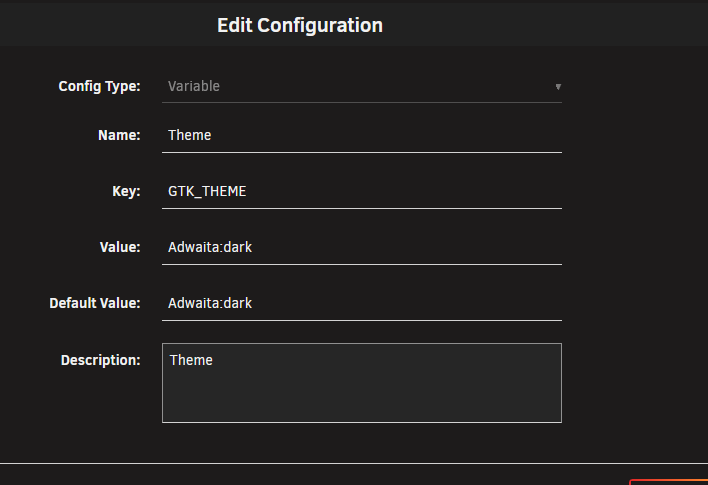
Same for me, only thing I figured out is you can set the FreeFileSync theme to default and used an integrated openbox theme for dark themes: New Container Variable: GTK_THEME Value: Adwaita:dark
-
Thank you for the reports its fixed now with the 2025.12.26 Update. (The Bug happens if you never changed & applied a value in the config so it was never generated)
-
Thanks for the reports of the issue in the 2025.12.24 Update of USE @808mp5 And special thanks for showing me the reason for the issue. The issue was simple: the CSS field was NULL if the config file didn’t exist. Since the servers I used for development already had this file, I didn’t encounter the bug during development. Btw: Correct thread for the Bug Reports of USE would be: https://forums.unraid.net/topic/191294-plugin-user-scripts-enhanced
-
I'm already working on a new version of the plugin, with a bit more features and some responsive fixes, but life is preventing me from being as productive as I used to be when I created it. Btw. you gave me indirect an idea how I can fix this multi line issue, so thanks 🤣
-
It would be useless to change this file, as every server restart or plugin update would wipe the file because the plugins are unpacked with each server reboot or update. I always try my best to make my programs as much customizable as possible to include everyones needs. ;) I can't teach you CSS, but here is an example: #categories-container .category-header { background: gray; } #categories-container .category-content { background: transparent; border: 3px solid gray; } That CSS would look like this (a bit bad with the border as I used linear-gradient but its overwriteable theoretically): But as the Unraid fields doesn't allow multi line (or I haven't figured out how to do yet) you must write it in a single line like this: #categories-container .category-header { background: gray; } #categories-container .category-content { background: transparent; border: 3px solid gray; } If you click the Custom CSS text you see some hints like: All CSS must be in a single line, and quotation marks should be avoided. Which should be followed, otherwise it could cause the CSS to be incorrect or not loaded.

-
I've never encountered or received any reports of this type of issue. The plugin simply moves the existing rows of the table created by the original plugin into separate containers, so this shouldn't happen. My only guess is that one of your script names contains a forbidden character. For example, the original plugin doesn't filter out all invalid characters like '!', and using such symbols can already cause problems on the original plugin, like being unable to modify schedules or delete the affected script. My plugin is only a pure restyling and moving basically nothing else, so that shouldn't be the cause for that issue.
-
Just copy a emoji in the text Field for the category naming :) When I programmed it, I didn't even had the intention that emojis will work.
-
Expand the categories, in the Header of each category you can move them with the Arrows. Basically the headers contain everything to define the appearance of each category + the order of the categories. Note: you cant move them under Uncategorized.



