





shelfactor
Members
-
Joined
-
Last visited
Everything posted by shelfactor
-
I currently have two pools on my unraid. Pool 1 "raidio": - 48 Drives - 8 vdevs of 6 devices - raidz1 Pool 2 "space": - 12 drives - two way mirror vdevs Over last night, the unraid web interface started to get unresponsive. Then this morning I couldnt perform any tasks. I was able to reboot once, but after reboot, and attempting to start the array. The interface shows "mounting disks" and never completes. I can click into Pool 1 and see the pool information, but Pool 2 will not show anything more than individual drive information. The unraid web interface is responsive but will never complete Mounting Disks. Attached are two diagnostic drops, one from earlier today, and one just now. ** Note, this most recent. I hard reset the server, with the drive shelfs unplugged. After reboot, i waited for the unraid interface to show, and then logged in. At this point, I reconnected the drive shelves. All drives populated to where they should be. I then attempted to start the array. Now Im at the same spot, it will not complete mounting the disks. I do see Read activity on Pool 1 drives totaling ~30 MB/s The only tasks being performed was copying data (media files) from pool 1 to pool 2 and importing them to Radarr. So nothing complex. Thank you so much for any input that may help! nucserver-diagnostics-20250510-1210.zip nucserver-diagnostics-20250510-1559.zip
-
Thanks, I was just making sure there wasn't another specific to unassigned devices. Confirmed: the drives were marked from the prior system. Re-inserted into Windows system, and then marked offline. -> Put back into unraid rack, and they are now not marked (RO). Thanks again!
-
- Thanks @OldManBeard for the suggestion, I checked the permissions and they all looked correct. Issue seemed to be corruption from prior system (as mentioned below) Thanks @Kilrah & @dlandon Y'all were correct, I removed the drives from the unraid setup, and put them back in the Windows rack. Partition information had been corrupted, one wouldn't even recognize in windows at all (though was back to normal in unraid when I put it back there. Still (RO). Data is very replaceable, so no big worry. @dlandon Which syslog are you referring to?
-
TIA for anyone that can help with this, I've been searching and can't find an explanation anywhere. I have added some older drives in that I have temporarily put in my unraid setup so they are only showing/used in unassigned devices. They are NTFS formatted from a Windows10 machine. When I mount them in UD, they are tagged (RO). and thus I am not able to delete files off them when I have moved them to my pool. Is there a way to tell why they are being tagged (RO).

-
@JorgeB I just wanted to come back and confirm that your solution worked, exactly as you stated. While following your steps, I was able to swap in transposers without issue. Now all drives are reporting temps. Thank you so much.
-
@JorgeB As always, thanks for all the help! Good to know that as long as the vdev has same size drives, I'm ok to add to current pool. I agree with the risk for sure. I would not use this layout with most setups. However, this is all media storage and completely replaceable via other backups/locations. (and not time sensitive to recreate if needed)
-
raidz1 - 6wide vdev *Note, I am also considering dropping to 16TB as well, as any potential resilver would benefit from smaller size.
-
Due to current pricing of drives, it seems to be a better choice to get larger drives than I currently have, than buying more of current capacity. - Currently I have 18TB drives in each vdev, all the same. - I am looking at having to change to 20TB drives. Which is the correct method? 1) Create new pool, so that vdevs within each pool are the same size. 2) Create a new vdev within the current zfs pool, with all size 20TB. (still noting that all the other vdevs have 18TB). Thank you to any help!
-
@JorgeB 100% Failing drive, numerous bad sectors. Thanks for the help as always!
-
Wow, that's incredibly simple. No data loss, or need to back up configuration of any form?
-
Thanks @JorgeB I didn't think to add that in. Here you go! raidio-diagnostics-20250108-1444.zip
-
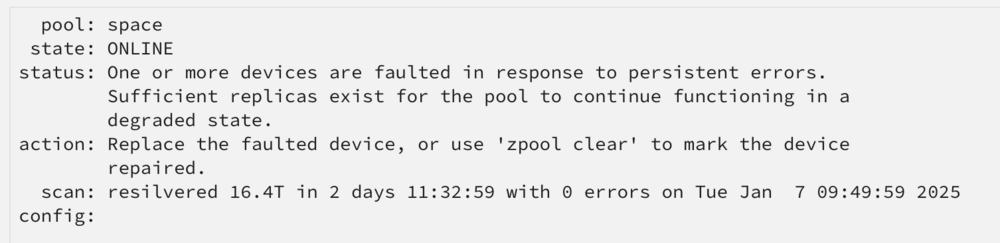
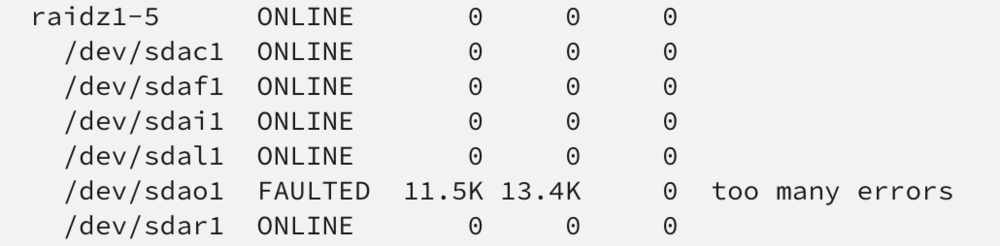
After resilvering a drive, a drive in another vdev now shows faulted, with note "too many errors" How can I determine what those errors are? Thanks to any help provided!
-
Thanks JorgeB! From my luck, drives weren't being recognized without the transposers. However, I will re-test it. I am not familiar with re-importing with the new ID. I would appreciate any information you could point me towards, I will try and look in the guide. On v7.0.0rc2
-
Thanks for the reply. Sorry I should have stated, the drives are in ZFS pool. The entire pool is not lost when trying to swap the transposer, just the single drive is not recognized. unraid views the drive as a new/different drive. Thus wants to resilver a degraded state. The drives are SATA, when I tried to use them straight into the NetApp, they are not recognized, I had to use the transposers. From what I've read only SAS drives in these disk shelves will be recognized without transposers. Thank you!
-
TIA to all that can give some insight. Relavent setup info: NetApp DS4246 Exos x18-18TB-SATA Exos x20-18TB-SATA *Connected using the transposers in the drive tray I recently noticed that a few of my drives were not reporting temperature. I believe it's the transposers that are not passing along the data, and are bad. However, if I swap out the transposer unraid does not recognize the same drive with a new transposer. While the model/serial is recognized in the drive name, the last digits are some form of a serial to the transposer (not the serial that is on the label of the transposer though). Is there any way to swap out these transposers without having to resilver the drive? Thanks!
-
Thanks for the reply! A follow up question, if I recreate it, and don’t move the config folder back in, will I need to do anything special to apply my license back? Or will the license be attached based on the usb GUID automatically. thanks again.
-
Thank you for the suggestion. However does not fit the questions. This plugin does not recreate the USB from scratch.
-
I have read through numerous posts here, but I can't find a clear answer. My current USB is fine, no issues. However, my OCD wants me to recreate the USB from scratch when I start using unRAID in production. I have been testing it for a few months now and I believe that I am ready to clear everything and start from the beginning. I understand that New Config is an option to clear the current drive/array config. But I would like to wipe EVERYTHING. There is no data to worry about on the drives. 1) Can I use the USB tool to recreate the USB? 2) Do I need to do anything special to transfer my license? I have read through the documentation, such as the page below, but they are all about creating a net-new USB, whereas I want to continue to use my current USB drive. https://docs.unraid.net/unraid-os/manual/changing-the-flash-device/#why-replace-your-usb-flash-boot-device Thanks to all.



