





Jlomb436
Members
-
Joined
-
Last visited
-
Solved! Drivers! That was it. My lord. For anyone experiencing this in the future, I had installed the Realtek Drivers for 2.5gb NIC 8125 via apps in addition to making an exception in the modprobe folder where I forced ASPM. That was: Create r8125.conf in /boot/config/modprobe.d with the following content: options r8125 aspm=1 options r8125 eee=0 I deleted that file along with the plugin and boom, I was in. Thanks for your suggestions Frank. Made me start to dig a little deeper on what I had done previously.
-
Thank you. I would say I've ruled out all 3 of those as the NIC is being used to connect to the internet in Windows. Same cable, same router. I'm typing to you from the exact hardware used. Switch lights up green and amber when connected in Windows and in Unraid. I'm really at a loss here. I will try removing the Realtek driver plugin from the boot drive as I'm not sure what else to do.
-
Deleted network.config again, booted and ran diagnostics. See attached. I know every little about networking, but looking at my system log, I do see lots of : Jan 1 16:44:12 Tower kernel: eth0: pci link is down Jan 1 16:44:12 Tower kernel: . Jan 1 16:44:12 Tower kernel: eth0: cmd = 0xff, should be 0x07 I did install realtek drivers from the store to try and force my 2.5 NIC into functioning ASPM so I'm not sure if that's what that is. But I did this a week ago and didn't have any issues until the 2nd change back into the original mobo. tower-diagnostics-20250102-0533.zip
-
Thanks! I did try this by deleting the config, rebooted and it simply just states that "IP not set". Router shows it offline. I'm guessing the router shows it offline and doesn't assign an IP because of something within Unraid, as Windows works perfect. # Generated settings: IFNAME[0]="br0" DHCP_KEEPRESOLV="no" DHCP6_KEEPRESOLV="yes" BONDNAME[0]="bond0" BONDNICS[0]="eth0 eth1 eth2 eth3" BONDING_MODE[0]="1" BONDING_MIIMON[0]="100" BRNAME[0]="br0" BRNICS[0]="bond0" BRSTP[0]="no" BRFD[0]="0" PROTOCOL[0]="ipv4" USE_DHCP[0]="yes" USE_DHCP6[0]="" SYSNICS="1"
-
My mistake. Just attached to original post. Thank you.
-
Morning all. I'm currently unable to connect to the GUI using the IP, local host etc and my server is unable to connect to the router. I had an ATX motherboard, switched to an ITX, proceeded to change the IP in Unraid to be static to my old ATX IP. Then I wanted to do some testing on the old ATX board, swapped it back in and the GUI is simply unavailable. My router doesn't show it as connected in Unraid, but shows it connected when booting into windows on the same hardware. When I first booted into windows, the computer did not have access to the internet. I disabled the LAN in BIOS, started it, shutdown, enabled and then windows connected fine. Maybe pure luck and just needed a second time? I've performed the following: Confirmed the cable is good. The same system will boot into windows and connect to the internet just fine. Router detects system in Windows. Changed the IP address in network.cfg to another and still no go. Deleted network.cfg. System just states no IP address set when booted. Factory reset router. I'm at a complete loss here that the same hardware connects to the internet just fine via windows but not in Unraid. Anyone have any suggestions? Thanks for your help. Diagnostics attached tower-diagnostics-20250101-1645.zip
-
You rock. This enabled it for me! Still can't get lower than C2 but I'm hopefully headed in the right direction.
-
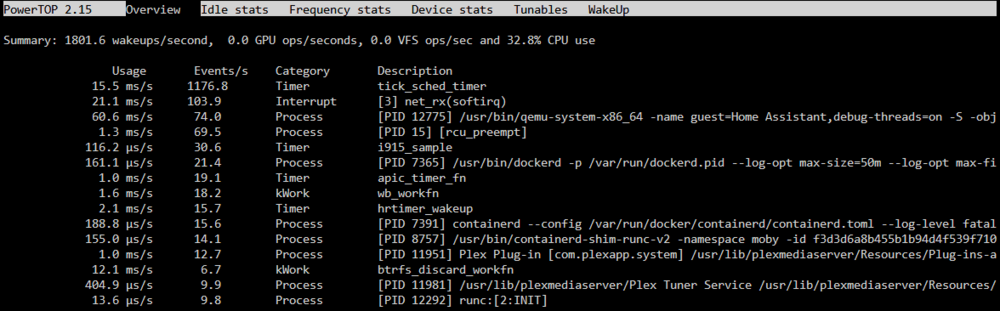
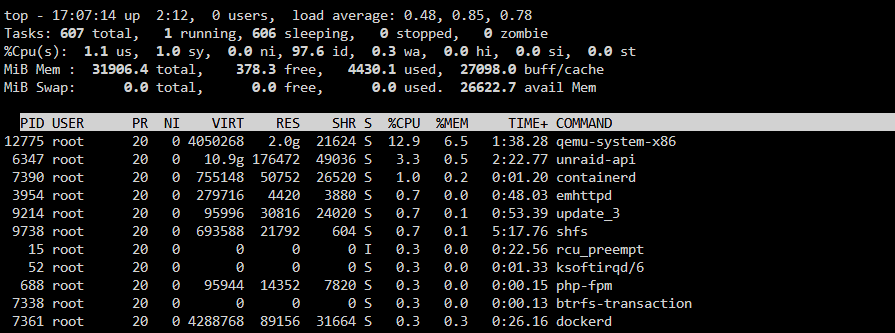
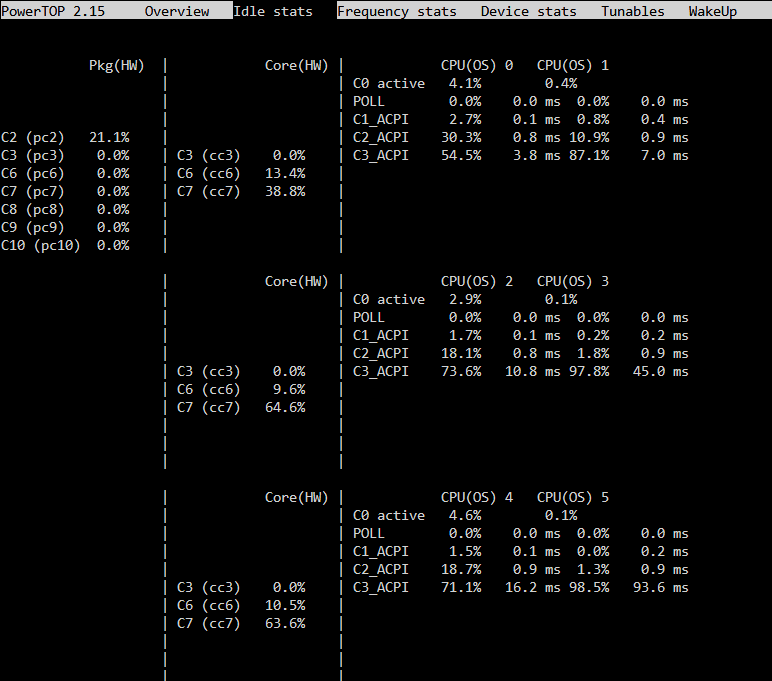
Hi all, I'm struggling with C states and after about 20 hours of browsing forums and tedious testing using process of elimination, I am asking for your help. Thank you in advance. Hardware: ASRock B760 ITX, 13500K, WD Black Sn850X 2TB, NVME>SATA x 6 and 6 WD Red Plus Drives. Running: 1 VM for Home Asisstant, 6-8 dockers for ARR's, Plex, etc I have done/confirmed the following: All ASPM/C State options enabled in BIOS Confirmed via LSPCI that all items show ASPM enabled. The only caveat is I created a config file for my Realtek 2.5 GBE to force ASPM (see post from PeeFes here). If I disable VM (pinned to CPU 10/11) and Dockers, I only get 50% C2. Dockers and VM running, my C2 is around 10-20%. If I disable the NIC in BIOS, I get C3. Powertop shows 1000+ wakeups for tick_sched_timer, but I can't seem to find anything online about it. I know the Home Assistant VM does some damage, but even with that off I don't get to C3. I know ASRock has a hidden BIOS for enabling C10 states and I know PCIE lanes attached to the CPU will prevent much better C states, but I can't even get to C3 with my NIC. My idle wattage is 31-35w with drives down but it's bothering me I can't even get to C3. Obviously the NIC is an issue, but I also feel like the 1000+ wakeups is hampering my C states as well. Any ideas or suggestions on where to start? Powertop and top screens below. Thanks again!
-
Chief, I could really use your help here. I have almost identical hardware (ASRock 760I ITX w/ wifi, 13500k and an NVME>6x Sata adapter. I have enabled all ASPM items in BIOS, ran Powertop, auto-tune etc and simply can't get my rig into even C3 territory. I have insured all items have ASPM enabled (lspci -vv | awk '/ASPM/{print $0}' RS= | grep --color -P '(^[a-z0-9:.]+|ASPM )'). Could you confirm your BIOS settings for me? Any other suggestions or tips that you can remember? I saw your setup and you've giving me hope. Thank you for your help!

