slydog75
Members
-
Joined
-
Last visited
Everything posted by slydog75
-
Whenever I go to reboot my server, it never completely stops so it never comes back up. I have to hold down the power button to kill it, then turn it back on. I've attached my syslog, any smoking guns in here? syslog-6-16-25
-
So maybe a 6 weeks ago my server started freezing. It's happened a total of 3 times now, so it runs for a few weeks before happening. I'm running headless and have to hold the power button down to kill the system and turn it back on to get it running again. This of course causes a parity scan. How do I go about troubleshooting this? Are there logs I can pull NOW, or do I need to set something up now and wait for the next freeze to troubleshoot?
-
So I've been running dockers on unRaid for a few months now and i'm pretty comfortable with how most of it works> However, I want to be able to set a docker path to connect to an external (it not within unRAID) share.. how can I do that? Can I enter something like \\192.168.86.60\my_share\cal_library in the path and expect it to work?
-
After all the fixes I've had to do to get everythign else working I'd rather just wipe out the VMs and start from scratch if there's no way to restore them from the backups created by the Appdata Backups plugin.
-
OK, I ran that command then rebooted. Attempted to start my Debian VM, doens't even try just get the BIOS screen. The WIndows 11 VM starts up and lets me log in but then the screen goes blank. Oddly my windows 2022 VM (which I hadn't tried up until now) is working fine. Most recent diagnostics attached. ur-homeserver-diagnostics-20250113-0937.zip
-
ahh.. you just helped me on Saturday with a similiar issue I was having with my Docker engine and made the same recommendation.. here's the results from THAT scrub (though I can do another helpful): UUID: 1783b43b-6693-45f5-9201-334d8e942e86 Scrub started: Sat Jan 11 11:02:59 2025 Status: finished Duration: 0:15:37 Total to scrub: 719.94GiB Rate: 786.79MiB/s Error summary: verify=41088 csum=3489528 Corrected: 3530616 Uncorrectable: 0 Unverified: 0 I can't figure out how to restore the VMs though like I was able to with the Dockers.
-
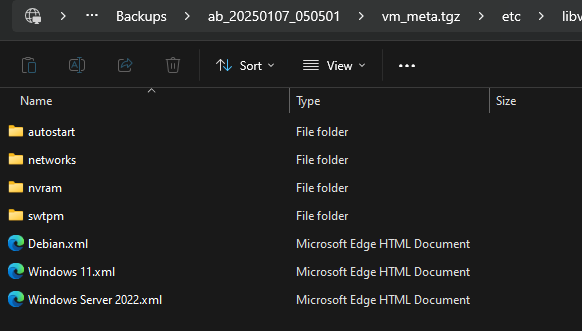
Man.. upgrading to 7.0 has been one issue after another for me.. I'm hoping this is my last issue. My VMs won't run. My windows 11 VM appears to run but i can't actually get RDP or the console to open.. Debian flat out wont' start, something was corrupted. I have backups I think: How do I go about restoring these? And just in case here's my diagnostics as well. ur-homeserver-diagnostics-20250112-1107.zip
-
Scrub results: UUID: 1783b43b-6693-45f5-9201-334d8e942e86 Scrub started: Sat Jan 11 11:02:59 2025 Status: finished Duration: 0:15:37 Total to scrub: 719.94GiB Rate: 786.79MiB/s Error summary: verify=41088 csum=3489528 Corrected: 3530616 Uncorrectable: 0 Unverified: 0 Do I just run this procedure to replace the image file? https://docs.unraid.net/unraid-os/manual/docker-management/#re-create-the-docker-image-file
-
here you go. ur-homeserver-diagnostics-20250111-1036.zip
-
Hi all, just updated to 7.0 .. My frist issue was that the Cache pool configuration was now invalid. I fixed that by deleting and recreating the pool, but now my Docker Service won't start. Not even sure where to start on this one. Help! What is dmsg(1)? says it might have more informatin. Jan 11 10:32:32 UR-HomeServer ool www[21128]: /usr/local/emhttp/plugins/dynamix/scripts/emcmd 'cmdStatus=Apply' Jan 11 10:32:32 UR-HomeServer emhttpd: Starting services... Jan 11 10:32:33 UR-HomeServer emhttpd: shcmd (139): /etc/rc.d/rc.samba reload Jan 11 10:32:33 UR-HomeServer emhttpd: shcmd (143): /etc/rc.d/rc.avahidaemon reload Jan 11 10:32:33 UR-HomeServer avahi-daemon[1737]: Got SIGHUP, reloading. Jan 11 10:32:36 UR-HomeServer ool www[21482]: /usr/local/emhttp/plugins/dynamix/scripts/emcmd 'cmdStatus=Apply' Jan 11 10:32:36 UR-HomeServer emhttpd: Starting services... Jan 11 10:32:36 UR-HomeServer emhttpd: shcmd (150): /etc/rc.d/rc.samba reload Jan 11 10:32:36 UR-HomeServer emhttpd: shcmd (154): /etc/rc.d/rc.avahidaemon reload Jan 11 10:32:36 UR-HomeServer avahi-daemon[1737]: Got SIGHUP, reloading. Jan 11 10:32:37 UR-HomeServer emhttpd: shcmd (162): /usr/local/sbin/mount_image '/mnt/cache/docker.img' /var/lib/docker 32 Jan 11 10:32:37 UR-HomeServer kernel: loop3: detected capacity change from 0 to 67108864 Jan 11 10:32:37 UR-HomeServer kernel: BTRFS: device fsid 7491084b-4d8a-40d1-a497-b147cdf3d06c devid 1 transid 184842 /dev/loop3 scanned by mount (21651) Jan 11 10:32:37 UR-HomeServer kernel: BTRFS info (device loop3): first mount of filesystem 7491084b-4d8a-40d1-a497-b147cdf3d06c Jan 11 10:32:37 UR-HomeServer kernel: BTRFS info (device loop3): using crc32c (crc32c-intel) checksum algorithm Jan 11 10:32:37 UR-HomeServer kernel: BTRFS info (device loop3): using free space tree Jan 11 10:32:37 UR-HomeServer kernel: BTRFS error (device loop3): bad tree block start, mirror 1 want 22109929472 have 3181288440457736952 Jan 11 10:32:37 UR-HomeServer kernel: BTRFS error (device loop3): bad tree block start, mirror 2 want 22109929472 have 15680564271484292426 Jan 11 10:32:37 UR-HomeServer kernel: BTRFS error (device loop3): failed to read chunk root Jan 11 10:32:37 UR-HomeServer root: mount: /var/lib/docker: can't read superblock on /dev/loop3. Jan 11 10:32:37 UR-HomeServer root: dmesg(1) may have more information after failed mount system call. Jan 11 10:32:37 UR-HomeServer kernel: BTRFS error (device loop3): open_ctree failed Jan 11 10:32:37 UR-HomeServer root: mount error Jan 11 10:32:37 UR-HomeServer emhttpd: shcmd (162): exit status: 1
-
Thanks Jorge
-
So one of my data drives died yesterday. I currently have 3 4TB Drives and 1 3TB drive. Lucky for me, the 3TB drive died. I want to replace it with an 8TB which means I need to make the 8TB drive the new parity drive. It this procedure still acurate or is there a newer one I'm not finding? https://docs.unraid.net/legacy/FAQ/parity-swap-procedure/ Thanks in advance.
-
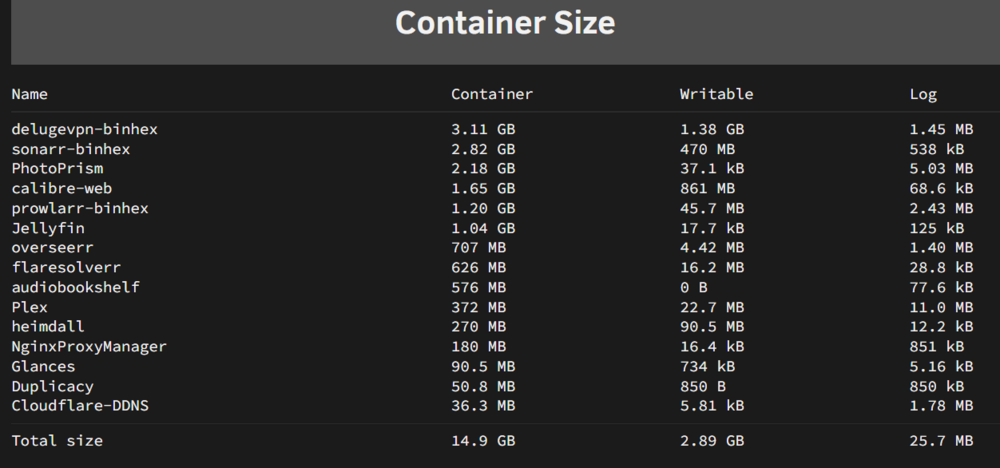
Thanks for sharing your sizes, you actually do have the same delugevpn-binhex docker.. I just renamed it to put the actual program name first.. Mine is nearly twice the size of yours but the rest look about the same..
-
I have a few dockers that seem to be taking up an abnormally large amount of space, especially DelugeVPN.. Are these normal sizes? With Deluge there is only one configurable path which is pointing to my appdata folder on my cache, so can't see how I would have it misconfigured.. If these are normal, ok, I'll just make my image file bigger, but if they're not, how do I fix it?
-
OK, it appears I have this issue fixed. First, my CPU was definitely overheating becuase there was a wire stuck in the fan.. so I think that was exacerbating the problem, but I don't think it was the root cause; even after fixing that, if I transfered a file to cache while plex was playing it would still stutter. I changed the transcode path from /mnt/user/plex_transcode/ to /mnt/cache/plex_transcode/ (appdata had already been changed to this previously) and that seems to have done the trick. SHFS no longer starts hogging the CPU whenever plex is recording Live TV and the stutters seem to be gone!
-
the only thing on a disk drive is my actual media but these stutters are actually occuring while watching Live TV (with an HDHomeRun tuner). I'll need to do some tests to see if it occurs while watching movies as well. However, this didn't occur before I mgirated Plex to unRAID.
-
I don't think it's a resource issue, as I said my CPU isn't going over 30% usage and RAM is under 50%. I"m using the official Plex docker currently. I just noticed my CPU temp is being reported as hitting 100C when the stutters occur so I may have a cooling issue. I'm going to try to repaste (this build is based off an older gaming PC) and install an upgraded heat sink while I'm at it. I've also attached my diagnostics log. Thanks for your time. ur-homeserver-diagnostics-20241031-0041.zip
-
So Plex randomly started stuttering the other day. I believe I've narrowed it down to SHFS. When Plex stutters, I log into unRAID and my CPU is running between 18 and 30% which shouldn't cause issues. When I check running tasks SHFS is running and using anywhere from 40 to 80%. NOthing is going on in the background other than Plex when this is occuring so I don't know what it's even doing. Is it running because Plex is recording to the cache pool? No maintenace tasks are scheduled for these times, mover is not scheduled, there's no data transfers going on.. Plex runs off of my cache pool, not writing or reading to the array. So what is SHFS doing and why would it cause Plex to stutter? IS there a way to make Plex a priority service to avoid these stutters?
-
Well, that was stupid easy.. I plugged it in via USB, enabled passthru in the VM settings pg and it just worked. It will forever bug me that I didn't get working over SATA, but on the plus side I now have another SATA port open so I might make a cache array. Thanks for all your help! And good luck with your current situation, I made a small donation to your gofundme.
-
Here's what I get after running the SCSI line above.. libvirt-2-format: /dev/sr0 (raw, read-only) Attached to: scsi0-0-0 Removable device: not locked, tray closed Cache mode: writeback but nothing actually appears within debian, within the GUI or under blkid.
-
Here's the error I get when trying to mount via the unRAID CLI... Going to start looking for my usb adapter.
-
Thanks again. I'll try these steps.. if they don't work I'll get the USB adapater.. in fact, I might have one lying around somewhere already.
-
A further update.. with nothing or a CD-ROm in the drive, everything is fine until i try to read it.. I can even use disc manager to eject the tray.. but with a CD rom the whole OS locks up as soon as i try to read it.. WIth a BluRay disc in, the whole Os locks up within a a few seconds without even trying to read the drive.
-
Thanks @bmartino1.. So, first,I modded the permissions and this is what I have now: brw-rw-rw- 1 root cdrom 11, 0 Oct 24 08:48 /dev/sr0 As far as the drive functioning, I know it does as it works fine with MakeMKV in a docker (I'm just trying to move away from running applications like that in a docker).. Finally, I tried adding your XML entries regarding the DVD drive snippet but get this error:
-
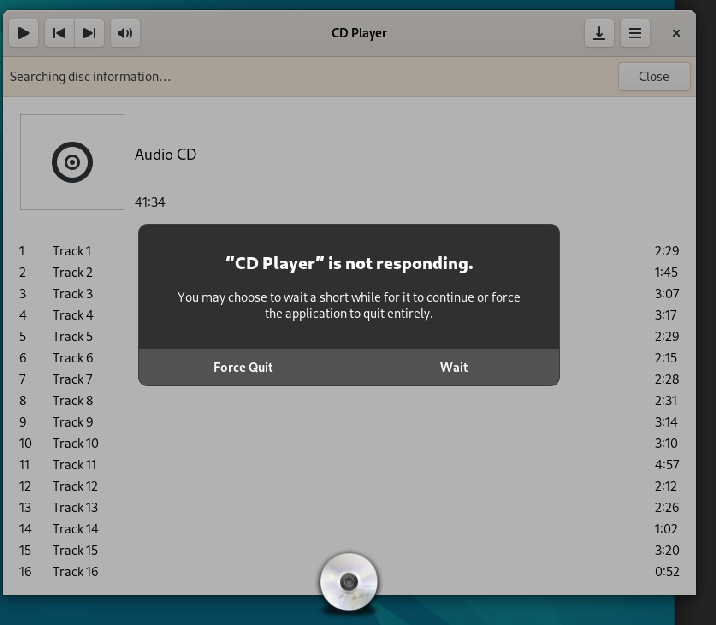
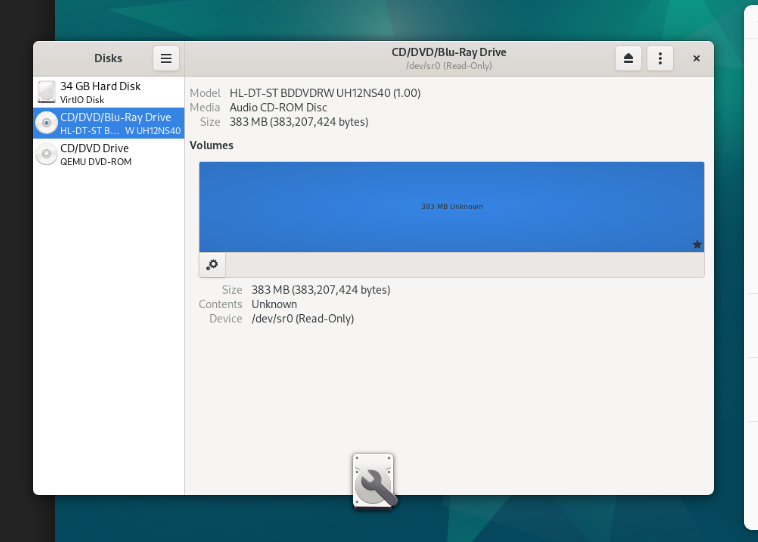
So I followed some steps I found here from a post a few years old which instructed me to make this entry in my XML file: <controller type='scsi' index='0' model='virtio-scsi'/> <hostdev mode='subsystem' type='scsi'> <source> <adapter name='scsi_host2'/> <address type='scsi' bus='0' target='0' unit='0'/> </source> <readonly/> <address type='drive' controller='0' bus='0' target='0' unit='0'/> </hostdev> my optical drive is coming up like this: [7:0:0:0] cd/dvd HL-DT-ST BDDVDRW UH12NS40 1.00 /dev/sr0 So I changed the entry for 'scsi_host2' to 'scsi_host7' WHen I tried to save this, it said another device was already assigned to scsi index 0, so I had to change the index to 4. AFter making those adjustments, the drive appears in Debian but I'm not able to read it. Goobox appears to see it, but then promptly locks up the entire VM which you can see in here: And here you can see that disc manager sees the drive: FInally here's my full XML file... Any help is greatly appreciated! <?xml version='1.0' encoding='UTF-8'?> <domain type='kvm'> <name>Debian</name> <uuid>b66a5edb-7f8e-ba7e-dba7-efe5eefa7719</uuid> <metadata> <vmtemplate xmlns="unraid" name="Debian" icon="debian.png" os="debian"/> </metadata> <memory unit='KiB'>2097152</memory> <currentMemory unit='KiB'>2097152</currentMemory> <memoryBacking> <nosharepages/> </memoryBacking> <vcpu placement='static'>3</vcpu> <cputune> <vcpupin vcpu='0' cpuset='0'/> <vcpupin vcpu='1' cpuset='5'/> <vcpupin vcpu='2' cpuset='2'/> </cputune> <os> <type arch='x86_64' machine='pc-q35-7.2'>hvm</type> <loader readonly='yes' type='pflash'>/usr/share/qemu/ovmf-x64/OVMF_CODE-pure-efi.fd</loader> <nvram>/etc/libvirt/qemu/nvram/b66a5edb-7f8e-ba7e-dba7-efe5eefa7719_VARS-pure-efi.fd</nvram> </os> <features> <acpi/> <apic/> </features> <cpu mode='host-passthrough' check='none' migratable='on'> <topology sockets='1' dies='1' cores='3' threads='1'/> <cache mode='passthrough'/> </cpu> <clock offset='utc'> <timer name='rtc' tickpolicy='catchup'/> <timer name='pit' tickpolicy='delay'/> <timer name='hpet' present='no'/> </clock> <on_poweroff>destroy</on_poweroff> <on_reboot>restart</on_reboot> <on_crash>restart</on_crash> <devices> <emulator>/usr/local/sbin/qemu</emulator> <disk type='file' device='disk'> <driver name='qemu' type='raw' cache='writeback'/> <source file='/mnt/user/domains/Debian/vdisk1.img'/> <target dev='hdc' bus='virtio'/> <serial>vdisk1</serial> <boot order='1'/> <address type='pci' domain='0x0000' bus='0x02' slot='0x00' function='0x0'/> </disk> <disk type='file' device='cdrom'> <driver name='qemu' type='raw'/> <source file='/mnt/user/isos/debian-12.7.0-amd64-netinst.iso'/> <target dev='hda' bus='sata'/> <readonly/> <boot order='2'/> <address type='drive' controller='0' bus='0' target='0' unit='0'/> </disk> <controller type='sata' index='0'> <address type='pci' domain='0x0000' bus='0x00' slot='0x1f' function='0x2'/> </controller> <controller type='pci' index='0' model='pcie-root'/> <controller type='pci' index='1' model='pcie-root-port'> <model name='pcie-root-port'/> <target chassis='1' port='0x8'/> <address type='pci' domain='0x0000' bus='0x00' slot='0x01' function='0x0' multifunction='on'/> </controller> <controller type='pci' index='2' model='pcie-root-port'> <model name='pcie-root-port'/> <target chassis='2' port='0x9'/> <address type='pci' domain='0x0000' bus='0x00' slot='0x01' function='0x1'/> </controller> <controller type='pci' index='3' model='pcie-root-port'> <model name='pcie-root-port'/> <target chassis='3' port='0xa'/> <address type='pci' domain='0x0000' bus='0x00' slot='0x01' function='0x2'/> </controller> <controller type='pci' index='4' model='pcie-root-port'> <model name='pcie-root-port'/> <target chassis='4' port='0xb'/> <address type='pci' domain='0x0000' bus='0x00' slot='0x01' function='0x3'/> </controller> <controller type='pci' index='5' model='pcie-root-port'> <model name='pcie-root-port'/> <target chassis='5' port='0xc'/> <address type='pci' domain='0x0000' bus='0x00' slot='0x01' function='0x4'/> </controller> <controller type='pci' index='6' model='pcie-root-port'> <model name='pcie-root-port'/> <target chassis='6' port='0xd'/> <address type='pci' domain='0x0000' bus='0x00' slot='0x01' function='0x5'/> </controller> <controller type='pci' index='7' model='pcie-root-port'> <model name='pcie-root-port'/> <target chassis='7' port='0xe'/> <address type='pci' domain='0x0000' bus='0x00' slot='0x01' function='0x6'/> </controller> <controller type='pci' index='8' model='pcie-root-port'> <model name='pcie-root-port'/> <target chassis='8' port='0xf'/> <address type='pci' domain='0x0000' bus='0x00' slot='0x01' function='0x7'/> </controller> <controller type='pci' index='9' model='pcie-to-pci-bridge'> <model name='pcie-pci-bridge'/> <address type='pci' domain='0x0000' bus='0x07' slot='0x00' function='0x0'/> </controller> <controller type='virtio-serial' index='0'> <address type='pci' domain='0x0000' bus='0x04' slot='0x00' function='0x0'/> </controller> <controller type='scsi' index='0' model='lsilogic'> <address type='pci' domain='0x0000' bus='0x09' slot='0x01' function='0x0'/> </controller> <controller type='scsi' index='1' model='lsilogic'> <address type='pci' domain='0x0000' bus='0x09' slot='0x02' function='0x0'/> </controller> <controller type='scsi' index='2' model='lsilogic'> <address type='pci' domain='0x0000' bus='0x09' slot='0x03' function='0x0'/> </controller> <controller type='scsi' index='3' model='virtio-scsi'> <address type='pci' domain='0x0000' bus='0x08' slot='0x00' function='0x0'/> </controller> <controller type='scsi' index='4' model='virtio-scsi'> <address type='pci' domain='0x0000' bus='0x05' slot='0x00' function='0x0'/> </controller> <controller type='usb' index='0' model='ich9-ehci1'> <address type='pci' domain='0x0000' bus='0x00' slot='0x07' function='0x7'/> </controller> <controller type='usb' index='0' model='ich9-uhci1'> <master startport='0'/> <address type='pci' domain='0x0000' bus='0x00' slot='0x07' function='0x0' multifunction='on'/> </controller> <controller type='usb' index='0' model='ich9-uhci2'> <master startport='2'/> <address type='pci' domain='0x0000' bus='0x00' slot='0x07' function='0x1'/> </controller> <controller type='usb' index='0' model='ich9-uhci3'> <master startport='4'/> <address type='pci' domain='0x0000' bus='0x00' slot='0x07' function='0x2'/> </controller> <interface type='bridge'> <mac address='52:54:00:5d:40:d9'/> <source bridge='br0'/> <model type='virtio-net'/> <address type='pci' domain='0x0000' bus='0x01' slot='0x00' function='0x0'/> </interface> <serial type='pty'> <target type='isa-serial' port='0'> <model name='isa-serial'/> </target> </serial> <console type='pty'> <target type='serial' port='0'/> </console> <channel type='unix'> <target type='virtio' name='org.qemu.guest_agent.0'/> <address type='virtio-serial' controller='0' bus='0' port='1'/> </channel> <input type='tablet' bus='usb'> <address type='usb' bus='0' port='1'/> </input> <input type='mouse' bus='ps2'/> <input type='keyboard' bus='ps2'/> <graphics type='vnc' port='-1' autoport='yes' websocket='-1' listen='0.0.0.0' keymap='en-us'> <listen type='address' address='0.0.0.0'/> </graphics> <audio id='1' type='none'/> <video> <model type='qxl' ram='65536' vram='65536' vgamem='16384' heads='1' primary='yes'/> <address type='pci' domain='0x0000' bus='0x00' slot='0x1e' function='0x0'/> </video> <hostdev mode='subsystem' type='scsi' managed='no'> <source> <adapter name='scsi_host7'/> <address bus='0' target='0' unit='0'/> </source> <readonly/> <address type='drive' controller='0' bus='0' target='0' unit='0'/> </hostdev> <memballoon model='virtio'> <address type='pci' domain='0x0000' bus='0x03' slot='0x00' function='0x0'/> </memballoon> </devices> </domain>