





edassis
Members
-
Joined
-
Last visited
-
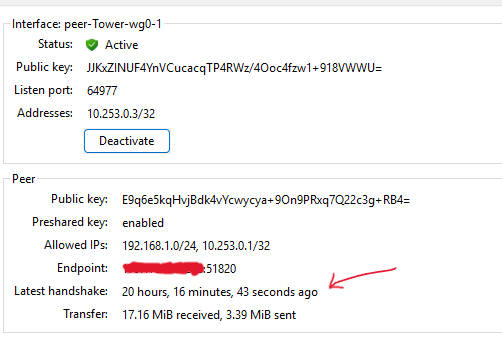
Hi everyone, I'm trying for a long time (months now) make some services public accessible, and to do it I'm using a VPS to create a tunnel to my server: Web --public IP-> VPS (peer-A, 10.13.13.1) --tunnel-> services (peer-B, 10.13.13.2) I'm using wireguard (tunnel) in a docker container to create the tunnel together with swag as reverse proxy. When I start the services the handshake between the tunnel peers occurs and I can access my Nextcloud instance via a public url per example, but after some time the peers stops to communicate with each other and I can't identify the reason. Sometimes it take only minutes to happen, other times hours, other times the handshake never occurs. And when this happens, the Unraid's default wireguard tunnel also turns unreachable. I'm running these 2 services in the VPS too. I followed this guide: https://virtualize.link/Containers/vps-proxy/ I saw in some comment in the foruns that ipvlan/macvlan network mode could be the culprit, so I disabled "bridging" as I don't need it and docker is using "macvlan". But the problem still occurs. What you guys think? Any help will be appreciated, I'm long in this journey of turning certain services public accessible. Thanks. tower-diagnostics-20260322-1628.zip

-
Running xfs_repair from the GUI without options: Phase 1 - find and verify superblock... Phase 2 - using internal log - zero log... ERROR: The filesystem has valuable metadata changes in a log which needs to be replayed. Mount the filesystem to replay the log, and unmount it before re-running xfs_repair. If you are unable to mount the filesystem, then use the -L option to destroy the log and attempt a repair. Note that destroying the log may cause corruption -- please attempt a mount of the filesystem before doing this. Proceeded to run with -L(logs attached). After it, stopped the array and rebooted the server. Took a look on syslog, no ATA errors this time. Array started normally. Services are operational. yay Thank you @JorgeB for the help! I will be marking your previous response as the solution. xfs_repair-L.txt tower-diagnostics-20250614-2101.zip
-
I had just one sparing sata cable, used it on disk1. Disconnected all SATA cables (power and data) and cleaned its contacts with a rubbber and contact cleaner. Swapped the PSU power cable too. Diagnostics attached. tower-diagnostics-20250614-1546.zip
-
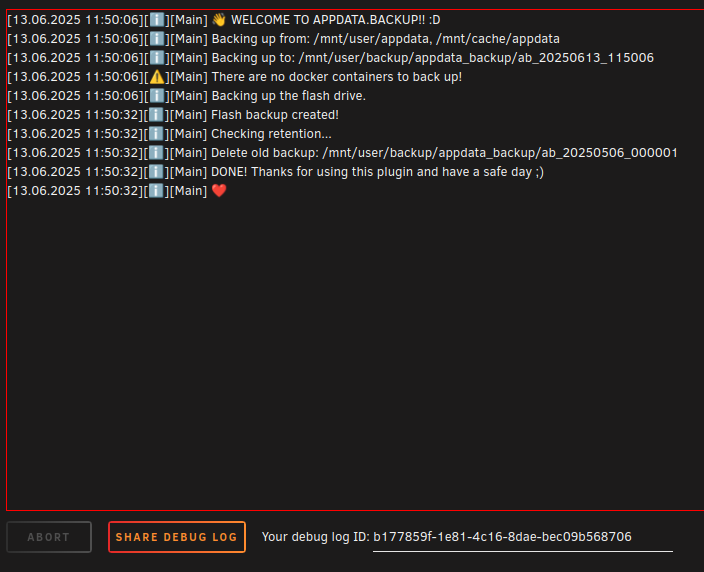
I rebooted the server and the shares didn't get mounted. I put the array in maintenance mode again, ran the xfs_repair, it pointed to log divergences again. I proceed to run xfs_repairwith the -L flag. And got the output in the attached file. This time, I disabled docker before rebooting. Did the reboot. The array started, the shares were mounted. Opened the Settings > User Utilities > Backup/Restore Appdata and started a manual backup: After the backup, I came back to the Shares view and they got unmounted: Seems to me that the shares break in the first writes to the array. I think maybe some plugin or script is misbehaving and affecting the shares links? I will be grateful for any help on diagnosing this. Thanks. xfs_repair -L.md tower-diagnostics-20250613-1201.zip

-
Phase 1 - find and verify superblock... Phase 2 - using internal log - zero log... ALERT: The filesystem has valuable metadata changes in a log which is being destroyed because the -L option was used. - scan filesystem freespace and inode maps... clearing needsrepair flag and regenerating metadata - found root inode chunk Phase 3 - for each AG... - scan and clear agi unlinked lists... - process known inodes and perform inode discovery... - agno = 0 - agno = 1 - agno = 2 - agno = 3 - agno = 4 - agno = 5 - agno = 6 - agno = 7 - process newly discovered inodes... Phase 4 - check for duplicate blocks... - setting up duplicate extent list... - check for inodes claiming duplicate blocks... - agno = 0 - agno = 3 - agno = 1 - agno = 4 - agno = 5 - agno = 6 - agno = 7 - agno = 2 clearing reflink flag on inodes when possible Phase 5 - rebuild AG headers and trees... - reset superblock... Phase 6 - check inode connectivity... - resetting contents of realtime bitmap and summary inodes - traversing filesystem ... - traversal finished ... - moving disconnected inodes to lost+found ... Phase 7 - verify and correct link counts... Maximum metadata LSN (7:1487733) is ahead of log (1:2). Format log to cycle 10. doneSeems to had completed fine. Should I stop the array and restart in normal mode now?
-
Oh got it. Done: Phase 1 - find and verify superblock... Phase 2 - using internal log - zero log... ERROR: The filesystem has valuable metadata changes in a log which needs to be replayed. Mount the filesystem to replay the log, and unmount it before re-running xfs_repair. If you are unable to mount the filesystem, then use the -L option to destroy the log and attempt a repair. Note that destroying the log may cause corruption -- please attempt a mount of the filesystem before doing this.
-
UD isnt the GUI? (Unraid Dashboard) I did it via GUI.
-
Did via UD with the default -n flag: Phase 1 - find and verify superblock... Phase 2 - using internal log - zero log... ALERT: The filesystem has valuable metadata changes in a log which is being ignored because the -n option was used. Expect spurious inconsistencies which may be resolved by first mounting the filesystem to replay the log. - scan filesystem freespace and inode maps... - found root inode chunk Phase 3 - for each AG... - scan (but don't clear) agi unlinked lists... - process known inodes and perform inode discovery... - agno = 0 - agno = 1 - agno = 2 - agno = 3 - agno = 4 - agno = 5 - agno = 6 - agno = 7 - process newly discovered inodes... Phase 4 - check for duplicate blocks... - setting up duplicate extent list... - check for inodes claiming duplicate blocks... - agno = 0 - agno = 6 - agno = 7 - agno = 3 - agno = 4 - agno = 5 - agno = 1 - agno = 2 No modify flag set, skipping phase 5 Phase 6 - check inode connectivity... - traversing filesystem ... - traversal finished ... - moving disconnected inodes to lost+found ... Phase 7 - verify link counts... Maximum metadata LSN (7:1487724) is ahead of log (7:1487705). Would format log to cycle 10. No modify flag set, skipping filesystem flush and exiting.
-
Hi, My pendrive containing the Unraid config got in a bad state and the UD notified me about it. I was directed to change the usb device and followed accordingly. I tried to fix the issue putting the pendrive on Windows and running its fix utility, but no luck. I proceeded to create a new boot device using the "Unraid USB Creator", selected the same OS version (6.12.15), and after it, copied the config/ and extra/ to the new pendrive. I opened Folder Properties of the old and new folders to see if they are the same size, they had, as expected. After this, I turned off the server, plugged in the new USB and booted. After this, the Unraid Dashboard asked to replace the register key to the new USB, I did it. So far so good. I dont recall precisely, but between getting my old USB failling and replacing the key on the new USB my server got restarted some times (doing "shutdown" via UD) and I remember waiting more than 90s to it to power off (probably, doing a forcefulll shutdown I think). After this, my Disk 1 started to show "Unmountable: Unsupported or no file system". I saw around that running xfs_repair -L could repair it, but as it can cause loss of data I prefered to open this thread asking for help. Can you guys check out my attached logs and instruct me how to get my array back online? Thanks. tower-diagnostics-20250611-0157.zip
-
Consegui o gabinete Cooler Master Cosmos 1000 (https://www.techpowerup.com/review/cooler-master-cosmos/) de segunda mão pela OLX. Bem espaçoso. O ponto negativo é que o fluxo de ar dele não é tão bom, o ar vem por duas passagens em baixo do gabinete, e as baias dos HDDs ficam num cluster sem ventilação direta (adaptei um cooler para tentar ajudar na ventilação dos HDDs). No geral, estou bem satisfeito. Sobre a fonte, comprei uma Cooler Master MWE 450 V2, que parece ter boa eficiência abaixo de 50W segundo o Wolfang (https://docs.google.com/spreadsheets/d/1TnPx1h-nUKgq3MFzwl-OOIsuX_JSIurIq3JkFZVMUas/edit?gid=110239702#gid=110239702). Mas ainda não consegui baixar o consumo do NAS para menos de 45W. Pelo `powertop`, notei que meu Package C-state não vai para os modos de menor consumo, ainda analisando para descobrir a causa. Obrigado pelas dicas.
-
Olá, Estou no processo de dar um up no servidor, com o intuito de atingir o menor consumo em idle possível e ter um gabinete com 4 ou mais baias 3.5' para os HDs. Como vocês bem sabem, no Brasil é difícil encontrar componentes que fogem do mainstream, ainda considerando custo-benefício. Qualquer ajuda ou indicação de gabinetes e fontes será muito bem-vinda. Minha mobo é microATX. Mas não tem problema ser um gabinete mid-tower ou full-tower, me preocupo mais com a construção e ter espaço para trabalhar. Os gabinetes que eu estava de olho: GameMax Titan Silent 2 Fractal Node 804 Silverstone cs380 Fractal Design Define R6 Nanoxia Deep Silence 4 Fractal meshify 2 Dos gabinetes, o único que eu estou com esperança de encontrar no BR é o GameMax Titan Silent 2 futuramente (foi lançado recentemente). PSUs: RM550x 2021 Pure Power 11 FM 550W Se tiverem sugestões de coolers para CPU low profile tb estou aceitando, é para um i3. Desde já, obrigado
-
Thanks, I will take a look into that. I found the culprit: I was fiddling around with the Wireguard VPN on my machine some time ago, and somehow the Unraid LAN IP (192.168.1.50) got into its configuration: Note the 2 IPs. After removing the IP managed by the router, I immediately got access back to the Unraid Dashboard on my Windows 11 PC: Thanks @JorgeB and @Frank1940


-
At some point (1+ month now) I can't access the Unraid dashboard (or ping it) from my Windows 11 PC (build 22631), and I'm in the dark about it. I wasn't with free time to solve this, so I was using my Android tablet to access it. But, the experience is far from ideal and I want to figure out why I can't access the server from my PC. I just tried, if I boot in another system, like my Windows 10 installation in the same PC I can reach the server and access the dashboard without a problem. Accessing from another PC in the LAN also works. The server have internet access and the services seems to be all working as expected. I'm trying to think what can be causing this problem. The modem/router? I use the ISP one (Nokia G-1425G-A), I didn't reset it yet (did multiples restarts though), planning to do it this weekend. Or some Workgroup config? But I didn't change it, and the group name is as I configured. Some docker network conflict? I booted in safe mode to see if something changed, but the server stayed unreachable. Thanks in advance for any help! tower-diagnostics-20241218-1840.zip
-
Hi, I have been using this container to access my files directly from Windows Explorer. It has a nice integration. But, I couldn't figure out a way to make the files only readable. I made the GET method public with hope that it would be enough to access the files in Windows Explorer without login. But every time I try to add the webdav as a network unit it ask me to do log in. You think it's better for me to stick with SMB for these permission related usage and use webdav more like an admin tool? Thanks.


