





Friarsgate_Customs
Members
-
Joined
-
Last visited
Everything posted by Friarsgate_Customs
-
About a week ago I had another drive drop out and need rebuilt. I didn't rebuild it right away and just bought a new PSU and splitters. I went with the MWE Gold 850 V2 because it comes with 10 SATA power cables from factory and has factory headers for more if needed. Also went with 1>2 splitters that don't have a 3.3v line at all, so no need to cut it for my SAS drives. It's a overkill setup for my server, but it should be good for future proof reasons, and I'm very sick of instability. I might get killed for saying this, but I was only using a 400w EVGA non modular PSU before. At peak usage, my UPS was reporting 250w draw, and that's including my inefficient Opnsense router, switch, WiFi AP, and ISP Modem. So the Unraid server itself was nowhere near the 400w limit of the PSU. Since I installed the new PSU and rebuilt the disc again, no issues. My power draw is lower as well, due to the PSU barely breaking a sweat. Been 10 days and no issues so far. Hopefully I don't have to open the case again for at least a year. Thanks Jorge for looking out.
-
I've got a 1-5 sata power extension, and it's the nicer crimped style variety. It hasn't given me issues previously, but I'll try to replace it. It would probably be better to get a modular PSU that has more sata connectors. The drive does seem to have all the content intact, and I did a backup of the most important data before the rebuild (had no errors during this). In your opinion, do you think I should run an error-correcting parity check now, or just wait until my next scheduled non-correcting check? Thanks again for helping so much.
-
Yeah I've got a sata power extension with the 3.3v wire cut that I use for the parity disk and 1-3. I can't remember why, but I know I've done over 30 days with no errors previously. Even during the rebuild, the errors all came within the first 2-3 hours and the remaining 20 had none.
-
Yeah I've got a sata power extension with the 3.3v wire cut that I use for the parity disk and 1-3. I can't remember why, but I know I've done over 30 days with no errors previously. Even during the rebuild, the errors all came within the first 2-3 hours and the remaining 20 had none.
-
Alright, here's my process: Power down, re-seat all my SAS cables and HBA card, replace all SATA data cables (again), use a different SATA power cable for the SATA HDD. The SATA power breakout cable I'm using for my SAS drives has the 3.3v line snipped, so I used a different breakout cable with that line intact. Reboot, run extended SMART tests on all drives (disk 1 kept getting interrupted for some reason, so I ran a few short tests instead), all the disks pass the test, check filesystem on all the drives and see that they're good. I downloaded all my most important data onto my gaming pc as a backup just in case. Did a complete rebuild of disk 3 in maintenance mode, and I did get a lot of read errors, but only in the first hour. The previously beeping SATA disk 4 actually ran at full speed with no weird noises. I downloaded my diagnostics and then shut down. I've restarted the system, started the array, and I'm going to start docker back up now. I haven't ran a parity check in months because of the SATA drive, but it seems to be properly working now, so I think my next move should be to run a correcting parity check? Does that sound right? I've ordered a 4TB SAS drive to have on standby in case it starts acting suspect again. I've attached the diagnostics prior to shutdown, and I can attach another if you'd find it helpful. Crisis might be averted for now. Thank you so much disc3_rebuild_6.11.26.zip
-
I'm gonna try reseating every cable on every drive again... All the cables are brand new and I haven't even touched anything on the inside in months besides replacing an m.2 last month. I tried making a manual backup of my Immich/Nextcloud data onto a local PC, and the SATA drive started beeping again, the copy task went from estimated completion of 40 minutes to 4 hours, failed, and then all of my SAS drives got read errors. I don't know if the HBA card is going out or what. All 4 of my SAS drives were working great for months, I get to a parity check day, cancel it because of the SATA drive being slow, and now it's all falling apart lol. Gonna open up the case here in a minute. I'm probably going to try some BIOS changes as well. Changing a PCIE slot from x2 to x4, and my M.2 speed from x2 to x4 as well (at the expense of disabling 2 SATA ports I'm not using). Maybe the extra lanes to the HBA card will help things be more stable.

-
Apologies for the title, not sure how else I can explain it. I'm currently panicking, but I'll try to explain this to the best of my abilities. Per diagnostics, I have a 5 disc array (4 data/1 parity). I have 1 SATA disc, and it's one of my smaller data discs, the rest are SAS drives. I know the SATA drive has been acting suspect for awhile, it can read and write decent, but during parity check it makes a beeping sound, and the speeds only display for a second and then drop to 0. I've just been putting off the monthly parity checks until I could replace the bad SATA disc with a SAS one. I had to cancel a parity check last night because it was never going to finish, but then I check today, and one of my SAS drives (disc 3) was disabled and others have some read errors. I restarted the server thinking maybe my HBA card was acting up, ran some smart tests, fixed a file system corruption on disc 3, looked over the emulated contents and saw everything looked completely correct, and tried rebuilding the disc on itself. The stupid SATA drive was beeping and making the rebuild out to take year, and then within 20 minutes the disc 3 rebuild was aborted for read errors. Am I just screwed here? Can I use the unbalanced plugin to move everything off the SATA disc (4) onto disc 1 and 2, remove it permanently from the array, and then rebuild disc 3? I do believe disc 3 to still be in good health and it's the faulty SATA disc (4) that is causing the rebuild to fail. As I said earlier, the emulated content on the parity disc all looked and played fine from what I checked. I've attached a video of the beeping SATA drive, some diagnostics from the fresh reboot that probably aren't extremely insightful, and an older diagnostics from when I was having cache issues (Fixed that problem, but it's the only diagnostics I have on hand with a long runtime.) Thank you so much! PXL_20260130_025605329.mp4 diagnostics-old.zip thewired-diagnostics-20260608-1911.zip
-
Legend, worked perfectly. I do wonder why the software was able to handle this while the array was already started, but not after a reboot. Bad time to buy an m.2 right now, but at least my data was protected. Question though, when my replacement m.2 arrives, can I simply add it back into the cache pool to fill in the missing spot without losing data on the good device?
-
I have a single array and a cache pool that consists of 2 mirrored ZFS m.2 drives. Recently, a few days into my uptime after updating for the security patches, I see one of the two drives in my cache dropped offline. I thought that maybe my motherboard was acting weird, so I tried to restart the whole system to see if the drive would come back online. However, the array fails to start because of the messed up cache drive. I restarted the server again, unassigned the cache drive, clicked yes I want to do this, and tried to hit start. After doing this, I've tried starting the array in normal and maintenance mode, but I get endless syslog errors regarding the unassigned drive being unreadable, and the array never starts. Do I need to change the slots from 2 back to 1? I don't want to lose my data on the cache drive that is still good. It's mirrored so I want to think I'll be okay to do this? I rely on my docker containers pretty heavily so this is a huge bummer. I'm not sure why unraid handled this more gracefully while the array was already started. diags attached. Thank you much thewired-diagnostics-20260516-2301.zip
-
I don't know how much of it was weird coincidence, but I used the new SAS cables I bought, and switched the sata power splitter to one with the 3.3v line cut. I'm now 50% through a drive rebuild with 0 errors on any drive. I was using a sata splitter with the 3.3v line intact before the power outage and it was never giving me errors pre-power outage. Regardless of which cable was malfunctioning, I've got my UPS installed and configured now, so hopefully I won't have to deal with this again.
-
Apologies, when you say slot, do you mean PCI slot? I was contemplating doing so, even if that's not what you meant. The HBA has 2 breakout cables that split into 4 connectors each and I've tried switching the adapters around and also the SATA power plugs that go on the back. My brand new breakout cables should be here on Monday, so I'll swap them out then. I know these cables are very fragile/unreliable and prone to errors. I'll update when possible, thanks!
-
First off, I'll start by saying I have an Eaton UPS on the way already. However, the other day, the power company had to shut down our street, and they didn't give me enough time to do a full clean shutdown of my Unraid box. When power was restored, I noticed that my disk 6 was disabled, and the contents were emulated. Looking at the emulated contents, everything is there and accounted for. Unraid started a parity read-check and after completing, it had 0 errors. I go about the process of rebuilding disc 6 onto itself, and now the parity disk is making odd noises for the first time, the speeds are slow, the disk log shows i/o errors, and instantly I have thousands of errors on the parity disk that weren't there before. I stop the data rebuild, and all of the issues with the parity disk stop. My array contains 4 SAS drives (parity disk, and disc 6 included) connected to an LSI SAS 9207-8i controller, and 1 SATA HDD. I had an issue months ago with another unclean shutdown that disabled my 1 SATA HDD, and it was very similar. It would click like it was broken, and the data rebuild process was going to take an obscene amount of time. I was thinking of replacing it, but decided to try a different SATA cable first, and after replacing the cable, everything was smooth sailing. I'm so confused with this new issue because I've tried different breakout cable leads, and different SATA power plugs to the SAS drives, but the errors still keep chasing me. The other 2 SAS drives connected to the controller are reading and writing just fine. I bought some replacement breakout cables for my HBA just in case, but they won't be in until next week. I'm not sure if I'm asking for help or just documenting fixing this issue. I'll update the thread once I figure out where my issue lies. I've attached my diagnostics in the off chance that someone wants to read it. Thanks for any attention this gets. thewired-diagnostics-20260304-1055.zip
-
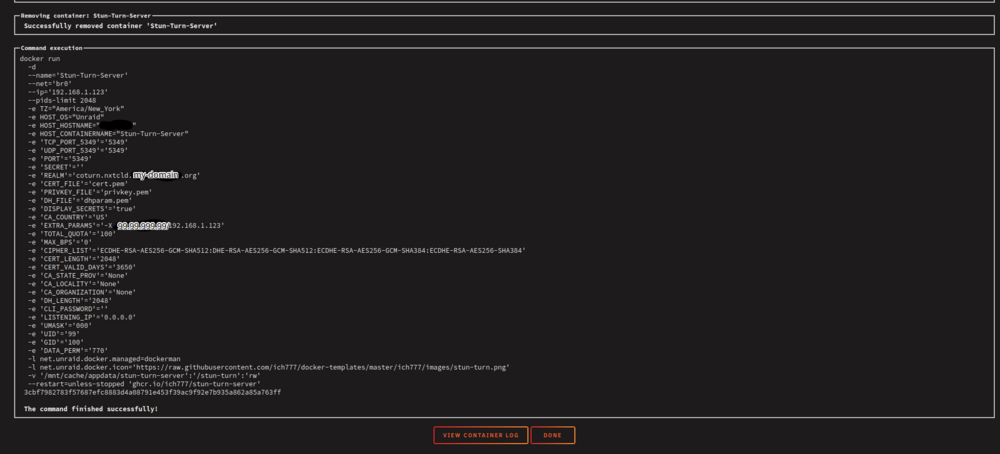
I'm new to home networking so I'm sorry if I don't understand something. I can't bypass my NAT currently because my ISP is quite restrictive. However, I see under extra parameters where you linked the coturn github wiki that there is this section: "-X, --external-ip <public-ip>[/private-ip] TURN Server public/private address mapping, if the server is behind NAT. In that situation, if a -X is used in form "-X <ip>" then that ip will be reported as relay IP address of all allocations. This scenario works only in a simple case when one single relay address is to be used, and no CHANGE_REQUEST STUN functionality is required. That single relay address must be mapped by NAT to the 'external' IP. The "external-ip" value, if not empty, is returned in XOR-RELAYED-ADDRESS field. For that 'external' IP, NAT must forward ports directly (relayed port 12345 must be always mapped to the same 'external' port 12345). In more complex case when more than one IP address is involved, that option must be used several times, each entry must have form "-X <public-ip/private-ip>", to map all involved addresses. CHANGE_REQUEST NAT discovery STUN functionality will work correctly, if the addresses are mapped properly, even when the TURN server itself is behind A NAT. By default, this value is empty, and no address mapping is used." So I got my public IP via the unraid console with curl ipinfo.io/ip (Let's call it 99.99.999.99) and my container IP is 192.168.1.123. I then put "-X 99.99.999.99/192.168.1.123" in extra param. However, the logs on startup say "No external IP set". I also tried "-X 99.99.999.99" and it also says no external IP set. Shouldn't this work at least until my ISP updates my public IP? Sorry if I don't understand fully. Here's my updated docker run if it helps: I also tried making a DNS record on my cloudflare domain of coturn.my-domain. org and set it to my public ipv4 address with DNS only (no proxy). then I updated the realm field to this domain and updated my container. With this new domain. the test button on nextcloud administration panel returns a green checkmark. The trickle ICE test still won't return my public IP or any relayProtocols, and my nextcloud calls still reconnect endlessly. I think this is close to working
-
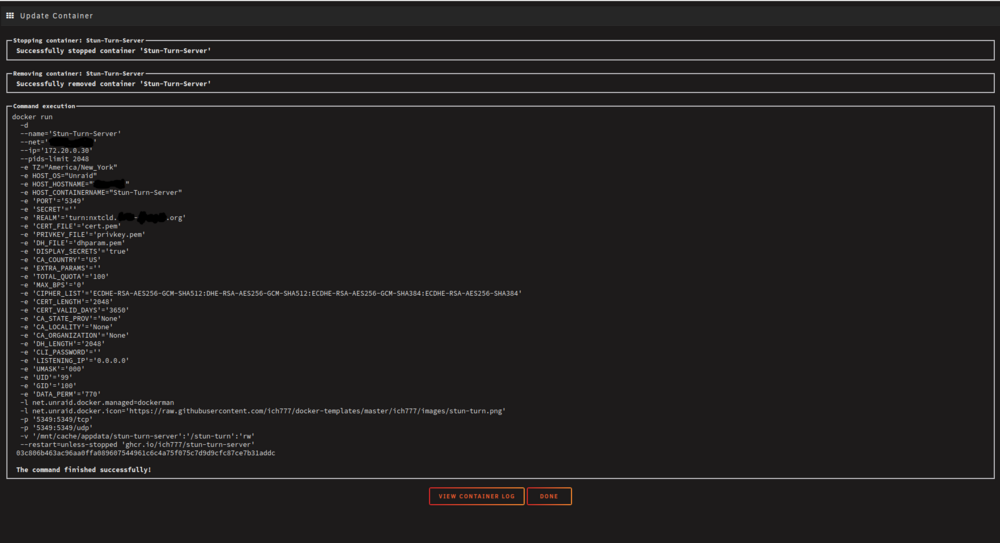
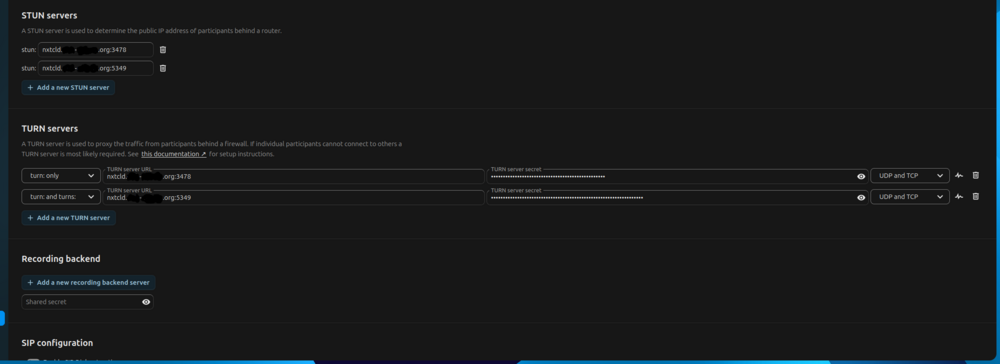
Hello, I was wondering if I could get some help setting up the Stun-Turn-Server for use with Nextcloud Talk. My Nextcloud instance is the Nextcloud-AIO-mastercontainer from SpaceInvaderOne, proxied with Nginx Proxy Manager and through a CloudFlare ZeroTrust tunnel. The AIO Stun/Turn server won't work through cloudflare, so I tried setting up the Stun-Turn-Server container to use instead. My docker run looks like this. The network type is my custom docker network with a fixed container IP (I also tried host mode, but it didn't work because the nextcloud AIO Talk container wouldn't start anymore.) For realm, I tried it as "turn:nxtcld.my-domain", as well as "nxtcld.my-domain.org". My NextCloud AIO admin interface looks as follows. I've tried turn: only, turns: only, and turn: and turns: . The secret matches what's in my logs and the appdata folder. When I run the webrtc Trickle ICE test for all IceTransport values, I don't get any relay results. When I test manually by calling two users on nextcloud talk outside of my home network, the Talk logs show "ICE failed for component 1 in stream 1..." and the calls just do a reconnecting loop. My network setup is an AT&T Fiber Gateway (BGW320-500) in DHCP mode with my Unraid machine connected to it directly. Ports 3478 and 5349 are open to my Unraid machine tcp/udp. I've checked with a port checker on another PC on the LAN and the port is open. I don't have the stun-turn-server proxied at all. Am I missing something simple? I shouldn't need to change anything in CloudFlare regarding my nextcloud instance, should I? Since the Turn server is running separately externally? Thank you
-
Working great again, thank you much! I wasn't super worried because I have Slskd set up as a backup container, but I like the nicotine+ experience a lot better. Thanks again
-
Having the same issue here as well. Minus trying to uninstall and reinstall. I have this container on auto update every night, and maybe 5 days ago I saw that it wasn't auto starting anymore, and then yesterday I tried to start the container 3-4 times and it wouldn't stay running at all.
-
Hey, update from me. I got iris to work properly, and now I have audio in all the rooms I want 😀 my mounts were wrong and the containers couldn't read/write to the snapfifo correctly. If anyone needs help setting this up I can do my best to show you my settings. Edit: if you have YouTube links working in the YouTube section of the Mopidy webserver landing page could you let me know how you got it to work? I changed the mopidy.config YouTube to enabled and package to yt-dlp. The package was from 2023 so I manually downloaded and volume mounted it into the container and it's now the most current version. YouTube videos still have no audio though. I also tried using the browse function in Iris but YouTube and YouTube music don't work. I see their Mopidy packages haven't been updated since 2023 though, so I'm guessing Google effectively killed it? Probably gonna have to figure out an alternative
-
Hey, thanks for your mopidy3 and snapcast containers. I couldn't get the conf files to load my local files on the other maintainer's containers. I've got the iris webui set up and I think everything is right, but the player is just skipping through every song after half a second and there's no audio. I have the speaker set to "stream to this device" (using a PC on the LAN) but I don't really see anything about playback on either container log so I'm confused what's the matter. I think I have snapcast connected to the right port under iris settings.
-
Can also confirm my container is working again. Big ups Binhex
-
I'm having the same "Unable to connect to gluetun Control Server" issue as Keek Uras. Been running fine for months now after I configured everything properly per binhex's instructions. My instance is really basic, just the container on my custom docker network, not ran through a VPN or anything, with a port opened on my router. I had it hosted through cloudflare, but at the moment neither cloudflare or the LAN address are working.
-
Hey, I've been running SoulSeek in a Windows 10 VM with the ports manually forwarded in my router. It's been working great, but this container was pretty easy to get running, and probably a hell of a lot more friendly on resources, so I'm trying to make the switch to it. Also would be nice to be able to queue downloads from my domain rather than the VNC window for my VM on my phone screen. I tried using the container with my actual publicIP and going into my router NAT settings to forward a free port to my unraid machine for Nicotine+, but even after doing so, it still says it's closed? Am I missing something stupid here? Soulseek/Nicotine+ makes you hard to find in search if you don't have open ports. I have your qbittorrent container setup with my ProtonVPN. I tried following your Q24 documentation to network share with qbit, but was too dumb to get it to work. I'm on Unraid7, so I just changed the network type on Nicotine+ to container, and binhex-qbit as the network container, and added the ports like you normally would on the documentation. This let me access the webgui from the nicotine+ port, but it takes me to "directory listing for /" and I have to click vnc.html or vnc_lite.html to actually get to the nicotine+ webgui (also it's a quarter size for some reason?). This is fine, and under network, my public IP address is the VPN address. However, the listening port is closed. If I look at the qbit logs to manually enter the ProtonVPN open port that your automatic matching does and use that in Nicotine+, it says it's already in use. Is that the problem MrSliff above was asking about where you said that spinning up another VPN container is the way to solve it? ProtonVPN only allows you a certain amount of logged-in devices, so I'm not sure it multiple containers would count each time. Sorry for rambling, let me know if I'm missing something obvious.
-
I am also having the issue with "error! app '276060' state is 0x6" after the latest Sven Co Op update. It had been working fine before when I initially set up and tested, but after the game updated recently it's been doing this. I have an XFS filesystem on both my array and my cache, with my install path being /mnt/user/appdata/. I tried reinstalling from the previously installed section under apps, as well as a fresh install of the container, and still have the issue.
-
I just had someone on reddit tell me this same thing, from this thread. I finally got to the unraid menu. So relieved 🙏
-
I don't have anything to reset to default inside of the BIOS sadly. It definitely reset the BIOS setting changes I've made when I hit the reset cmos button though, because I keep having to disable fast boot each time I do it hah.
-
After updating I've used the clear cmos button that the motherboard has on the rear I/O as well as popping out and reinstalling the cmos battery.



