





dougraid
Members
-
Joined
-
Last visited
-
Did a memtest, but not not seeing any errors. Did the scrub on the pool and these are the results: UUID: 5dc4753d-9d19-4b7b-928f-d322f9130885 Scrub started: Fri Jun 5 14:34:52 2026 Status: finished Duration: 0:01:21 Total to scrub: 731.33GiB Rate: 9.03GiB/s Error summary: csum=8 Corrected: 0 Uncorrectable: 8 Unverified: 0 Still showing the Errors on the Pool. Is there a way to reset the errors? After switching out the processor, shat steps should I take from there?
-
I'm starting a memtest and will check the results once it has completed. I also have another intel processor (albeit a 14th Gen Intel) that I can swap out if you think it may be the current processor. However, let's say it was/is the processor causing the issues. If I swap that out, how do I fix the existing errors? Is it possible the drives themselves are bad, or is that not what you are seeing in the logs? Is there a text or fix I can run on the pool? Not sure where to go from here.
-
Thank you @JorgeB here are the diagnostics. centralperk-diagnostics-20260604-1449.zip
-
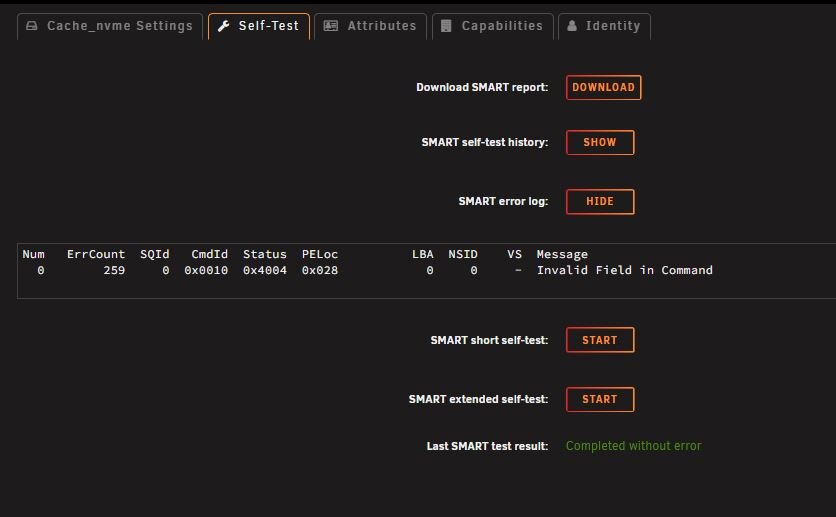
I have a drive pool using two Firecuda 2TB NVMe drives. I use this pool for my appdata (Docker), VM's, cached media (later saved to array), and system data. These errors don't seem to be generated during a parity check (parity is valid), I'm not even sure if the parity check only runs on the Array, or also on this pool. The system is running ok, but I do experience weird glitches now and then. I'm more concerned that these errors keep increasing. I'm not sure how to fix this and don't want to lose all my data. Does anyone know the process on how best to resolve these errors (see attached)?

-
I think you can probably send him a private message though these forums. @SpaceInvaderOne
-
Great question, I wouldn't mind knowing the answer as well. It appears it would be one of the nct6687 sensors as I believe those are MSI motherboard related. The acpitz is apparently a temperature sensor near the CPU (not the CPU temp) and it is obviously not the nvme sensors. Hopefully someone else can comment and give you an accurate answer.
-
It depends. If you are using it for a file server, you'll be fine. I also think running a Minecraft server would also work well. If you already have that processor, I would say just give it a try and see how it performs. Upgrading later isn't too difficult if you find it isn't performant enough. Personally, I try and find a solution that is powerful enough for what I need, while also being as efficient as possible. That is one of the reasons why I use xfs for my Array (so it can spin down unused drives). With the number of drives I have, that saves me about 42 watts alone. I'm currently using some left over parts (intel core i7-9700k cpu). This is an 8 core/8 thread CPU that has similar (slightly better) performance as you Ryzen 5. But your Ryzen 5 has more threads and better power draw. I think you'll be find with it. I am running Plex, a handful of docker containers and the CPU usage is nominal. The only other item I will mention is if you plan on using Unraid as a media server. If you do and plan on transcoding, then an intel CPU with Quicksync has a major advantage over AMD. Have you noticed any performance issues thus far?
-
Interesting, I have a gaming pc with a i7-13700k. Haven't had any issues. Maybe I am one of the lucky ones.
-
If you are doing object detection on your cameras, I would recommend getting a Google Coral TPU (M.2 PCIe slot) if you have a free slot available in your build. It does AI detection using 2-4 watts with inference speeds of 5-6ms. I don't know anything about Agent DVR but both Frigate and BlueIris works with the TPU. If you get an intel processor, quicksync will do a great job at any media transcodes that you likely wouldn't need a GPU. Should probably handle 2 4k transcodes or about 10 1080p transcodes (depending on bit rate).
-
Doesn't the issue only affect core-i9 13th and 14th gen? I thought the core i5 and i7's were not an issue.
-
I use Frigate on Home Assistant to detect 'objects' instead of motion. Setting up zones will filter out street traffic for my event notifications and tv screen pip popup. I still use detections in the other low priority areas like the street traffic, etc, but I don't have those detections alert me (they are still shown in Frigate). Running on a n100 NUC with a dual Google Coral M.2 TPU. CPU runs at about 25%-30% with two 4k cameras and three 2k cameras and uses about 25 watts. I've considered moving this to Unraid, but it's working on Home Assistant almost flawlessly, so I probably won't move it over. For 24/7 recording I use BlueIris (retreams from Frigate). I had been using BlueIris for years before finding Frigate. BI works good for direct to disk full time recordings.
-
Great info, thank you. That's not too bad. I plan on filling up the first couple drives so they will be spun up most of the time anyway. That makes sense regarding the boot drive, I will make an off server backup. Is it possible to have a backup USB ready to go with the key ready as well? It would be nice to have one ready on a moments notice if the current usb flash drive fails. I did just install Dynamix Cache Directories. I will change it so it just looks at the media shares. Thank you all, this has been very helpful.
-
I've searched Youtube, Unraid forums and docs, etc., but I am having a hard time getting a clear picture of the following. I'm sure time will reveal all answers, but if you have any insight or knowledge, it would be appreciated. I'm running Unraid 7 Beta 2, have a 8 drive SATA xfs Array, a raid1 nvme cache btfs pool, and a mirrored smaller btfs SSD pool. Is there anyway to speed up 'reads' from the Array with this setup? I know ZFS has additional sub pools that can help with this, but is it possible using xfs/btfs? Are there any apps that backup the Flash Drive that Unraid uses for the OS? I know I can manually back it up by downloading the file, but is there an automated method that does it periodically and saves it to the array? Most of my usage will be for media storage/server. Since I have over 20TBs of media, I have to keep this data on the SATA HD Array not in high speed storage. I know streaming is fine off of mechanical drives but I am concerned about the time it might take to spin up the drives where the data is located. While I like the idea of the drives being spun down when not in-use, I don't want the user experience of browsing movies/tv shows to be slow due to the amount of time it takes to spin up the drives. What concerned me the most is a video I saw that showed that Unraid 'has to' spin up the drives in order. For example, it will spin-up drive one, then will spin-up drive two only when the first has completed (and so on). If the data were on drive 8 for example, how long would it take for it to become available? I'm hoping this was an old video that no longer is accurate. How do I designate a drive as a hot spare? Do I add it to the array first, or leave it unassigned? Is this a manual process (i.e. I add the drive to the Array once one fails), or is there a way to make this happen automatically when a failure is detected?
-
I'm pretty new to unraid myself so take this with a grain of salt. I think the answer depends on your objective, what you hope to gain. I appears you have good VM performance since they are on your current nvme drive. Is space the issue? If that is the case, then upgrading would keep your speed while improving your available storage. If redundancy is important, then I think that answers your question. 2 x 2TB NVme drives in Raid 1 would be nice for sure. I've heard good things about Segate Firecuda NVme drives for durability and performance. The 2TB versions were on Amazon for $129 each not too long ago (maybe they still are).
-
Hi fellow Unraiders. New user here, just getting ready to install unraid for the first time. Here are some details to what I am looking to use and do with unraid. Hardware (this is already set) Supermicro chassis with 8x hot swap drive bays Gigabyte consumer motherboard with intel 9700k cpu Dual 10G SFP+ NIC Hardware minisas 2-port sas/sata controller (8x sata drives) 9x 12TB Sata drives (7 in array, 1 parity, 1 spare) 2x Segate Firecudu m.2 NVme drives 2x Team Group 512GB SSDs Unraid use 80% plus of the usage will be for running Channels DVR (similar to Plex). Will be recording and streaming frequently to multiple devices (most to internal netowrk, some external) Will use Docker for Channels DVR and some other programs (radarr, sonarr, etc.) May experiment with VMs, but I have no planned use for VMs yet. I am using home assistant, but have that on a small NUC and will likely keep it there. Goals I prefer using XFS for the main array. Mainly for the ability to keep most of the drives spun down when not in use. With 9x mechanical drives, keeping them on will use a signifcant amount of extra energy. Would like to maximize responsiveness when streaming media on my local network. This doesn't require much, but I am concerned how long it might take for the mechanical hard drives to spin up. Backup the unraid arraid to my Qnap NAS Easy file recovery. If one drive fails, Questions: Is there anyway to improve read performance in an xfs array? I've read about slogs, arc, etc. but those seem to only be available if using ZFS on the array. Again, I would like to spin down drives that aren't in use so I don't think ZFS is for me. Plus, I would like the ability to add another drive one at a time. I would be ok with havig to add 2 at a time if needed. I would like to use the 2 nvme drives in a mirroed array and use them as a write cache. BTFS or ZFS? What would work better? What are the pros and cons? Not sure what I want to use the SSD drives for. A read cache would be great, but I don't know if that is possible when using xfs on the array. Is there any way to minimize drive spin up time, especially for media? It wouldn't be good if I have to wait 10-20 seconds while the drive spools up anytime I want to watch a show. Drives in an XFS array don't spin up one at a time, do they? I saw some video where media was located on say the 8th drive in the array. While this was an older video, drives 1-7 had to spin up one at a time first before drive 8 spun up. It doesn't still work this way, does it? I have a 128GB Samsung Bar plus usb flash drive. Can this be used for Unraid? I have seen a max 32GB limit, but those aren't readily available. Is ther any benefit to using a 3.1 USB port on the flash drive (speed), or should it be on an older 2.0 USB port? Any insight would be greatly appreciated. Getting ready to get unraid fired up.


