





Davo67
Members
-
Joined
-
Last visited
Everything posted by Davo67
-
So the suggestion would be to modify/duplicate the script so I have: * stop array - runs the script and then stops the array * restart server - runs the script then restarts the server * shutdown server - runs the script and then shuts down the server I did actually having it stop the array but then restarting it would not be mounted. But there is still a place and numbers 2 and 3 are a good idea.
-
Thanks, it is as I suspected and hence explains why it doesn't work as expected. Thanks for getting back to me with confirmation.
-
I have my shutdown time set to 600 as I have some VMs etc. The script shuts them down properly. Running as a userscript at stopping of array doesn't work. It starts too late that I can see. I asked the dev for assistance but I'm guessing he's put it in the "too hard basket" as he hasn't replied to my last few messages. And yes I shouldn't need a script. And yet I do. I've uploaded my syslog asking how to fix and got no where. Always seems to be something different. Yesterday was this: 2025-03-04 14:26:35 User.Notice 192.168.100.78 Mar 4 14:26:35 DavoUnraid root: cannot unmount '/mnt/disk5/zpool-backup/appcache_appdata/Plex-Media-Server': pool or dataset is busy Eventually it rebooted dirty. My script does what I believe Unraid should do by itself - ie shutdown/stop everything that could cause a dirty restart. So with that behind are you able to assist with how to run it automatically at shutdown. The present manual running the script works but if I need to do a restart it doesn't run and the restart will 99% of the time be dirty.
-
Ever since v6 I've constantly had issues with the array not dismounting. Tried troubleshooting but the reality is I just wanted it to stop cleanly. So I developed a userscript that works fine. Except the "run at array stop" part is too late and hence I need to run it manually, then stop array/restart etc. I had heard mention of the stop script and have used this to successfully put basic comments to syslog so that appears to work. But my script as it stands doesn't work. Is this actually possible and the script needs modifying? The script is as below. Can it be made to run as I require? #!/bin/bash # Redirect output to both console and log file exec > >(tee -a /mnt/user/temp/logs/StopArrayCleanly.log) 2>&1 # Logging function to include timestamps log() { echo "$(date '+%Y-%m-%d %H:%M:%S') - $*" } log "Starting array shutdown script..." # 1. Unmount all SMB (CIFS) shares mounted on this server log "Unmounting all SMB (CIFS) shares mounted on this server..." mount | grep -i cifs | awk '{print $3}' | while read -r share; do if [ -n "$share" ]; then log "Unmounting $share" umount "$share" # Check if unmount was successful if mountpoint -q "$share"; then log "Failed to unmount $share. Forcing unmount..." umount -l "$share" fi fi done # 2. Stop all Docker containers log "Stopping all Docker containers..." docker ps -q | xargs -r docker stop # 3. Stop VMs log "Stopping all VMs..." virsh list --name | while read -r vm; do if [ -n "$vm" ]; then log "Shutting down VM: $vm" virsh shutdown "$vm" # Initialize countdown max_wait=150 # Maximum wait time in seconds interval=10 # Interval between checks in seconds elapsed=0 # Loop to check VM status while [ $elapsed -lt $max_wait ]; do sleep $interval elapsed=$((elapsed + interval)) log "Checking if VM '$vm' has shut down... (Elapsed: ${elapsed}s)" if ! virsh list --name --state-running | grep -qw "^${vm}$"; then log "VM '$vm' has shut down gracefully." break fi done # After maximum wait time, forcefully destroy the VM if it's still running if virsh list --name --state-running | grep -qw "^${vm}$"; then log "VM '$vm' did not shut down within ${max_wait} seconds. Forcing shutdown..." virsh destroy "$vm" # Optional: Confirm if the destroy was successful sleep 5 if ! virsh list --name --state-running | grep -qw "^${vm}$"; then log "VM '$vm' has been forcefully terminated." else log "Failed to forcefully terminate VM '$vm'. Manual intervention may be required." fi fi fi done # 4. Terminate SSH sessions accessing the array log "Terminating SSH sessions accessing the array..." # Get the PID of the current script to avoid killing itself current_pid=$$ pids=$(lsof -t /mnt/disk* /mnt/user* 2>/dev/null | grep sshd | uniq | grep -v "^${current_pid}$") if [ -n "$pids" ]; then log "Terminating SSH sessions with PIDs: $pids" echo "$pids" | xargs -r kill else log "No SSH sessions accessing the array found." fi # 5. Close any open files on the array log "Closing any open files on the array..." pids=$(lsof -t /mnt/disk* /mnt/user* 2>/dev/null | uniq | grep -v "^${current_pid}$") if [ -n "$pids" ]; then log "Terminating processes with PIDs: $pids" echo "$pids" | xargs -r kill else log "No processes accessing the array found." fi # 6. Stop SMB services log "Stopping SMB services..." /etc/rc.d/rc.samba stop # 7. Stop NFS services log "Stopping NFS services..." /etc/rc.d/rc.nfsd stop # 8. Ensure all disk activity has ceased log "Ensuring all disk activity has ceased..." sleep 5 log "Script completed." log "Safe to stop array if desired."
-
Any chance of some assistance with this please?
-
Just further to this, looking at the syslog output below it looks like the userscript isn't being run until a lot of other processes have run. And this has been where the system has failed (and what the script avoids). So I'm not sure there is a way around this. Feb 4 13:36:02 DavoUnraid kernel: mdcmd (40): nocheck cancel Feb 4 13:36:03 DavoUnraid emhttpd: Spinning up all drives... Feb 4 13:36:03 DavoUnraid emhttpd: spinning up /dev/sda Feb 4 13:36:13 DavoUnraid emhttpd: read SMART /dev/sdh Feb 4 13:36:13 DavoUnraid emhttpd: read SMART /dev/sdg Feb 4 13:36:13 DavoUnraid emhttpd: read SMART /dev/sdd Feb 4 13:36:13 DavoUnraid emhttpd: read SMART /dev/sde Feb 4 13:36:13 DavoUnraid emhttpd: read SMART /dev/sdb Feb 4 13:36:13 DavoUnraid emhttpd: read SMART /dev/sdf Feb 4 13:36:13 DavoUnraid emhttpd: read SMART /dev/sdc Feb 4 13:36:13 DavoUnraid emhttpd: read SMART /dev/nvme1n1 Feb 4 13:36:13 DavoUnraid emhttpd: read SMART /dev/nvme0n1 Feb 4 13:36:13 DavoUnraid emhttpd: read SMART /dev/sda Feb 4 13:36:13 DavoUnraid emhttpd: Stopping services... Feb 4 13:36:13 DavoUnraid usb_manager: Info: rc.usb_manager Reset Connected Status Feb 4 13:36:13 DavoUnraid emhttpd: shcmd (75809): /etc/rc.d/rc.libvirt stop Feb 4 13:36:13 DavoUnraid rc.libvirt: Stopping libvirt daemon... Feb 4 13:36:14 DavoUnraid rc.libvirt: virsh net-destroy d2cdc0e3-89b3-49d3-825f-2e04c1c0f184 Feb 4 13:36:14 DavoUnraid dnsmasq[21844]: exiting on receipt of SIGTERM Feb 4 13:36:15 DavoUnraid rc.libvirt: libvirt daemon... Stopped. Feb 4 13:36:15 DavoUnraid rc.libvirt: Stopping virtlog daemon... Feb 4 13:36:16 DavoUnraid rc.libvirt: virtlog daemon... Stopped. Feb 4 13:36:16 DavoUnraid rc.libvirt: Stopping virtlock daemon... Feb 4 13:36:17 DavoUnraid rc.libvirt: virtlock daemon... Stopped. Feb 4 13:36:18 DavoUnraid emhttpd: shcmd (75810): umount /etc/libvirt Feb 4 13:36:18 DavoUnraid kernel: BTRFS info (device loop3): last unmount of filesystem 6fb45768-fade-4fc3-9937-9eca695e5285 Feb 4 13:36:18 DavoUnraid emhttpd: shcmd (75812): /etc/rc.d/rc.docker stop Feb 4 13:36:18 DavoUnraid rc.docker: Stopping containers... Feb 4 13:36:18 DavoUnraid rc.docker: Unraid managed containers stopped. Feb 4 13:36:18 DavoUnraid rc.docker: Stopping network... Feb 4 13:36:19 DavoUnraid rc.docker: Network stopped. Feb 4 13:36:19 DavoUnraid rc.docker: Stopping Docker daemon... Feb 4 13:36:19 DavoUnraid root: Waiting 30 seconds for Docker daemon to die. Feb 4 13:36:26 DavoUnraid rc.docker: ip link set docker0 down Feb 4 13:36:26 DavoUnraid rc.docker: ip link del docker0 Feb 4 13:36:26 DavoUnraid rc.docker: Docker daemon... Stopped. Feb 4 13:36:26 DavoUnraid emhttpd: shcmd (75814): umount --lazy /var/lib/docker Feb 4 13:36:30 DavoUnraid kernel: ccp 0000:30:00.2: tee enabled Feb 4 13:36:30 DavoUnraid kernel: ccp 0000:30:00.2: psp enabled Feb 4 13:36:30 DavoUnraid kernel: kvm_amd: TSC scaling supported Feb 4 13:36:30 DavoUnraid kernel: kvm_amd: Nested Virtualization enabled Feb 4 13:36:30 DavoUnraid kernel: kvm_amd: Nested Paging enabled Feb 4 13:36:30 DavoUnraid kernel: kvm_amd: LBR virtualization supported Feb 4 13:36:30 DavoUnraid kernel: kvm_amd: Virtual VMLOAD VMSAVE supported Feb 4 13:36:30 DavoUnraid kernel: kvm_amd: Virtual GIF supported Feb 4 13:36:31 DavoUnraid kernel: BTRFS info (device loop2): last unmount of filesystem 82241304-4c3b-4d2c-b308-45e2a74c2b46 Feb 4 13:36:32 DavoUnraid unassigned.devices: Unmounting All Devices... Feb 4 13:36:32 DavoUnraid sudo: pam_unix(sudo:session): session closed for user root Feb 4 13:36:33 DavoUnraid unraid.usbip-gui: Stopping Daemon(USBIPD) Feb 4 13:36:33 DavoUnraid emhttpd: /usr/local/emhttp/plugins/user.scripts/backgroundScript.sh "/tmp/user.scripts/tmpScripts/00000001/script" >/dev/null 2>&1/usr/local/emhttp/plugins/user.scripts/backgroundScript.sh "/tmp/user.scripts/tmpScripts/test_array_shutdown/script" >/dev/null 2>&1 Feb 4 13:36:33 DavoUnraid rc.samba: Stopping Samba server daemon... Feb 4 13:36:33 DavoUnraid rc.samba: Samba server daemon... Already stopped. Feb 4 13:36:33 DavoUnraid rc.nfsd: Stopping NFS server daemon... Feb 4 13:36:34 DavoUnraid rc.nfsd: NFS server daemon... Already stopped. Feb 4 13:36:35 DavoUnraid emhttpd: Stopping mover... Feb 4 13:36:35 DavoUnraid emhttpd: shcmd (75817): /usr/local/sbin/mover stop Feb 4 13:36:35 DavoUnraid root: ionice -c 2 -n 0 nice -n 0 /usr/local/sbin/mover.old stop Feb 4 13:36:35 DavoUnraid root: mover: not running
-
Yes to date it always works. The issue isn't the script, but that I don't think it runs when I click "shutdown array" or "reboot system". Certainly I'm still having issues. Yesterday I ran the script then rebooted the system. All smooth, 5 minutes later was back up. Then there was an update that needed a restart and just did "reboot system". I don't believe the script ran and although the system did eventually restart without a power off/on needed (an improvement in v7) the array was marked as unclean so it clearly forced the shutdown. I can't see where I can check logs for my script or userscripts in general. There doesn't seem to be any documentation available (that I can find) - for support it points to this thread.
-
I've had issues since v6 (now on v7) with restarting my system. Basically for one reason or another the array won't shutdown cleanly. I created a userscript which ensures a clean dismount of the array by stopping everything. To date has worked without fail. But only if I run it manually and then stop the array. I've tried having it set as "run at array shutdown" but it doesn't run and I'm not sure why as I believe this is how it should work? I.e. I click "shutdown array" and this script should first run. Is that the case?
-
After restarting I've had no more issues with it basically disappearing. But I was still getting CRC errors on this drive only. I swapped the cables (one at a time) and was still experiencing issues on this one drive only. I then replaced the drive entirely. Same thing. Finally, found a thread talking about this issue with this exact drive (Kingston 1TB SSD) in which Kinston advised that the 199 isn't a CRC error with this drive and the reporting of it as such should be disabled. Which I've done. So I don't understand the initial failure, still very strange. But that drive has been replaced so maybe it was faulty?? Anyway thanks all for your help and thought best to report back and close off this thread.
-
So this is weird. After restarting the drive temp is showing and I can do the smart test.
-
I gave that a try and I'm afraid it didn't run. Which to me seems strange as it says "stopping of array". Which would have to be before the array is stopped as I don't think you can run a userscript when the array is offline. Or can you? Nevertheless I'll need to work out an alternative way to get the script to run as per usual it's been 20 minutes and hasn't shutdown so I'll no doubt need to restart it.
-
I hadn't thought of that. I'll try that. Would be awesome if it works. When manually stopping the array I run it in the background via userscripts and always works. I'll update when I am able to stop the array.
-
Diagnostics as requested davounraid-diagnostics-20241203-0733.zip
-
Assuming it is faulty, and I'm thinking it is, what is the best way to work out which drive it is?
-
I noticed a message this morning "appcache degraded" but then when I refreshed the page it says "healthy". But doesn't look right to me (no temperature): Appcache 3 active * healthy If I try to do a smart test on that disk it does nothing and the l get nothing (it just starts and immediately stops) and the attributes page says: -Smartctl open device /dev/sdg failed So to me it sounds faulty, yet this is really weird as it's saying healthy most of the time.
-
I am continually having issues with my array not stopping. Various reasons (often "stopping filesystem"). This isn't normally an issue as I've developed a script that I run which shuts everything down nicely and the array always stops properly. But yesterday I stupidly bumped the power button on my server. So it started shutting down. And of course didn't finish and I had to dirty restart. I'm not looking to troubleshoot why it didn't shutdown. I've wasted dozens of hours on this and as my array stop script works perfectly every time I'm wondering if there is a way to implement that on my system? So "shutdown" runs my script, then shuts down. Is this possible?
-
Actually I don't know. I'm running the arrs, plex, a few other containers (e.g. to send Whatsapp msgs) 3 x windows VM's. I access the shares from my windows computer. That's about it so not sure about nfs. I'm something of a newb with linux/unraid I'm afraid but learning.
-
Oops missed that. Looking on my phone all a bit small. Will add that now. Is that all I should do?
-
I already have that running. For a few weeks now and still have issues I'm afraid.
-
About 50% of the time when I stop my array I have an issue. And then have to troubleshoot and most of the time give up and dirty reboot the server. I'm hoping for a process to follow (that I can possibly script) that will give it the best chance of shutting down cleanly. For example I have SMB shares that link to a windows VM. My process now is: 1. Unmount each SMB share from the main page 2. Stop all VMs from the VM page 3. Stop all dockers from the docker page 4. Ensure no remote terminal sessions (as a work colleague sometimes has a WinSCP session on another computer to unraid) - I have a plugin for this too Then stop the array. But I still often get errors so there are other things I need to consider. I don't care if it kicks someone out of a session or they potentially lose data. I'd prefer everything that needs to be closed/stopped/unmounted to be done and then stop the array. Is this possible?
-
From time to time I will get a heap of messages in the syslog as follows: Nov 25 11:50:35 DavoUnraid nginx: 2024/11/25 11:50:35 [error] 31535#31535: *1032807 limiting requests, excess: 20.088 by zone "authlimit", client: 192.168.100.125, server: , request: "PROPFIND /login HTTP/1.1", host: "davounraid" I have only one gui session running (on my computer - .125) and the last few times on the dashboard. Killing that session stops the errors. Should the dashboard be killed when I'm not actively using it? If that's best practice I can do that but just not sure if this is normal. I
-
I don't believe the issue is to do with Samba. As has been mentioned, the rights are incorrect after the files were written by the arr apps/sab which wouldn't use samba. Looking at the container setup for these apps they all run as user PUID 99 (nobody). I've changed to PUID 1000 (remote - the user I connect from the windows pc) and potentially it's working. After downloading a file via Sonarr/Sabnzbd I have the following: (owner) remote (permissions) rw-r--r-- Which I think is correct? Certainly it appears that my mini windows pc can write to those files now. I forced rights of rw-rw-r-- across the entire share. It probably would have made more sense to change the owner to remote and set them to rw-r--r-- I'm guessing?
-
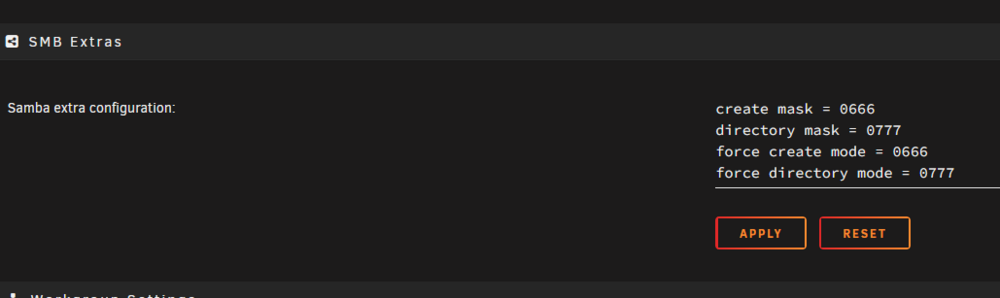
So I made the changes to the smb settings as below and restarted the array. Downloaded via sabnzbd and it unfortunately the new file still has the wrong permissions. Did I make a mistake with how I did the settings? This is the permissions of the file one it was moved to the folder (the new file is the 4.73GB file), the others have the correct permissions:

-
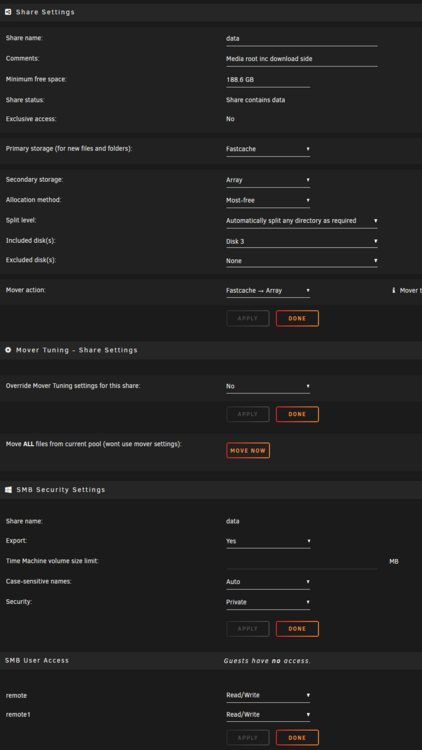
So I'm connecting from Windows as a user. The share is defined to give that user RW access. Works correctly. But. When one of the arrs adds a new file the new file permission is -rw-r--r-- Not -rw-rw-rw- As per the other files, and accordingly I have no write access to the share on a windows computer. I'm sure it's something I'm doing wrong or misconfigure in unraid as I haven't at this point ever tried to access the file in windows. Share settings attached. The file is on my cache drive at the moment. Not sure if this is relevant or not.
-
Thanks. Very good explanation. I'll reconfigure that share to require user access which will also mean changes in plex and the arrs but shouldn't be hard. I'm hoping lol.


