




Skip to content
View in the app

A better way to browse. Learn more.

Unraid

A full-screen app on your home screen with push notifications, badges and more.

To install this app on iOS and iPadOS
  1. Tap the Share icon in Safari
  2. Scroll the menu and tap Add to Home Screen.
  3. Tap Add in the top-right corner.
To install this app on Android
  1. Tap the 3-dot menu (⋮) in the top-right corner of the browser.
  2. Tap Add to Home screen or Install app.
  3. Confirm by tapping Install.

rip3rs

Members
  • Joined

  • Last visited

Everything posted by rip3rs

  1. For those having issues with Project Zomboid (PZ). Took me a second to understand what was happening. If ports 16261 16262 and 27015 says Not listening, but you added them to the ports in the container settings and it's probably the first time loading, the startup will hang until you add a admin password. meaning, either add a password on the configurations or go to the console and type a admin password, to move forward, once that is completed you should be able to get the server working.
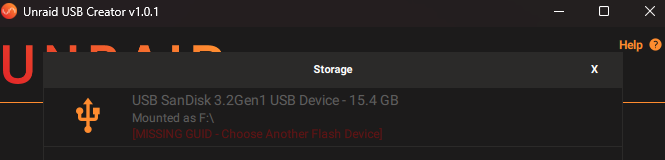
  2. I am having the same problem, scared me a bit: Followed @JorgeB post, hope all goes well, when I plug it in the server.
Account

Navigation

Search

Search

Configure browser push notifications

Chrome (Android)
  1. Tap the lock icon next to the address bar.
  2. Tap Permissions → Notifications.
  3. Adjust your preference.
Chrome (Desktop)
  1. Click the padlock icon in the address bar.
  2. Select Site settings.
  3. Find Notifications and adjust your preference.