





KoolKiwiNZ
Members
-
Joined
-
Last visited
Everything posted by KoolKiwiNZ
-
You are correct that Parity doesn't protect against file corruption, but it does allow (when working corectly), overall detection and recovery from data corruption. I still use this plug-in to (theoretically) identify which file(s) were involved in an unRAID parity detected data corruption. But, so far, the only files it has reported as corrupted were not actually corrupted! All "corrupted" files were verified as actually okay, because I happened to have another copy of the files to directly "binary compare" against. So, I'm not actually sure why I still use this plug-in? Maybe in the hope that the author will one day fix the bugs. But, they seem to have abandoned the project (presumably as they couldn't fix the bugs to make it actually work!).
-
Well, I've persevered with it, despite all the issues so far. But, last week I got my first verify alert! - "Found 1 file with BLAKE3 hash key corruption" Interestingly, this reported a corruption to a file in my Backup share, on a file I had backed up just a few weeks ago. This was great, as I still had the original file on my PC. So, I copied the so called "corrupt" file from unRAID back to my PC, and did a Binary File Compare with the original file that was still on my PC. Well, interestingly, you guessed it: FC: No differences encountered! So, this was a bogus "file corruption" alert. Makes me question that if it can alert for a file that isn't corrupt (is identical to it's original copy), then what confidence do I have that a file that has actually been corrupted, actually gets detected? I think I persevere out of amusement. Like, how bad can this plugin get? To be fair, most of my issues to date have been user interface related. I was just hoping that the underlying code would reliably do it's function. 🙄

-
It's interesting that you have dual parity also. I've been trying to understand why a parity check keeps finding and correcting parity errors, when everything otherwise appears good. I did a parity check confirming no errors about 13 days ago. Smart shows all drives are good. I even now have the File Integerity plug-in installed (showing no file corruption). All I've done in the last 13 days is maybe add perhaps 5 new movie files, via my Cache drive and the Mover. I've also had no power issues on my UPS protected unRAID server. I just watch something each night, otherwise the drives are spun-down. Now I'm running another parity check and it's nearly done, but finding and correcting another 5 new parity bit errors. !!! The interesting thing is that based on the write count, there has been 5 extra writes to my first Parity drive, in comparison to the count on the Parity 1 drive. So, I'm assuming from this, that the all 5 parity bit errors were probably found / corrected on the first Parity drive, with the second Parity drive (Parity 1), being okay? File Integrity check finds no file corruption on my array. So, now I'm wondering if there is a bug in the implementation of dual parity drives? As I can't fathom what else would cause 5 parity errors over the last 2 weeks, with an otherwise healthy system.
-
Couldn't agree more. A working File Integrity Plugin is indeed a good idea. I've really persevered with this so far for days, but the issues and questions keep coming. Unfortunately, it seems from the lack of help on this forum, that the plugin is no longer supported. Perhaps the developer gave up, with issues they couldn't fix? I guess to uninstall it, you first use the manual "Remove" button to delete all the file hash extended attributes, then uninstall? With the experiences so far with this plugin, I'm kinda nervious to see what happens if I click "Remove". A warning should be posted somewhere that this plugin is no longer supported, and appears to have numerous issues.
-
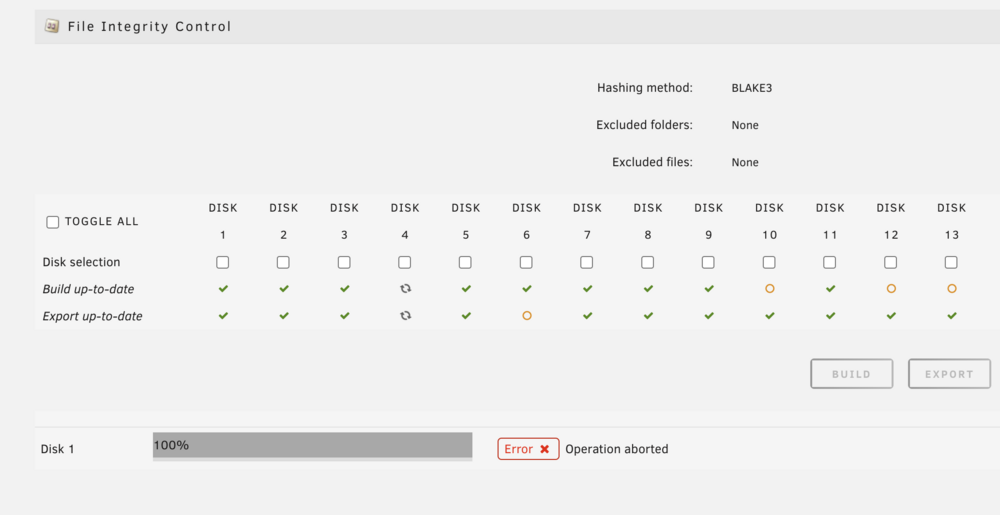
Okay, All Builds complete. All Exports complete. 3 Disks have been verified (twice now - see above). So, my first attempt at moving some new files to the server... and you guessed it... more questions. The mover moved some new files onto Disk 6. But when I now go to the "Integrity" page, I get the below! Why "Error Operation aborted" on Disk 1 ?? What Operation? What Error? Nothing in the logs! Also: Why have Disks 10, 12, and 13 now lost their 'Build up-to-date' green ticks, when there have been NO write activity on these disks? Do I need to build them again?
-
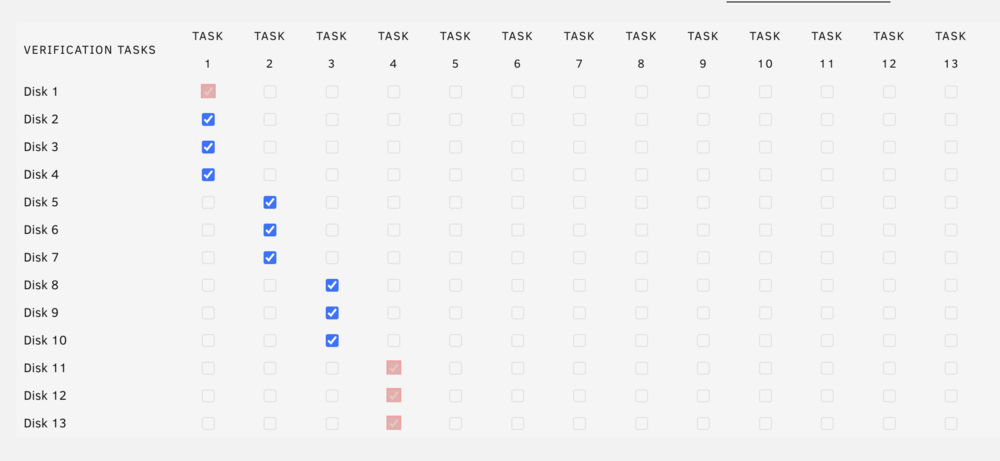
So, I thought I'd setup my verification schedule so that the second scheduled verification would kick-off. The thinking was that since the first verififcation run seemed to do TASK 4 (for some reason), that maybe the next (2nd) verification run, would wrap around to doing TASK 1 (Disks 1 - 4)? But, NO. Instead the 2nd verification scheduled run is again doing TASK 4, so my disks 11 - 13 are getting verified once again. In addition, while it's running, the Settings page is once again showing an activity on Disk 1 (in TASK 1), even though Disk 1 is not being verified. According to the notifications only Disks 11 - 13 are being verified. So, I have no idea: a). Why TASK 4 is once again being run (instead of wrapping around to do TASK 1 next). b). Why Disk 1 (scheduled in TASK 1) icon in Settings, appears to be showing it has some verification activity? Here's the verification TASK schedule screenshot, which verification of TASK 4 (Disks 11 - 13) is again in progress (and showing Disk 1 seems to also indicate activity?): Yes, I am still persevering with this plugin, even though I'm yet to find anything that does what I'd expected it to do!
-
Okay, another question: My first scheduled verify task finished overnight. But, how do I know: a). That a disk has actually done a verify pass? Nothing has changed in the user interface to indicate a verfy pass has been done! b). Whether the verification was successful, and how many files were verified? The only indication that a verify pass has happened (that I can find), is in the sytem log (mirrored in my notification). i.e. The single log entry only tells me the task finished. No indication of whether it was successful or not. How many errors it found, or confirmation of zero errors found. Or, how many files it processed etc. So are we just supposed to assume it processed all the files on the disk successfully, and no errors were found??? Apologies if my posts are coming across a bit negative, but so far every step of the way with this plugin has raised more questions, and less confidence that it is actually doing what it is supposed to be doing. I'm sure the developer is very capable, but so far my user experience just seems full of bugs, or at least full of user interface bugs?
-
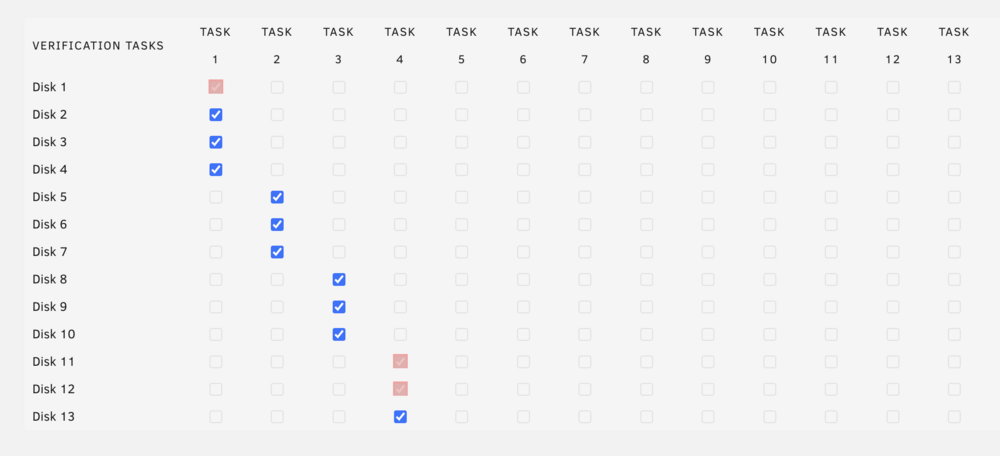
Yet more weirdness, that defies my logical understanding of this plugin... I setup the verification schedule, as per the help instructions. i.e. Specifically: "When multiple tasks exist then each task is executed in the next schedule in a rotating fashion. " I put Disks 1 - 4 in TASK 1, Disks 5 - 7 in TASK 2 etc. etc. (as below). I then expected the first weekly schedule run to do disks 1 - 4 (TASK 1), as per the help. Then next week would be Diisks 5 - 7 (in TASK 2), etc. However, the first scheduled verification has just started and it is currently working on Disk 11 & 12 (from TASK 4), and also showing Disk 1 (from TASK 1), is also in progress! But, it also has only notified me that Disks 11 & 12 are running, but the below also shows Disk 1 as a (presumably) "in progress" coloured box??? I mean, WTF? How is this verification schedule really supposed to work? Does anything work as it's supposed to?
-
Interestingly, although NO duplicate filenames are now being found, the 292MB 'duplicate_file_hashes.txt' file includes obvious duplicate filenames! Huh? e.g. These are obviously duplicate files (with the same filename!). But 'Find' still says "No duplicate file names found". I'm really at a loss as to how this Plugin can be trusted to actually work?
-
Yes, very confusing. I've now found that after nearly completing all of my manual "Builds' and 'Exports' (12 of 13 disks completed), when I now run 'Find', it reports no duplicates have been found! So, no output file. But, if I tick the duplicate hash box, I get a 292MB 'duplicate_file_hashes.txt' output file! In addition, even though all of my manual 'Exports' have been done / updated (and are green ticked), for the 12 of 13 disks that have completed the 'Build', the 'Find' initially rpeorts: 'Hash files are not up-to-date'. Even though the Exports (for the completed 'Build' disks), are ALL green ticked! I'm really struggling to understand this. It's really looking like a buggy Plugin! Or, at the very least, a buggy User Interface?
-
Yes, I have Enabled "Automatic protect new and modified files". I don't actually understand why you wouldn't have this Enabled, if you're trying to identify the integrity of the files on your system. Otherwise, any new / changed files would presumably not be included? Are you suggesting that by Enabling this setting it then disregards the fact that all of the existing files have not yet had a hash built as yet? This doesn't really make any sense to me. If this was the case, the option should be called: "ONLY protect new and modified files". Also, I hadn't added or modified any files on the disks that it decided were now "build up-to-date" on (even though I hadn't done an initial manual 'Build' yet). Perplexing...
-
I installed this plug-in with some hope of file integrity checking. But so far it's just been a very confusing, resource hungry journey. Apart from trying to understand why "build up-to-date" is now all green ticked, when I have only performed the manual 'Build' for 1 of my drives (so far), is very confusing. If I then try to do the "Export" command, it says nothing to export on all the drives that say "build up-to-date" (except for the one I know I manually did a Build for). Then, today I tried the "Find" command, and it said duplicate files found and output a 'duplicate_file_names.txt' file. On looking at this file it makes no sense. e.g. (a portion of the text file): disk1,disk1,disk1,disk1 [equal content] SDTVShows/SDTV Series/Star Trek Voyager/Star Trek- Voyager.S01E01 - Caretaker (1).576p.mkv disk1,disk1,disk1,disk1 [equal content] SDTVShows/SDTV Series/Star Trek Voyager/Star Trek- Voyager.S01E02 - Caretaker (2).576p.mkv disk1,disk1,disk1,disk1 [equal content] SDTVShows/SDTV Series/Star Trek Voyager/Star Trek- Voyager.S01E03 - Parallax.576p.mkv disk1,disk1,disk1,disk1 [equal content] SDTVShows/SDTV Series/Star Trek Voyager/Star Trek- Voyager.S01E04 - Time and Again.576p.mkv disk1,disk1,disk1,disk1 [equal content] SDTVShows/SDTV Series/Star Trek Voyager/Star Trek- Voyager.S01E05 - Phage.576p.mkv disk1,disk1,disk1,disk1 [equal content] SDTVShows/SDTV Series/Star Trek Voyager/Star Trek- Voyager.S01E06 - The Cloud.576p.mkv disk1,disk1,disk1,disk1 [equal content] SDTVShows/SDTV Series/Star Trek Voyager/Star Trek- Voyager.S01E07 - Eye of the Needle.576p.mkv disk1,disk1,disk1,disk1 [equal content] SDTVShows/SDTV Series/Star Trek Voyager/Star Trek- Voyager.S01E08 - Ex Post Facto.576p.mkv disk1,disk1,disk1,disk1 [equal content] SDTVShows/SDTV Series/Star Trek Voyager/Star Trek- Voyager.S01E09 - Emanations.576p.mkv disk1,disk1,disk1,disk1 [equal content] SDTVShows/SDTV Series/Star Trek Voyager/Star Trek- Voyager.S01E10 - Prime Factors.576p.mkv disk1,disk1,disk1,disk1 [equal content] SDTVShows/SDTV Series/Star Trek Voyager/Star Trek- Voyager.S01E11 - State of Flux.576p.mkv disk1,disk1,disk1,disk1 [equal content] SDTVShows/SDTV Series/Star Trek Voyager/Star Trek- Voyager.S01E12 - Heroes and Demons.576p.mkv This makes no sense to me? There is no indication of what the CSV columns mean. What are the duplicate filenames? The episode files listed (along with all the other files included in the 'duplicate_file_names.txt' file), are clearly all different filenames. Should I just uninstall this plug-in? Is there a better plug-in for detecting file level corruption? Even a plug-in that is a little more user-friendly in terms of how to use it, and what it is doing, would be helpful!
-
I thought I'd just add that I also want them spun-down when not in use, but mainly due to wanting to minimise the heat generated by a spinning drive. I want my case fans running as silent (slow), as possible, as well as lowing the power drain of my unRAID to <6W when drive's are not actively in use. I found this thread, after changing my spin-down delay to only 30 minutes of inactivity, and noticing Spin-up Groups were enabled, even though I wasn't using them (now disabled). I recently upgraded my unRAID motherboard to something newer, than the old one I'd been using for years. After doing this I noted the resulting spin-up buffering delays, on starting a viewing / listening, were now much shorter and entirely acceptable, than they had been on my older / slower unRAID server motherboard.
-
This is because doing a Parity check effectively completes an extended SMART check of all your protected pool drives. So just use the scheduled Parity check option in unRAID.



