





tlou
Members
-
Joined
-
Last visited
Everything posted by tlou
-
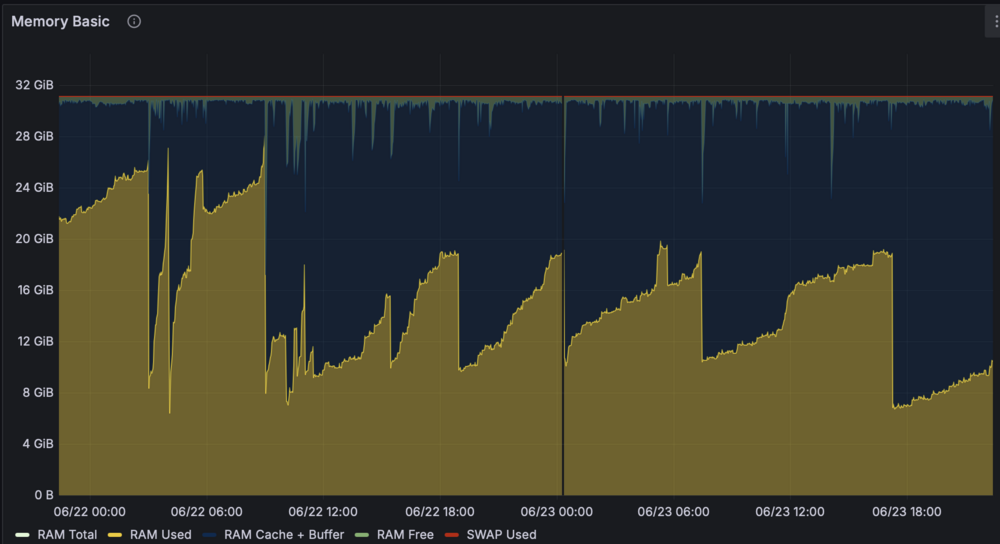
I'm getting horrible memory leakage with one of my qbittorrent instances. I'm currently on the latest binhex container, unraid 6.12.15. I currently have the memory limit at 10G so once the leak gets to that point, the container crashes and restarts. If I don't have that limit, it will use up 100% of the memory eventually and crash the whole server. I have tried the following so far based on my own search but none of them works -WebUI memory leakage when more than 2 instance WebUI tabs are open at the same time. -Disk read type to default or simple read/write or POSIX compliant -physical ram limit to 512 mb -most other advanced settings are all default -tried lib torrent 1.2.x and 2.0 -tried lsio qbit container and still had the same problem I'm at my wits ends in terms of trying to find a fix. Im doubtful there's ever a solution maybe side from switching to a totally different client but I figure I post here just in case someone might know.
-
I would my Overseerr container (with Tailscale mod built in) to automatically run the command "Tailscale serve 5055" each time the container needs to be restarted. Is there a way to achieve this? For now, I am using user scripts to run this command with a chron job set to daily, but it is not the most ideal solution.
-
how do you get the indicator icon for if the container is started/paused/stopped in the preview section of the docker tab? (just the play/stop icon, no labels or container names)
-
It’s currently set to no.
-
I have the official Tailscale Docker Mod for linuxserver containers installed into Plex and Overseerr in Unraid 6.12.14. Took me a lot of time to set it up and figure out enabling Tailscale Serve for it as well. If I upgrade to Unraid 7, will its natively integrated Tailscale break this setup or will it still function as is without issue?
-
Just installed the plugin, love it. Thank you for creating it. Everything seems to work quite well with the minor hiccup that qbittorrent would could not be automatically restarted. However, I was able to manually restart it without an issue. The logs say [10.01.2025 00:43:17][ℹ️][qbittorrent] Starting qbittorrent... (try #1) Container did not started! - Code: Image can not be deleted, in use by other container(s) [10.01.2025 00:43:22][ℹ️][qbittorrent] Starting qbittorrent... (try #2) Container did not started! - Code: Image can not be deleted, in use by other container(s) [10.01.2025 00:43:28][ℹ️][qbittorrent] Starting qbittorrent... (try #3) Container did not started! - Code: Image can not be deleted, in use by other container(s) [10.01.2025 00:43:28][❌][qbittorrent] Container did not started after multiple tries, skipping. More infos in debug log Not sure why it would need to delete the image and not sure what other container could be using that image? Debug dfa77972-8c34-418a-9e95-75304a57ffcd
-
I'm currently on Unraid 6.12.14, I'm trying to integrate Tailscale into a docker container (Overseerr) with SSL certificate. Following Spaceinvader One's video at 49:09, there is a way to do that via Tailscale Serve in Unraid 7 beta, but is there an alternative way for me to get the SSL cert in Unraid 6.12.14?
