





Th3Element05
Members
-
Joined
-
Last visited
Everything posted by Th3Element05
-
Wonderful, thanks for the link. The description on Microcenter's site says "The Core chipset JMB585 manage the 5 SATA port with port multiplier and multiple commands for simultaneous sending/receiving data both in AHCI and legacy IDE mode." So hopefully should be good.
-
Has anyone tried using a product like this with Unraid? https://www.microcenter.com/product/649761/vantec-m2-pcie-gen3x2-to-5-ports-sata-iii-expansion-card It states compatibility with Windows 10/11 without any software or drivers needed, just wondering if anyone has tried using it in a system running Unraid who can verify firsthand if it is compatible or not?
-
Thank you, that was exactly where it was.

-
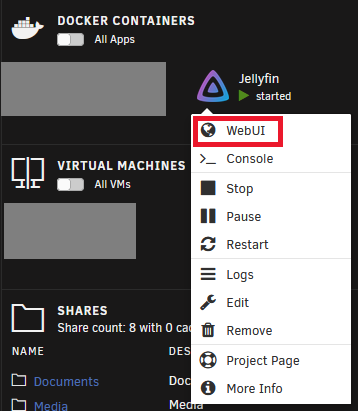
I have read that, and does not answer my question. Even when I change the Network Type to Bridge, and the port mappings show the non-default port I have set, when I try to launch the WebUI from the container's context menu in Unraid, it is still going to the default port and not the one I have set. To be clear, the application is running and working fine using the port I have set, I am able to access the WebUI successfully at the port I have set. But I would like to be able to click on the docker container on my Dashboard and click on WebUI and have it take me to the port I have set; Currently that link is still going to the default port. How do I change where that link goes? This link, here:

-
When I installed this container, I left the ports at the default. But I have since changed the WebUI port to a non-default port. Accessing the service is fine, and I can get to the WebUI at the new port successfully. But, the option to launch the WebUI from Unraid is still using the old default port. The old default port is still listed in the Port Mappings for the docker container, even though I changed it within the actual container settings. I can't figure out how/where to change this Port Mapping for the container.


-
Yes, both. I might add forwarding for each of them separately instead, just to see if it makes a difference. I am currently stuck using a NOKIA BGW320-505 router/modem combo from AT&T Fiber. Its plausible that it is the problem, but I find it strange that the port forwarding (the same port numbers) is working for other things, but when I put the minecraft server connection on a port, it suddenly doesn't work anymore. I am running into problems with other things I'd like to run, like pi-hole, which aren't playing nice with some of the limitations of this AT&T junk. So I'm going to need to see if another router I have can do what I need if I can just pass my public IP through the AT&T router.
-
Excuse me for replying to this 4 years later, but, how would one do this? I am having the same issue as the OP, and your suggestion seems to have solved their problem, but I'm not seeing any obvious way to do this. Nevermind this for now, I figured it out. In case anyone finds this in the future, just set Network Type to Custom and then you can set a Fixed IP address.

-
I'm having an issue with external access to the server. I'm fairly confident the issue is not with my port forwarding, as I will explain. I have installed the binhex-minecraftbedrockserver docker container with all the default settings, (except for WEBUI_USER and WEBUI_PATH). And I have forwarded ports 19132, 19133, and 8222 in my router, and restarted my router. When I use port checker tools, the ports for `Port: Minecraft Server connection IPv4 (TCP):` and `Port: Minecraft Server connection IPv4 (UDP):` always show up as Closed. (canyouseeme.org specifies it as "Connection refused") At the same time, the port for `Port: Web Interface:` shows as open. Here's the kicker. It doesn't matter what port I use for the server connection or for the web UI, the server connection port always returns closed/connection refused, and the web UI port returns open. When I forwarded 8222 (which was the web connection,) and saw the test said it was open, the first thing I did was swap that port with the server connection port. (So I set the web UI to 19132, and I set the server connection to 8222.) But then when I tested them, 8222 (now the server) was showing closed/connection refused. And now the previously "closed" 19132 was testing as open, now that it was the port for the web UI. Am I right to assume at this point that it is the server or docker image that is actually refusing the incoming traffic? For the record, when connecting to the server using my local IP address of unRAID on the same port, there is no issue. Edit: I should also mention, I have Plex running in another docker, with its port forwarded and showing as open when I test it with the same tools.
