





kronox
Members
-
Joined
-
Last visited
-
have you tried clearing Plex cookies or using a private/incognito window or different browser? Looks like it could be browser issue
-
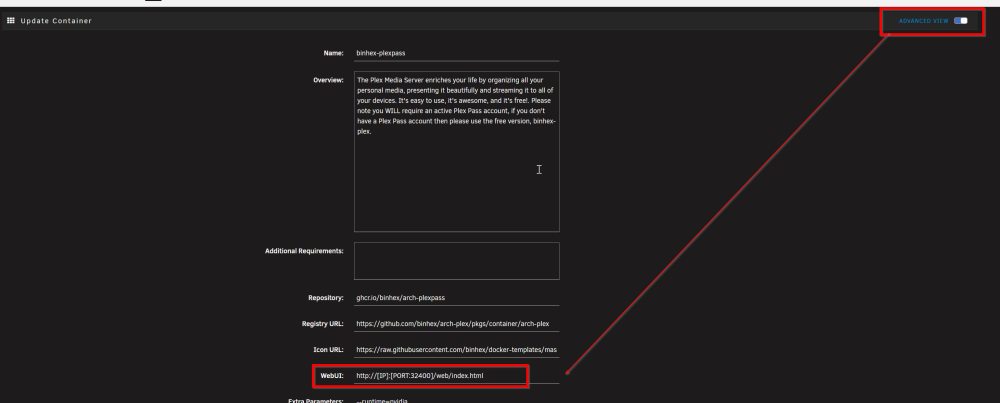
can you try to open directly in browser LAN IP:Port/web/index.html that shows in plex row, docker tab in unraid (for example 192.168.66.66:32000/web/index.html), if that works, check if webUI is set correctly in unraid template
-
seems to be pretty normal, do you have any issue with plex now?
-
/config/Plex Media Server/Plug-ins/HelloHue.bundle or /mnt/user/appdata/binhex-plexpass/Plex Media Server/Plug-ins/HelloHue.bundle
-
you have an old Plex plug-in installed called HelloHue, remove it or check if there is some update for it, nothing to do with plex itself
-
hi, are we behind plex version for some reason? 1.43.3.10861 is out for couple days
-
works great! maybe just an idea for future (or never, just an idea) to add some kind of scheduling, use config_01 from 00:00 - 07:00; use config_02 07:00 - 00:00; would be useful in cases when sound is an issue
-
plugin looks great, just that CPU thingy would be great! good job!
-
changed mapping to container from /mnt/user/gitea/ to /mnt/cache/gitea/ now it is ok, not sure if thats possible but would be nice to see some warning that it is exclusive share and it is mapped via /user/, by accident noticed, if that would be real backup requiring situation would be in trouble, maybe others also having same config issue and some warning would come in handy
-
hi, I just noticed that external volume backed up only as 'symlink' and there is no data at all, I am doing something wrong?
-
focalboard is broken by default, creates db and files in /opt/focalboard/data while mapped '/data' via unraid path is at /data to fix I have changed container path from /data to /opt/focalboard/data


