Nozle
Members
-
Joined
-
Last visited
Everything posted by Nozle
-
Hello, So I have an UNRAID server, and several containers installed on it using Dockge. I recently installed Immich so I can view my photos, but I'm having issues with it. I currently have it configured to read an external library (a shared folder in UNRAID called photos). The problem is that when the image sync starts, after 30-60 minutes, UNRAID restarts. I've never had this problem with any other container before. The server is: Intel 14500 64GB DDR5 Asrock z790 tb4 itx PG Seasonic SPX650 Everything is up to date, and the container I'm using is the following: # # WARNING: To install Immich, follow our guide: https://immich.app/docs/install/docker-compose # # Make sure to use the docker-compose.yml of the current release: # # https://github.com/immich-app/immich/releases/latest/download/docker-compose.yml # # The compose file on main may not be compatible with the latest release. name: immich services: immich-server: container_name: immich-server image: ghcr.io/immich-app/immich-server:${IMMICH_VERSION:-release} # extends: # file: hwaccel.transcoding.yml # service: cpu # set to one of [nvenc, quicksync, rkmpp, vaapi, vaapi-wsl] for accelerated transcoding volumes: - /mnt/user/photos:/mnt/media/photos:ro - ${UPLOAD_LOCATION}:/usr/src/app/upload - /etc/localtime:/etc/localtime:ro labels: net.unraid.docker.icon: /mnt/user/system/icons/Immich.png net.unraid.docker.managed: dockerman env_file: - .env depends_on: - immich-redis - immich-database restart: always healthcheck: disable: false immich-machine-learning: container_name: immich-machine-learning # For hardware acceleration, add one of -[armnn, cuda, openvino] to the image tag. # Example tag: ${IMMICH_VERSION:-release}-cuda image: ghcr.io/immich-app/immich-machine-learning:${IMMICH_VERSION:-release} # extends: # uncomment this section for hardware acceleration - see https://immich.app/docs/features/ml-hardware-acceleration # file: hwaccel.ml.yml # service: cpu # set to one of [armnn, cuda, openvino, openvino-wsl] for accelerated inference - use the `-wsl` version for WSL2 where applicable volumes: - model-cache:/cache labels: net.unraid.docker.icon: /mnt/user/system/icons/Immich.png net.unraid.docker.managed: dockerman env_file: - .env restart: always healthcheck: disable: false immich-redis: container_name: immich-redis image: docker.io/redis:6.2-alpine@sha256:148bb5411c184abd288d9aaed139c98123eeb8824c5d3fce03cf721db58066d8 command: redis-server --bind 0.0.0.0 --port 6381 healthcheck: test: redis-cli -p 6381 ping || exit 1 restart: always labels: net.unraid.docker.icon: /mnt/user/system/icons/Immich.png net.unraid.docker.managed: dockerman immich-database: container_name: immich-database image: docker.io/tensorchord/pgvecto-rs:pg14-v0.2.0@sha256:739cdd626151ff1f796dc95a6591b55a714f341c737e27f045019ceabf8e8c52 environment: POSTGRES_PASSWORD: ${DB_PASSWORD} POSTGRES_USER: ${DB_USERNAME} POSTGRES_DB: ${DB_DATABASE_NAME} PGPORT: 5433 POSTGRES_INITDB_ARGS: --data-checksums volumes: # Do not edit the next line. If you want to change the database storage location on your system, edit the value of DB_DATA_LOCATION in the .env file - ${DB_DATA_LOCATION}:/var/lib/postgresql/data labels: net.unraid.docker.icon: /mnt/user/system/icons/Immich.png net.unraid.docker.managed: dockerman healthcheck: test: pg_isready --dbname="$${POSTGRES_DB}" --username="$${POSTGRES_USER}" || exit 1; Chksum="$$(psql --dbname="$${POSTGRES_DB}" --username="$${POSTGRES_USER}" --tuples-only --no-align --command='SELECT COALESCE(SUM(checksum_failures), 0) FROM pg_stat_database')"; echo "checksum failure count is $$Chksum"; [ "$$Chksum" = '0' ] || exit 1 interval: 5m start_interval: 30s start_period: 5m command: postgres -c shared_preload_libraries=vectors.so -c 'search_path="$$user", public, vectors' -c logging_collector=on -c max_wal_size=2GB -c shared_buffers=512MB -c wal_compression=on restart: always volumes: model-cache: null networks: default: external: true name: npm_network I have done memtest, CPU stress tests and everything has been satisfactory, without errors or problems. I've enabled persistent syslog logging, but there are absolutely no significant errors. 12:47 this is the last time the problem occurred When this happened last time, I was standing next to the server and saw it completely shut down and then turn back on. I don't understand why. I hope you can help me, thanks in advance. syslog-previous
-
Hi, So I'm facing a new problem. When I run PowerTop AutoTune, the system crashes after a few hours.
-
It seems that all my crashing issues were due to the XMP profile on the Corsair DDR5 6600MHz memory (I manually lowered it to 6000MHz and everything works fine). Now I want to run Autotune, but I have some questions. Since I have an ASM1166 and a 2.5G network card, what would be the best option?
-
I have done some tests with memtest and these are the results. module 1 Memory module 2 Slot A Slot B Results: Memory module 1 in Slot A (no errors with xmp disabled and no errors with xmp enabled) Memory module 2 in Slot A (no errors with xmp disabled and no errors with xmp enabled) Memory module 1 in Slot B (XMP enabled with errors) Memory module 2 in slot B (XMP enabled with errors) It seems that everything fails in memory slot B At the moment I have not solved the problem. I still have to see if the motherboard is really defective or not (if I don't enable xmp both slots work perfectly) The memory is healthy and the processor too, that is 100% verified. What I don't really know is if it is a problem with the motherboard, the bios or simply the design (slot b is longer and therefore has more sensitivity)
-
Disable xmp and take 10 hours running without any problems so far
-
It has been running for 9 hours without crashes, removing the HDD and without starting the pools or array EDIT: Damn, it froze again after almost 11 hours of operation (no hdd and nvme connected and array turned off) I don't understand anything I really don't know if it freezes or what is happening, since no image is seen, nor does it respond to anything from the keyboard or network
-
I update, with the new source (without running autotune) it stops working after 4-5 hours. This is driving me crazy
-
Update, it had been 5 hours without crashes with the new power supply, without running autotune, I ran autotune and after 30 minutes it froze. I have restarted and will leave it overnight (if it doesn't crash before) without autotune. If it doesn't hang, I don't know what steps to take next to solve this... I would try to order a replacement for the seasonic spx650 and I would try again, if everything worked without autotune it is progress, then see why when you run autotune it stops working and congeals again. (I think they are two different problems)
-
I have been using a Seasonic SPX650 (I need a small source for Jonsbo n3) Now I have a Corsair RM750X out of the box and so far it has been running for two hours without any crashes (the C states seem lower now too) Screenshot with testing power supply and 2 hours on.
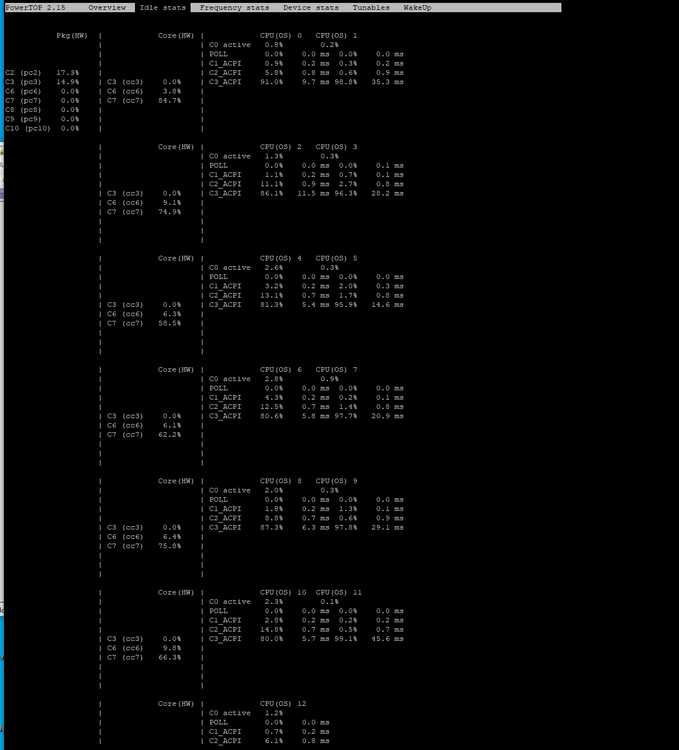
-
I will try removing the array (sata HDDs) and the two NVME (chache) later I'm trying a new power supply right now to see if it has anything to do with it.
-
I just restarted UNRAID without running powertop autotune, and it crashed before use time. In summary: UNRAID hangs with autotune executed and without autotune executed. Ubuntu, hangs with Autotune executed, but does not hang without autotune executed (almost 5 hours online)
-
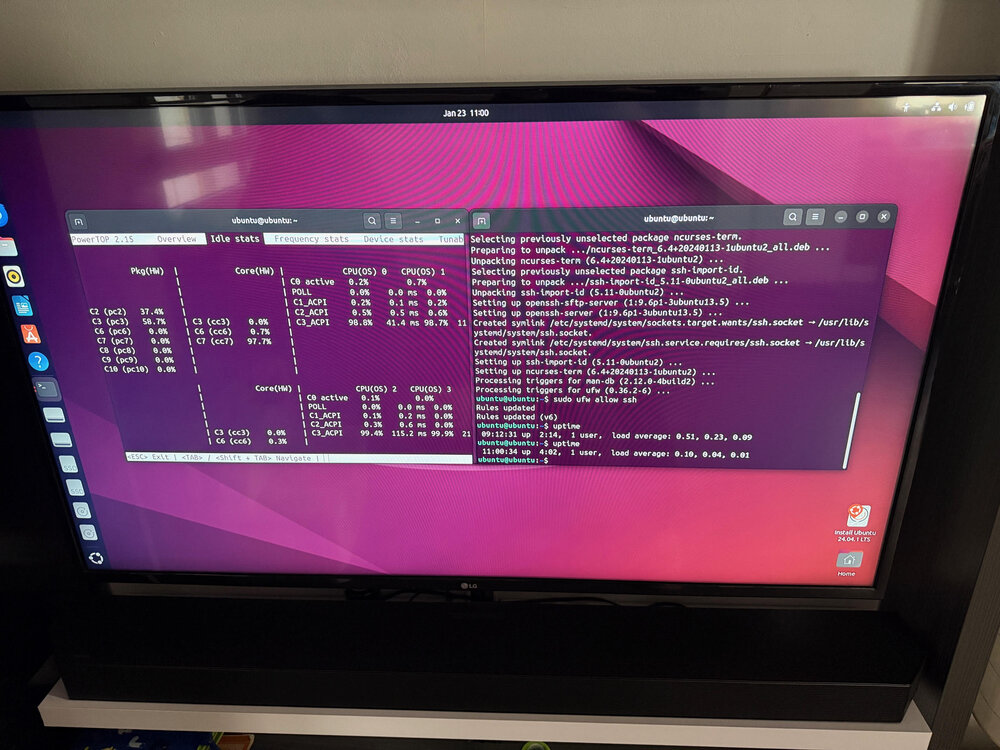
Update, now it has been 4 hours without crashes (ubuntu usb with powertop installed) without running powertop autotune.
-
After approximately two hours with ubuntu live usb and powertop autotune running, it has crashed, I am now testing without autotune.
-
I was able to disable Intel LAN in the bios and get the same crash after an hour and a half.
-
Sure, I'll try it! What configuration should I do? install powertop and run powertop autotune?
-
I have tried a new 14500 and same problem here, it keeps hanging when enabling C7 in the bios (after about an hour)
-
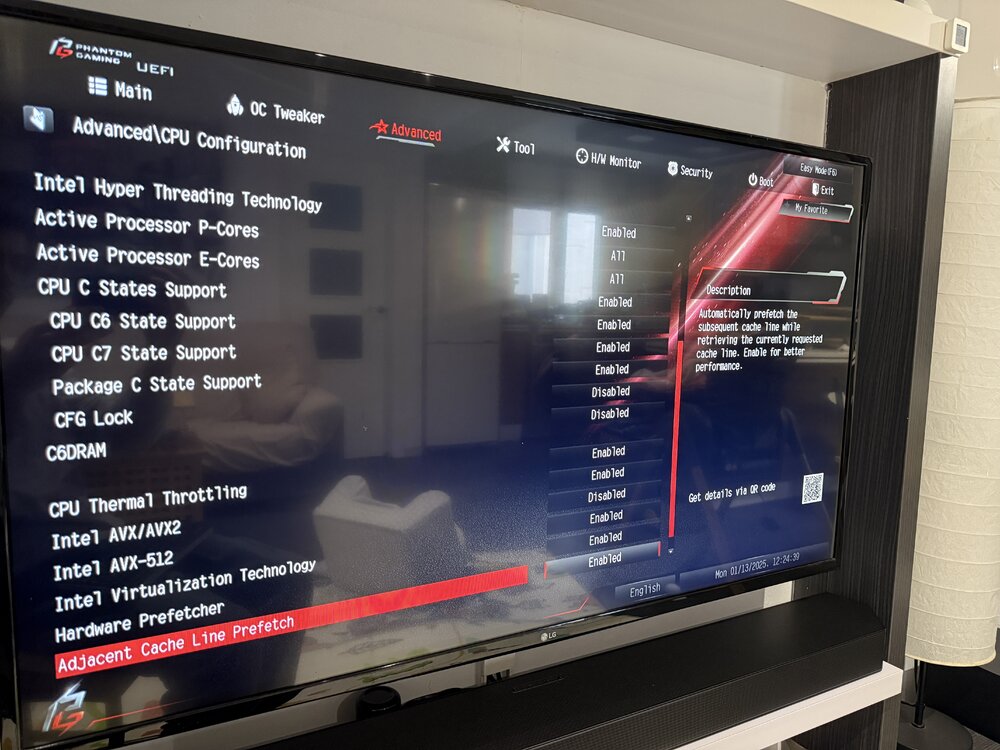
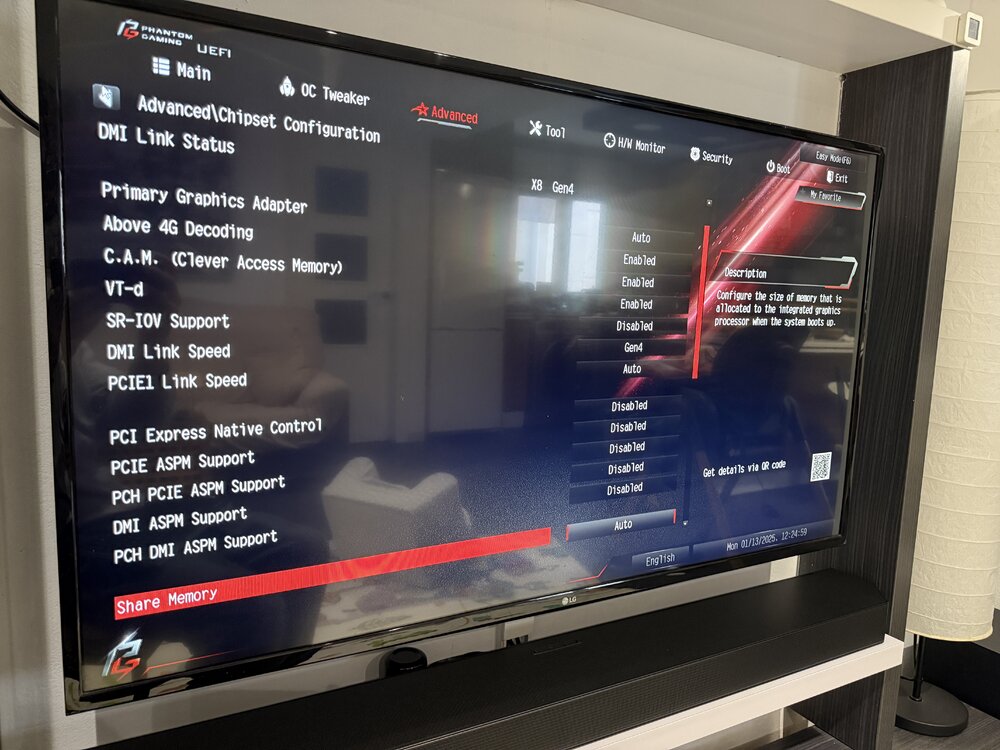
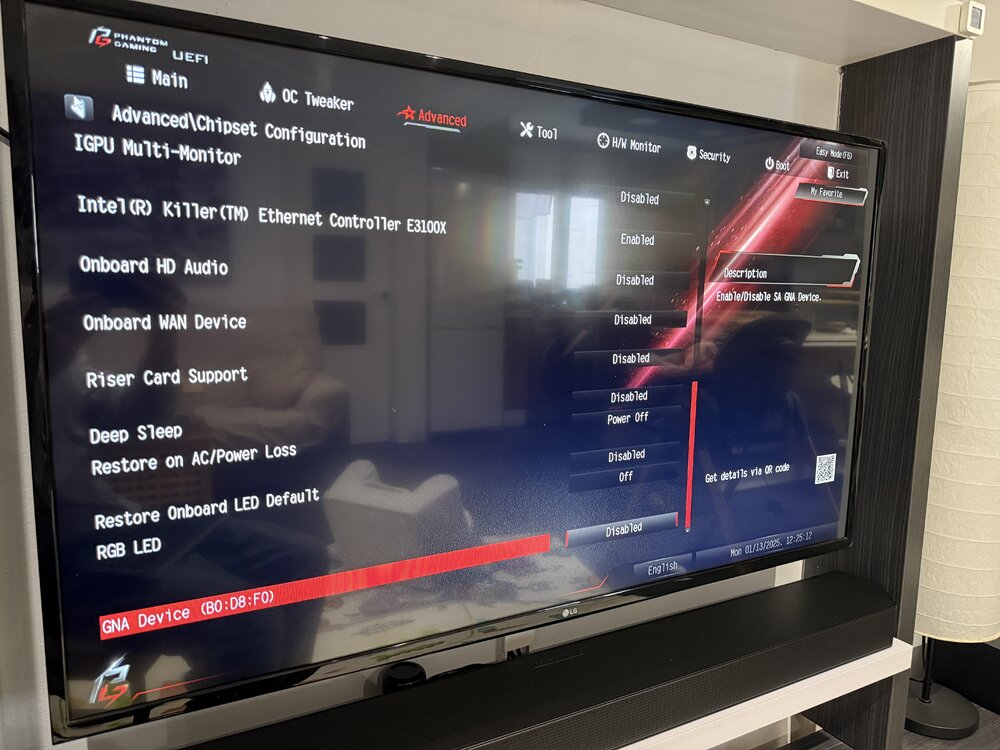
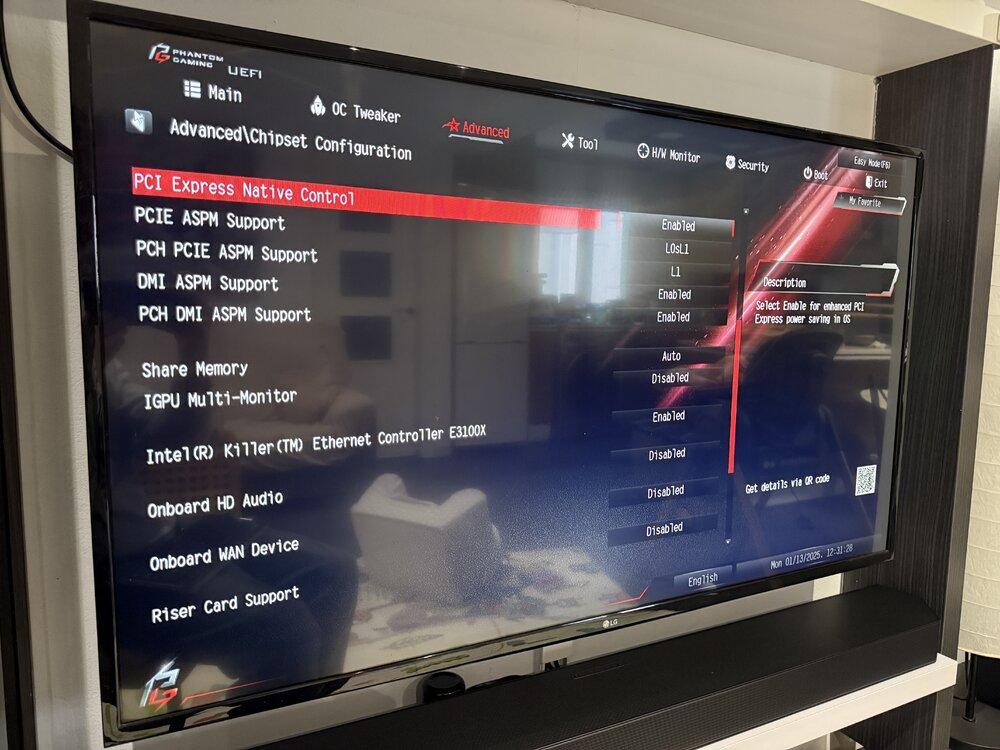
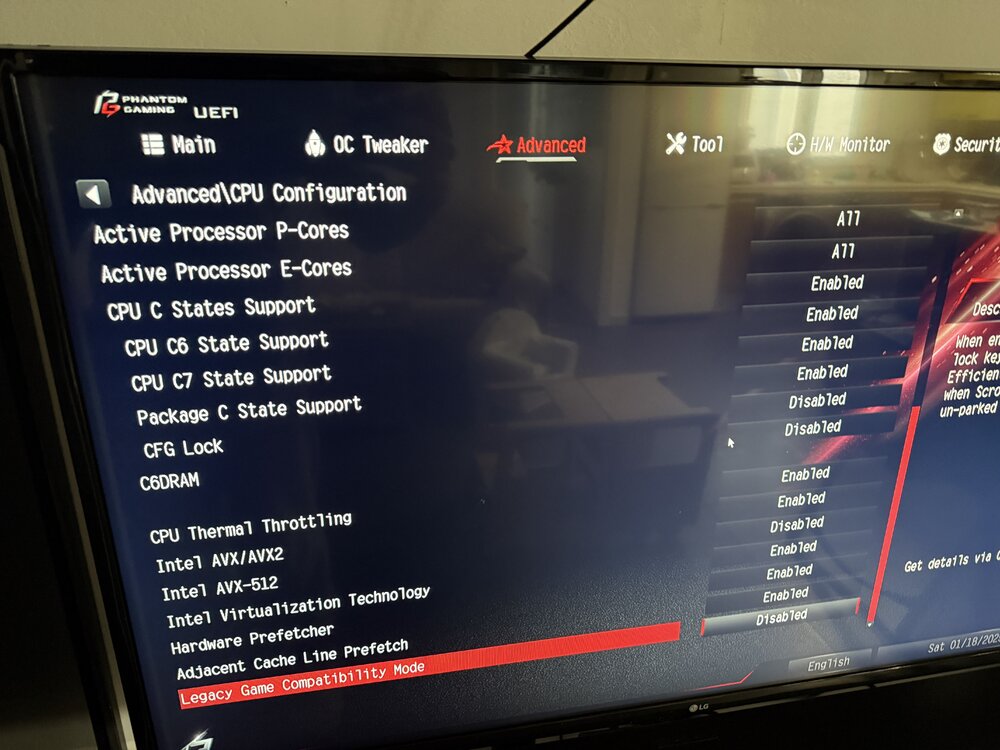
So I did a clean reinstallation of unraid 7, without configuring array, or anything else, and I got a first crash, nothing in the log, nothing on the unraid screen (powertop didn't even want to be installed) I'm going crazy with this no is posible login in screen Unraid, is frozen. Cpu is okay in other mb. If I don't enable c7 in the bios, everything is fine, the crashes appear when enabling c7 as in the photos above PSU is Seasonic Focus SPX-650
-
I ran the script from the run script plugin, and I enabled the screen, it hung again but nothing appeared on the screen (only login) and the script did not send me any email.
-
The log doesn't really say anything, the last thing I can read before it crashes is: Jan 18 21:57:30 Tower kernel: Bluetooth: Core ver 2.22 Jan 18 21:57:30 Tower kernel: NET: Registered PF_BLUETOOTH protocol family Jan 18 21:57:30 Tower kernel: Bluetooth: HCI device and connection manager initialized Jan 18 21:57:30 Tower kernel: Bluetooth: HCI socket layer initialized Jan 18 21:57:30 Tower kernel: Bluetooth: L2CAP socket layer initialized Jan 18 21:57:30 Tower kernel: Bluetooth: SCO socket layer initialized Jan 18 22:10:33 Tower emhttpd: spinning down /dev/sdd Jan 18 22:10:33 Tower emhttpd: spinning down /dev/sdb Jan 18 22:10:33 Tower emhttpd: spinning down /dev/sdc The bios configured as in the previous photos, and powertop autotune is not executed, the array is executed.
-
I seem to remember that I had the same problem on unraid 6, but I couldn't be sure. I tried to check the logs but they are lost on reboot, I enabled the syslog server but there was nothing there
-
I tried without starting the array, and it worked normally for at least two hours (I restarted it to test with the array started), then it crashed again as usual (bios configuration as in the screenshots above) The array is two NVME cache disks (one plugged into the chipset slot and another in the rear slot) and 3 8TB HDD disks I run out of ideas if everything is configured correctly and if I'm doing it wrong or how to solve all this. My parity every time the system hangs needs to be checked (12 hours) and found more than 1000 errors...
-
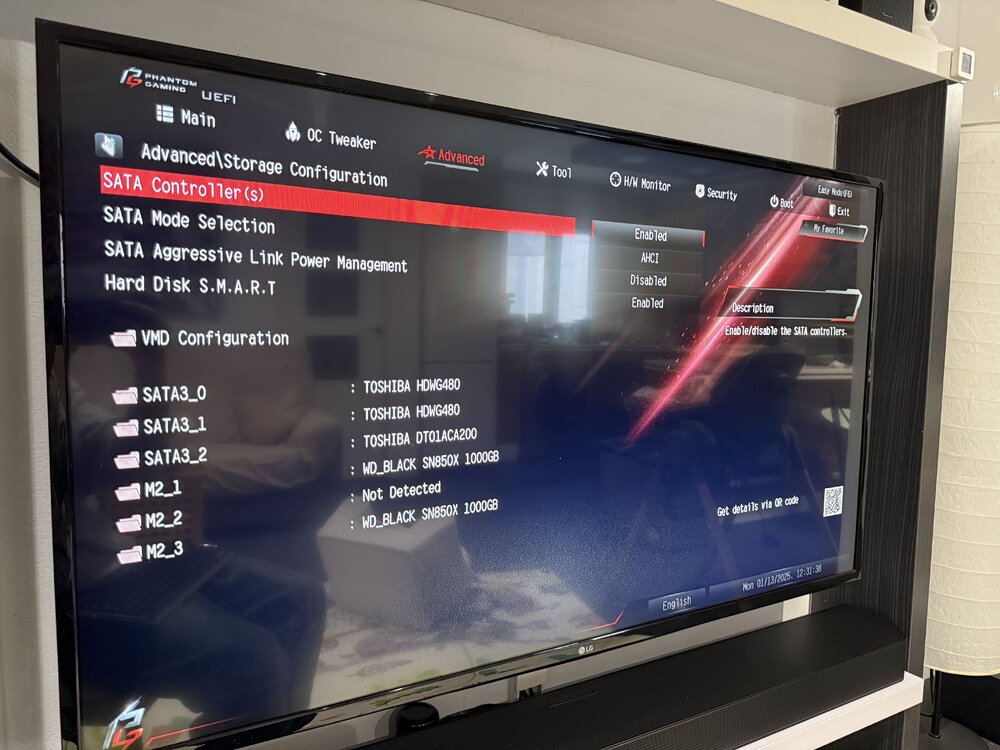
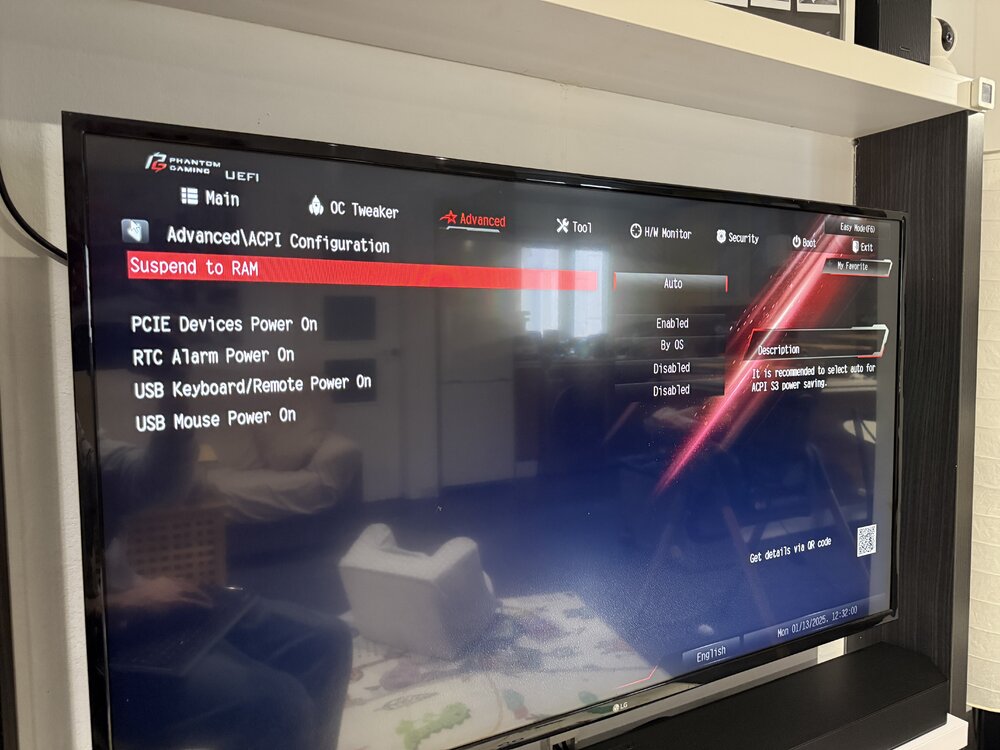
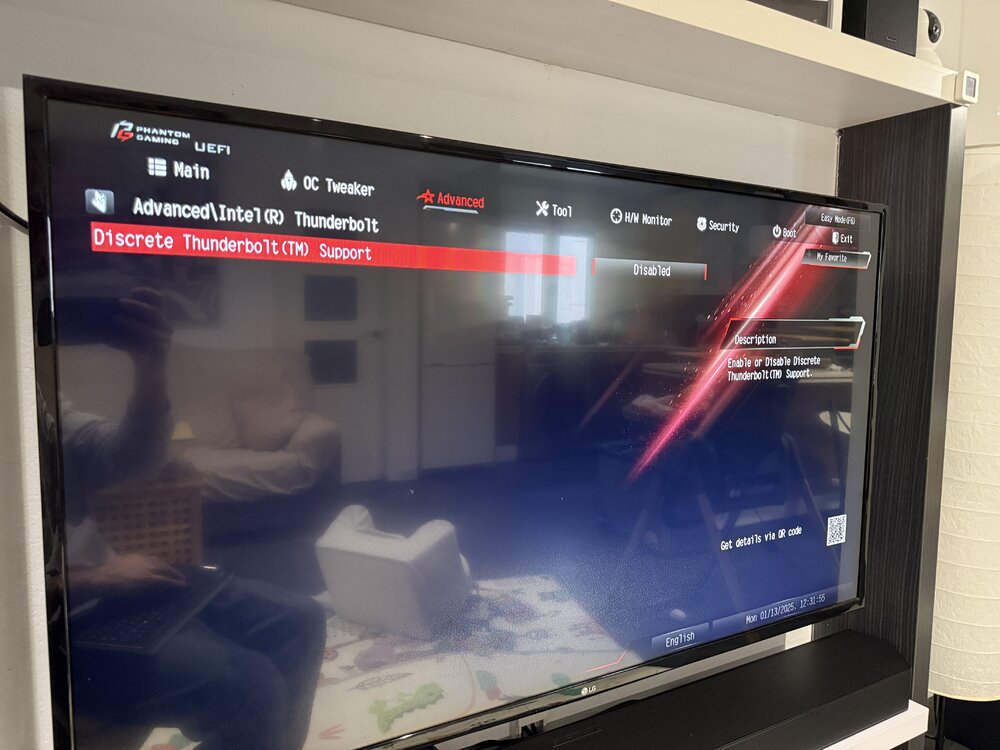
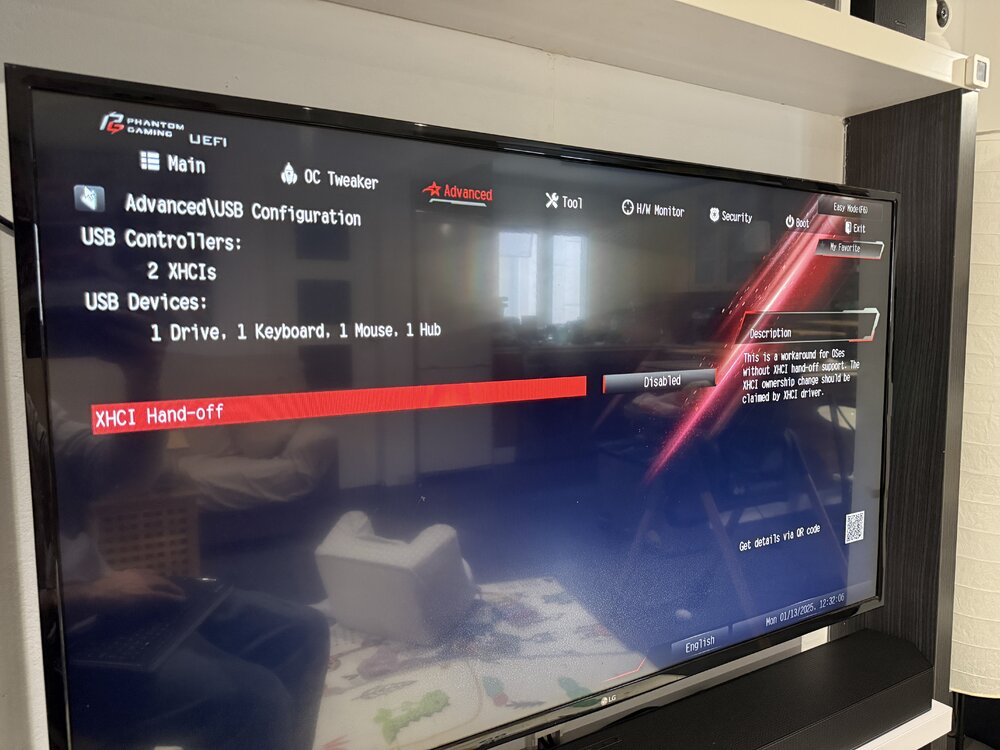
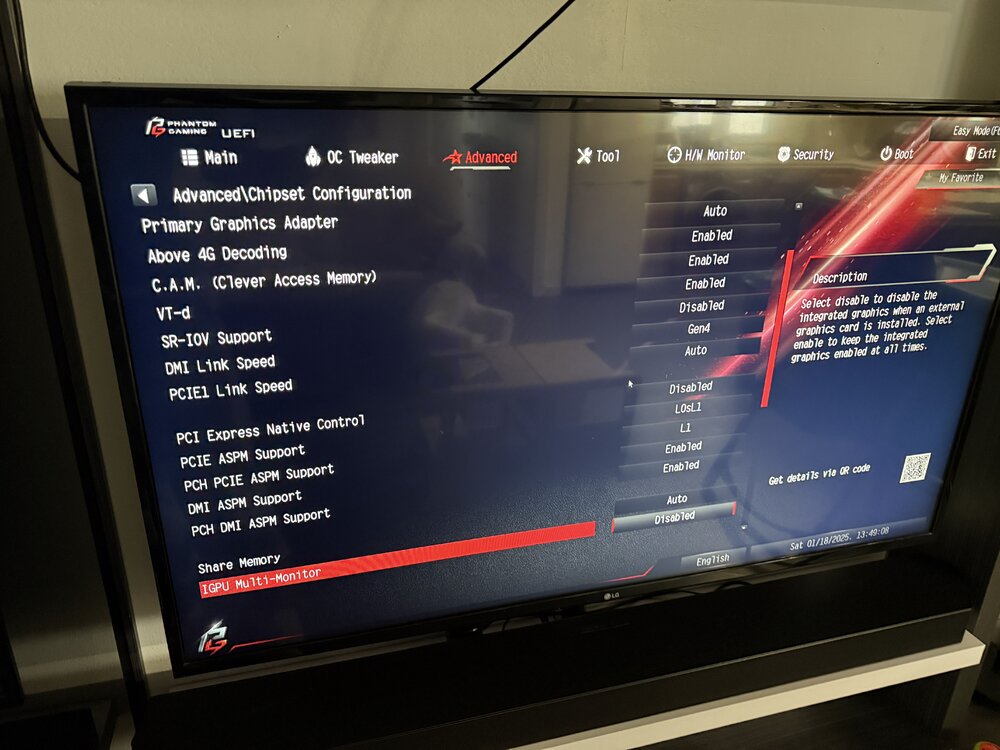
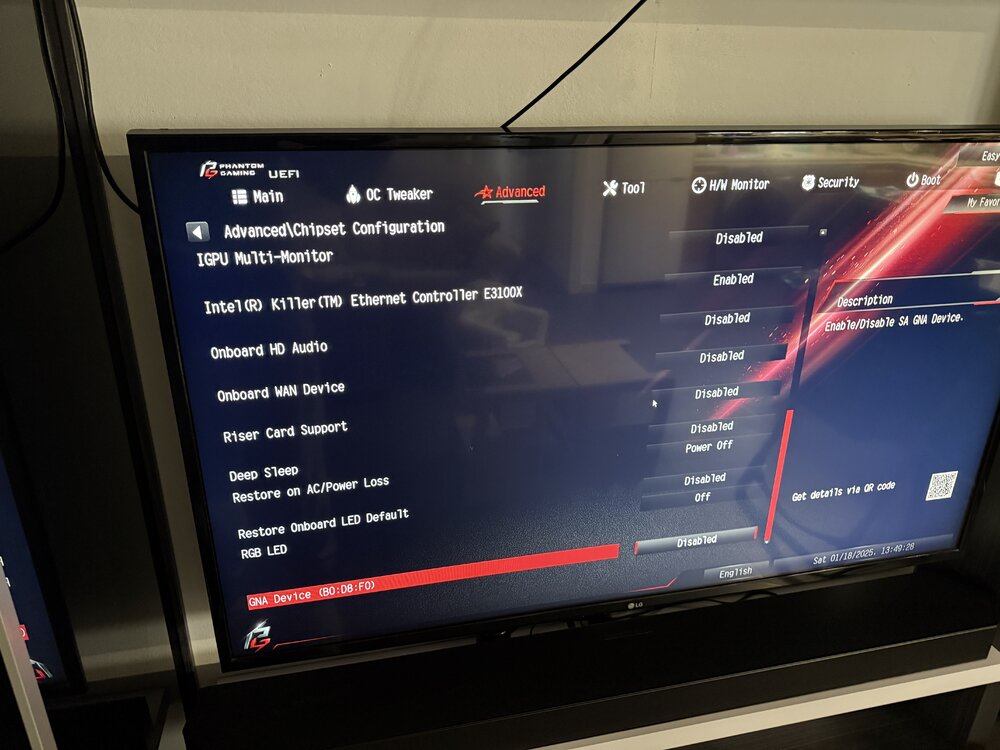
Yeah; The firmware was updated. Right now the bios is configured like this: I haven't run autotune powertop, but the system hangs after about an hour. This is generating many parity errors for me. unraid 7 is installed. asm1166 no have disk connect (is update firmware)
-
Hello, thank you very much for your reply and information, I didn't know that the version of this ethernet is 226V, it only hangs if I activate C7 in the bios (if I enable all ASPM and C states except C7) everything is fine... But I only get to C3 in package and c6 in core (c2_acpi in cpu) maximum. If I enable C7 in bios, I get to C3 in package, c7 in Core, C3_ACPI maximum. So, I'm not very clear now, what is the solution to avoid it hanging with this 226V? I didn't do anything additional in UnRaid (it doesn't matter if I run the command: powertop --auto-tune &>/dev/null or I don't run it) it hangs whenever c7 is enabled in the bios, it doesn't matter if I run that command or not. On the other hand: Should PCI EXPRESS NATIVE CONTROL be enabled or disabled? In the motherboard manual it says that the network card is: E3100X 2.5G LAN lspci: 09:00.0 Ethernet controller [0200]: Intel Corporation Device [8086:3102] (rev 04)
-
Hello, following this thread, to try to configure my new UnRaid in the best way. It is about: Intel 14500 Asrock Z790 ITX/TB4 64gb ddr5 ram 2 x WD SN850X nvme for cache 3 x Sata hdd for array M2 x6 Sata ASM1166 I have enabled all C states in the bios, I have also disabled thunderbolt4 (although it continues to appear in the list of devices despite being disabled) I have also disabled the sound card, wifi and some other things that are not used. After starting UnRaid, I see C3 states on the packet, but after about an hour, UnRaid stops working (no local access to it or any of the virtual machines or dockers) I will update with photos of the bios later so you can see my configuration and what I did wrong. All the devices when listing them, I can see that they support ASPM, except these two: PCI bridge: Intel Corporation Thunderbolt 4 Bridge [Maple Ridge 4C 2020] (rev 02) (prog-if 00 [Normal decode]) LnkCap: Port #0, Speed 8GT/s, Width x4, ASPM L0s L1, Exit Latency L0s <2us, L1 <4us LnkCtl: ASPM Disabled; LnkDisable- CommClk+ PCI bridge: Intel Corporation Raptor Lake PCI Express Root Port #21 (rev 11) (prog-if 00 [Normal decode]) LnkCap: Port #21, Speed 16GT/s, Width x4, ASPM L1, Exit Latency L1 <64us LnkCtl: ASPM Disabled; RCB 64 bytes, LnkDisable- CommClk+ Thank you above all for your time and help.