





Nozle
Members
-
Joined
-
Last visited
Everything posted by Nozle
-
root@Tower:~# powertop --auto-tune modprobe cpufreq_stats failed Cannot load from file /var/cache/powertop/saved_results.powertop Cannot load from file /var/cache/powertop/saved_parameters.powertop File will be loaded after taking minimum number of measurement(s) with battery only RAPL device for cpu 0 RAPL Using PowerCap Sysfs : Domain Mask d RAPL device for cpu 0 RAPL Using PowerCap Sysfs : Domain Mask d Devfreq not enabled glob returned GLOB_ABORTED Cannot load from file /var/cache/powertop/saved_parameters.powertop File will be loaded after taking minimum number of measurement(s) with battery only Leaving PowerTOP
-
It appears that powertop --auto-tune is not working for the latest version unraid 7.3.0
-
trapped in c3 package
-
I have left Asrock, I'm building a new system with unRAID and I'm having a small problem with the power saving states in package C. Has anyone here with an MSI Tomahawk Z790 WiFi motherboard been able to get past the C3 package? I have one installed with a 14500t processor, but it's stuck on the C3 package. The BIOS configuration looks like this: Powertop --auto-tune running I've also tried Ubuntu Live USB with the same result. Nothing else is connected besides RAM, CPU, and mouse/keyboard (apart from the USB drive with Ubuntu Live USB or unRAID).
-
Hi, I'm building a new system with unRAID and I'm having a small problem with the power saving states in package C. Has anyone here with an MSI Tomahawk Z790 WiFi motherboard been able to get past the C3 package? I have one installed with a 14500t processor, but it's stuck on the C3 package. The BIOS configuration looks like this: Powertop --auto-tune running I've also tried Ubuntu Live USB with the same result. Nothing else is connected besides RAM, CPU, and mouse/keyboard (apart from the USB drive with Ubuntu Live USB or unRAID).
-
So if I remove the Intel x710da2 I can reach c3, but if I install it, I only reach c2. Why is this and how can I prevent it? ASPM accepted/enabled.
-
This motherboard can reach C10 on Windows without any problems. I reinstalled an Ubuntu live USB and everything was clean, it reaches C2, once I remove the Intel x710 I can see up to C3 maximum.
-
ower:~# root@Tower:~# lspci -vvv | grep -B 20 'ASPM Disabled' Status: Cap+ 66MHz- UDF- FastB2B- ParErr- DEVSEL=fast >TAbort- <TAbort- <MAbort- >SERR- <PERR- INTx- Latency: 0, Cache Line Size: 64 bytes Interrupt: pin A routed to IRQ 125 IOMMU group: 9 Bus: primary=00, secondary=04, subordinate=09, sec-latency=0 I/O behind bridge: 3000-4fff [size=8K] [16-bit] Memory behind bridge: 50800000-511fffff [size=10M] [32-bit] Prefetchable memory behind bridge: 4019000000-40194fffff [size=5M] [32-bit] Secondary status: 66MHz- FastB2B- ParErr- DEVSEL=fast >TAbort- <TAbort- <MAbort- <SERR- <PERR- BridgeCtl: Parity- SERR+ NoISA- VGA- VGA16+ MAbort- >Reset- FastB2B- PriDiscTmr- SecDiscTmr- DiscTmrStat- DiscTmrSERREn- Capabilities: [40] Express (v2) Root Port (Slot+), IntMsgNum 0 DevCap: MaxPayload 256 bytes, PhantFunc 0 ExtTag- RBE+ TEE-IO- DevCtl: CorrErr- NonFatalErr- FatalErr- UnsupReq- RlxdOrd- ExtTag- PhantFunc- AuxPwr- NoSnoop- MaxPayload 128 bytes, MaxReadReq 128 bytes DevSta: CorrErr- NonFatalErr- FatalErr- UnsupReq- AuxPwr+ TransPend- LnkCap: Port #21, Speed 16GT/s, Width x4, ASPM L1, Exit Latency L1 <64us ClockPM- Surprise- LLActRep+ BwNot+ ASPMOptComp+ LnkCtl: ASPM Disabled; RCB 64 bytes, LnkDisable- CommClk+ -- Memory behind bridge: 50800000-510fffff [size=9M] [32-bit] Prefetchable memory behind bridge: 4019000000-40194fffff [size=5M] [32-bit] Secondary status: 66MHz- FastB2B- ParErr- DEVSEL=fast >TAbort- <TAbort- <MAbort- <SERR- <PERR- BridgeCtl: Parity- SERR+ NoISA- VGA- VGA16+ MAbort- >Reset- FastB2B- PriDiscTmr- SecDiscTmr- DiscTmrStat- DiscTmrSERREn- Capabilities: [80] Power Management version 3 Flags: PMEClk- DSI- D1+ D2+ AuxCurrent=375mA PME(D0+,D1+,D2+,D3hot+,D3cold+) Status: D0 NoSoftRst+ PME-Enable- DSel=0 DScale=0 PME- Capabilities: [88] MSI: Enable- Count=1/1 Maskable- 64bit+ Address: 0000000000000000 Data: 0000 Capabilities: [ac] Subsystem: Intel Corporation Device 0000 Capabilities: [c0] Express (v2) Upstream Port, IntMsgNum 0 DevCap: MaxPayload 128 bytes, PhantFunc 0 ExtTag+ AttnBtn- AttnInd- PwrInd- RBE+ SlotPowerLimit 25W TEE-IO- DevCtl: CorrErr+ NonFatalErr+ FatalErr+ UnsupReq+ RlxdOrd+ ExtTag+ PhantFunc- AuxPwr- NoSnoop+ MaxPayload 128 bytes, MaxReadReq 512 bytes DevSta: CorrErr- NonFatalErr- FatalErr- UnsupReq- AuxPwr+ TransPend- LnkCap: Port #0, Speed 8GT/s, Width x4, ASPM L0s L1, Exit Latency L0s <2us, L1 <4us ClockPM+ Surprise- LLActRep- BwNot- ASPMOptComp+ LnkCtl: ASPM Disabled; LnkDisable- CommClk+ root@Tower:~# root@Tower:~# lspci -vvv | grep -B 20 'ASPM Disabled' Status: Cap+ 66MHz- UDF- FastB2B- ParErr- DEVSEL=fast >TAbort- <TAbort- <MAbort- >SERR- <PERR- INTx- Latency: 0, Cache Line Size: 64 bytes Interrupt: pin A routed to IRQ 125 IOMMU group: 9 Bus: primary=00, secondary=04, subordinate=09, sec-latency=0 I/O behind bridge: 3000-4fff [size=8K] [16-bit] Memory behind bridge: 50800000-511fffff [size=10M] [32-bit] Prefetchable memory behind bridge: 4019000000-40194fffff [size=5M] [32-bit] Secondary status: 66MHz- FastB2B- ParErr- DEVSEL=fast >TAbort- <TAbort- <MAbort- <SERR- <PERR- BridgeCtl: Parity- SERR+ NoISA- VGA- VGA16+ MAbort- >Reset- FastB2B- PriDiscTmr- SecDiscTmr- DiscTmrStat- DiscTmrSERREn- Capabilities: [40] Express (v2) Root Port (Slot+), IntMsgNum 0 DevCap: MaxPayload 256 bytes, PhantFunc 0 ExtTag- RBE+ TEE-IO- DevCtl: CorrErr- NonFatalErr- FatalErr- UnsupReq- RlxdOrd- ExtTag- PhantFunc- AuxPwr- NoSnoop- MaxPayload 128 bytes, MaxReadReq 128 bytes DevSta: CorrErr- NonFatalErr- FatalErr- UnsupReq- AuxPwr+ TransPend- LnkCap: Port #21, Speed 16GT/s, Width x4, ASPM L1, Exit Latency L1 <64us ClockPM- Surprise- LLActRep+ BwNot+ ASPMOptComp+ LnkCtl: ASPM Disabled; RCB 64 bytes, LnkDisable- CommClk+ -- Memory behind bridge: 50800000-510fffff [size=9M] [32-bit] Prefetchable memory behind bridge: 4019000000-40194fffff [size=5M] [32-bit] Secondary status: 66MHz- FastB2B- ParErr- DEVSEL=fast >TAbort- <TAbort- <MAbort- <SERR- <PERR- BridgeCtl: Parity- SERR+ NoISA- VGA- VGA16+ MAbort- >Reset- FastB2B- PriDiscTmr- SecDiscTmr- DiscTmrStat- DiscTmrSERREn- Capabilities: [80] Power Management version 3 Flags: PMEClk- DSI- D1+ D2+ AuxCurrent=375mA PME(D0+,D1+,D2+,D3hot+,D3cold+) Status: D0 NoSoftRst+ PME-Enable- DSel=0 DScale=0 PME- Capabilities: [88] MSI: Enable- Count=1/1 Maskable- 64bit+ Address: 0000000000000000 Data: 0000 Capabilities: [ac] Subsystem: Intel Corporation Device 0000 Capabilities: [c0] Express (v2) Upstream Port, IntMsgNum 0 DevCap: MaxPayload 128 bytes, PhantFunc 0 ExtTag+ AttnBtn- AttnInd- PwrInd- RBE+ SlotPowerLimit 25W TEE-IO- DevCtl: CorrErr+ NonFatalErr+ FatalErr+ UnsupReq+ RlxdOrd+ ExtTag+ PhantFunc- AuxPwr- NoSnoop+ MaxPayload 128 bytes, MaxReadReq 512 bytes DevSta: CorrErr- NonFatalErr- FatalErr- UnsupReq- AuxPwr+ TransPend- LnkCap: Port #0, Speed 8GT/s, Width x4, ASPM L0s L1, Exit Latency L0s <2us, L1 <4us ClockPM+ Surprise- LLActRep- BwNot- ASPMOptComp+ LnkCtl: ASPM Disabled; LnkDisable- CommClk+
-
Hi, So I have UNRAID installed on: Intel 14500 (soon to be upgraded to a 13500t I have lying around) 64GB of DDR5 RAM without XMP enabled ASROCK Z790 TB4 PG ITX motherboard updated to the latest version. nvme slot1 -> WD 1TB SN850X nvme slot 2-> WD 1TB SN850X nvme slot 3 -> sata adapter x6 asm1166 update last versión pcie -> Intel x710 DA2 update firmware oficial intel last version Seasonic SPX650 HDDs Toshiba and seagate. I'm trying to get past C2 in the package and I'm unable to (it's enabled in the BIOS). https://i.ibb.co/PGFpzw5t/Screenshot-1.png https://einfoldtech.com/wp-content/uploads/2022/11/Block-Diagram-e1667970796153-768x555.png Has anyone else encountered this problem? I'd like to try to achieve the highest possible C state to reduce power consumption as much as possible, but I haven't been able to so far. Everything is up to date, including unraid.
-
Hi, So I have UNRAID installed on: Intel 14500 (soon to be upgraded to a 13500t I have lying around) 64GB of DDR5 RAM without XMP enabled ASROCK Z790 TB4 PG ITX motherboard updated to the latest version. nvme slot1 -> WD 1TB SN850X nvme slot 2-> WD 1TB SN850X nvme slot 3 -> sata adapter x6 asm1166 update last versión pcie -> Intel x710 DA2 update firmware oficial intel last version Seasonic SPX650 HDDs Toshiba and seagate. I'm trying to get past C2 in the package and I'm unable to (it's enabled in the BIOS). https://i.ibb.co/PGFpzw5t/Screenshot-1.png Has anyone else encountered this problem? I'd like to try to achieve the highest possible C state to reduce power consumption as much as possible, but I haven't been able to so far. Everything is up to date, including unraid.
-
Hello, I have an Intel 13500, configured as best power efficiency in unraid, and the HDDs stop spinning when in use. I have several Dockers (approximately 10) and a virtual machine with HomeAssistant. The server is: Intel 13500 ASrock Z790 ITX TB4 64GB DDR5 6600MHz Corsair 2 x SN850X WD, 1TB each for cache. ASM1166 2 x Toshiba N300 8TB HDD I've run: powertop --auto-tune &> /dev/null In the BIOS, I'm configured to enter Cstates, but I can't see any very high Cstates... I've attached screenshots. What could be happening? I have stopped all the dockers and virtual machines that I have, and C2 goes to 80% pkg, but nothing more than that, I am not able to get a deeper C state, why? I also have a problem, since I activated something related to PCIE (I don't remember if it was ASPM mode or reactivate from PCIE) is that when I turn off the server, it automatically turns on by itself (it has been happening to me since I installed X710 Intel. Also perform the following steps: Bios I modified with AMISCE 5.5: Change to Enabled(0x1) .\SCEWIN_64.exe /i /lang 'en-US' /ms "Low Power S0 Idle Capability" /qv 0x1 /cpwd YOUR-BIOS-ADMIN-PASSWORD /hb Change to Disabled (0x0) .\SCEWIN_64.exe /i /lang 'en-US' /ms "Native ASPM" /qv 0x0 /cpwd YOUR-BIOS-ADMIN-PASSWORD /hb .\SCEWIN_64.exe /i /lang 'en-US' /ms "Discrete Bluetooth Interface" /qv 0x0 /cpwd YOUR-BIOS-ADMIN-PASSWORD /hb
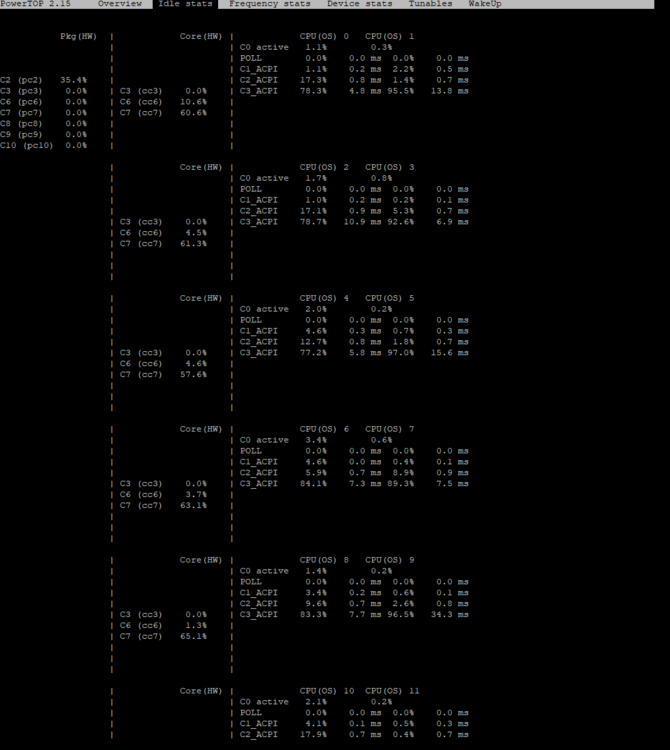

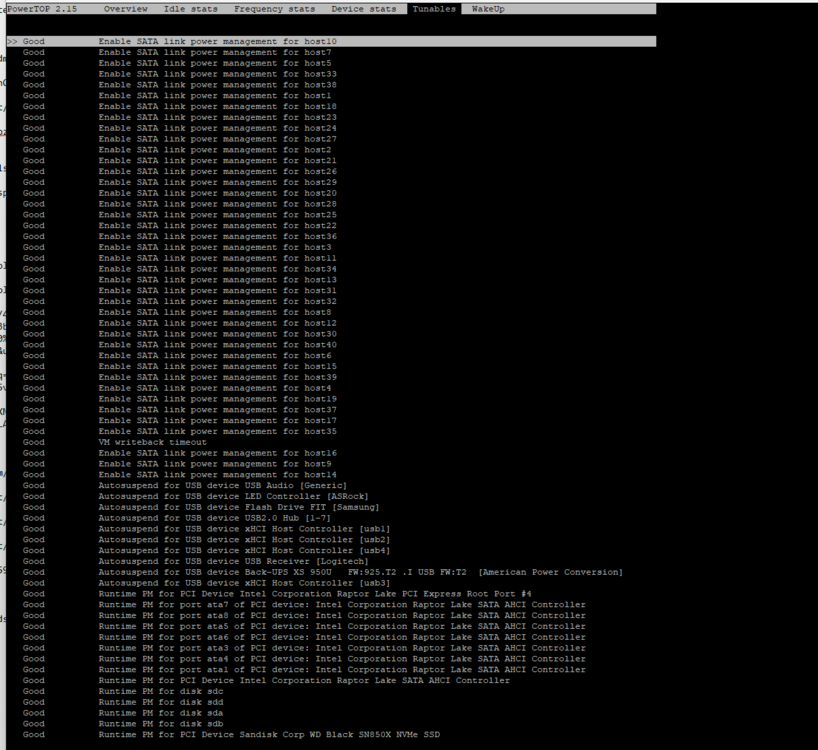
-
It would also be nice to have options like multiple months to select from.
-
I just set it up like this when my colleague told me that it could be the problem.
-
Looking at it, I think you're right. That every day runs the entire first week of each month... I've set it to run on the Sunday of the first week of the month (every 3 months) to see how that works. I think 3 months is fine to check parity? Or any other advice here?
-
I actually think it coincided with reboots and tests in the past few months (since that's when I started the entire server and was testing). I can't be 100% sure. What I want is for the parity check to work every 2-3 months, but something is happening that's causing it to happen daily (for about a week now).
-
Good morning, I've been having a problem for about a week now that I can't solve. Unraid checks my parity daily at 00:01, but I actually have it set to check every two months. I don't know what's going on here; here's the configuration:
-
This is what I got by stopping all Docker programs except Authentik, npm, and Vaultwarden. I also ran the HomeAssistant virtual machine.
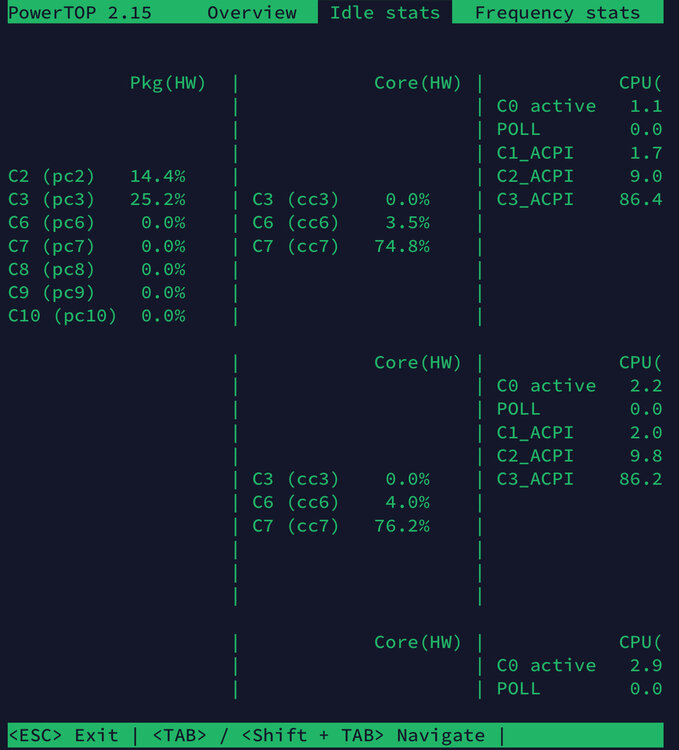
-
No, because some are critical, like Authentik, npm, and Vaultwarden. The rest are disabled. Also, the HomeAssistant vm is running.
-
Sorry, my configuration was a few messages above: 13500 Seasonic SPX650 Asrock ITX PG TB4 Z790 64GB DDR5 6600 Corsair ASM1166 with latest firmware 6 fans total: 1 CPU, 2 HDDs at the back, 2 at the top of the motherboard, and one on the side 3 Toshiba N200 HDDs 2 NVME WD SN850X Everything is up to date (BIOS, NVME firmware, ASM, etc.) PowerTop Autotune running 20 Dockers ( authentik, wallos, npm, inmich, dockge, paperless, etc)
-
So I set up powertop autotune on my 13500 (I also have updated ASM1106) I see that the C states in the packets are not very big, could this be improved in any way?
-
So, yesterday and today were days of testing. I ran 10 runs (11 hours) of memtest without failure. I inserted a Windows 10 live USB drive with Ycruncher, and after a few minutes: blue error: CLOCK_WATCHDOG_TIMEOUT I cleared CMOS, installed Ycruncher, and the same error occurred. I tested two power supplies with Ycruncher, and the same error occurred. The motherboard BIOS has been updated with the latest Asrock BIOS for four months since I built this server. I just installed a 13500 CPU and will run ycruncher to see if the problem goes away. If it does, the CPU is defective. Damn, this processor is new for 2 months. I hope this ordeal ends soon, but everything points to this CPU being defective. I hope Intel doesn't waste time and replaces it quickly, otherwise my Unraid will be down for a long time. Now I'm also facing another problem: Unraid doesn't work at all. I get the following error and it won't start rcu task blocked on level rcu node unraid
-
So you think it's not a hardware defect? I was thinking of creating a Windows 11 live USB and trying some CPU stress programs and other things. I'd also run memtest again for at least 8-12 hours to make sure everything is okay. I don't have anything to run for the PSU. My unraid server is: Intel 14500 64GB DDR5 Asrock z790 tb4 itx PG Seasonic SPX650 Array: 3 Toshiba N300 8TB HDD Cache: 2x WD850X 1TB ASM1106 x 6 SATA M2 updated There are a few virtual machines, one for Windows 11 and one for HomeAssistant. There are over 20 Docker containers: Authentik Docker Controller Bot Watchtower Dockge Grafana Hommar Immich Nodered npm Paperless Unifi Vaultwarden Wallos etc. I also have a problem when I run PowerTop Autotune: the system crashes after a few hours. I still have to figure out who the culprit is. I plan to use plex/jellyfin later.
-
After adding: deploy: resources: limits: cpus: '2.0' memory: 4096M It's been running for over 4 hours. What could be the real problem?
-
Thank you very much for so much information and suggestions. I've run some new tests without success, I removed the UPS in case it could have something to do with it, the problem persists, I changed the array disks directly connected to the motherboard, in case the ASM1106 could be the problem, the problem persists. I'd like to test the power supply, but I don't know if there's any test that would allow me to test it 100%, that would be great. I have another test I could try, although it involves bringing down the server, disassembling and changing... a few hours of work. I'd prefer to do a test before the change, but it wouldn't be a problem. Temperature monitoring is enabled and everything is correct, CPU is at maximum 40º and the motherboard at maximum about 50º I don't think the problem has anything to do with the disks, because when you do a parity for about 12-14 hours, there's no problem, but I could be wrong. I need to look at the diagnostics section you mentioned to see if it gives any more clues, but I need to figure out how to do it best so it lasts. I don't know how to check if it is using GPU acceleration (I don't have a dedicated GPU, I only have an Intel 14500) find and du -sh show no errors or failures, everything runs fine. No errors SMART. If I make immich not read this external shared resource (it is not overloaded) so it does not restart and there are no problems, it is when it starts to load the shared resource (external library) when it generates the problem after 20-50 minutes. Thanks for your time! du -sh /mnt/disk1/photos/ 194G /mnt/disk1/photos/
-
Very good guide, but I don't see the problem related to mine, do you have any thoughts?


