





Heisenberg7
Members
-
Joined
-
Last visited
-
Due to the insane prices for HDDs, I was forced to upgrade to 12 HDDs instead of switching my 16TB HDDs for 32TB HDDs, so my system now consists of 12x Toshiba MG08 16TB HDDs. I'm excited to share that the HDPlex 250W GaN can even handle 12 hard drives! From my tests, the system pulls 225W at the peak for a few seconds when booting up and spinning all the drives at once. To make this work, I made a third custom cable to power four drives. I split the +5V from the 24PIN ATX connector on the PSU and grabbed 1x +12V and 2x GND from the PSU's PCI-E connector (check out the picture in my first post).
-
Ich grabe den Thread hiermit mal aus, da ich dieselbe Frage hatte und keine finale Antwort finden konnte. Auch mit der (aktuell) neusten BIOS Version F8a von Juni 2025 wird nämlich lediglich x8/x8-Bifurcation im BIOS angeboten. Ich habe daraufhin den Gigabyte-Support kontaktiert und die finale Antwort erhalten, dass x4/x4/x4/x4-Bifurcation vom Mainboard bereits auf Hardwareebene nicht unterstützt wird.
-
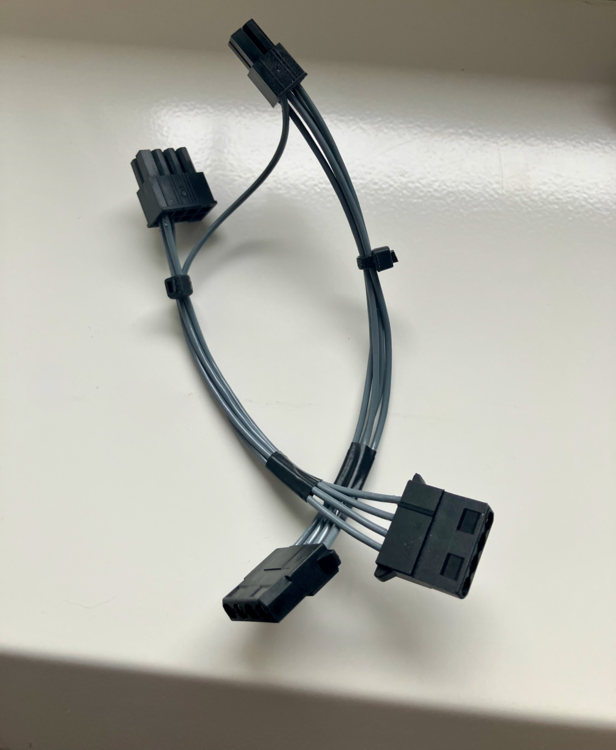
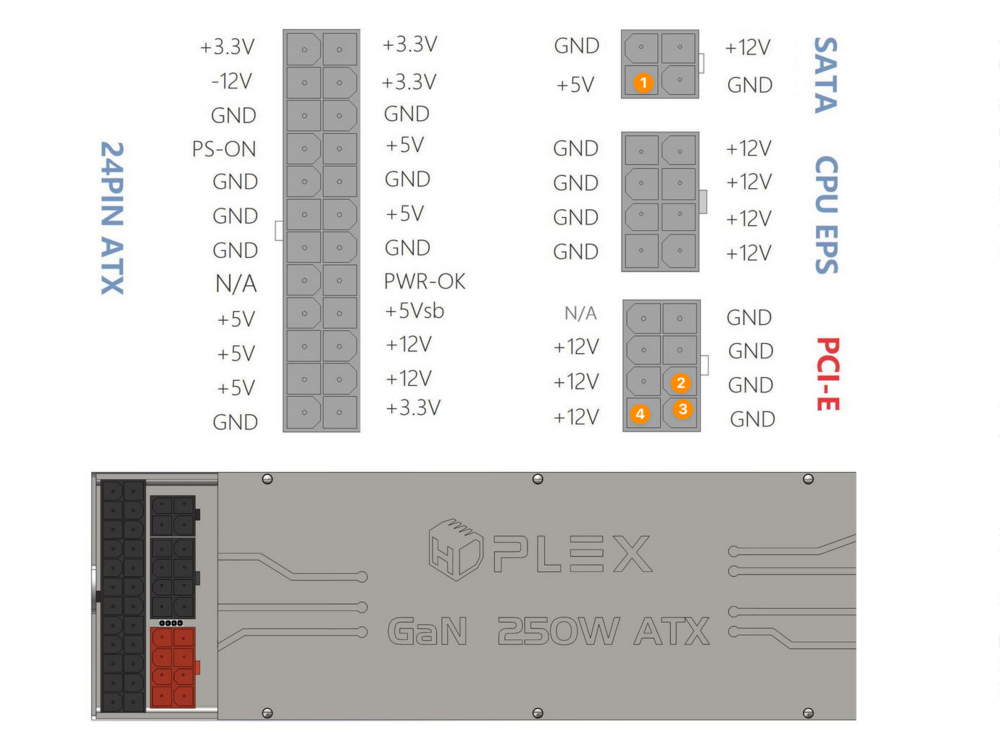
The cable is self-made, but it is no rocket science. The backplane inside my case utilizes two female 4-pin Molex connectors to supply power to all eight hard drives. I have the following cables to power the hard drives: Cable: 4pin SATA ATX connector to FAT4 male "Molex" connector Cable: 8pin PCI-E ATX connector to FAT4 male "Molex" connector The wiring is straightforward and illustrated in the figure mentioned earlier. All the orange pins (1, 2, 3, 4) are designated for the second cable. The unique aspect here is that the +5V (orange pin 1) from the first cable is split, ensuring that both cables receive a +5V, as a FAT4 male "Molex" connector requires one +5V, one +12V, and two GND lines. A picture of the cable is included in the attachments. Hope this helps!
-
Hi zusammen, ich bin kürzlich auf das vor knapp einem Jahr vorgestellte Kontron K3881-c mATX Mainboard gestoßen, das sehr interessante Specs mitbringt. Unter anderem: - Intel C266 Chipsatz - 3x PCIe - 4x M.2 - 8x SATA III (davon 4x via MCIO-Connector) - ECC DDR5 Memory Support - 2x 10GbE RJ45 (Intel E510-XAT2), 2x 1GbE RJ45 (Intel I210AT) Hier mal das Datenblatt des Mainboards. Hatte jemand von euch das Mainboard ggf. schon in seinen Händen und kann etwas zum Stromverbrauch sagen?
-
Ich habe das D3617 Mainboard (unklusive eines passenden ATX-Adapters oder des originalen Fujitsunetzteils) zu einem fairen Preis abzugeben. Falls also jemand Interesse haben sollte, gerne eine PN an mich.
-
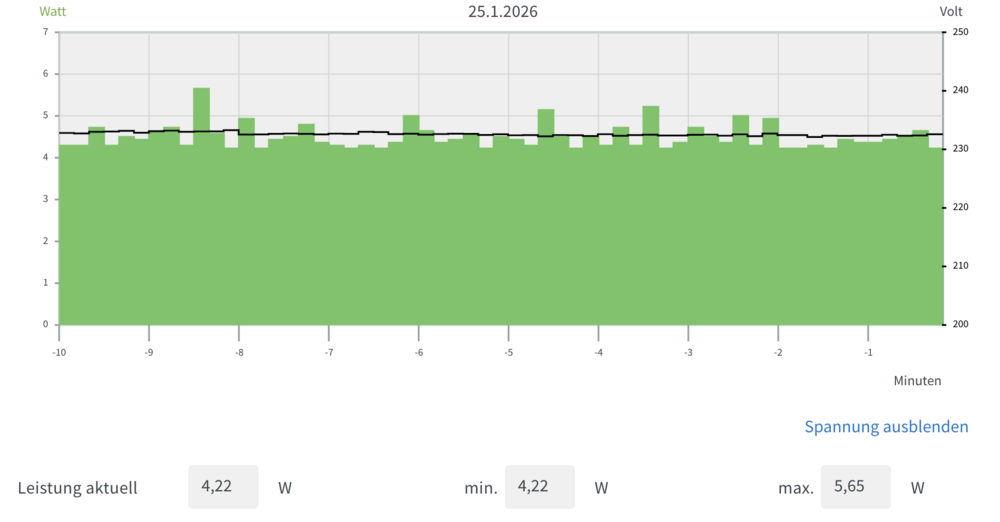
Ich habe nun mal den Idleverbrauch des Mainboards zusammen mit dem HDPlex 250W GaN gemessen. Bis auf das Netzteil exakt diesselbe Konfiguration bzw. Ausgangssituation wie in meinem Beitrag vor einigen Tagen: Im Idle komme ich auf unglaubliche 4,2W. Das dürfte für ein mATX Mainboard wohl ein neuer Rekord sein.
-
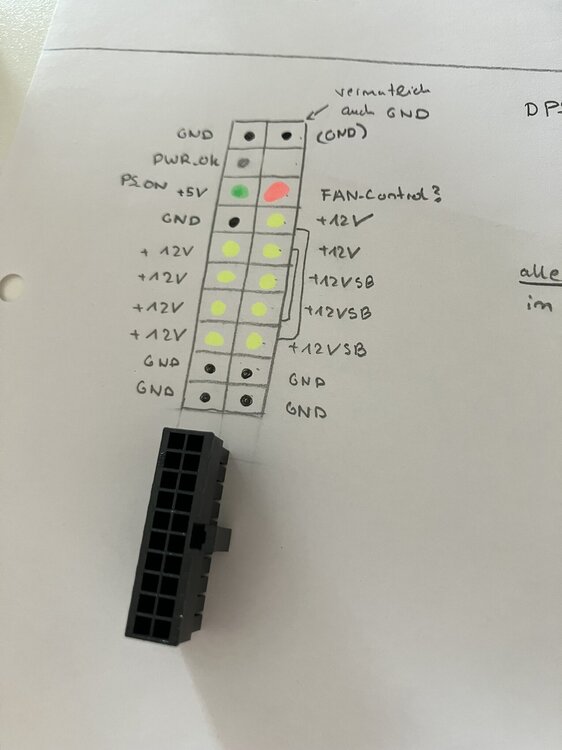
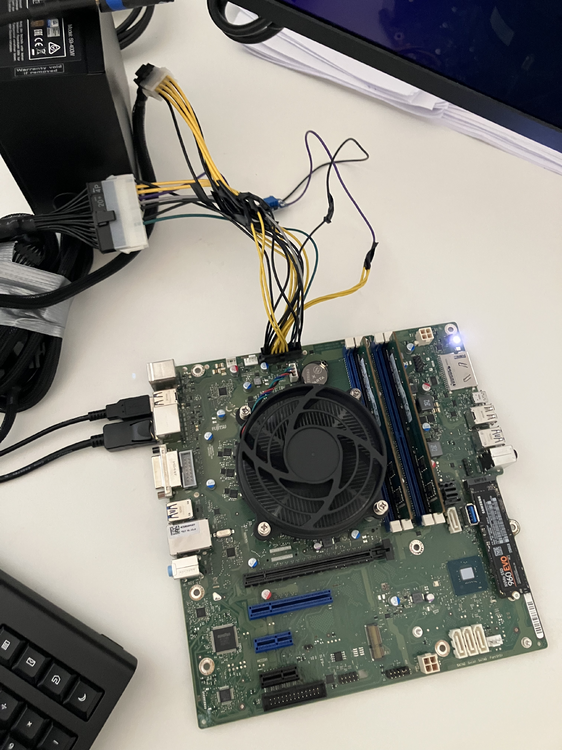
Update. Ich hatte das Glück, noch ein paar weitere W580 Workstations mit unterschiedlichen Netzteilen in die Hände zu bekommen und habe mir diese genauer angeschaut, da je nach Modell tatsächlich unterschiedliche Netzteile mit unterschiedlichen Kabelfarben und auch minimal unterschiedlichen Belegungen verwendet wurden. Zudem verwenden nicht alle Netzteile auf allen gelben +12V Pins eine Standbyspannung von +12V, wie ich es in meinem ersten gepostet Pinout gekennzeichnet hatte. Um die Sache kurz zu machen: Ich habe einen ersten funktionierenden proof-of-concept eines ATX-Adapters, mit dem das System zumindest schon mal startet :) Hier das verwendete Pinout, das ich in meinem Adapter verwende zusammen mit einem MicroFit 20pin-ATX-Stecker, der vom Mainboard benötigt wird: Da ich das System noch nicht ausführlich getestet habe, ist das Pinout allerdings noch mit großer Vorsicht zu genießen. Bei meinem Adapter nehme ich die vier linken +12V und die vier unteren GND einfach vom 8pin-EPS-Stecker des ATX-Standards. Die drei +12VSB werden mittels des +5VSB vom 24pin-ATX-Stecker versorgt und vorher mit einem Step-Up-Wandler auf +12V gewandelt (MT3608). Die restlichen Pins (außer der rote/blaue FAN_C) kommen auch vom 24pin-ATX-Stecker, da hier dieselben Farben des ATX-Standards verwendet werden. Der rote/blaue (je nach Fujitsunetzteil) FAN_C wird nicht benötigt und dient anscheinend lediglich der Lüftersteuerung der originalen Fujitsunetzteile. Sobald ich Gewissheit habe, dass das Pinout korrekt ist und ich einen vernünftigen Adapter zusammengebastelt habe, folgen in den nächsten Tagen auch erste Messungen des Idle-Stromverbrauchs zusammen mit dem HDPlex 250W GaN.
-
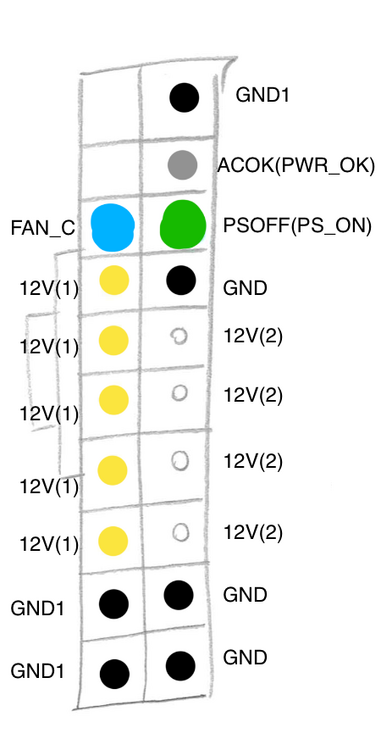
Kurzes Update. Ich habe die Pins des Fujitsu-20pin-Steckers mal mit dem Multimeter durchgemessen und bin schon ein Stück weiter gekommen. Das hier ist das aktuelle Pinout (ohne Gewähr): Am blauen Pin liegen lediglich 8mV an, der ist vermutlich für die Steuerung des Netzteillüfters zuständig, weshalb er im Inneren des Netzteiles selbst mit "FAN_C" beschriftet ist. Sollte also für uns nicht relevant sein. Aktuell gibt es noch drei "Probleme": Mir ist nach wie vor nicht klar, was das Fujitsu-Äquivalent zum "+5VSB"-Pin des ATX-Standards ist, welches für den Standby benötigt wird. Auffällig ist, dass an allen (!) +12V Pins die 12V anliegen, wenn das Netzteil im Standby ist. Somit sind theoretisch alle diese 12V Pins gleichzeitig +12VSB beim Fujitsu-Netzteil. Weird. Mein aktueller Ansatz wäre, dass ich mir +5VSB vom ATX-Netzteil nehme und mittels Step-Up-Wandler auf 12V bringe und dann einen der 12V Pins damit versorge um somit ein +12VSB nachzubilden. Ist nur die Frage, welcher sich dafür eignet und ob das Mainboard das auch ohne Probleme schluckt... Am grauen PWR_OK / PG konnte ich nur 4,5mV messen, was deutlich über der Spannung von +5V liegt, mit welcher PWR_OK innerhalb des ATX-Standards versorgt wird. Ich habe hier die Hoffnung, dass ich mich da nur vermessen habe oder dass das Netzteil Intern bei meinem Test das PWR_OK-Signal nicht richtig schalten konnte und somit die reguläre Spannungsversorgung von 12V eingestellt hat. Diese Spannung erscheint mir nämlich deutlich zu niedrig. Unter der Annahme, dass der Pin regulär mit 12V versorgt wird, wird es spannend zu sehen, ob auch die +5V von meinem ATX-Netzteil ausreichen werden. Analog ist die Situation bei PS_ON. Hier konnte ich noch keine Spannung messen. Allerdings wird wird PS_ON innerhalb des ATX-Standards mit +5V versorgt, während es hier beim Fujitsu vermutlich +12V sind. Es ist zumindest einen Versuch wert, einfach direkt PS_ON vom ATX-Netzteil zu verwenden, evtl. reichen dem Mainboard hier ja schon die +5V statt der +12V. PS: Mehr Details und noch einige Bilder findet der interessierte Leser übrigens auch in diesem Thread bei ComputerBase.
-
Danke für den Tipp. Puh, gute Frage. Der Physik-Leistungskurs im Abi ist zwar schon mehr als ein Jahrzehnt her, aber ich denke, das sollte ich hinbekommen. Das notwendige Werkzeug wie z.B. einen Multimeter zum Ausmessen oder einen Lötkolben habe ich hier. Sobald ich in den nächsten Tagen Zeit finde, werde ich das mal angehen und hier ggf berichten, sobald es etwas neues gibt. Das Pinout des 16Pin-Steckers ist ja bereits bekannt - den werde ich auf jeden Fall beim Messen berücksichtigen. Erfreulich ist auch, dass beim 20pin-Stecker des D3617 vermutlich kein Step-Up-Wandler benötigt wird, um die 5V-SB (Standby) des 20-PIN-ATX-Steckers auf die geforderten 11V-SB des 16-Pin-Fujitsu-Steckers zu wandeln. Dieser Wandler ist ja gerade das entscheidende Bauteil, das in allen Adapterkabeln verbaut ist. Dann hoffe ich mal, dass das Finden des richtigen Pinouts des Steckers zum Basteln eines eigenen Adapters ausreicht.
-
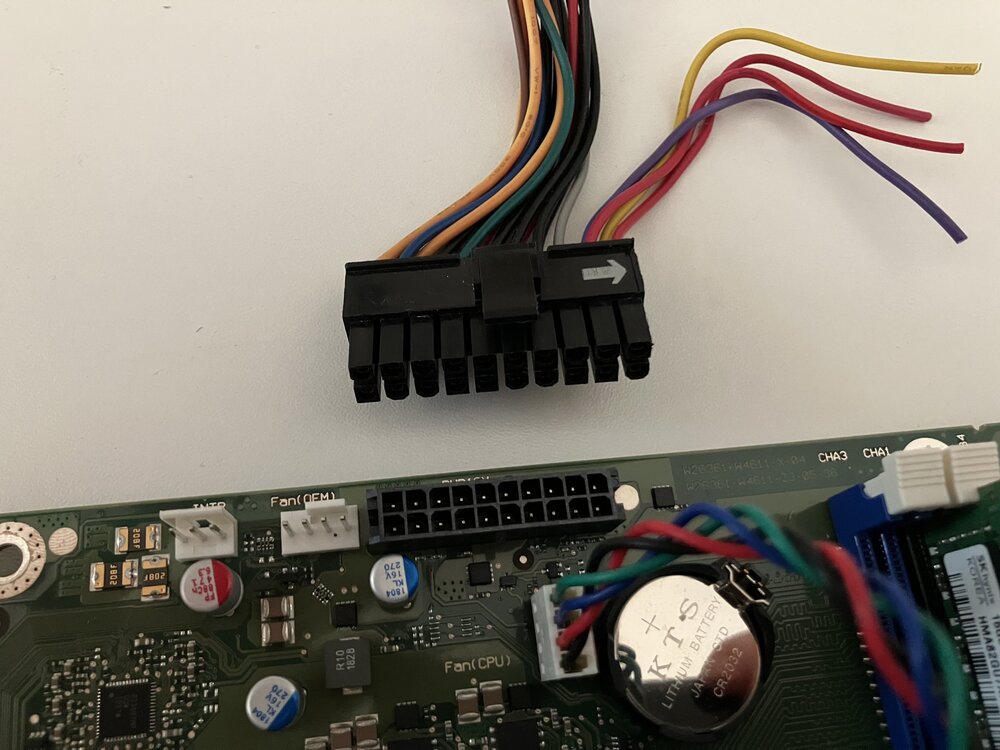
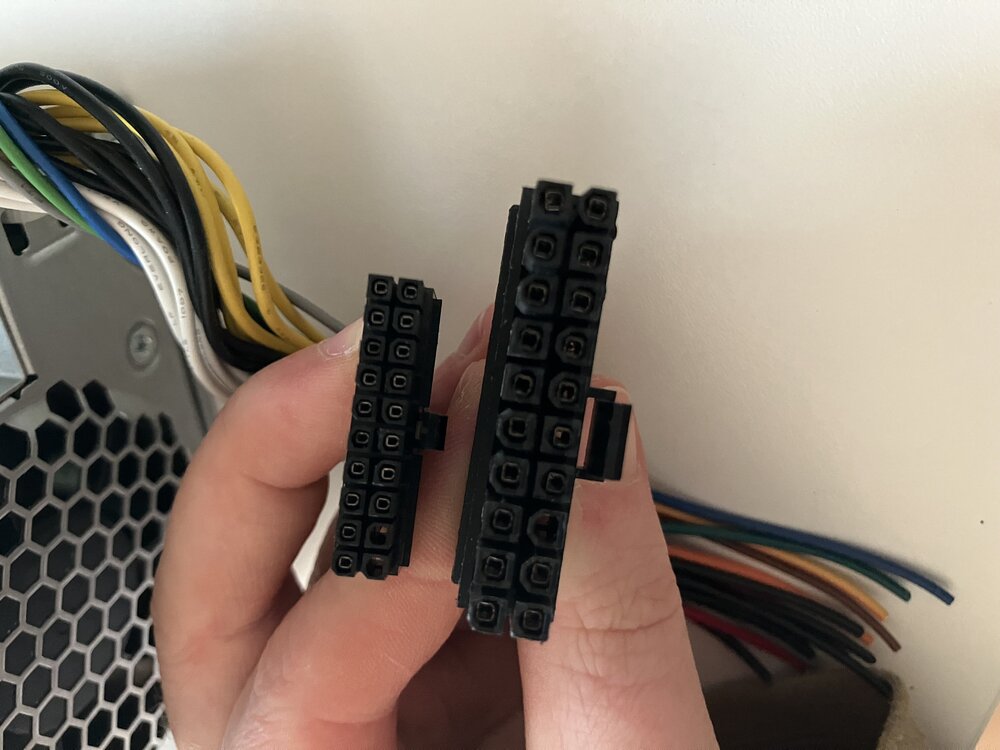
Ich würde den Thread mal gerne ausgraben, denn durch zwei sehr glückliche Schnäppchen bei Kleinanzeigen bin ich zu der Workstation W570 und der W580 gekommen. In letzterer ist das Fujitsu D3617 A13 Mainboard verbaut. Es handelt sich hierbei zu meiner Überraschung nicht um einen normalen 20 Pin Stecker. Der Stecker ist deutlich kleiner als ein herkömmlicher 20Pin ATX Stecker. Im Anhang sind Fotos, die den verwendeten Stecker des originale Fujitsu Netzteils bzw. des Mainboards und einen normalen 20PIN ATX-Stecker zeigen. Zudem verwendet das originale Fujitsu Netzteil im Gegensatz zu jenem aus der W570 Workstation keinen 11V Pin, sondern tatsächlich nur 12V. Bei der Gelegenheit habe ich den Idleverbrauch des Mainboards mit dem original verbautem Fujitsu 250W Netzteil gemessen und war baff: 5,5W im Idle! 80% C8 State nach ausgeführtem power-top auto-tune Ubuntu Server 25.01 Intel i7 8700 2x 16GB DDR4 ECC RAM 1x M.2 SSD 250GB Samsung Pro Evo 960 Aktiver RJ45-Lan Anschluss Eine aktive SSH-Session C10 States im Bios aktiviert kein angeschlossener Monitor Ebenfalls mit Ubuntu habe ich auch das D3517 zusammen mit dem Fujitsu Originalnetzteil des W570 gemessen, welches im W570 verbaut war. Dort erreichte ich im Idle ~7,2W. Ich kann allerdings nicht sagen, ob der Unterschied am Mainboard, Netzteil oder der anderen CPU (Xeon 1225 v5) liegt. Ich schaue mal, ob ich in den nächsten Tagen das genaue Pinout des Steckers herausfinden kann und würde mir dann einen Adapter basteln, so dass sich das Mainboard auch mit ATX-Netzteilen betreiben lässt. Sollte mir das gelingen, würde ich das Mainboard gerne mal mit dem HDPlex 250W GaN Netzteil messen, das ja im Niedrieglastbereich zur Königsklasse gehört.
-
Yeah, the HDPlex is totally passive and thus 100% silent. I haven't heard any coil whine sounds at all so far.
-
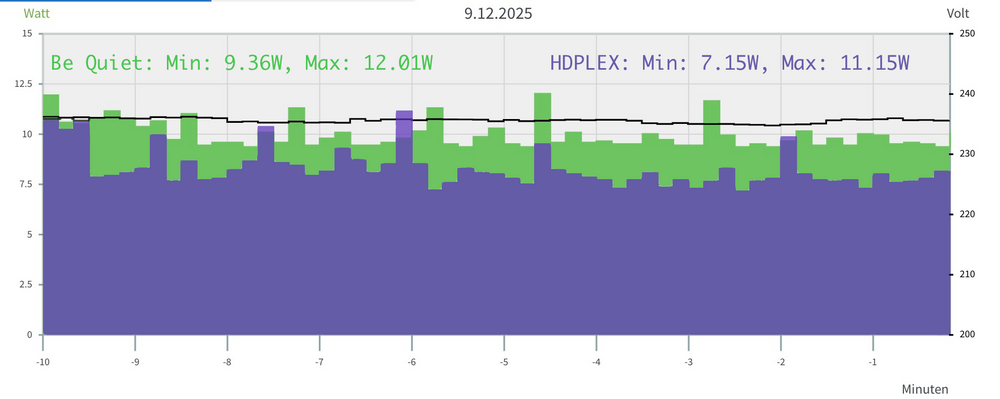
Hey everyone, I wasn't able to find any low load tests for this PSU before I bought it, so I thought this post could be useful for anyone thinking about getting the HDPlex 250W GaN PSU. To help with this, I compared it to the Be Quiet! Pure Power 13 M 550W, which is already recognized as a reliable option for power efficiency. You can find a test review for the latter here. The most interesting figure related to low load efficiency is this one: Obviously, it reveals that the Be Quiet PSU has an efficiency of 69.6% at 10W load and 77% at 15W load. As I don't have professional measuring equipment, I simply compared the low power loads for a time span of 10 minutes starting 20 minutes after booting. Both PSUs used the exact same hardware, that is: Unraid 7.2.2 Mainboard: Gigabyte C246M-WU4 CPU: Intel i3 9100 Memory: 2x 32GB Kingston DDR4-3200 ECC RAM Cachedrive: 1x WD Black SN850x NVME M.2 SSD No hard drives! no running docker containers no active case fans, only the CPU fan was running at 400rpm the system reaches C10 state The results look like this (measured with Fritz!DECT 200): The HDPlex consumes approximately 2,2 W less on average in my idle scenario. Utilizing the same hardware as previously mentioned, along with the HDPlex PSU, my hard drives (5x Toshiba MG08 16 TB SATA HDD, 3x WD WDC161 Gold 16 TB SATA HDD), and running Docker containers, I achieve around 12.8W load during idle when all hard drives are spun down. This is an impressive outcome, IMO. Plus, I can confirm that the HDPlex PSU can power my eight (!) hard drives without any problems if you don't need the PCI-E power port on the PSU. Four drives are powered by the power cable connected to the SATA power port on the PSU and the remaining four drives are powered by a second custom cable that uses the orange pins in the below figure. The +5V is splitted from the SATA power port, which is no problem since the PSU is a single rail one.
-
I can't believe it, but the issue is finally sorted out! I made the diagnostics files and looked for any files that contain the names of the deleted shares. Turns out, there was still an smb-extra.conf file that had those deleted shares. After I removed those entries from /boot/config/smb-extra.conf and restarted the samba service with /etc/rc.d/rc.samba restart, the problem was fixed! Thank you for the suggestion regarding the diagnostics tool! I just wish I had taken this approach sooner, lol.
-
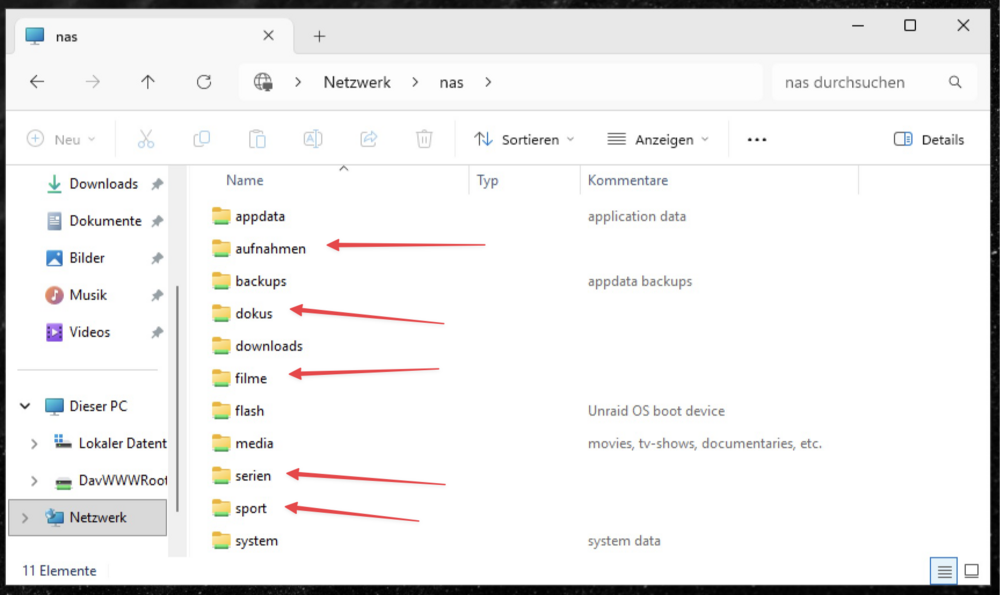
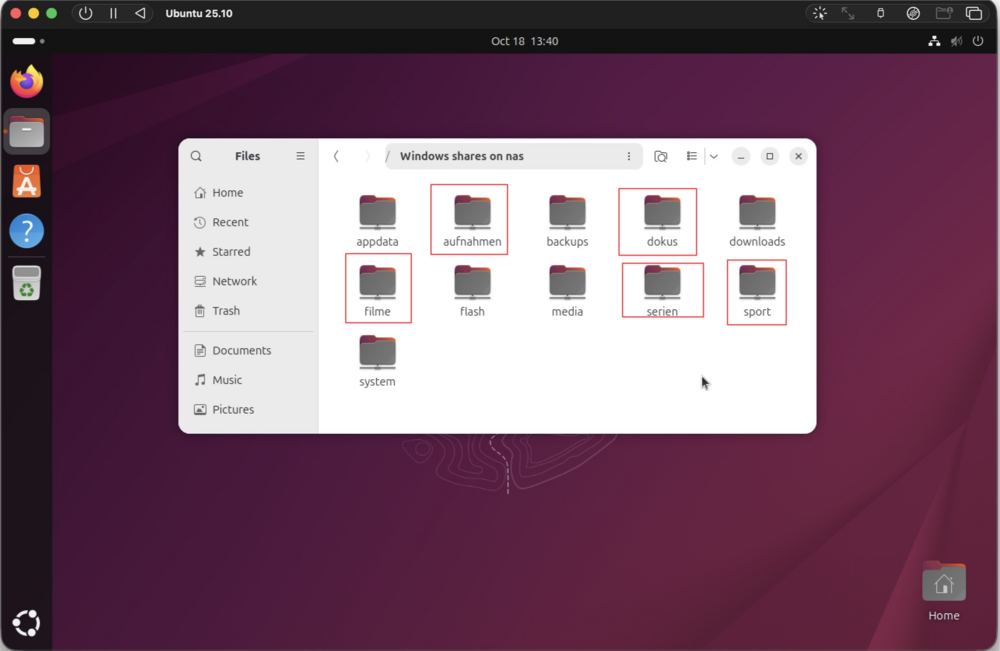
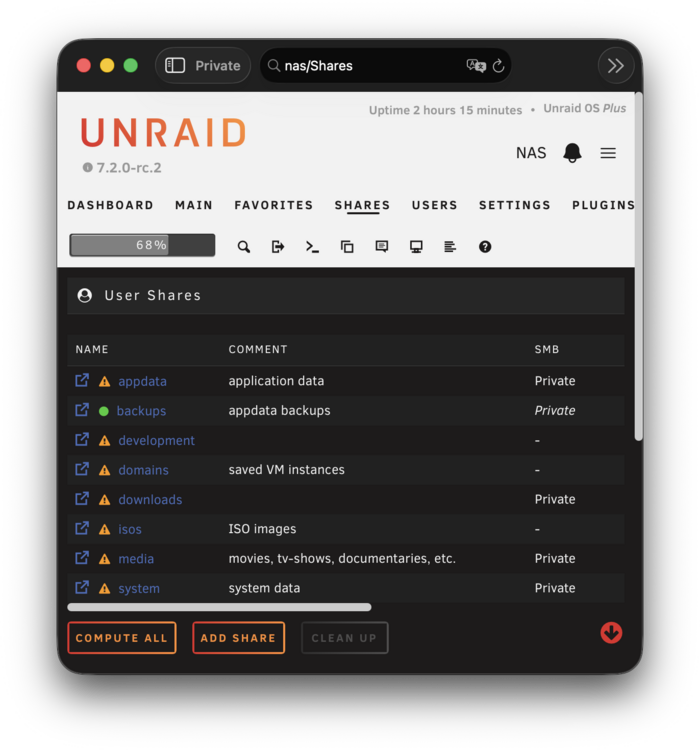
Yeah, I had the same idea a while back and I remember testing it on Windows which had the same issue. Just did another double-check and I can confirm that it seems to be independent of the OS as it also happens on Windows and on Ubuntu: Those marked shares were deleted months ago and are no longer visible in Unraid's list of shares:
-
Hm, given that I've been dealing with this issue for months and I encountered it even when I was using version 6.12.x, I have my doubts that it's connected to the new Samba feature in 7.2.0-rc1. I went ahead and updated to 7.2.0-rc2 anyway, but unfortunately, the issue persists.





